

The Barcode Generator Using Python was developed using Python Programming, This Simple Project Tutorial was created using console based and generates barcode.
This simple project is easy to understand the codes and its functions.
A Barcode Generator Program In Python, we are going to write a short script to generate barcodes using Python. We’ll be using the python-barcode module which is a fork of the pyBarcode module.
In this tutorial also teach you on How To Generate Barcode In Python in a short period of time.
Project Information’s
| Project Name: | Barcode Generator Program in Python |
| Language/s Used: | Python (GUI) Based |
| Python version (Recommended): | 2.x or 3.x |
| Database: | None |
| Type: | Python App |
| Developer: | IT SOURCECODE |
| Updates: | 0 |
Additionally, This Simple Project Code also includes a downloadable Project With Source Code for free, just find the downloadable source code below and click to start downloading.
By the way if you are new to python programming and you don’t know what would be the the Python IDE to use, I have here a list of Best Python IDE for Windows, Linux, Mac OS that will suit for you.
I also have here How to Download and Install Latest Version of Python on Windows.
To start executing Barcode Generator Using Python With Source Code, make sure that you have installed Python 3.9 and PyCharm in your computer.
Steps On How To Run The Barcode Generator Using Python
Time needed: 5 minutes
These are the steps on how to run Barcode Generator Using Python With Source Code
- Step 1: Download the given source code below.
First, download the given source code below and unzip the source code.

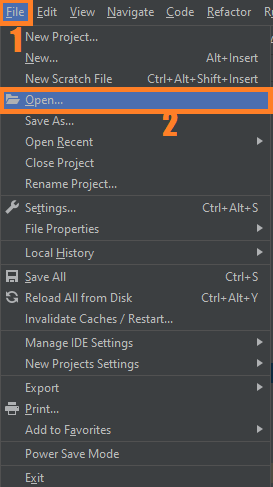
- Step 2: Import the project to your PyCharm IDE.
Next, import the source code you’ve download to your PyCharm IDE.

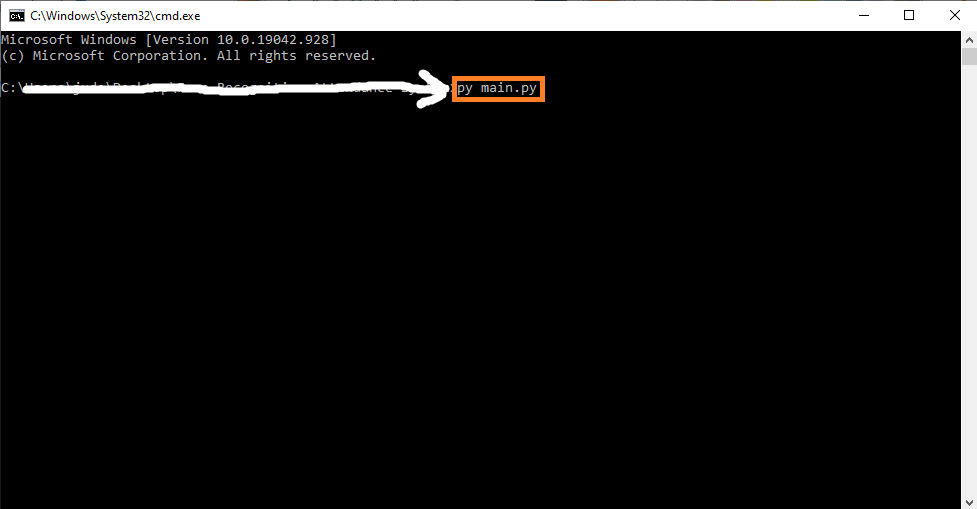
- Step 3: Run the project.
last, run the project with the command “py main.py”

How To Generate Barcode in Python?
Here’s the complete source code on how to generate barcode in python.
Installed Libraries
import barcode
from barcode.writer import ImageWriter
Complete Source Code
import barcode
from barcode.writer import ImageWriter

def testEan():
    EAN = barcode.get_barcode_class('ean13')
    ean = EAN(u'123456789022')
    fullname = ean.save('my_ean13_barcode')

if __name__ == '__main__':
    testEan()
Download Source Code below
Frequently Asked Questions
Select the barcode type: EAN-13, UPC-A, Code 39, or ITF. Fill in the product category information in the barcode data box.
Click on the barcode title box and barcode note if you want to add them in the barcode. Add a name for the barcode in the title box and more details in the note box.
1. Compute the Scharr gradient magnitude representations in both the x and y direction.
2. Subtract the y-gradient from the x-gradient to reveal the barcoded region.
3. Blur and threshold the image.
4. Apply a closing kernel to the thresholded image.
5. Perform a series of dilations and erosions.
6. Find the largest contour in the image, which is now presumably the barcode.
Summary
This Project was developed using Python Programming, This Simple Project Tutorial was created using console based and generates barcode. This simple project is easy to understand the codes and its functions.
In this Simple Project Code also includes a downloadable Project With Source Code for free, just find the downloadable source code below and click to start downloading.
Related Articles
- Code For Game in Python: Python Game Projects With Source Code
- Best Python Projects With Source Code 2020 FREE DOWNLOAD
- How to Make a Point of Sale In Python With Source Code 2021
- Python Code For Food Ordering System | FREE DOWNLOAD | 2020
- Inventory Management System Project in Python With Source Code
Inquiries
If you have any questions or suggestions about Barcode Generator Using Python With Source Code, please feel free to leave a comment below.
Technology stack and requirements
To run this Python project on your development machine, you need:
- Python 3.10 or higher. Download from python.org or install via Anaconda if you prefer bundled packages.
- pip package manager. Comes with Python. Used to install project dependencies from requirements.txt.
- Virtual environment. Use venv or conda to isolate project dependencies from your global Python install.
- VS Code or PyCharm. Free code editors with Python syntax highlighting, IntelliSense, and debugging.
- Git. For version control and cloning source code repositories.
Installing the source code
- Download or clone the repository. Get the ZIP archive from the download link on this page and extract it.
- Create a virtual environment. Open a terminal in the project folder and run: python -m venv venv, then activate it (venv\Scripts\activate on Windows or source venv/bin/activate on Mac/Linux).
- Install dependencies. Run pip install -r requirements.txt to install all libraries the project needs.
- Configure environment variables. If the project uses API keys (OpenAI, Anthropic, database), create a .env file and set the required keys.
- Run the project. Follow the run command in the README (usually python main.py or streamlit run app.py).
Using this project for your BSIT capstone
- Chapter 1 (Introduction). Discuss the real-world problem this system solves. Cite Philippine or international use cases where the manual process could be automated.
- Chapter 2 (RRL). Compare your project against 5-10 similar published works. Cite ACM, IEEE, or arXiv papers for academic-standard sources.
- Chapter 3 (Methodology). Document the model architecture, training data, hyperparameters, and evaluation metrics used.
- Chapter 4 (Results). Report accuracy, precision, recall, F1-score, and confusion matrix. Screenshot the running app on real inputs.
- Chapter 5 (Conclusion). Identify features for Version 2: better model, larger dataset, mobile deployment, or REST API.
Modules typical of Barcode Generator Using Python
- Text preprocessing. Tokenization, lowercasing, stop-word removal, lemmatization with NLTK or spaCy.
- Feature extraction. TF-IDF, word embeddings (GloVe), or transformer embeddings (BERT).
- Model training. scikit-learn baseline (Naive Bayes, SVM) or HuggingFace fine-tuned transformer.
- Evaluation. Accuracy, precision, recall, F1 for classification; BLEU/ROUGE for generation.
- Inference API. Flask or FastAPI endpoint for real-time predictions.
- UI or demo. Streamlit dashboard for interactive testing.
Common enhancements for capstone review
- Multilingual support. Extend to Filipino, Cebuano, or other Philippine languages with translation preprocessing.
- Real-time streaming. Add WebSocket support for continuous input classification.
- Explainability. Use LIME or SHAP to visualize why the model made a specific prediction.
- Batch mode. Add CSV upload for bulk classification, useful for research analysis.
Official documentation
Frequently Asked Questions
How does this Python barcode scanner project work?
Uses pyzbar library to decode barcode/QR codes from webcam frames. cv2.VideoCapture grabs frames, pyzbar.decode() returns decoded text + bounding box. Highlight detected codes + lookup in DB. Foundation for inventory/POS capstones.
What Python version and libraries does this project require?
Most projects in this batch use Python 3.10, 3.11, or 3.12 (avoid 3.13 until library wheels catch up). Standard libs: tkinter (built-in), sqlite3 (built-in). External: pip install pillow opencv-python pygame mysql-connector-python reportlab requests beautifulsoup4. Check the requirements.txt file (if included) for exact versions.
How do I set up the database for this Python project?
For SQLite (most common, no setup needed): the .db file auto-creates on first run. For MySQL: install MySQL Server + MySQL Workbench, create an empty database, import the included .sql file, edit the connection string in db.py (or db_connect.py) with your host, user, password, database name.
Can I use this Python project for a BSIT capstone or thesis?
Yes. Python is rising fast in Philippine BSIT panels. Extend it: add user roles via auth module, dashboards (matplotlib charts), PDF reports (reportlab), email notifications (smtplib), real domain extension (analytics, audit log, multi-branch support). Pair with Chapter 1-5 documentation matching your panel’s rubric.
Why am I getting ‘ModuleNotFoundError’ or ‘No module named X’?
Three common Python issues: (1) Module not installed: pip install
Where can I find more Python projects with source code?
Browse the Python Projects hub for the full library. For computer vision specifically see OpenCV Projects (46 vision systems). For ML / AI capstones see Machine Learning Projects. For BSIT capstone idea lists see 150 Best Capstone Project Ideas.

Angel Jude Suarez
Full-Stack Developer at PIES IT Solution
Focuses on Python development, machine learning, and AI integration. Has built production AI systems including OpenAI Whisper integration for medical transcription and GPT-4o-powered diagnosis assistance. Strong background in pandas, scikit-learn, and TensorFlow.
Expertise: Python · PHP · Java · VB.NET · ASP.NET · Machine Learning · AI Integration · OpenCV · Django · CodeIgniter
· View all posts by Angel Jude Suarez →
When I try to import barcode.writer it shows this error
ERROR: Could not find a version that satisfies the requirement writer (from versions: none)
ERROR: No matching distribution found for writer
WARNING: You are using pip version 21.3.1; however, version 22.3.1 is available.
You should consider upgrading via the ‘C:\Users\arman\PycharmProjects\pythonProject\venv\Scripts\python.exe -m pip install –upgrade pip’ command.
you need to this command in your cmd pip install –upgrade pip