
The Real-Time Hand Detection OpenCV Python was developed using Python Detection OpenCV, Hand detection is a simple idea, but it requires some advanced tools to do it.
This project is one of the systems that can detect the gesture of hand in a real-time video.
A Hand Detection OpenCV Python is one of the most viable and popular solutions for improving human-computer interaction.
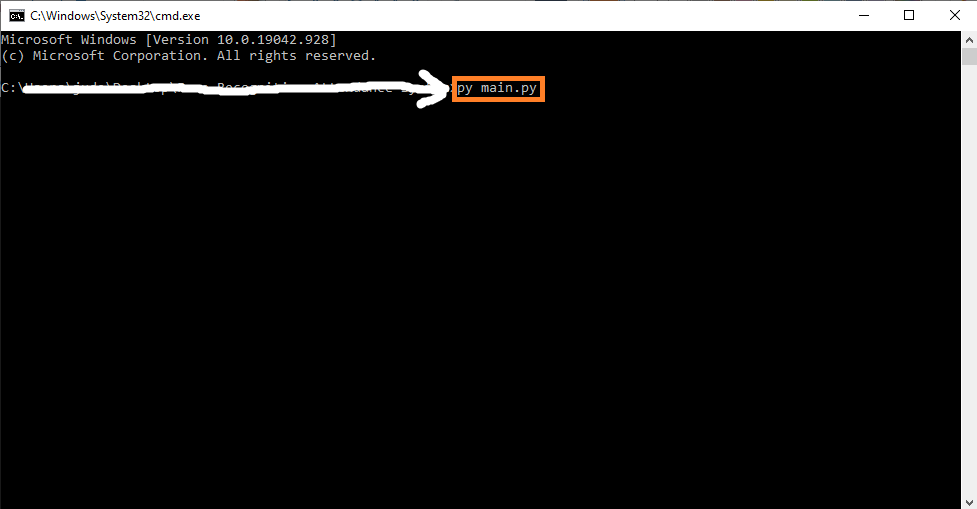
The code consists of a single file and can be executed from the command line or terminal by calling: “py main.py“.
Project Information
| Project Name: | Hand Detection OpenCV Python With Source Code |
| Language/s Used: | Python (OpenCV) |
| Python version (Recommended): | 2.x or 3.x |
| Database: | None |
| Type: | Deep Learning Project |
| Developer: | IT SOURCECODE |
| Updates: | 0 |
About Hand Detection OpenCV Python
This OpenCV Python Project also includes a downloadable Python Project With Source Code for free, just find the downloadable source code below and click to start downloading.
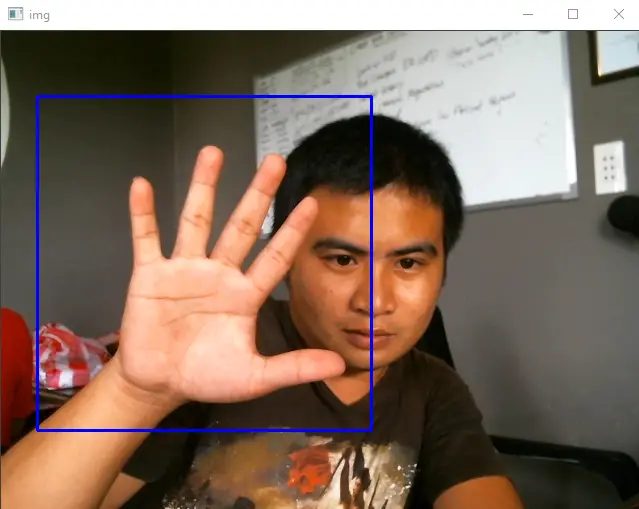
When running the Python file, you can expect to see the real-time frame from your camera with a bounding rectangular framing in your hand.
By the way, if you are new to Python programming and don’t know how to use the Python IDE, I have here a list of the Best Python IDE for Windows, Linux, and Mac OS that will suit you.
I also have here How to Download and Install the Latest Version of Python on Windows.
To start executing a Real-Time Hand Detection With Source Code, make sure that you have installed Python on your computer.
Hand Detection using OpenCV in Python Tutorial With Source Code
Time needed: 5 minutes
These are the steps on how to run Real-Time Hand Detection OpenCV Python With Source Code
- Step 1: Download the given source code below.
First, download the given source code below and unzip the source code.

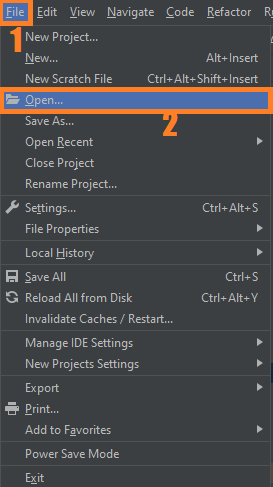
- Step 2: Import the project to your PyCharm IDE.
Next, import the source code you’ve downloaded to your PyCharm IDE.

- Step 3: Run the project.
Lastly, run the project with the command “py main.py”


Installed Libraries
import cv2Complete Source Code
import cv2

# Load the cascade
face_cascade = cv2.CascadeClassifier('haarcascade_hand.xml')
# To capture video from webcam.
cap = cv2.VideoCapture(0)
# To use a video file as input
# cap = cv2.VideoCapture('filename.mp4')
while True:
    # Read the frame
    _, img = cap.read()
    # Convert to grayscale
    gray = cv2.cvtColor(img, cv2.COLOR_BGR2GRAY)
    # Detect the faces
    faces = face_cascade.detectMultiScale(gray, 1.1, 4)
    # Draw the rectangle around each face
    for (x, y, w, h) in faces:
        cv2.rectangle(img, (x, y), (x+w, y+h), (255, 0, 0), 2)
    # Display
    cv2.imshow('img', img)
    # Stop if escape key is pressed
    k = cv2.waitKey(30) & 0xff
    if k==27:
        break
# Release the VideoCapture object
cap.release()
Output:
Download the Source Code below
Summary
In this tutorial, you will learn about detecting a Hand with the feature mappers known as haar cascades.
Here in the project, we will use the Python language along with the OpenCV library for the algorithm execution and image processing respectively.
The haar cascades we are going to use in the project are pretrained and stored along with the OpenCV library as haarcascade_hand.xml files.
The project develops a basic understanding of the systems such as hand detection and also the haar cascades usage with the OpenCV library.
Inquiries
If you have any questions or suggestions about Real-Time Hand Detection OpenCV Python With Source Code, please feel free to leave a comment below.
Technology stack and requirements
To run this Python project on your development machine, you need:
- Python 3.10 or higher. Download from python.org or install via Anaconda if you prefer bundled packages.
- pip package manager. Comes with Python. Used to install project dependencies from requirements.txt.
- Virtual environment. Use venv or conda to isolate project dependencies from your global Python install.
- VS Code or PyCharm. Free code editors with Python syntax highlighting, IntelliSense, and debugging.
- Git. For version control and cloning source code repositories.
Installing the source code
- Download or clone the repository. Get the ZIP archive from the download link on this page and extract it.
- Create a virtual environment. Open a terminal in the project folder and run: python -m venv venv, then activate it (venv\Scripts\activate on Windows or source venv/bin/activate on Mac/Linux).
- Install dependencies. Run pip install -r requirements.txt to install all libraries the project needs.
- Configure environment variables. If the project uses API keys (OpenAI, Anthropic, database), create a .env file and set the required keys.
- Run the project. Follow the run command in the README (usually python main.py or streamlit run app.py).
Using this project for your BSIT capstone
- Chapter 1 (Introduction). Discuss the real-world problem this system solves. Cite Philippine or international use cases where the manual process could be automated.
- Chapter 2 (RRL). Compare your project against 5-10 similar published works. Cite ACM, IEEE, or arXiv papers for academic-standard sources.
- Chapter 3 (Methodology). Document the model architecture, training data, hyperparameters, and evaluation metrics used.
- Chapter 4 (Results). Report accuracy, precision, recall, F1-score, and confusion matrix. Screenshot the running app on real inputs.
- Chapter 5 (Conclusion). Identify features for Version 2: better model, larger dataset, mobile deployment, or REST API.
Modules typical of Hand Detection Using OpenCV
- Image dataset preparation. Train/val/test split, augmentation (rotation, flip, brightness).
- Model architecture. Pre-trained CNN (ResNet, EfficientNet) fine-tuned on your dataset.
- Training loop. PyTorch or TensorFlow/Keras training with early stopping and checkpoints.
- Evaluation. Confusion matrix, precision, recall, and per-class F1 scores.
- Inference API. FastAPI endpoint accepting image uploads and returning predictions.
- Web or mobile demo. Streamlit or React front-end for user interaction.
Common enhancements for capstone review
- Grad-CAM visualization. Show which pixels the model focused on when making a prediction.
- Data augmentation. Increase training data variety with imgaug or Albumentations library.
- Transfer learning benchmark. Compare training-from-scratch vs fine-tuning pre-trained models.
- Model quantization. Convert to TensorFlow Lite for mobile deployment.
Official documentation
Frequently Asked Questions
How does this Python project work?
Built with Python 3.10+ and either Tkinter (desktop GUI), Django (web), or Flask (lightweight web). Standard structure: main.py launches the app, modules organized by feature, SQLite/MySQL for persistence.
What Python version and libraries does this project require?
Most projects in this batch use Python 3.10, 3.11, or 3.12 (avoid 3.13 until library wheels catch up). Standard libs: tkinter (built-in), sqlite3 (built-in). External: pip install pillow opencv-python pygame mysql-connector-python reportlab requests beautifulsoup4. Check the requirements.txt file (if included) for exact versions.
How do I set up the database for this Python project?
For SQLite (most common, no setup needed): the .db file auto-creates on first run. For MySQL: install MySQL Server + MySQL Workbench, create an empty database, import the included .sql file, edit the connection string in db.py (or db_connect.py) with your host, user, password, database name.
Can I use this Python project for a BSIT capstone or thesis?
Yes. Python is rising fast in Philippine BSIT panels. Extend it: add user roles via auth module, dashboards (matplotlib charts), PDF reports (reportlab), email notifications (smtplib), real domain extension (analytics, audit log, multi-branch support). Pair with Chapter 1-5 documentation matching your panel’s rubric.
Why am I getting ‘ModuleNotFoundError’ or ‘No module named X’?
Three common Python issues: (1) Module not installed: pip install
Where can I find more Python projects with source code?
Browse the Python Projects hub for the full library. For computer vision specifically see OpenCV Projects (46 vision systems). For ML / AI capstones see Machine Learning Projects. For BSIT capstone idea lists see 150 Best Capstone Project Ideas.

Angel Jude Suarez
Full-Stack Developer at PIES IT Solution
Focuses on Python development, machine learning, and AI integration. Has built production AI systems including OpenAI Whisper integration for medical transcription and GPT-4o-powered diagnosis assistance. Strong background in pandas, scikit-learn, and TensorFlow.
Expertise: Python · PHP · Java · VB.NET · ASP.NET · Machine Learning · AI Integration · OpenCV · Django · CodeIgniter
· View all posts by Angel Jude Suarez →