
How To Encrypt Password In PHP uses a hash algorithm to make sure the password is secure. Most of the time, it is used in functions like crypt(), password hash(), and md5() to encrypt password.
About The Project
In this tutorial was developed using PHP, HTML, CSS, JavaScript and MySQL Database, In this simple project you can learn on How To Encrypt and Decrypt Password In PHP Using MD5.
The tutorial How To Encrypt Password In PHP MySQL is very simple php code but most effective because in this we have not store password in string format but we have encrypt password and then after we have store password into our database. So no one can hack password because it was encrypt by using md5() php function.
In this tutorial How To Encrypt Password also includes a Downloadable Source Code for free, just find the downloadable source code below and click to start downloading.
To start creating this tutorial How To Encrypt Password, makes sure that you have sublime or any platform of PHP and MySQL installed in your computer.
Steps On How To Encrypt Password In PHP With Source Code
Time needed: 5 minutes
These are the steps on How To Encrypt Password In PHP With Source Code.
- Step 1: Create folder.
First, create a folder from your “xampp” folder under “htdocs” folder and name it.

- Step 2: Open folder.
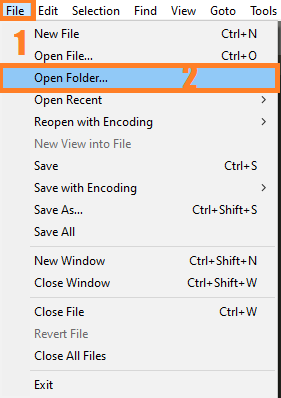
Second, open “sublime text” and open the project folder you’ve created.

- Step 3: Create a php file.
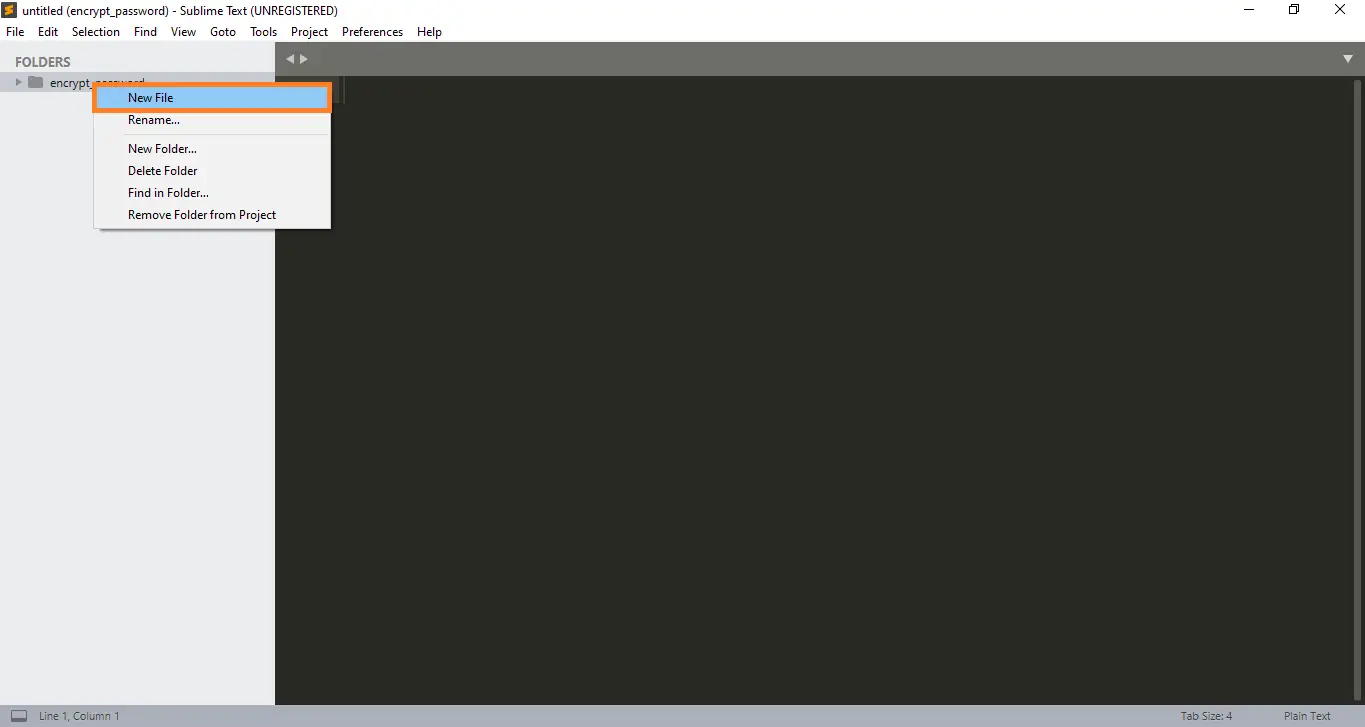
Third, create the php file under your project folder and name it into “index.php“.

- Step 4: Open xampp.
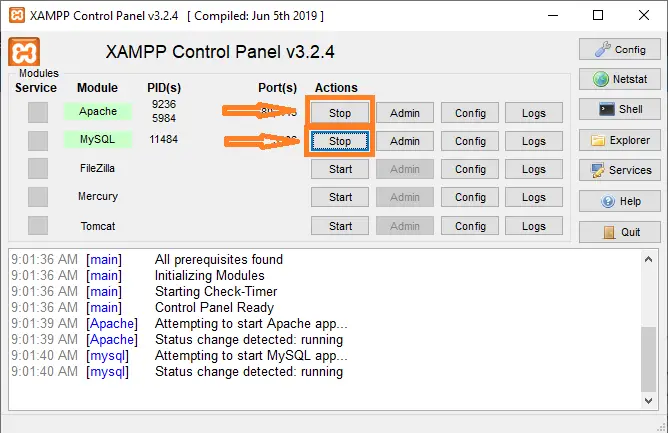
Fourth, open “xampp” and simply click the “start” button of “apache” and “mysql“.

- Step 5: Open browser.
Fifth, Open a browser and go to URL “http://localhost/phpmyadmin/”.

- Step 6: Create database.
Six, click on databases tab and Create database naming “registration_db”.

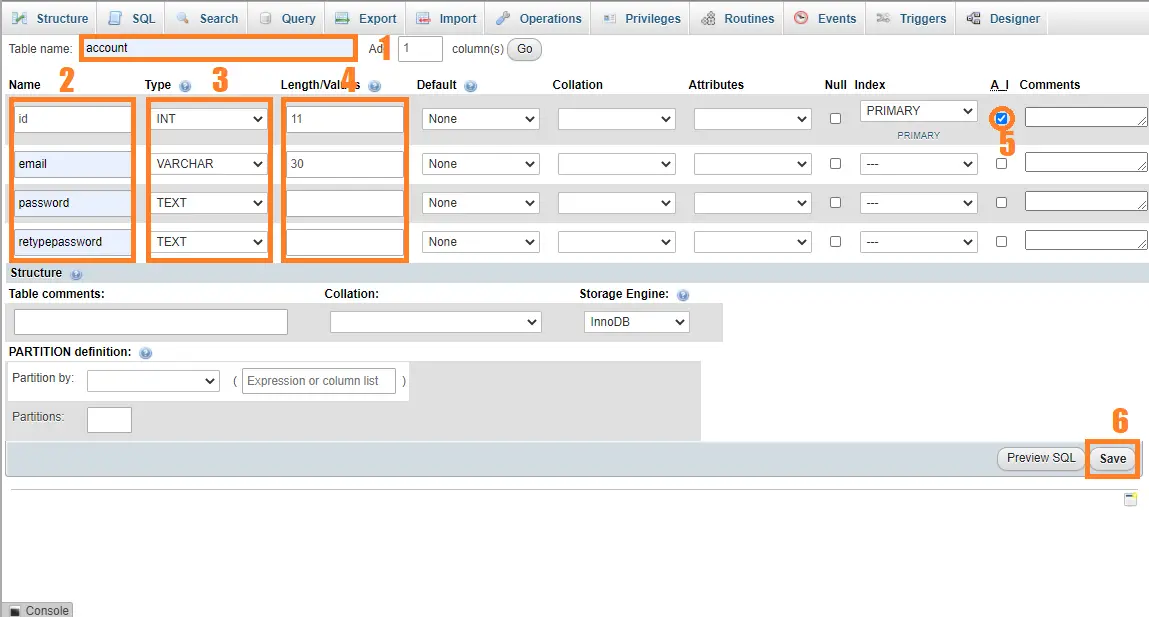
- Step 7: create database table.
Seventh, create a database table and name it to “account” and its fields id(INT,11) AUTO INCRIMENT, email(VARCHAR,30), password(TEXT) and retypepassword(TEXT) on your created database.

- Step 8: Paste the code given below.
Final, paste all the codes or the complete source code given below into your php file.



How To Encrypt Password Using PHP?
Here’s the codes on how to encrypt password.
CSS File
<style>
body {
  font-family: Arial, Helvetica, sans-serif;
  background-color: black;
}

* {
  box-sizing: border-box;
}

/* Add padding to containers */
.container {
  padding: 16px;
  background-color: white;
}

/* Full-width input fields */
input[type=text], input[type=password] {
  width: 100%;
  padding: 15px;
  margin: 5px 0 22px 0;
  display: inline-block;
  border: none;
  background: #f1f1f1;
}

input[type=text]:focus, input[type=password]:focus {
  background-color: #ddd;
  outline: none;
}

/* Overwrite default styles of hr */
hr {
  border: 1px solid #f1f1f1;
  margin-bottom: 25px;
}

/* Set a style for the submit button */
.registerbtn {
  background-color: #4CAF50;
  color: white;
  padding: 16px 20px;
  margin: 8px 0;
  border: none;
  cursor: pointer;
  width: 100%;
  opacity: 0.9;
}

.registerbtn:hover {
  opacity: 1;
}

/* Add a blue text color to links */
a {
  color: dodgerblue;
}

/* Set a grey background color and center the text of the "sign in" section */
.signin {
  background-color: #f1f1f1;
  text-align: center;
}
</style>
HTML Form
<body>

<form action="#" method="POST">
  <div class="container">
    <h1>Register</h1>
    <p>Please fill in this form to create an account.</p>
    <hr>

    <label for="email"><b>Email</b></label>
    <input type="text" placeholder="Enter Email" name="email" id="email" required>

    <label for="psw"><b>Password</b></label>
    <input type="password" placeholder="Enter Password" name="psw" id="psw" required>

    <label for="psw-repeat"><b>Repeat Password</b></label>
    <input type="password" placeholder="Repeat Password" name="psw_repeat" id="psw-repeat" required>
    <hr>
    <button type="submit" name="submit" class="registerbtn">Register</button>
  </div>
</form>
</body>
Connection
$db = mysqli_connect('localhost', 'root', '') or
die ('Unable to connect. Check your connection parameters.');
mysqli_select_db($db, 'registration_db' ) or die(mysqli_error($db));
Executing process from HTML Form
<?php
if(isset($_POST['submit'])){
$email = $_POST['email'];
$psw = $_POST['psw'];
$psw_repeat = $_POST['psw_repeat'];

$query = "INSERT INTO `account`(email,password,retypepassword) VALUES ('".$email."',md5('".$psw."'),md5('".$psw_repeat."'))";
mysqli_query($db,$query)or die ('Error in updating Database');
?>
<script type="text/javascript">
      alert("Account Successfully Registered!.");
      window.location = "index.php";
    </script>
    <?php
}
?>
Encrypt Password Using MD5()
$query = "INSERT INTO `account`(email,password,retypepassword) VALUES ('".$email."',md5('".$psw."'),md5('".$psw_repeat."'))";Complete Source Code
<!DOCTYPE html>
<html>
<head>
<meta name="viewport" content="width=device-width, initial-scale=1">
<style>
body {
  font-family: Arial, Helvetica, sans-serif;
  background-color: black;
}

* {
  box-sizing: border-box;
}

/* Add padding to containers */
.container {
  padding: 16px;
  background-color: white;
}

/* Full-width input fields */
input[type=text], input[type=password] {
  width: 100%;
  padding: 15px;
  margin: 5px 0 22px 0;
  display: inline-block;
  border: none;
  background: #f1f1f1;
}

input[type=text]:focus, input[type=password]:focus {
  background-color: #ddd;
  outline: none;
}

/* Overwrite default styles of hr */
hr {
  border: 1px solid #f1f1f1;
  margin-bottom: 25px;
}

/* Set a style for the submit button */
.registerbtn {
  background-color: #4CAF50;
  color: white;
  padding: 16px 20px;
  margin: 8px 0;
  border: none;
  cursor: pointer;
  width: 100%;
  opacity: 0.9;
}

.registerbtn:hover {
  opacity: 1;
}

/* Add a blue text color to links */
a {
  color: dodgerblue;
}

/* Set a grey background color and center the text of the "sign in" section */
.signin {
  background-color: #f1f1f1;
  text-align: center;
}
</style>
</head>
<body>

<form action="#" method="POST">
  <div class="container">
    <h1>Register</h1>
    <p>Please fill in this form to create an account.</p>
    <hr>

    <label for="email"><b>Email</b></label>
    <input type="text" placeholder="Enter Email" name="email" id="email" required>

    <label for="psw"><b>Password</b></label>
    <input type="password" placeholder="Enter Password" name="psw" id="psw" required>

    <label for="psw-repeat"><b>Repeat Password</b></label>
    <input type="password" placeholder="Repeat Password" name="psw_repeat" id="psw-repeat" required>
    <hr>
    <button type="submit" name="submit" class="registerbtn">Register</button>
  </div>
</form>
</body>
</html>

<?php
$db = mysqli_connect('localhost', 'root', '') or
die ('Unable to connect. Check your connection parameters.');
mysqli_select_db($db, 'registration_db' ) or die(mysqli_error($db));

if(isset($_POST['submit'])){
$email = $_POST['email'];
$psw = $_POST['psw'];
$psw_repeat = $_POST['psw_repeat'];

$query = "INSERT INTO `account`(email,password,retypepassword) VALUES ('".$email."',md5('".$psw."'),md5('".$psw_repeat."'))";
mysqli_query($db,$query)or die ('Error in updating Database');
?>
<script type="text/javascript">
      alert("Account Successfully Registered!.");
      window.location = "index.php";
    </script>
    <?php
}
?>
Download Source Code below
Anyway, if you want to level up your programming knowledge, especially PHP, try this new article I’ve made for you Best PHP Projects With Source Code Free Download.
Summary
This tutorial will encrypt user password and store that encrypted password in database and when user come for login then user enter his password and when system validate user information then at that time also password has been encrypt and validate user information by using that encrypted password, this is because in database table we have already inserted encrypted password.
This for prevent from password hacking.
Frequently Asked Questions
What does this PHP tutorial cover?
Focused PHP language or library tutorial showing a single concept with working code. Use as a building block when assembling a larger system.
What PHP and MySQL versions does this project require?
Most projects in this batch run on PHP 7.4 to PHP 8.2 with MySQL 5.7+ or MariaDB 10+. A few older projects need PHP 5.6 (deprecated, use XAMPP 7.x). To run: install XAMPP / WAMP / Laragon, extract project to htdocs, import the included .sql file via phpMyAdmin, edit the connection file (usually config.php or db_connect.php) with your DB credentials, browse to the project URL in your browser.
How do I set up the database for this PHP project?
Open phpMyAdmin (http://localhost/phpmyadmin/ on XAMPP), create a new empty database with the name specified in the project’s config.php. Click the Import tab, choose the included .sql file, click Go. Then edit config.php (or includes/connection.php) with: ‘localhost’, your MySQL username (usually ‘root’), your MySQL password (usually blank for XAMPP), and the database name.
Can I use this PHP project for a BSIT capstone or thesis?
Yes, but extend it. A bare CRUD app is too narrow for full capstone scope. Add: user roles via session checks, reports/dashboards (Chart.js + AJAX), PDF exports (TCPDF library), email notifications (PHPMailer), real domain extension (analytics, audit log, multi-branch support). Pair with Chapter 1-5 documentation matching your panel’s rubric.
Why am I getting ‘connection error’ or ‘undefined function mysqli_connect’?
Three common PHP issues: (1) Connection error: Apache + MySQL services not running in XAMPP control panel, OR database name in config.php does not match what you created in phpMyAdmin. (2) ‘undefined function mysqli_connect’: MySQL extension not enabled, in php.ini uncomment extension=mysqli (then restart Apache). (3) ‘No such file or directory’: MySQL socket path wrong, use 127.0.0.1 instead of localhost in the connection string.
Where can I find more PHP projects with source code?
Browse the PHP Projects hub for the full library (300+ vanilla PHP systems). For modern PHP MVC alternatives see Laravel Projects (74 systems) or CodeIgniter Projects (32 systems). For BSIT-focused capstone idea lists see 150 Best Capstone Project Ideas.
Related PHP Projects
- Login Page PHP Database Source Code
- Registration Page Using PHP Source Code
- Laravel Login Page With Source Code
- Login Page In CodeIgniter With Database
- Simple Registration Form Source Code PHP
- Simple Login Registration Logout Using PHP MySQL
Inquiries
If you have any questions or suggestions about How to Encrypt Password in PHP With Source Code, please feel free to leave a comment below.

Angel Jude Suarez
Full-Stack Developer at PIES IT Solution
Focuses on Python development, machine learning, and AI integration. Has built production AI systems including OpenAI Whisper integration for medical transcription and GPT-4o-powered diagnosis assistance. Strong background in pandas, scikit-learn, and TensorFlow.
Expertise: Python · PHP · Java · VB.NET · ASP.NET · Machine Learning · AI Integration · OpenCV · Django · CodeIgniter · View all posts by Angel Jude Suarez →
After encryption how do i decrypt it if my password is forgotten