

A Pharmacy Management System Project in CodeIgniter is any system used in a pharmacy that helps automate the way the pharmacy works.
This includes tasks like reviewing doctor orders and making sure medications are ready, keeping track of the inventory and placing orders for drugs, handling billing and insurance, giving advice, spotting drug interactions, and more, all while following legal rules and protocols.
About The Project
The Pharmacy Management System In CodeIgniter is primarily concerned with keeping track of and selling pharmacy products.
In addition, the system shows all of the categories along with their associated details. Additionally, the system allows for the inclusion of generic names.
A Admin and Staff Panel are the two sections of the project. The staff account has its own set of limits within the system, according to an overview of this web service.
The personnel can only help with the sale item’s upkeep. The user must first enter the customer’s name, then choose the drugs and quantity.
Project Information
| Project Name: | Pharmacy Management System in CodeIgniter Source Code |
| Language/s Used: | PHP with CodeIgniter Web Framework |
| PHP version (Recommended): | 5.6.3, 7.4.12 |
| Database: | MySQL |
| Type: | Website, Web Application |
| Developer: | IT SOURCECODE |
| Updates: | 0 |
What is CodeIgniter?
CodeIgniter is an Application Development Framework – a toolset – for PHP web site developers. Its purpose is to let you construct projects much faster than if you were programming code from start by providing a rich set of libraries for common activities, as well as a simple interface and logical structure to access these libraries.
By reducing the amount of code required for a given operation, CodeIgniter allows you to focus more creatively on your project.
The Pharmacy Management System In CodeIgniter displays the entire payment amount, prompting the user to enter a paid amount in order to proceed. Finally, following a successful transaction, the system allows the user to print the invoice.
Pharmacy Management System CodeIgniter Features
- Staff Panel
- Admin Panel
- Manage Medicine Presentation, Generic Name
- Manage Medicines, Suppliers
- Medicine Inventory
- Purchase Statement
- Supplier’s Payment
- Sales Management
- sales statement
- Print Invoice
- profit/ Loss Report
- Staff Management
- Expired Products
- Sales of the month
This CodeIgniter Project With Source Code also includes a downloadable CodeIgniter Source Code for free, just find the downloadable source code below and click to start downloading.
I have here a suggested list of CodeIgniter Projects With Source Code Free Download Free to download and I’m sure this can help you to improve your skills in CodeIgniter under PHP programming and web development as a whole.
To start executing a Pharmacy Management System Project In CodeIgniter With Source Code , makes sure that you have any platform in creating a JavaScript, CSS, bootstrap, and HTML installed in your computer, in my case I will use Sublime Text.
Steps On How To Run The Pharmacy Management System Project In CodeIgniter With Source Code
Time needed: 5 hours
These are the steps on how to run Pharmacy Management System Project In CodeIgniter With Source Code .
- Download Source Code
First, find the downloadable source code below and click to start downloading the source code file.

- Extract File
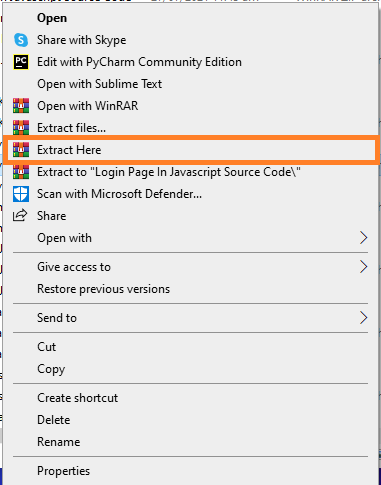
Next, after finished to download the file, go to file location and right click the file and click extract.

- Copy Project Folder
Next, copy the project folder and paste it to C:\xampp\htdocs.

- Open Xampp
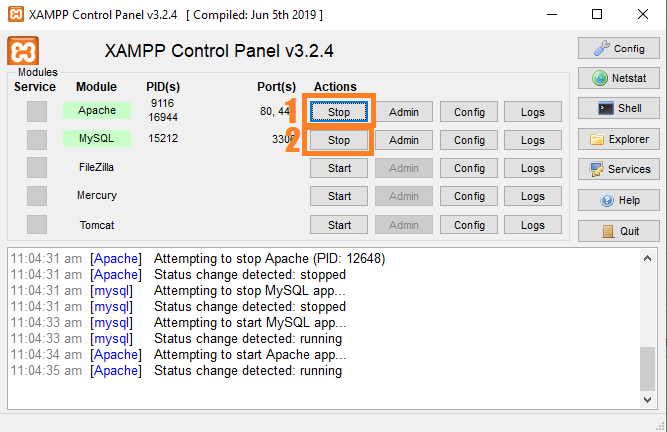
Next, open xampp and start the apache and mysql.

- Create Database
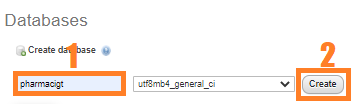
Next, click any browser and type to the URL localhost/phpmyadmin and create database.

- Import Database
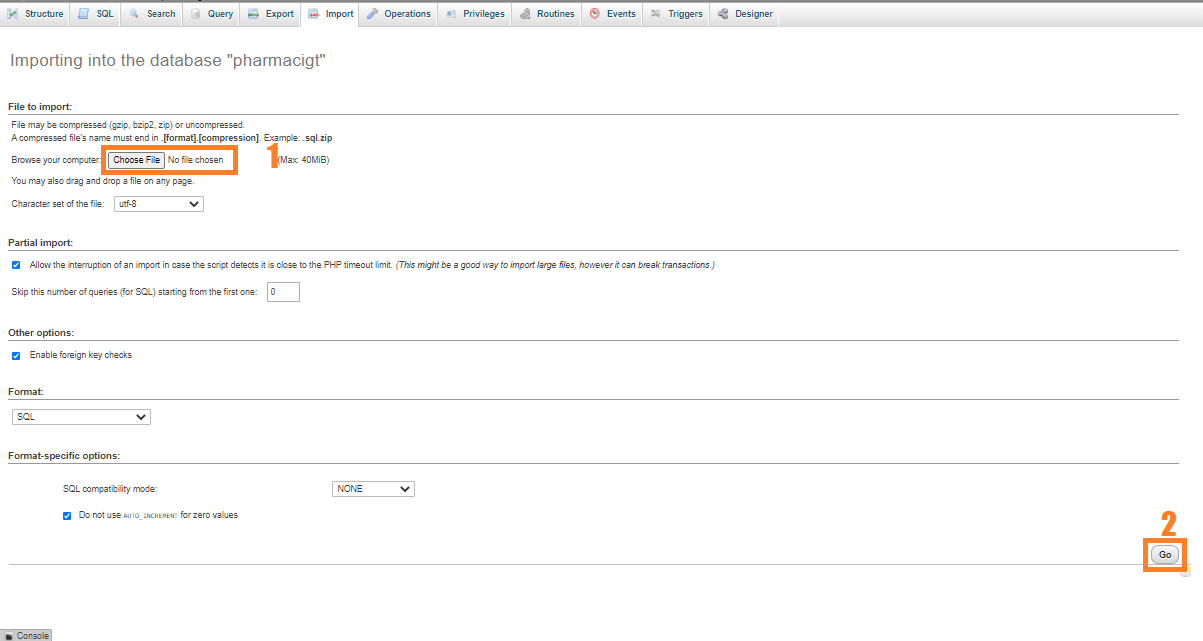
Next, click the created database and click import to the right tab and click choose file and import the sql file inside the download folder.

- Execute Project
final, type to the URL localhost/pharmacyci.




Project Output


Download Source Code below
Anyway, if you want to level up your programming knowledge, especially PHP, try this new article I’ve made for you Best PHP Projects With Source Code Free Download.
Summary
As a result, this Pharmacy Management System is a basic CodeIgniter project for all beginning and intermediate CodeIgniter users who want to broaden their understanding of PHP web applications.
Finally, the entire PHP project with open source code is an absolute project and a valuable way for users to understand and explore more about it.
Official documentation
Frequently Asked Questions
How does this CodeIgniter pharmacy management system work?
Inventory (medicines, expiry tracking, low-stock alerts), sales/POS (prescription verification, invoice generation), supplier purchase orders, reports (sales by drug, expiring inventory, top-selling). Standard CodeIgniter MVC: Pharmacy_model + Sale_model + Supplier_model controllers.
What CodeIgniter and PHP versions does this project require?
Most projects in this batch use CodeIgniter 3 (CI3 – the dominant version on tutorial sites) which runs on PHP 5.6 to PHP 8.1. A few newer projects use CodeIgniter 4 which requires PHP 7.4+. Check the system/CodeIgniter.php file or composer.json for exact version. To run: extract to your htdocs (XAMPP/WAMP/Laragon), update application/config/database.php with your MySQL credentials, import the included .sql file via phpMyAdmin, browse to the project folder URL.
How do I set up the database for this CodeIgniter project?
Open phpMyAdmin (or MySQL client), create a new empty database (typical names: ci_school, ci_pos, etc.). Import the included .sql file via the Import tab. Edit application/config/database.php: set ‘hostname’ to localhost, ‘database’ to the new DB name, ‘username’ and ‘password’ to your local MySQL credentials. If using CodeIgniter 4: edit .env with database.default.* settings.
Can I use this CodeIgniter project for a BSIT capstone or thesis?
Yes, but extend it. A bare CRUD app is too narrow for full capstone scope. Add: user roles via session checks, reports/dashboards (Chart.js + AJAX), PDF exports (TCPDF library), email notifications (CodeIgniter Email library), real domain extension (analytics, audit log, multi-branch support). Pair with Chapter 1-5 documentation matching your panel’s rubric.
Why am I getting ‘An Error Was Encountered’ or ‘404 Page Not Found’ errors?
Three common CodeIgniter issues: (1) Wrong base_url in application/config/config.php, set $config[‘base_url’] to your actual project URL (e.g. http://localhost/myproject/). (2) Apache mod_rewrite not enabled, run sudo a2enmod rewrite (Linux) or check XAMPP/WAMP config. (3) Missing .htaccess in project root with proper RewriteRule. For DB errors: verify credentials in application/config/database.php match your MySQL setup.
Where can I find more CodeIgniter projects with source code?
Browse the CodeIgniter Projects hub for the full library. For broader PHP capstones see PHP Projects (300+ vanilla PHP + MySQL systems). For modern PHP MVC alternatives see Laravel Projects (74 systems). For BSIT-focused capstone idea lists see 150 Best Capstone Project Ideas.
Related PHP Projects
- Bookstore Management System Project In CodeIgniter With Source Code
- Student Management System Project In CodeIgniter With Source Code
- Parking Management System In CodeIgniter With Source Code
- User Management System In CodeIgniter With Source Code
- Hotel Management System In CodeIgniter With Source Code
- Attendance Management System In CodeIgniter With Source Code
Inquiries
If you have any questions or suggestions about Pharmacy Management System Project In CodeIgniter With Source Code , please feel free to leave a comment below.

Angel Jude Suarez
Full-Stack Developer at PIES IT Solution
Focuses on Python development, machine learning, and AI integration. Has built production AI systems including OpenAI Whisper integration for medical transcription and GPT-4o-powered diagnosis assistance. Strong background in pandas, scikit-learn, and TensorFlow.
Expertise: Python · PHP · Java · VB.NET · ASP.NET · Machine Learning · AI Integration · OpenCV · Django · CodeIgniter · View all posts by Angel Jude Suarez →
The zip asks for a passoword…what is the password?
Password: itsourcecode.com or itsourcecode
Zip file password:itsourcecode.com or itsourcecode
The zip asks for a passoword…what is the password?
Zip file password: itsourcecode or itsourcecode.com
its wrong
Zip file password: itsourcecode
if it is wrong try this one
Zip file password: itsourcecode.com
sir admin and staff password ?
It is in the database