
The Café Billing System in C# is a simple C# Language-developed desktop application. The project is based on the idea of generating the receipt of a client’s total bills.
Speaking of the billing system project in c#, the user simply has to choose between products for cakes and drinks, enter the amount, and press the total button to see the total price.
The user can display the total receipt of their products, showing the receipt.
A Cafes have become popular and there are cafes everywhere whenever you go around the streets.
Due to the environment that makes them happy, many people hang out at cafes and enjoy a cup of tea/coffee and a slice of cake.
So, this Café Billing System in C# will help you a lot when it comes to the billing process if you are planning to have your own coffee company.
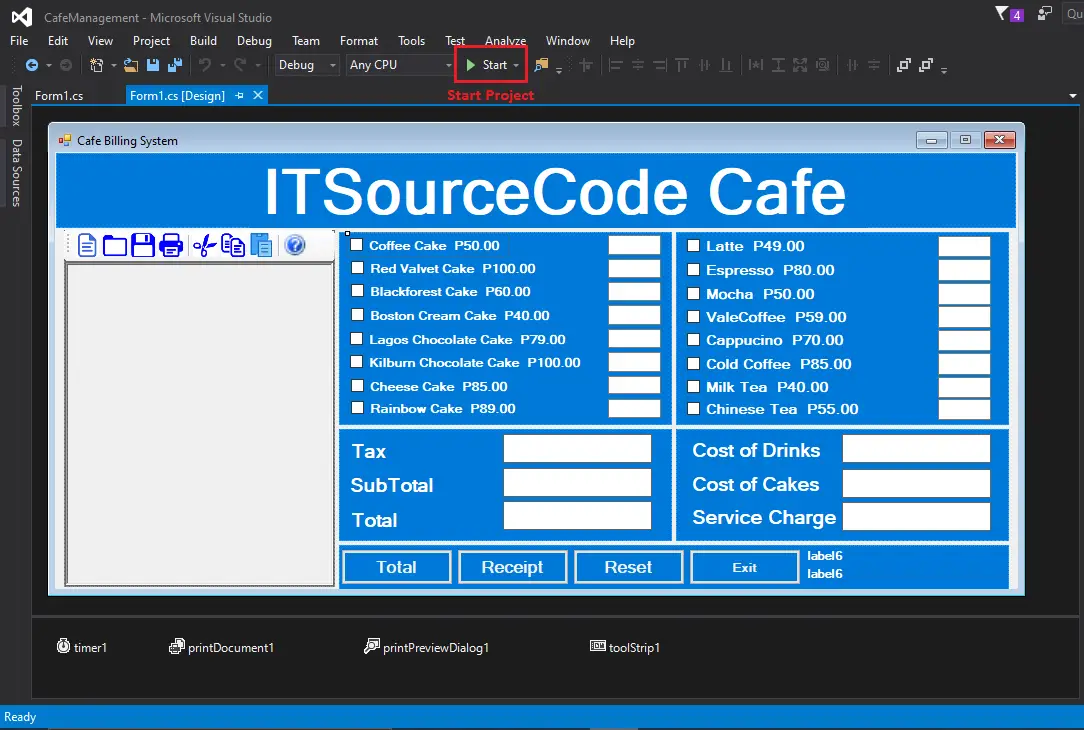
This Cafe Billing Framework is an application for the desktop and is very simple to use. In this Café Billing System in c#.net, the user simply selects the cakes and drinks available.
Then, by clicking the total button, he enters the quantity of items he has chosen; he can see the total price.
A billing system project in c# is very simple so that the user won’t find any difficulties while working on it. This billing system c# code project does not use any external file as a database/to store records.
Billing System Project in c#.net free download source code, just find the download now below and click to start downloading.
These are the following features of the system
- Menu
- Summary of Payments
- Generate Receipt
- Print Receipt
- Save Receipt
- Open Receipt
- Copy
- Cut
- Paste
To run this project make sure that you have Visual Studio IDE installed in your PC(for Windows) to run this project. Billing System Project in C#.net is free to download with source code.
Cafe Billing System in C# with Source Code Steps On How To Run The Project
Time needed: 5 minutes
These are the steps on how to run Cafe Billing System in C# with Source Code
- Step 1: Download
First, download the source code given below.

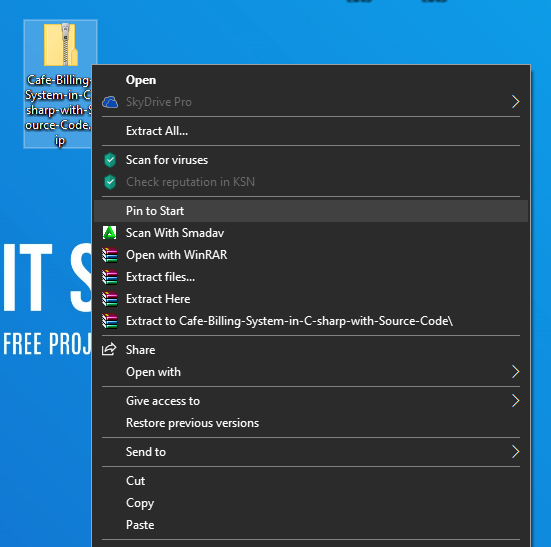
- Step 2: Extract file
Second, after you finished download the source code, extract the zip file.

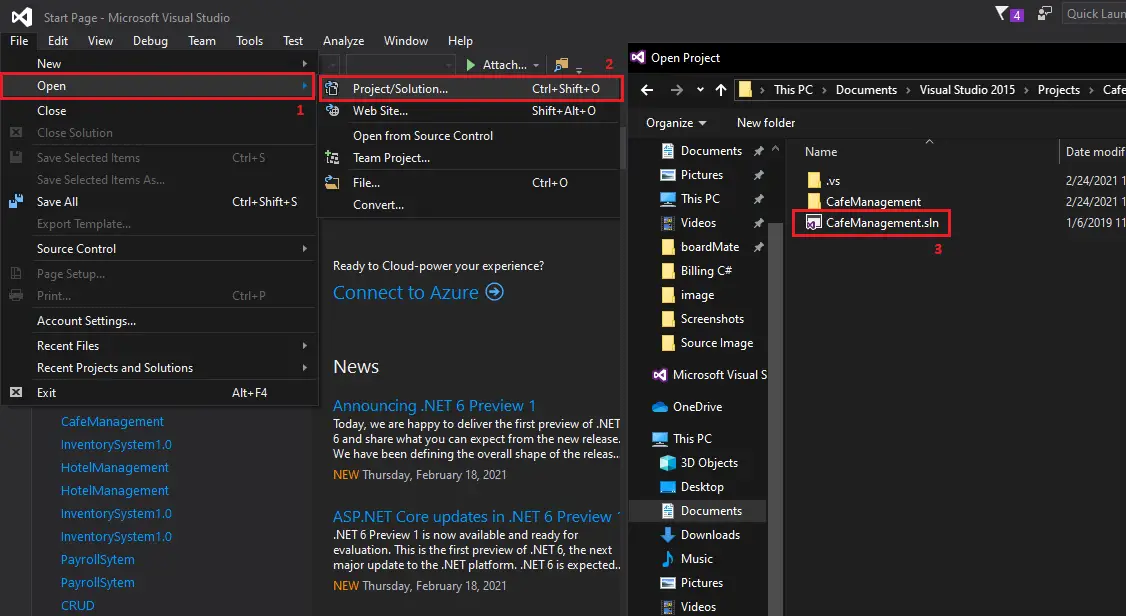
- Step 3: Open Project
Third, Open a Visual Studio and open project folder CafeBilling then open the “CafeManagement.sln“.

- Step 4: Start Project
Fourth, Start the project.

| ABOUT PROJECT | PROJECT DETAILS |
|---|---|
| Project Name : | Cafe Billing System |
| Project Platform : | C# |
| Programming Language Used: | C# Programming Language |
| Developer Name : | itsourcecode.com |
| IDE Tool (Recommended): | Visual Studio 2019 |
| Project Type : | Desktop Application |
| Database: | MYSQL DATABASE |
| Upload Date and Time: | February 25, 2021- 2:15 am |
Downloadable Source Code
Conclusion
This billing system in c#.net is only a project made for school requirement purposes only.
You can download this source code and modify it to suit your client requirements, since this is a student project it means you cannot really expect 100% functionality from this.
Related Articles
- Restaurant Billing System Project in Python With Source Code
- Coffee Shop Management System Project in C with Source Code
- Customer Billing System Project in C With Source Code
- Laravel Billing System Project with Source Code
- Cafeteria Order Management System Project in C
- Billing System In PHP With Source Code
- Billing Android App with Source Code
Inquiries
If you have any questions or suggestions about Cafe Billing System in C# with Source Code, please feel free to leave a comment below.
Frequently Asked Questions
How does this C# billing or invoice system work?
Customer master, products/services catalog, invoice generation (auto-numbered), payment recording, A/R aging, statement printing. Crystal Reports or RDLC for PDF/printable invoices.
What .NET and SQL Server versions does this project require?
Most projects in this batch use C# WinForms on .NET Framework 4.5+ (the dominant stack for tutorial sites) with SQL Server 2012 Express or higher. A few newer projects use .NET 6/7/8. To run: install Visual Studio 2019 / 2022 (Community edition is free), install SQL Server Express + SSMS, open the .sln file, build, run.
How do I set up the database for this C# project?
Open SQL Server Management Studio (SSMS) and connect to your SQL Server instance (e.g. localhost\SQLEXPRESS). Right-click Databases > Restore Database OR > New Database then import the included .sql script. Update the connection string in App.config (or in code-behind) with your server name + credentials. Rebuild and run.
Can I use this C# project for a BSIT capstone or thesis?
Yes, but extend it. A bare CRUD form is too narrow for full capstone scope. Add: role-based access (admin/staff/customer login redirect), Crystal Reports or RDLC reports, dashboard with Chart controls, audit log, multi-branch support. Pair with Chapter 1-5 documentation matching your panel’s rubric.
Why am I getting ‘connection error’ or ‘object reference not set’?
Three common C# issues: (1) Connection error: SQL Server isn’t running OR connection string in App.config has wrong server name. Open SQL Server Configuration Manager + verify SQL Server (SQLEXPRESS) service is running. (2) NullReferenceException: a control reference or DB column returned NULL, add a check or use ?? operator. (3) Build error ‘The type or namespace could not be found’: missing assembly reference, add via Project > Add Reference.
Where can I find more C# projects with source code?
Browse the C# Projects hub for the full library. For other .NET stacks see VB.NET Projects (300+ Windows Forms systems). For ASP.NET WebForms see ASP.NET Projects. For BSIT capstone idea lists see 150 Best Capstone Project Ideas.

Adrian Mercurio
Full-Stack Developer at PIES IT Solution
Specializes in building complete capstone projects with full documentation. Strong background in PHP/MySQL development and database design. Has personally built and tested over 30 capstone-ready projects with ER diagrams, DFDs, and chapter-by-chapter thesis documentation.
Expertise: PHP · Laravel · Database Design · Capstone Projects · C# · C · C++ · Python · AI Projects · View all posts by Adrian Mercurio →
How to connect SQL in c# for cafe Billing system? please help me