
What is a Restaurant Billing System Project in Python?
The Restaurant Billing System Project in Python lets you do a smooth transaction and keep track of all other tasks, like order management, a production system, tracking inventory, and so on.
Also, a restaurant billing system is mostly a centralized control system that keeps track of every transaction, customer, purchase, and sale.
Restaurant Billing System Project: Table of contents
- What is a Restaurant Billing System Project in Python?
- Restaurant Billing System In Python : Project Information
- Why Should You Get a Restaurant Billing System Project in Python
- About Restaurant Billing System Project Python
- Steps on How To Create Restaurant Billing System Project in Python
- Restaurant Billing System Code Explanation
- 1. Main Module
- 2. Declaring Variables and Its Data Types
- 3. Exit Function
- 4. Reset Function
- 5. Compute Total Purchased
- 6. Product Function
- 7. Receipt Function
- 8. Drinks Module
- 9. Foods Module
- 10. Total Foods and Drinks
- 11. Button Functions
- 12. Display Calculator
- 13. Button Function for Calculator
- The Main Module of the Restaurant Billing System
- Program Output:
- How To Run The Restaurant Billing System Python Project?
- Downloadable Source Code
- Summary
- Related Articles
- Inquiries
Restaurant Billing System In Python: Project Information
| Project Name: | Restaurant Billing System Project in Python |
| Abstract: | A Restaurant Billing System is how a business sends bills and invoices to its customers. |
| Language/s Used: | Python with Tkinter GUI Library |
| Python version (Recommended): | 2.x or 3.x |
| Database: | MySQL |
| Type: | Python App |
| Developer: | IT SOURCECODE |
| Updates: | 0 |
Why Should You Get a Restaurant Billing System Project in Python
The way a restaurant bills customers is like a database. It helps the people in charge learn more about their customers.
The billing software will tell you everything you need to know, from the most popular meals to the deals that bring in the most customers. It also keeps track of everything you buy and sell.
So, you’ll be able to see which parts of your business work better and which ones need more work.
If you have more than one location, billing software can also help you figure out which ones are doing well and which ones aren’t.
About Restaurant Billing System Project Python
Python is used to write this project, the Restaurant Billing System Project in Python. The project record has a file called restaurant billing.Py, which is a Python script.
This is a simple GUI-based application with a graphical user interface that is easy to understand and use. For the GUI, it uses the Tkinter module.
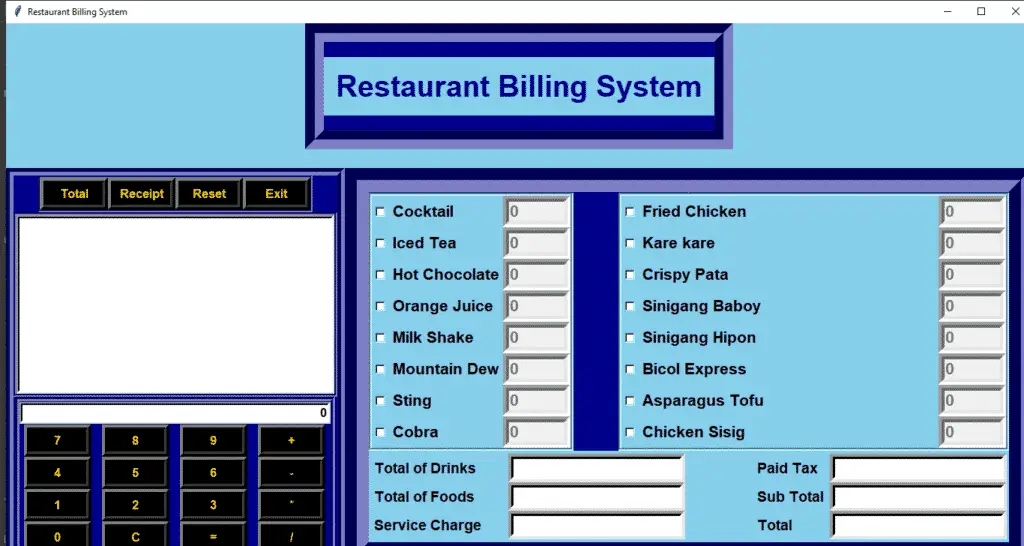
When it comes to the app, the customer just has to pick the food and drinks they want, enter the amount, and click the “total” button to see the total price.
The customer can see the full receipt for their items, which shows the receipt number, the number of food and drink items, and the total amount.
Here, the customer’s total bill includes tax and service prices.
Steps on How To Create Restaurant Billing System Project in Python
Before you start to create a Restaurant Billing System Project in Python, make sure you have PyCharm IDE and Python installed in your computer.
Time needed: 5 minutes
Restaurant Billing System Project in Python With Source Code
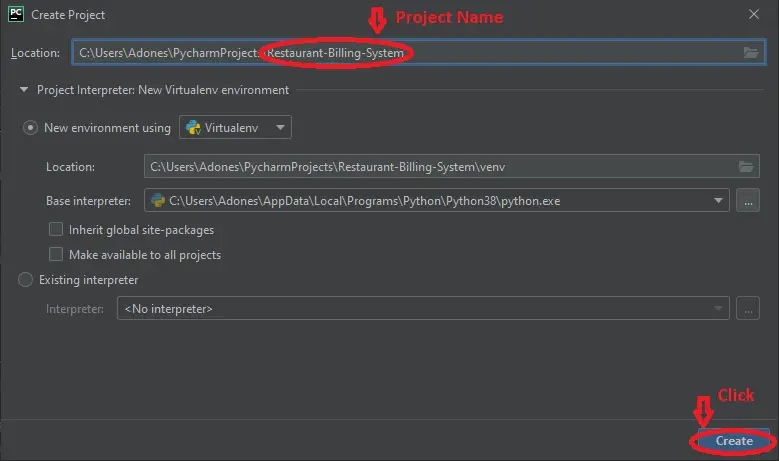
- Step 1: Create a Project Name.
First step open the PyCharm IDE and click “File” and select “New Project” and then create a project name after that click the “create” button.

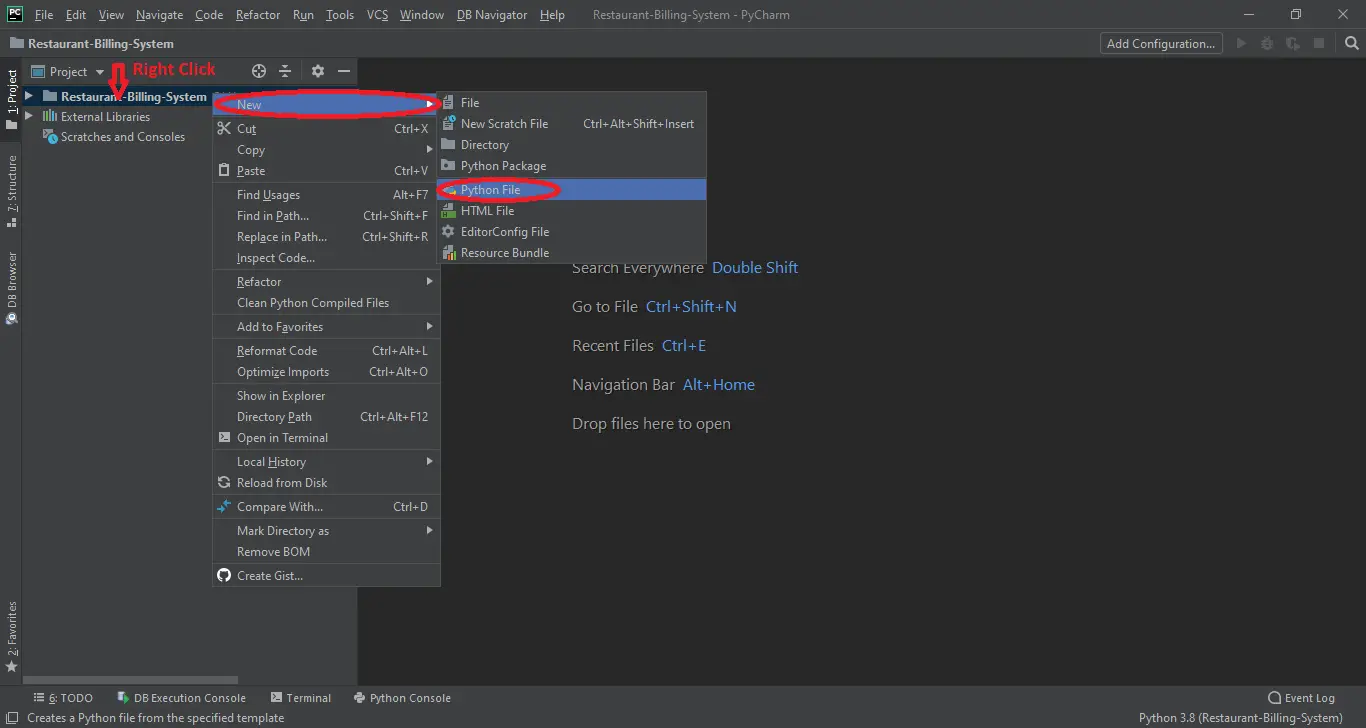
- Step 2: Create a Python File.
The second step after creating a project name, “right” click the project name, and the click “New” after that choose “Python File“.

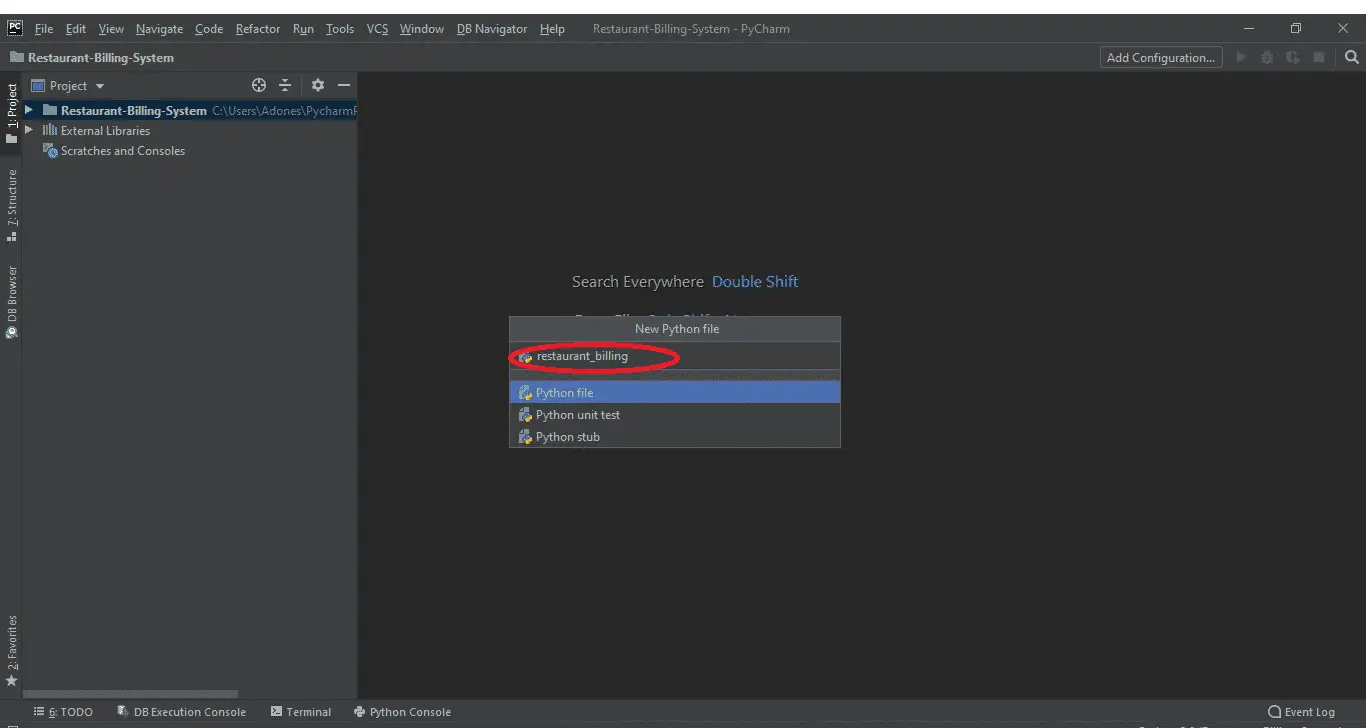
- Step 3: Name the Python File
The third step after choosing Python File name the file “Information_of_Patient” and then click “Enter“.
- Creating a File name in the Restaurant Billing System
Now you can start coding, you are free to copy the code that being provided below.
Restaurant Billing System Code Explanation
1. Main Module
This Module is for the Main Module and the Whole Frame Window of the Restaurant Billing System Project in Python
root =Tk()
root.geometry("1400x750+0+0")
root.title("Restaurant Billing System")
root.configure(background='sky blue')

Tops = Frame(root, bg='dark blue', bd=25, pady=20, relief=GROOVE)
Tops.pack(side=TOP)

lblTitle = Label(Tops, font=('arial', 30, 'bold'), text='Restaurant Billing System', bd=15, bg='sky blue',
fg='dark blue', justify=CENTER)
lblTitle.grid(row=0)


ReceiptCal_Function = Frame(root, bg='dark blue', bd=10, relief=GROOVE)
ReceiptCal_Function.pack(side=LEFT)

Buttons_Function = Frame(ReceiptCal_Function, bg='dark blue', bd=3, relief=GROOVE)
Buttons_Function.pack(side=TOP)

Calculator_Function = Frame(ReceiptCal_Function, bg='dark blue', bd=6, relief=GROOVE)
Calculator_Function.pack(side=BOTTOM)

Receipt_Function = Frame(ReceiptCal_Function, bg='dark blue', bd=4, relief=GROOVE)
Receipt_Function.pack(side=BOTTOM)

MenuFrame = Frame(root, bg='dark blue', bd=32, relief=GROOVE)
MenuFrame.pack(side=RIGHT)
Total_Function = Frame(MenuFrame, bg='sky blue', bd=4)
Total_Function.pack(side=BOTTOM)
Drinks_Function = Frame(MenuFrame,bg='sky blue',bd=4)
Drinks_Function.pack(side=TOP)


Drinks_Function = Frame(MenuFrame, bg='sky blue', bd=4, relief=GROOVE)
Drinks_Function.pack(side=LEFT)
Food_Function = Frame(MenuFrame, bg='sky blue', bd=4, relief=GROOVE)
Food_Function.pack(side=RIGHT)
2. Declaring Variables and Its Data Types
The code given below Declares the variables and data types that are being used in the program.
variable1 = IntVar()
variable2 = IntVar()
variable3 = IntVar()
variable4 = IntVar()
variable5 = IntVar()
variable6 = IntVar()
variable7 = IntVar()
variable8 = IntVar()
variable9 = IntVar()
variable10 = IntVar()
variable11 = IntVar()
variable12 = IntVar()
variable13 = IntVar()
variable14 = IntVar()
variable15 = IntVar()
variable16 = IntVar()

Date_of_Order = StringVar()
Receipt_Ref = StringVar()
PaidTax = StringVar()
SubTotal = StringVar()
TotalCost = StringVar()
Total_of_Food = StringVar()
Total_of_Drinks = StringVar()
ServiceCharge = StringVar()

text_Input = StringVar()
operator = ""

cocktail = StringVar()
iced_tea = StringVar()
hot_chocolate = StringVar()
orange_juice = StringVar()
milkshake = StringVar()
mountain_dew = StringVar()
sting = StringVar()
cobra = StringVar()

fried_chicken = StringVar()
kare_kare = StringVar()
crispy_pata = StringVar()
sinigang_baboy = StringVar()
sinigang_hipon = StringVar()
bicol_express = StringVar()
asparagus_tofu = StringVar()
chicken_sisig = StringVar()

cocktail.set("0")
iced_tea.set("0")
hot_chocolate.set("0")
orange_juice.set("0")
milkshake.set("0")
mountain_dew.set("0")
sting.set("0")
cobra.set("0")

fried_chicken.set("0")
kare_kare.set("0")
crispy_pata.set("0")
sinigang_baboy.set("0")
sinigang_hipon.set("0")
bicol_express.set("0")
asparagus_tofu.set("0")
chicken_sisig.set("0")
3. Exit Function
This Module is for Exit Functions.
def iExit():
iExit=tkinter.messagebox.askyesno("Exit Restaurant System", "Confirm if you want to exit")
if iExit > 0:
root.destroy()
return
4. Reset Function
This Module is for Reset Function the sets the value of all declared variables to null or zero.
def Reset():

    PaidTax.set("")
    SubTotal.set("")
    TotalCost.set("")
    Total_of_Food.set("")
    Total_of_Drinks.set("")
    ServiceCharge.set("")
    textReceipt.delete("1.0", END)


    cocktail.set("0")
    iced_tea.set("0")
    hot_chocolate.set("0")
    orange_juice.set("0")
    milkshake.set("0")
    mountain_dew.set("0")
    sting.set("0")
    cobra.set("0")

    fried_chicken.set("0")
    kare_kare.set("0")
    crispy_pata.set("0")
    sinigang_baboy.set("0")
    sinigang_hipon.set("0")
    bicol_express.set("0")
    asparagus_tofu.set("0")
    chicken_sisig.set("0")

    variable1.set(0)
    variable2.set(0)
    variable3.set(0)
    variable4.set(0)
    variable5.set(0)
    variable6.set(0)
    variable7.set(0)
    variable8 .set(0)
    variable9 .set(0)
    variable10 .set(0)
    variable11 .set(0)
    variable12 .set(0)
    variable13 .set(0)
    variable14 .set(0)
    variable15 .set(0)
    variable16 .set(0)


    textCocktail.configure(state=DISABLED)
    textIcedTea.configure(state=DISABLED)
    textHotChocolate.configure(state=DISABLED)
    textOrangeJuice.configure(state=DISABLED)
    textMilkShake.configure(state=DISABLED)
    textMountainDew.configure(state=DISABLED)
    textSting.configure(state=DISABLED)
    textCobra.configure(state=DISABLED)
    textFriedChicken.configure(state=DISABLED)
    textKareKAre.configure(state=DISABLED)
    textCrispyPata.configure(state=DISABLED)
    textSinigangBaboy.configure(state=DISABLED)
    textSinigangHipon.configure(state=DISABLED)
    textBicolExpress.configure(state=DISABLED)
    textAsparagusTofu.configure(state=DISABLED)
    textChickenSisig.configure(state=DISABLED)
5. Compute Total Purchased
This Module is for getting the total unit and putting a price on the food and drinks.
def TotalofUnit():
Unit1 = float(cocktail.get())
Unit2 = float(iced_tea.get())
Unit3 = float(hot_chocolate.get())
Unit4 = float(orange_juice.get())
Unit5 = float(milkshake.get())
Unit6 = float(mountain_dew.get())
Unit7 = float(sting.get())
Unit8 = float(cobra.get())

Unit9 = float(fried_chicken.get())
Unit10 = float(kare_kare.get())
Unit11 = float(crispy_pata.get())
Unit12 = float(sinigang_baboy.get())
Unit13 = float(sinigang_hipon.get())
Unit14 = float(bicol_express.get())
Unit15 = float(asparagus_tofu.get())
Unit16 = float(chicken_sisig.get())

Prices_Drinks = (Unit1 * 50) + (Unit2 * 45) + (Unit3 * 60) + (Unit4 * 35) + (Unit5 * 70) + (Unit6 * 40) + (Unit7 * 55) + (Unit8 * 75)

Prices_Food = (Unit9 * 490) + (Unit10 * 450) + (Unit11 * 350) + (Unit12 * 400) + (Unit13 * 500) + (Unit14 * 250) + (Unit15 * 650) + (Unit16 * 370)


DrinksPrices = "P" + str('%.2f' % Prices_Drinks)
FoodsPrices = "P" + str('%.2f' % Prices_Food)
Total_of_Food.set(FoodsPrices)
Total_of_Drinks.set(DrinksPrices)
SC = "P" + str('%.2f' % 1.59)
ServiceCharge.set(SC)

Sub_Total_of_Unit = "P" + str('%.2f'%(Prices_Drinks + Prices_Food + 1.59))
SubTotal.set(Sub_Total_of_Unit)

Tax = "P" + str('%.2f'%((Prices_Drinks + Prices_Food + 1.59) * 0.15))
PaidTax.set(Tax)

TT = ((Prices_Drinks + Prices_Food + 1.59) * 0.15)
TC = "P" + str('%.2f'%(Prices_Drinks + Prices_Food + 1.59 + TT))
TotalCost.set(TC)
6. Product Function
This Module is for Foods and Drinks Function.
def drinksCocktail():
if variable1.get() == 1:
textCocktail.configure(state=NORMAL)
textCocktail.focus()
textCocktail.delete('0', END)
cocktail.set("")
elif variable1.get() == 0:
textCocktail.configure(state=DISABLED)
cocktail.set("0")

def drinksIceTea():
if variable2.get() == 1:
textIcedTea.configure(state=NORMAL)
textIcedTea.focus()
textIcedTea.delete('0', END)
iced_tea.set("")
elif variable2.get() == 0:
textIcedTea.configure(state=DISABLED)
iced_tea.set("0")

def drinksHotChocolate():
if variable3.get() == 1:
textHotChocolate.configure(state=NORMAL)
textHotChocolate.delete('0', END)
textHotChocolate.focus()
elif variable3.get() == 0:
textHotChocolate.configure(state=DISABLED)
hot_chocolate.set("0")

def drinksOrangeJuice():
if variable4.get() == 1:
textOrangeJuice.configure(state=NORMAL)
textOrangeJuice.delete('0', END)
textOrangeJuice.focus()
elif variable4.get() == 0:
textOrangeJuice.configure(state=DISABLED)
orange_juice.set("0")

def drinksMilkShake():
if variable5.get() == 1:
textMilkShake.configure(state=NORMAL)
textMilkShake.delete('0', END)
textMilkShake.focus()
elif variable5.get() == 0:
textMilkShake.configure(state=DISABLED)
milkshake.set("0")

def drinksMountainDew():
if variable6.get() == 1:
textMountainDew.configure(state=NORMAL)
textMountainDew.delete('0', END)
textMountainDew.focus()
elif variable6.get() == 0:
textMountainDew.configure(state=DISABLED)
mountain_dew.set("0")

def drinksSting():
if variable7.get() == 1:
textSting.configure(state=NORMAL)
textSting.delete('0', END)
textSting.focus()
elif variable7.get() == 0:
textSting.configure(state=DISABLED)
sting.set("0")

def drinksCobra():
if variable8.get() == 1:
textCobra.configure(state=NORMAL)
textCobra.delete('0', END)
textCobra.focus()
elif variable8.get() == 0:
textCobra.configure(state=DISABLED)
cobra.set("0")

def foodsFriedChicken():
if variable9.get() == 1:
textFriedChicken.configure(state=NORMAL)
textFriedChicken.delete('0', END)
textFriedChicken.focus()
elif variable9.get() == 0:
textFriedChicken.configure(state=DISABLED)
fried_chicken.set("0")

def foodsKareKare():
if variable10.get() == 1:
textKareKAre.configure(state=NORMAL)
textKareKAre.delete('0', END)
textKareKAre.focus()
elif variable10.get() == 0:
textKareKAre.configure(state=DISABLED)
kare_kare.set("0")

def foodsCrispyPata():
if variable11.get() == 1:
textCrispyPata.configure(state=NORMAL)
textCrispyPata.delete('0', END)
textCrispyPata.focus()
elif variable11.get() == 0:
textCrispyPata.configure(state=DISABLED)
crispy_pata.set("0")

def foodsSinigangBaboy():
if variable12.get() == 1:
textSinigangBaboy.configure(state=NORMAL)
textSinigangBaboy.delete('0', END)
textSinigangBaboy.focus()
elif variable12.get() == 0:
textSinigangBaboy.configure(state=DISABLED)
sinigang_baboy.set("0")

def foodsSinigangHipon():
if variable13 .get() == 1:
textSinigangHipon.configure(state=NORMAL)
textSinigangHipon.delete('0',END)
textSinigangHipon.focus()
elif(variable13.get() == 0):
textSinigangHipon.configure(state=DISABLED)
sinigang_hipon.set("0")

def foodsBicolExpress():
if variable14 .get() == 1:
textBicolExpress.configure(state=NORMAL)
textBicolExpress.delete('0', END)
textBicolExpress.focus()
elif variable14.get() == 0:
textBicolExpress.configure(state=DISABLED)
bicol_express.set("0")

def foodsAsparagusTofu():
if variable15.get() == 1:
textAsparagusTofu.configure(state=NORMAL)
textAsparagusTofu.delete('0', END)
textAsparagusTofu.focus()
elif variable15.get() == 0:
textAsparagusTofu.configure(state=DISABLED)
asparagus_tofu.set("0")

def foodsChickenSisig():
if variable16 .get() == 1:
textChickenSisig.configure(state=NORMAL)
textChickenSisig.delete('0',END)
textChickenSisig.focus()
elif(variable16.get() == 0):
textChickenSisig.configure(state=DISABLED)
chicken_sisig.set("0")
7. Receipt Function
This Module is for the Receipt Function.
def Receipt():
textReceipt.delete("1.0", END)
x = random.randint(10908, 500876)
randomRef = str(x)
Receipt_Ref.set("Bill" + randomRef)


textReceipt.insert(END, 'Receipt Ref:\t\t\t'+Receipt_Ref.get() + '\t' + Date_of_Order.get() + '\n')
textReceipt.insert(END, 'Unit\t\t\t\t'+"Total of Unit \n")
textReceipt.insert(END, 'Cocktail:\t\t\t\t\t' + cocktail.get() + '\n')
textReceipt.insert(END, 'Iced Tea:\t\t\t\t\t' + iced_tea.get()+'\n')
textReceipt.insert(END, 'Hot Chocolate:\t\t\t\t\t' + hot_chocolate.get()+'\n')
textReceipt.insert(END, 'Orange Juice:\t\t\t\t\t' + orange_juice.get()+'\n')
textReceipt.insert(END, 'Milk Shake:\t\t\t\t\t' + milkshake.get()+'\n')
textReceipt.insert(END, 'Mountain Dew:\t\t\t\t\t' + mountain_dew.get()+'\n')
textReceipt.insert(END, 'Sting:\t\t\t\t\t' + sting.get()+'\n')
textReceipt.insert(END, 'Cobra:\t\t\t\t\t' + cobra.get()+'\n')
textReceipt.insert(END, 'Fried Chicken:\t\t\t\t\t' + fried_chicken.get()+'\n')
textReceipt.insert(END, 'Kare Kare:\t\t\t\t\t' + kare_kare.get()+'\n')
textReceipt.insert(END, 'Crispy Pata:\t\t\t\t\t' + crispy_pata.get()+'\n')
textReceipt.insert(END, 'Sinigang baboy:\t\t\t\t\t' + sinigang_baboy.get()+'\n')
textReceipt.insert(END, 'Sinigang Hipon:\t\t\t\t\t' + sinigang_hipon.get()+'\n')
textReceipt.insert(END, 'Bicol Express:\t\t\t\t\t' + bicol_express.get()+'\n')
textReceipt.insert(END, 'Asparagus Tofu:\t\t\t\t\t' + asparagus_tofu.get()+'\n')
textReceipt.insert(END, 'Chicken Sisig:\t\t\t\t\t' + chicken_sisig.get()+'\n')
textReceipt.insert(END, 'Total of Drinks:\t\t\t\t' + Total_of_Drinks.get()+'\nTax Paid:\t\t\t\t'+PaidTax.get()+"\n")
textReceipt.insert(END, 'Total of Foods:\t\t\t\t' + Total_of_Food.get()+'\nSubTotal:\t\t\t\t'+str(SubTotal.get())+"\n")
textReceipt.insert(END, 'Service Charge:\t\t\t\t' + ServiceCharge.get()+'\nTotal Cost:\t\t\t\t'+str(TotalCost.get())+"\n")
8. Drinks Module
This Module is for the Design GUI of Drinks.
Cocktail = Checkbutton(Drinks_Function, text='Cocktail', variable=variable1, onvalue=1, offvalue=0, font=('arial', 16, 'bold'),
bg='sky blue', command=drinksCocktail).grid(row=0, sticky=W)
IcedTea = Checkbutton(Drinks_Function, text='Iced Tea', variable=variable2, onvalue=1, offvalue=0, font=('arial', 16, 'bold'),
bg='sky blue', command=drinksIceTea).grid(row=1, sticky=W)
HotChocolate = Checkbutton(Drinks_Function, text='Hot Chocolate', variable=variable3, onvalue=1, offvalue=0, font=('arial', 16, 'bold'),
bg='sky blue', command=drinksHotChocolate).grid(row=2, sticky=W)
OrangeJuice = Checkbutton(Drinks_Function, text='Orange Juice', variable=variable4, onvalue=1, offvalue=0, font=('arial', 16, 'bold'),
bg='sky blue', command=drinksOrangeJuice).grid(row=3, sticky=W)
MilkShake = Checkbutton(Drinks_Function, text='Milk Shake', variable=variable5, onvalue=1, offvalue=0, font=('arial', 16, 'bold'),
bg='sky blue', command=drinksMilkShake).grid(row=4, sticky=W)
MountainDew = Checkbutton(Drinks_Function, text='Mountain Dew', variable=variable6, onvalue=1, offvalue=0, font=('arial', 16, 'bold'),
bg='sky blue', command=drinksMountainDew).grid(row=5, sticky=W)
Sting = Checkbutton(Drinks_Function, text='Sting', variable=variable7, onvalue=1, offvalue=0, font=('arial', 16, 'bold'),
bg='sky blue', command=drinksSting).grid(row=6, sticky=W)
Cobra = Checkbutton(Drinks_Function, text='Cobra', variable=variable8, onvalue=1, offvalue=0, font=('arial', 16, 'bold'),
bg='sky blue', command=drinksCobra).grid(row=7, sticky=W)
# Drink Entry

textCocktail = Entry(Drinks_Function, font=('arial', 16, 'bold'), bd=8, width=6, justify=LEFT, state=DISABLED, textvariable=cocktail)
textCocktail.grid(row=0,column=1)

textIcedTea = Entry(Drinks_Function,font=('arial',16,'bold'),bd=8,width=6,justify=LEFT,state=DISABLED,textvariable=iced_tea)
textIcedTea.grid(row=1,column=1)

textHotChocolate = Entry(Drinks_Function,font=('arial',16,'bold'),bd=8,width=6,justify=LEFT,state=DISABLED,textvariable=hot_chocolate)
textHotChocolate.grid(row=2,column=1)

textOrangeJuice= Entry(Drinks_Function,font=('arial',16,'bold'),bd=8,width=6,justify=LEFT,state=DISABLED,textvariable=orange_juice)
textOrangeJuice.grid(row=3,column=1)

textMilkShake = Entry(Drinks_Function,font=('arial',16,'bold'),bd=8,width=6,justify=LEFT,state=DISABLED,textvariable=milkshake)
textMilkShake.grid(row=4,column=1)

textMountainDew = Entry(Drinks_Function,font=('arial',16,'bold'),bd=8,width=6,justify=LEFT,state=DISABLED, textvariable=mountain_dew)
textMountainDew.grid(row=5,column=1)

textSting = Entry(Drinks_Function,font=('arial',16,'bold'),bd=8,width=6,justify=LEFT,state=DISABLED
,textvariable=sting)
textSting.grid(row=6,column=1)

textCobra = Entry(Drinks_Function,font=('arial',16,'bold'),bd=8,width=6,justify=LEFT,state=DISABLED
,textvariable=cobra)
textCobra.grid(row=7,column=1)
9. Foods Module
This Module is for the Design GUI of Foods.
FriedChicken = Checkbutton(Food_Function,text="Fried Chicken\t\t\t ",variable=variable9,onvalue = 1, offvalue=0,
font=('arial',16,'bold'),bg='sky blue',command=foodsFriedChicken).grid(row=0,sticky=W)
KareKare = Checkbutton(Food_Function,text="Kare kare",variable=variable10,onvalue = 1, offvalue=0,
font=('arial',16,'bold'),bg='sky blue',command=foodsKareKare).grid(row=1,sticky=W)
CrispyPata = Checkbutton(Food_Function,text="Crispy Pata ",variable=variable11,onvalue = 1, offvalue=0,
font=('arial',16,'bold'),bg='sky blue',command=foodsCrispyPata).grid(row=2,sticky=W)
SinigangBaboy = Checkbutton(Food_Function,text="Sinigang Baboy ",variable=variable12,onvalue = 1, offvalue=0,
font=('arial',16,'bold'),bg='sky blue',command=foodsSinigangBaboy).grid(row=3,sticky=W)
SinigangHipon = Checkbutton(Food_Function,text="Sinigang Hipon ",variable=variable13,onvalue = 1, offvalue=0,
font=('arial',16,'bold'),bg='sky blue',command=foodsSinigangHipon).grid(row=4,sticky=W)
BicolExpress = Checkbutton(Food_Function,text="Bicol Express ",variable=variable14,onvalue = 1, offvalue=0,
font=('arial',16,'bold'),bg='sky blue',command=foodsBicolExpress).grid(row=5,sticky=W)
AsparagusTofu = Checkbutton(Food_Function,text="Asparagus Tofu ",variable=variable15,onvalue = 1, offvalue=0,
font=('arial',16,'bold'),bg='sky blue',command=foodsAsparagusTofu).grid(row=6,sticky=W)
ChickenSisig = Checkbutton(Food_Function,text="Chicken Sisig ",variable=variable16,onvalue = 1, offvalue=0,
font=('arial',16,'bold'),bg='sky blue',command=foodsChickenSisig).grid(row=7,sticky=W)

textFriedChicken=Entry(Food_Function,font=('arial',16,'bold'),bd=8,width=6,justify=LEFT,state=DISABLED,textvariable=fried_chicken)
textFriedChicken.grid(row=0,column=1)

textKareKAre=Entry(Food_Function,font=('arial',16,'bold'),bd=8,width=6,justify=LEFT,state=DISABLED,textvariable=kare_kare)
textKareKAre.grid(row=1,column=1)

textCrispyPata=Entry(Food_Function,font=('arial',16,'bold'),bd=8,width=6,justify=LEFT,state=DISABLED, textvariable=crispy_pata)
textCrispyPata.grid(row=2,column=1)

textSinigangBaboy=Entry(Food_Function,font=('arial',16,'bold'),bd=8,width=6,justify=LEFT,state=DISABLED,textvariable=sinigang_baboy)
textSinigangBaboy.grid(row=3,column=1)

textSinigangHipon=Entry(Food_Function,font=('arial',16,'bold'),bd=8,width=6,justify=LEFT,state=DISABLED,textvariable=sinigang_hipon)
textSinigangHipon.grid(row=4,column=1)

textBicolExpress=Entry(Food_Function,font=('arial',16,'bold'),bd=8,width=6,justify=LEFT,state=DISABLED,textvariable=bicol_express)
textBicolExpress.grid(row=5,column=1)

textAsparagusTofu=Entry(Food_Function,font=('arial',16,'bold'),bd=8,width=6,justify=LEFT,state=DISABLED,textvariable=asparagus_tofu)
textAsparagusTofu.grid(row=6,column=1)

textChickenSisig=Entry(Food_Function,font=('arial',16,'bold'),bd=8,width=6,justify=LEFT,state=DISABLED,textvariable=chicken_sisig)
textChickenSisig.grid(row=7,column=1)
10. Total Foods and Drinks
This Module is for the Design GUI of Total of Foods and Drinks.
lblTotalofDrinks=Label(Total_Function,font=('arial',14,'bold'),text='Total of Drinks\t',bg='sky blue',fg='black',justify=CENTER)
lblTotalofDrinks.grid(row=0,column=0,sticky=W)
textTotalofDrinks=Entry(Total_Function,bg='white',bd=7,font=('arial',14,'bold'),insertwidth=2,justify=RIGHT,textvariable=Total_of_Drinks)
textTotalofDrinks.grid(row=0,column=1)

lblTotalofFood=Label(Total_Function,font=('arial',14,'bold'),text='Total of Foods ',bg='sky blue',fg='black',justify=CENTER)
lblTotalofFood.grid(row=1,column=0,sticky=W)
textTotalofFood=Entry(Total_Function,bg='white',bd=7,font=('arial',14,'bold'),insertwidth=2,justify=RIGHT,textvariable=Total_of_Food)
textTotalofFood.grid(row=1,column=1)

lblServiceCharge=Label(Total_Function,font=('arial',14,'bold'),text='Service Charge',bg='sky blue',fg='black',justify=CENTER)
lblServiceCharge.grid(row=2,column=0,sticky=W)
txtServiceCharge=Entry(Total_Function,bg='white',bd=7,font=('arial',14,'bold'),insertwidth=2,justify=RIGHT,textvariable=ServiceCharge)
txtServiceCharge.grid(row=2,column=1)

lblPaidTax=Label(Total_Function,font=('arial',14,'bold'),text='\tPaid Tax',bg='sky blue',bd=7,fg='black',justify=CENTER)
lblPaidTax.grid(row=0,column=2,sticky=W)
textPaidTax=Entry(Total_Function,bg='white',bd=7,font=('arial',14,'bold'),insertwidth=2,justify=RIGHT,textvariable=PaidTax)
textPaidTax.grid(row=0,column=3)

lblSubTotal=Label(Total_Function,font=('arial',14,'bold'),text='\tSub Total',bg='sky blue',bd=7,fg='black',justify=CENTER)
lblSubTotal.grid(row=1,column=2,sticky=W)
textSubTotal=Entry(Total_Function,bg='white',bd=7,font=('arial',14,'bold'), insertwidth=2,justify=RIGHT,textvariable=SubTotal)
textSubTotal.grid(row=1,column=3)

lblTotalCost=Label(Total_Function,font=('arial',14,'bold'),text='\tTotal',bg='sky blue',bd=7,fg='black',justify=CENTER)
lblTotalCost.grid(row=2,column=2,sticky=W)
textTotalCost=Entry(Total_Function,bg='white',bd=7,font=('arial',14,'bold'),insertwidth=2,justify=RIGHT,textvariable=TotalCost)
textTotalCost.grid(row=2,column=3)
11. Button Functions
This Module is for the Buttons of Total, Receipt, Reset, and Exit.
buttonTotal=Button(Buttons_Function,padx=16,pady=1,bd=7,fg='gold',font=('arial',12,'bold'),width=4,text='Total',bg='black',command=TotalofUnit).grid(row=0,column=0)
buttonReceipt=Button(Buttons_Function,padx=16,pady=1,bd=7,fg='gold',font=('arial',12,'bold'),width=4,text='Receipt',bg='black',command=Receipt).grid(row=0,column=1)
buttonReset=Button(Buttons_Function,padx=16,pady=1,bd=7,fg='gold',font=('arial',12,'bold'),width=4,text='Reset',bg='black',command=Reset).grid(row=0,column=2)
buttonExit=Button(Buttons_Function,padx=16,pady=1,bd=7,fg='gold',font=('arial',12,'bold'),width=4,text='Exit',bg='black',command=iExit).grid(row=0,column=3)
12. Display Calculator
This function is for the Calculator Display.
def btnClick(numbers):
global operator
operator = operator + str(numbers)
text_Input.set(operator)

def btnClear():
global operator
operator = ""
text_Input.set("")

def btnEquals():
global operator
sumup = str(eval(operator))
text_Input.set(sumup)
operator = ""

txtDisplay = Entry(Calculator_Function, width=45, bg='white', bd=4, font=('arial',12,'bold'), justify=RIGHT, textvariable=text_Input)
txtDisplay.grid(row=0,column=0,columnspan=4,pady=1)
txtDisplay.insert(0,"0")
13. Button Function for Calculator
This Module is for the Buttons of the Calculator.
btn7=Button(Calculator_Function, padx=16, pady=1, bd=7, fg='gold', font=('arial', 12, 'bold'), width=4, text='7',bg='black',command=lambda:btnClick(7)).grid(row=2,column=0)
btn8=Button(Calculator_Function,padx=16,pady=1,bd=7,fg='gold',font=('arial',12,'bold'),width=4,text='8',bg='black',command=lambda:btnClick(8)).grid(row=2,column=1)
btn9=Button(Calculator_Function,padx=16,pady=1,bd=7,fg='gold',font=('arial',12,'bold'),width=4,text='9',bg='black',command=lambda:btnClick(9)).grid(row=2,column=2)
btnAdd=Button(Calculator_Function,padx=16,pady=1,bd=7,fg='gold',font=('arial',12,'bold'),width=4,text='+',bg='black',command=lambda:btnClick('+')).grid(row=2,column=3)

btn4=Button(Calculator_Function,padx=16,pady=1,bd=7,fg='gold',font=('arial',12,'bold'),width=4,text='4',bg='black',command=lambda:btnClick(4)).grid(row=3,column=0)
btn5=Button(Calculator_Function,padx=16,pady=1,bd=7,fg='gold',font=('arial',12,'bold'),width=4,text='5',bg='black',command=lambda:btnClick(5)).grid(row=3,column=1)
btn6=Button(Calculator_Function,padx=16,pady=1,bd=7,fg='gold',font=('arial',12,'bold'),width=4,text='6',bg='black',command=lambda:btnClick(6)).grid(row=3,column=2)
btnSub=Button(Calculator_Function,padx=16,pady=1,bd=7,fg='gold',font=('arial',12,'bold'),width=4,text='-',bg='black',command=lambda:btnClick('-')).grid(row=3,column=3)

btn1=Button(Calculator_Function,padx=16,pady=1,bd=7,fg='gold',font=('arial',12,'bold'),width=4,text='1',bg='black',command=lambda:btnClick(1)).grid(row=4,column=0)
btn2=Button(Calculator_Function,padx=16,pady=1,bd=7,fg='gold',font=('arial',12,'bold'),width=4,text='2',bg='black',command=lambda:btnClick(2)).grid(row=4,column=1)
btn3=Button(Calculator_Function,padx=16,pady=1,bd=7,fg='gold',font=('arial',12,'bold'),width=4,text='3',bg='black',command=lambda:btnClick(3)).grid(row=4,column=2)
btnMulti=Button(Calculator_Function,padx=16,pady=1,bd=7,fg='gold',font=('arial',12,'bold'),width=4,text='*',bg='black',command=lambda:btnClick('*')).grid(row=4,column=3)

btn0=Button(Calculator_Function,padx=16,pady=1,bd=7,fg='gold',font=('arial',12,'bold'),width=4,text='0',bg='black',command=lambda:btnClick(0)).grid(row=5,column=0)
btnClear=Button(Calculator_Function,padx=16,pady=1,bd=7,fg='gold',font=('arial',12,'bold'),width=4,text='C',bg='black',command=btnClear).grid(row=5,column=1)
btnEqual=Button(Calculator_Function,padx=16,pady=1,bd=7,fg='gold',font=('arial',12,'bold'),width=4,text='=',bg='black',command=btnEquals).grid(row=5,column=2)
btnDiv=Button(Calculator_Function,padx=16,pady=1,bd=7,fg='gold',font=('arial',12,'bold'),width=4,text='/',bg='black',command=lambda:btnClick('/')).grid(row=5,column=3)
The Main Module of the Restaurant Billing System
from tkinter import *
import time
import random
import tkinter.messagebox

root =Tk()
root.geometry("1400x750+0+0")
root.title("Restaurant Billing System")
root.configure(background='sky blue')

Tops = Frame(root, bg='dark blue', bd=25, pady=20, relief=GROOVE)
Tops.pack(side=TOP)

lblTitle = Label(Tops, font=('arial', 30, 'bold'), text='Restaurant Billing System', bd=15, bg='sky blue',
fg='dark blue', justify=CENTER)
lblTitle.grid(row=0)


ReceiptCal_Function = Frame(root, bg='dark blue', bd=10, relief=GROOVE)
ReceiptCal_Function.pack(side=LEFT)

Buttons_Function = Frame(ReceiptCal_Function, bg='dark blue', bd=3, relief=GROOVE)
Buttons_Function.pack(side=TOP)

Calculator_Function = Frame(ReceiptCal_Function, bg='dark blue', bd=6, relief=GROOVE)
Calculator_Function.pack(side=BOTTOM)

Receipt_Function = Frame(ReceiptCal_Function, bg='dark blue', bd=4, relief=GROOVE)
Receipt_Function.pack(side=BOTTOM)

MenuFrame = Frame(root, bg='dark blue', bd=32, relief=GROOVE)
MenuFrame.pack(side=RIGHT)
Total_Function = Frame(MenuFrame, bg='sky blue', bd=4)
Total_Function.pack(side=BOTTOM)
Drinks_Function = Frame(MenuFrame,bg='sky blue',bd=4)
Drinks_Function.pack(side=TOP)


Drinks_Function = Frame(MenuFrame, bg='sky blue', bd=4, relief=GROOVE)
Drinks_Function.pack(side=LEFT)
Food_Function = Frame(MenuFrame, bg='sky blue', bd=4, relief=GROOVE)
Food_Function.pack(side=RIGHT)
# variables

variable1 = IntVar()
variable2 = IntVar()
variable3 = IntVar()
variable4 = IntVar()
variable5 = IntVar()
variable6 = IntVar()
variable7 = IntVar()
variable8 = IntVar()
variable9 = IntVar()
variable10 = IntVar()
variable11 = IntVar()
variable12 = IntVar()
variable13 = IntVar()
variable14 = IntVar()
variable15 = IntVar()
variable16 = IntVar()

Date_of_Order = StringVar()
Receipt_Ref = StringVar()
PaidTax = StringVar()
SubTotal = StringVar()
TotalCost = StringVar()
Total_of_Food = StringVar()
Total_of_Drinks = StringVar()
ServiceCharge = StringVar()

text_Input = StringVar()
operator = ""

cocktail = StringVar()
iced_tea = StringVar()
hot_chocolate = StringVar()
orange_juice = StringVar()
milkshake = StringVar()
mountain_dew = StringVar()
sting = StringVar()
cobra = StringVar()

fried_chicken = StringVar()
kare_kare = StringVar()
crispy_pata = StringVar()
sinigang_baboy = StringVar()
sinigang_hipon = StringVar()
bicol_express = StringVar()
asparagus_tofu = StringVar()
chicken_sisig = StringVar()

cocktail.set("0")
iced_tea.set("0")
hot_chocolate.set("0")
orange_juice.set("0")
milkshake.set("0")
mountain_dew.set("0")
sting.set("0")
cobra.set("0")

fried_chicken.set("0")
kare_kare.set("0")
crispy_pata.set("0")
sinigang_baboy.set("0")
sinigang_hipon.set("0")
bicol_express.set("0")
asparagus_tofu.set("0")
chicken_sisig.set("0")

Date_of_Order.set(time.strftime("%y/%m/%d"))

# Function Declaration

def iExit():
iExit=tkinter.messagebox.askyesno("Exit Restaurant System", "Confirm if you want to exit")
if iExit > 0:
root.destroy()
return

def Reset():

PaidTax.set("")
SubTotal.set("")
TotalCost.set("")
Total_of_Food.set("")
Total_of_Drinks.set("")
ServiceCharge.set("")
textReceipt.delete("1.0", END)


cocktail.set("0")
iced_tea.set("0")
hot_chocolate.set("0")
orange_juice.set("0")
milkshake.set("0")
mountain_dew.set("0")
sting.set("0")
cobra.set("0")

fried_chicken.set("0")
kare_kare.set("0")
crispy_pata.set("0")
sinigang_baboy.set("0")
sinigang_hipon.set("0")
bicol_express.set("0")
asparagus_tofu.set("0")
chicken_sisig.set("0")

variable1.set(0)
variable2.set(0)
variable3.set(0)
variable4.set(0)
variable5.set(0)
variable6.set(0)
variable7.set(0)
variable8 .set(0)
variable9 .set(0)
variable10 .set(0)
variable11 .set(0)
variable12 .set(0)
variable13 .set(0)
variable14 .set(0)
variable15 .set(0)
variable16 .set(0)


textCocktail.configure(state=DISABLED)
textIcedTea.configure(state=DISABLED)
textHotChocolate.configure(state=DISABLED)
textOrangeJuice.configure(state=DISABLED)
textMilkShake.configure(state=DISABLED)
textMountainDew.configure(state=DISABLED)
textSting.configure(state=DISABLED)
textCobra.configure(state=DISABLED)
textFriedChicken.configure(state=DISABLED)
textKareKAre.configure(state=DISABLED)
textCrispyPata.configure(state=DISABLED)
textSinigangBaboy.configure(state=DISABLED)
textSinigangHipon.configure(state=DISABLED)
textBicolExpress.configure(state=DISABLED)
textAsparagusTofu.configure(state=DISABLED)
textChickenSisig.configure(state=DISABLED)

def TotalofUnit():
Unit1 = float(cocktail.get())
Unit2 = float(iced_tea.get())
Unit3 = float(hot_chocolate.get())
Unit4 = float(orange_juice.get())
Unit5 = float(milkshake.get())
Unit6 = float(mountain_dew.get())
Unit7 = float(sting.get())
Unit8 = float(cobra.get())

Unit9 = float(fried_chicken.get())
Unit10 = float(kare_kare.get())
Unit11 = float(crispy_pata.get())
Unit12 = float(sinigang_baboy.get())
Unit13 = float(sinigang_hipon.get())
Unit14 = float(bicol_express.get())
Unit15 = float(asparagus_tofu.get())
Unit16 = float(chicken_sisig.get())

Prices_Drinks = (Unit1 * 50) + (Unit2 * 45) + (Unit3 * 60) + (Unit4 * 35) + (Unit5 * 70) + (Unit6 * 40) + (Unit7 * 55) + (Unit8 * 75)

Prices_Food = (Unit9 * 490) + (Unit10 * 450) + (Unit11 * 350) + (Unit12 * 400) + (Unit13 * 500) + (Unit14 * 250) + (Unit15 * 650) + (Unit16 * 370)


DrinksPrices = "P" + str('%.2f' % Prices_Drinks)
FoodsPrices = "P" + str('%.2f' % Prices_Food)
Total_of_Food.set(FoodsPrices)
Total_of_Drinks.set(DrinksPrices)
SC = "P" + str('%.2f' % 1.59)
ServiceCharge.set(SC)

Sub_Total_of_Unit = "P" + str('%.2f'%(Prices_Drinks + Prices_Food + 1.59))
SubTotal.set(Sub_Total_of_Unit)

Tax = "P" + str('%.2f'%((Prices_Drinks + Prices_Food + 1.59) * 0.15))
PaidTax.set(Tax)

TT = ((Prices_Drinks + Prices_Food + 1.59) * 0.15)
TC = "P" + str('%.2f'%(Prices_Drinks + Prices_Food + 1.59 + TT))
TotalCost.set(TC)


def drinksCocktail():
if variable1.get() == 1:
textCocktail.configure(state=NORMAL)
textCocktail.focus()
textCocktail.delete('0', END)
cocktail.set("")
elif variable1.get() == 0:
textCocktail.configure(state=DISABLED)
cocktail.set("0")

def drinksIceTea():
if variable2.get() == 1:
textIcedTea.configure(state=NORMAL)
textIcedTea.focus()
textIcedTea.delete('0', END)
iced_tea.set("")
elif variable2.get() == 0:
textIcedTea.configure(state=DISABLED)
iced_tea.set("0")

def drinksHotChocolate():
if variable3.get() == 1:
textHotChocolate.configure(state=NORMAL)
textHotChocolate.delete('0', END)
textHotChocolate.focus()
elif variable3.get() == 0:
textHotChocolate.configure(state=DISABLED)
hot_chocolate.set("0")

def drinksOrangeJuice():
if variable4.get() == 1:
textOrangeJuice.configure(state=NORMAL)
textOrangeJuice.delete('0', END)
textOrangeJuice.focus()
elif variable4.get() == 0:
textOrangeJuice.configure(state=DISABLED)
orange_juice.set("0")

def drinksMilkShake():
if variable5.get() == 1:
textMilkShake.configure(state=NORMAL)
textMilkShake.delete('0', END)
textMilkShake.focus()
elif variable5.get() == 0:
textMilkShake.configure(state=DISABLED)
milkshake.set("0")

def drinksMountainDew():
if variable6.get() == 1:
textMountainDew.configure(state=NORMAL)
textMountainDew.delete('0', END)
textMountainDew.focus()
elif variable6.get() == 0:
textMountainDew.configure(state=DISABLED)
mountain_dew.set("0")

def drinksSting():
if variable7.get() == 1:
textSting.configure(state=NORMAL)
textSting.delete('0', END)
textSting.focus()
elif variable7.get() == 0:
textSting.configure(state=DISABLED)
sting.set("0")

def drinksCobra():
if variable8.get() == 1:
textCobra.configure(state=NORMAL)
textCobra.delete('0', END)
textCobra.focus()
elif variable8.get() == 0:
textCobra.configure(state=DISABLED)
cobra.set("0")

def foodsFriedChicken():
if variable9.get() == 1:
textFriedChicken.configure(state=NORMAL)
textFriedChicken.delete('0', END)
textFriedChicken.focus()
elif variable9.get() == 0:
textFriedChicken.configure(state=DISABLED)
fried_chicken.set("0")

def foodsKareKare():
if variable10.get() == 1:
textKareKAre.configure(state=NORMAL)
textKareKAre.delete('0', END)
textKareKAre.focus()
elif variable10.get() == 0:
textKareKAre.configure(state=DISABLED)
kare_kare.set("0")

def foodsCrispyPata():
if variable11.get() == 1:
textCrispyPata.configure(state=NORMAL)
textCrispyPata.delete('0', END)
textCrispyPata.focus()
elif variable11.get() == 0:
textCrispyPata.configure(state=DISABLED)
crispy_pata.set("0")

def foodsSinigangBaboy():
if variable12.get() == 1:
textSinigangBaboy.configure(state=NORMAL)
textSinigangBaboy.delete('0', END)
textSinigangBaboy.focus()
elif variable12.get() == 0:
textSinigangBaboy.configure(state=DISABLED)
sinigang_baboy.set("0")

def foodsSinigangHipon():
if variable13 .get() == 1:
textSinigangHipon.configure(state=NORMAL)
textSinigangHipon.delete('0',END)
textSinigangHipon.focus()
elif(variable13.get() == 0):
textSinigangHipon.configure(state=DISABLED)
sinigang_hipon.set("0")

def foodsBicolExpress():
if variable14 .get() == 1:
textBicolExpress.configure(state=NORMAL)
textBicolExpress.delete('0', END)
textBicolExpress.focus()
elif variable14.get() == 0:
textBicolExpress.configure(state=DISABLED)
bicol_express.set("0")

def foodsAsparagusTofu():
if variable15.get() == 1:
textAsparagusTofu.configure(state=NORMAL)
textAsparagusTofu.delete('0', END)
textAsparagusTofu.focus()
elif variable15.get() == 0:
textAsparagusTofu.configure(state=DISABLED)
asparagus_tofu.set("0")

def foodsChickenSisig():
if variable16 .get() == 1:
textChickenSisig.configure(state=NORMAL)
textChickenSisig.delete('0',END)
textChickenSisig.focus()
elif(variable16.get() == 0):
textChickenSisig.configure(state=DISABLED)
chicken_sisig.set("0")

def Receipt():
textReceipt.delete("1.0", END)
x = random.randint(10908, 500876)
randomRef = str(x)
Receipt_Ref.set("Bill" + randomRef)


textReceipt.insert(END, 'Receipt Ref:\t\t\t'+Receipt_Ref.get() + '\t' + Date_of_Order.get() + '\n')
textReceipt.insert(END, 'Unit\t\t\t\t'+"Total of Unit \n")
textReceipt.insert(END, 'Cocktail:\t\t\t\t\t' + cocktail.get() + '\n')
textReceipt.insert(END, 'Iced Tea:\t\t\t\t\t' + iced_tea.get()+'\n')
textReceipt.insert(END, 'Hot Chocolate:\t\t\t\t\t' + hot_chocolate.get()+'\n')
textReceipt.insert(END, 'Orange Juice:\t\t\t\t\t' + orange_juice.get()+'\n')
textReceipt.insert(END, 'Milk Shake:\t\t\t\t\t' + milkshake.get()+'\n')
textReceipt.insert(END, 'Mountain Dew:\t\t\t\t\t' + mountain_dew.get()+'\n')
textReceipt.insert(END, 'Sting:\t\t\t\t\t' + sting.get()+'\n')
textReceipt.insert(END, 'Cobra:\t\t\t\t\t' + cobra.get()+'\n')
textReceipt.insert(END, 'Fried Chicken:\t\t\t\t\t' + fried_chicken.get()+'\n')
textReceipt.insert(END, 'Kare Kare:\t\t\t\t\t' + kare_kare.get()+'\n')
textReceipt.insert(END, 'Crispy Pata:\t\t\t\t\t' + crispy_pata.get()+'\n')
textReceipt.insert(END, 'Sinigang baboy:\t\t\t\t\t' + sinigang_baboy.get()+'\n')
textReceipt.insert(END, 'Sinigang Hipon:\t\t\t\t\t' + sinigang_hipon.get()+'\n')
textReceipt.insert(END, 'Bicol Express:\t\t\t\t\t' + bicol_express.get()+'\n')
textReceipt.insert(END, 'Asparagus Tofu:\t\t\t\t\t' + asparagus_tofu.get()+'\n')
textReceipt.insert(END, 'Chicken Sisig:\t\t\t\t\t' + chicken_sisig.get()+'\n')
textReceipt.insert(END, 'Total of Drinks:\t\t\t\t' + Total_of_Drinks.get()+'\nTax Paid:\t\t\t\t'+PaidTax.get()+"\n")
textReceipt.insert(END, 'Total of Foods:\t\t\t\t' + Total_of_Food.get()+'\nSubTotal:\t\t\t\t'+str(SubTotal.get())+"\n")
textReceipt.insert(END, 'Service Charge:\t\t\t\t' + ServiceCharge.get()+'\nTotal Cost:\t\t\t\t'+str(TotalCost.get())+"\n")


# Drinks
Cocktail = Checkbutton(Drinks_Function, text='Cocktail', variable=variable1, onvalue=1, offvalue=0, font=('arial', 16, 'bold'),
bg='sky blue', command=drinksCocktail).grid(row=0, sticky=W)
IcedTea = Checkbutton(Drinks_Function, text='Iced Tea', variable=variable2, onvalue=1, offvalue=0, font=('arial', 16, 'bold'),
bg='sky blue', command=drinksIceTea).grid(row=1, sticky=W)
HotChocolate = Checkbutton(Drinks_Function, text='Hot Chocolate', variable=variable3, onvalue=1, offvalue=0, font=('arial', 16, 'bold'),
bg='sky blue', command=drinksHotChocolate).grid(row=2, sticky=W)
OrangeJuice = Checkbutton(Drinks_Function, text='Orange Juice', variable=variable4, onvalue=1, offvalue=0, font=('arial', 16, 'bold'),
bg='sky blue', command=drinksOrangeJuice).grid(row=3, sticky=W)
MilkShake = Checkbutton(Drinks_Function, text='Milk Shake', variable=variable5, onvalue=1, offvalue=0, font=('arial', 16, 'bold'),
bg='sky blue', command=drinksMilkShake).grid(row=4, sticky=W)
MountainDew = Checkbutton(Drinks_Function, text='Mountain Dew', variable=variable6, onvalue=1, offvalue=0, font=('arial', 16, 'bold'),
bg='sky blue', command=drinksMountainDew).grid(row=5, sticky=W)
Sting = Checkbutton(Drinks_Function, text='Sting', variable=variable7, onvalue=1, offvalue=0, font=('arial', 16, 'bold'),
bg='sky blue', command=drinksSting).grid(row=6, sticky=W)
Cobra = Checkbutton(Drinks_Function, text='Cobra', variable=variable8, onvalue=1, offvalue=0, font=('arial', 16, 'bold'),
bg='sky blue', command=drinksCobra).grid(row=7, sticky=W)
# Drink Entry

textCocktail = Entry(Drinks_Function, font=('arial', 16, 'bold'), bd=8, width=6, justify=LEFT, state=DISABLED, textvariable=cocktail)
textCocktail.grid(row=0,column=1)

textIcedTea = Entry(Drinks_Function,font=('arial',16,'bold'),bd=8,width=6,justify=LEFT,state=DISABLED,textvariable=iced_tea)
textIcedTea.grid(row=1,column=1)

textHotChocolate = Entry(Drinks_Function,font=('arial',16,'bold'),bd=8,width=6,justify=LEFT,state=DISABLED,textvariable=hot_chocolate)
textHotChocolate.grid(row=2,column=1)

textOrangeJuice= Entry(Drinks_Function,font=('arial',16,'bold'),bd=8,width=6,justify=LEFT,state=DISABLED,textvariable=orange_juice)
textOrangeJuice.grid(row=3,column=1)

textMilkShake = Entry(Drinks_Function,font=('arial',16,'bold'),bd=8,width=6,justify=LEFT,state=DISABLED,textvariable=milkshake)
textMilkShake.grid(row=4,column=1)

textMountainDew = Entry(Drinks_Function,font=('arial',16,'bold'),bd=8,width=6,justify=LEFT,state=DISABLED, textvariable=mountain_dew)
textMountainDew.grid(row=5,column=1)

textSting = Entry(Drinks_Function,font=('arial',16,'bold'),bd=8,width=6,justify=LEFT,state=DISABLED
,textvariable=sting)
textSting.grid(row=6,column=1)

textCobra = Entry(Drinks_Function,font=('arial',16,'bold'),bd=8,width=6,justify=LEFT,state=DISABLED
,textvariable=cobra)
textCobra.grid(row=7,column=1)
# Foods

FriedChicken = Checkbutton(Food_Function,text="Fried Chicken\t\t\t ",variable=variable9,onvalue = 1, offvalue=0,
font=('arial',16,'bold'),bg='sky blue',command=foodsFriedChicken).grid(row=0,sticky=W)
KareKare = Checkbutton(Food_Function,text="Kare kare",variable=variable10,onvalue = 1, offvalue=0,
font=('arial',16,'bold'),bg='sky blue',command=foodsKareKare).grid(row=1,sticky=W)
CrispyPata = Checkbutton(Food_Function,text="Crispy Pata ",variable=variable11,onvalue = 1, offvalue=0,
font=('arial',16,'bold'),bg='sky blue',command=foodsCrispyPata).grid(row=2,sticky=W)
SinigangBaboy = Checkbutton(Food_Function,text="Sinigang Baboy ",variable=variable12,onvalue = 1, offvalue=0,
font=('arial',16,'bold'),bg='sky blue',command=foodsSinigangBaboy).grid(row=3,sticky=W)
SinigangHipon = Checkbutton(Food_Function,text="Sinigang Hipon ",variable=variable13,onvalue = 1, offvalue=0,
font=('arial',16,'bold'),bg='sky blue',command=foodsSinigangHipon).grid(row=4,sticky=W)
BicolExpress = Checkbutton(Food_Function,text="Bicol Express ",variable=variable14,onvalue = 1, offvalue=0,
font=('arial',16,'bold'),bg='sky blue',command=foodsBicolExpress).grid(row=5,sticky=W)
AsparagusTofu = Checkbutton(Food_Function,text="Asparagus Tofu ",variable=variable15,onvalue = 1, offvalue=0,
font=('arial',16,'bold'),bg='sky blue',command=foodsAsparagusTofu).grid(row=6,sticky=W)
ChickenSisig = Checkbutton(Food_Function,text="Chicken Sisig ",variable=variable16,onvalue = 1, offvalue=0,
font=('arial',16,'bold'),bg='sky blue',command=foodsChickenSisig).grid(row=7,sticky=W)

textFriedChicken=Entry(Food_Function,font=('arial',16,'bold'),bd=8,width=6,justify=LEFT,state=DISABLED,textvariable=fried_chicken)
textFriedChicken.grid(row=0,column=1)

textKareKAre=Entry(Food_Function,font=('arial',16,'bold'),bd=8,width=6,justify=LEFT,state=DISABLED,textvariable=kare_kare)
textKareKAre.grid(row=1,column=1)

textCrispyPata=Entry(Food_Function,font=('arial',16,'bold'),bd=8,width=6,justify=LEFT,state=DISABLED, textvariable=crispy_pata)
textCrispyPata.grid(row=2,column=1)

textSinigangBaboy=Entry(Food_Function,font=('arial',16,'bold'),bd=8,width=6,justify=LEFT,state=DISABLED,textvariable=sinigang_baboy)
textSinigangBaboy.grid(row=3,column=1)

textSinigangHipon=Entry(Food_Function,font=('arial',16,'bold'),bd=8,width=6,justify=LEFT,state=DISABLED,textvariable=sinigang_hipon)
textSinigangHipon.grid(row=4,column=1)

textBicolExpress=Entry(Food_Function,font=('arial',16,'bold'),bd=8,width=6,justify=LEFT,state=DISABLED,textvariable=bicol_express)
textBicolExpress.grid(row=5,column=1)

textAsparagusTofu=Entry(Food_Function,font=('arial',16,'bold'),bd=8,width=6,justify=LEFT,state=DISABLED,textvariable=asparagus_tofu)
textAsparagusTofu.grid(row=6,column=1)

textChickenSisig=Entry(Food_Function,font=('arial',16,'bold'),bd=8,width=6,justify=LEFT,state=DISABLED,textvariable=chicken_sisig)
textChickenSisig.grid(row=7,column=1)

# ToTal Cost
lblTotalofDrinks=Label(Total_Function,font=('arial',14,'bold'),text='Total of Drinks\t',bg='sky blue',fg='black',justify=CENTER)
lblTotalofDrinks.grid(row=0,column=0,sticky=W)
textTotalofDrinks=Entry(Total_Function,bg='white',bd=7,font=('arial',14,'bold'),insertwidth=2,justify=RIGHT,textvariable=Total_of_Drinks)
textTotalofDrinks.grid(row=0,column=1)

lblTotalofFood=Label(Total_Function,font=('arial',14,'bold'),text='Total of Foods ',bg='sky blue',fg='black',justify=CENTER)
lblTotalofFood.grid(row=1,column=0,sticky=W)
textTotalofFood=Entry(Total_Function,bg='white',bd=7,font=('arial',14,'bold'),insertwidth=2,justify=RIGHT,textvariable=Total_of_Food)
textTotalofFood.grid(row=1,column=1)

lblServiceCharge=Label(Total_Function,font=('arial',14,'bold'),text='Service Charge',bg='sky blue',fg='black',justify=CENTER)
lblServiceCharge.grid(row=2,column=0,sticky=W)
txtServiceCharge=Entry(Total_Function,bg='white',bd=7,font=('arial',14,'bold'),insertwidth=2,justify=RIGHT,textvariable=ServiceCharge)
txtServiceCharge.grid(row=2,column=1)
# Payment information

lblPaidTax=Label(Total_Function,font=('arial',14,'bold'),text='\tPaid Tax',bg='sky blue',bd=7,fg='black',justify=CENTER)
lblPaidTax.grid(row=0,column=2,sticky=W)
textPaidTax=Entry(Total_Function,bg='white',bd=7,font=('arial',14,'bold'),insertwidth=2,justify=RIGHT,textvariable=PaidTax)
textPaidTax.grid(row=0,column=3)

lblSubTotal=Label(Total_Function,font=('arial',14,'bold'),text='\tSub Total',bg='sky blue',bd=7,fg='black',justify=CENTER)
lblSubTotal.grid(row=1,column=2,sticky=W)
textSubTotal=Entry(Total_Function,bg='white',bd=7,font=('arial',14,'bold'), insertwidth=2,justify=RIGHT,textvariable=SubTotal)
textSubTotal.grid(row=1,column=3)

lblTotalCost=Label(Total_Function,font=('arial',14,'bold'),text='\tTotal',bg='sky blue',bd=7,fg='black',justify=CENTER)
lblTotalCost.grid(row=2,column=2,sticky=W)
textTotalCost=Entry(Total_Function,bg='white',bd=7,font=('arial',14,'bold'),insertwidth=2,justify=RIGHT,textvariable=TotalCost)
textTotalCost.grid(row=2,column=3)

# RECEIPT
textReceipt=Text(Receipt_Function,width=46,height=12,bg='white',bd=4,font=('arial',12,'bold'))
textReceipt.grid(row=0,column=0)


# BUTTONS
buttonTotal=Button(Buttons_Function,padx=16,pady=1,bd=7,fg='gold',font=('arial',12,'bold'),width=4,text='Total',bg='black',command=TotalofUnit).grid(row=0,column=0)
buttonReceipt=Button(Buttons_Function,padx=16,pady=1,bd=7,fg='gold',font=('arial',12,'bold'),width=4,text='Receipt',bg='black',command=Receipt).grid(row=0,column=1)
buttonReset=Button(Buttons_Function,padx=16,pady=1,bd=7,fg='gold',font=('arial',12,'bold'),width=4,text='Reset',bg='black',command=Reset).grid(row=0,column=2)
buttonExit=Button(Buttons_Function,padx=16,pady=1,bd=7,fg='gold',font=('arial',12,'bold'),width=4,text='Exit',bg='black',command=iExit).grid(row=0,column=3)


# Calculator Display


def btnClick(numbers):
global operator
operator = operator + str(numbers)
text_Input.set(operator)

def btnClear():
global operator
operator = ""
text_Input.set("")

def btnEquals():
global operator
sumup = str(eval(operator))
text_Input.set(sumup)
operator = ""


# Calculator
txtDisplay = Entry(Calculator_Function, width=45, bg='white', bd=4, font=('arial',12,'bold'), justify=RIGHT, textvariable=text_Input)
txtDisplay.grid(row=0,column=0,columnspan=4,pady=1)
txtDisplay.insert(0,"0")

# CALCULATOR BUTTONS
button7=Button(Calculator_Function, padx=16, pady=1, bd=7, fg='gold', font=('arial', 12, 'bold'), width=4, text='7',bg='black',command=lambda:btnClick(7)).grid(row=2,column=0)
button8=Button(Calculator_Function,padx=16,pady=1,bd=7,fg='gold',font=('arial',12,'bold'),width=4,text='8',bg='black',command=lambda:btnClick(8)).grid(row=2,column=1)
button9=Button(Calculator_Function,padx=16,pady=1,bd=7,fg='gold',font=('arial',12,'bold'),width=4,text='9',bg='black',command=lambda:btnClick(9)).grid(row=2,column=2)
buttonAdd=Button(Calculator_Function,padx=16,pady=1,bd=7,fg='gold',font=('arial',12,'bold'),width=4,text='+',bg='black',command=lambda:btnClick('+')).grid(row=2,column=3)

button4=Button(Calculator_Function,padx=16,pady=1,bd=7,fg='gold',font=('arial',12,'bold'),width=4,text='4',bg='black',command=lambda:btnClick(4)).grid(row=3,column=0)
button5=Button(Calculator_Function,padx=16,pady=1,bd=7,fg='gold',font=('arial',12,'bold'),width=4,text='5',bg='black',command=lambda:btnClick(5)).grid(row=3,column=1)
button6=Button(Calculator_Function,padx=16,pady=1,bd=7,fg='gold',font=('arial',12,'bold'),width=4,text='6',bg='black',command=lambda:btnClick(6)).grid(row=3,column=2)
buttonSub=Button(Calculator_Function,padx=16,pady=1,bd=7,fg='gold',font=('arial',12,'bold'),width=4,text='-',bg='black',command=lambda:btnClick('-')).grid(row=3,column=3)

button1=Button(Calculator_Function,padx=16,pady=1,bd=7,fg='gold',font=('arial',12,'bold'),width=4,text='1',bg='black',command=lambda:btnClick(1)).grid(row=4,column=0)
button2=Button(Calculator_Function,padx=16,pady=1,bd=7,fg='gold',font=('arial',12,'bold'),width=4,text='2',bg='black',command=lambda:btnClick(2)).grid(row=4,column=1)
button3=Button(Calculator_Function,padx=16,pady=1,bd=7,fg='gold',font=('arial',12,'bold'),width=4,text='3',bg='black',command=lambda:btnClick(3)).grid(row=4,column=2)
buttonMulti=Button(Calculator_Function,padx=16,pady=1,bd=7,fg='gold',font=('arial',12,'bold'),width=4,text='*',bg='black',command=lambda:btnClick('*')).grid(row=4,column=3)

button0=Button(Calculator_Function,padx=16,pady=1,bd=7,fg='gold',font=('arial',12,'bold'),width=4,text='0',bg='black',command=lambda:btnClick(0)).grid(row=5,column=0)
buttonClear=Button(Calculator_Function,padx=16,pady=1,bd=7,fg='gold',font=('arial',12,'bold'),width=4,text='C',bg='black',command=btnClear).grid(row=5,column=1)
buttonEqual=Button(Calculator_Function,padx=16,pady=1,bd=7,fg='gold',font=('arial',12,'bold'),width=4,text='=',bg='black',command=btnEquals).grid(row=5,column=2)
buttonDiv=Button(Calculator_Function,padx=16,pady=1,bd=7,fg='gold',font=('arial',12,'bold'),width=4,text='/',bg='black',command=lambda:btnClick('/')).grid(row=5,column=3)

root.mainloop()
Program Output:
How To Run The Restaurant Billing System Python Project?
To run this project, you must have installed a Pycharm on your PC (for Windows). This Source Code Restaurant Billing System Project in Python is free to download and use for educational purposes only!
After downloading the project you must follow the steps below:
Step 1: Unzip the file or Extract the file
Step 2: Double-click the restaurant_billing
Step 3: The project is ready to run
Downloadable Source Code
I have here the list of Best Python Project with Source code free to download for free, I hope this can help you a lot.
Summary
In this system, the user can easily figure out the total bill for a customer. Service charges and state tax are added to get the total bill.
All you have to do is put the number of each item in the blank boxes and click the “General” button.
The program will display your total bill.
There are no errors or warning messages in the project. The layout is so simple that it won’t be hard for anyone to use or get around.
Related Articles
- Hotel Management System Project in Python With Source Code
- Student Management System Project in Python with Source Code
- How To Make A Point Of Sale System In Python
Inquiries
If you have any questions or suggestions about the Restaurant Billing System Project in Python, please feel free to leave a comment below.
Official documentation
Frequently Asked Questions
How does this Python restaurant or canteen system work?
Tkinter UI: menu, orders, billing, kitchen queue. SQLite or MySQL backend. Receipt printing via reportlab PDF or browser. Common BSIT capstone for retail food.
What Python version and libraries does this project require?
Most projects in this batch use Python 3.10, 3.11, or 3.12 (avoid 3.13 until library wheels catch up). Standard libs: tkinter (built-in), sqlite3 (built-in). External: pip install pillow opencv-python pygame mysql-connector-python reportlab requests beautifulsoup4. Check the requirements.txt file (if included) for exact versions.
How do I set up the database for this Python project?
For SQLite (most common, no setup needed): the .db file auto-creates on first run. For MySQL: install MySQL Server + MySQL Workbench, create an empty database, import the included .sql file, edit the connection string in db.py (or db_connect.py) with your host, user, password, database name.
Can I use this Python project for a BSIT capstone or thesis?
Yes. Python is rising fast in Philippine BSIT panels. Extend it: add user roles via auth module, dashboards (matplotlib charts), PDF reports (reportlab), email notifications (smtplib), real domain extension (analytics, audit log, multi-branch support). Pair with Chapter 1-5 documentation matching your panel’s rubric.
Why am I getting ‘ModuleNotFoundError’ or ‘No module named X’?
Three common Python issues: (1) Module not installed: pip install
Where can I find more Python projects with source code?
Browse the Python Projects hub for the full library. For computer vision specifically see OpenCV Projects (46 vision systems). For ML / AI capstones see Machine Learning Projects. For BSIT capstone idea lists see 150 Best Capstone Project Ideas.

Adones Evangelista
Programmer & Technical Writer at PIES IT Solution
Adones Evangelista is a programmer and writer at PIES IT Solution, author of over 900 tutorials and error-fix guides at itsourcecode.com. Specializes in JavaScript, Django, Laravel, and Python error debugging covering ValueError, TypeError, AttributeError, ModuleNotFoundError, and RuntimeError, plus C/C++ and PHP capstone projects for BSIT students.
Expertise: JavaScript · Python · Django · Laravel · Error Debugging · C/C++ · View all posts by Adones Evangelista →
can we get a report on this project