
This Student Management System in C is a consoled based application created using c programming language.
This system is a simple mini project and compiled in Code::Blocks IDE using GCC compiler. The Student Management System is built on the idea of keeping track of students’ records.
This system has a login system, which the user can use at their discretion.
This little project has only a few features, but they are all necessary. This project aids in the management of student information by allowing users to add, update, remove, view, and search for details.
A Student Management System Project using C language is an easy project for beginners to learn how to build a web-based C language project.
We will provide you with the complete source code for the C project so that you can easily install it on your machine and learn how to program in C language.
This Student Management System in C Framework, Also includes a Download Source Code for free, just find the downloadable source code below and click download now.
Anyway if you want level up your knowledge in programming especially C/C++ Programming Language, try this new article I’ve made for you Best C Projects with Source Code for Beginners Free Download 2022.
To start creating a Student Management System Project in C , make sure that you have a Code Blocks or any platform of C installed in your computer.
| ABOUT PROJECT | PROJECT DETAILS |
|---|---|
| Project Name : | Student Attendance Management System |
| Project Platform : | C/C++ |
| Programming Language Used: | C Programming Language |
| Developer Name : | itsourcecode.com |
| IDE Tool (Recommended): | Dev-C++/Codeblocks |
| Project Type : | Desktop Application |
| Database: | Stores data in .DAT file |
Features of Student Management System in C with Source Code
- Add Program – For the program, the user can add new program.
- Add Course – For the course, the user can add new course.
- Create New Student – For the student, the user can add new student.
- Add Course Enroll – For the course enroll, the user can add new course enroll.
- Add Result – For the result, the user can add new result.
- Exit – For the exit, the user can also exit in the system.
Student Management System in C Steps on How to Create a Project
Time needed: 5 minutes
Here’s the step’s on how to create a Student Management System Project in C with Source Code.
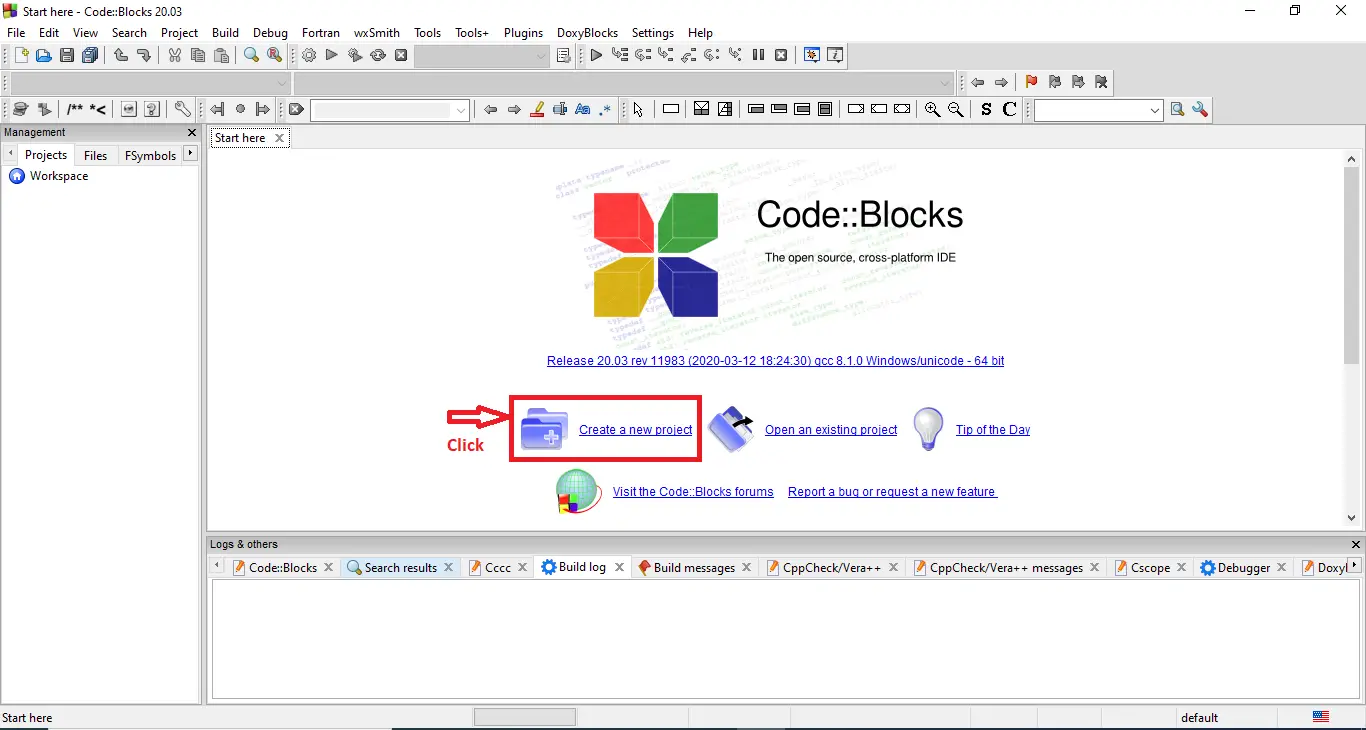
- Step 1: Create a new project.
First open the code blocks IDE and click “create a new project“.

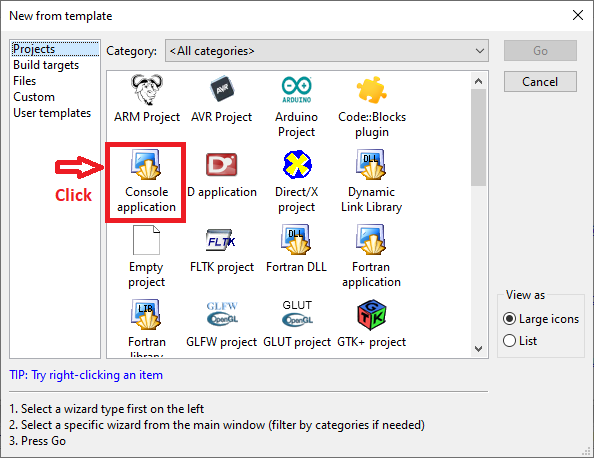
- Step 2: Choose console application.
Next, click the “console application” and after that click “next“.

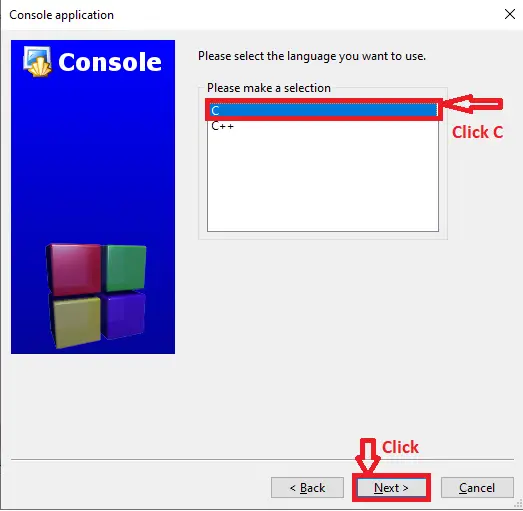
- Step 3: Choose C language.
Then , choose “C language” and click “next“.

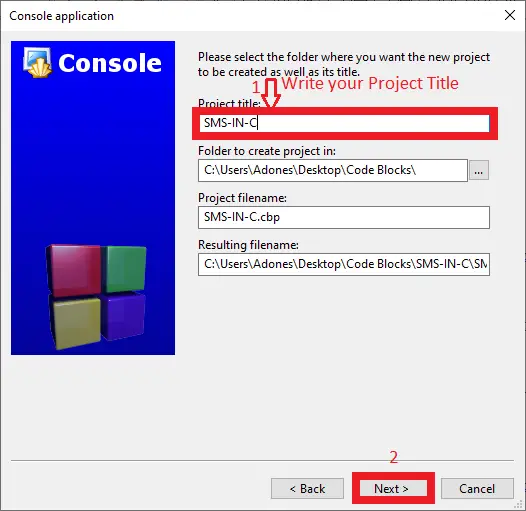
- Step 4: Name your project.
Lastly, name the project you’ve created and click “next” after that click “finish“.

- Step 5: The actual code.
Finally, we will now start adding functionality to our C Framework by adding some functional codes.
Downloadable Source Code
Summary
In summary, this Student Management System in C with Source Code can be useful to students or professional who wants to learn C Programming Language.
This project can also be modified to fit your personal requirements. Hope this project will help you to improve your skills. Happy Coding!
Related Articles
- Student Management System In PHP With Source Code
- Student Management System Project in Python with Source Code
- Django Student Management System With Source Code
- Student Management System Project In C++ with Source Code
- Student Management System Project In CodeIgniter Source Code
- Student Database Management System Project in C
- Student Management System Project Report
- Student Management System Project in ASP.net with Source Code
Inquiries
If you have any questions or suggestions about Student Management System in C with Source Code, please feel free to leave a comment below.
Frequently Asked Questions
How does this C / C++ student management system work?
Console menu: records student demographics, enrollment, grades, attendance, fees. Struct array OR file storage.
What compiler do I need to run this C or C++ project?
For C: gcc (GNU Compiler Collection) or MinGW (Windows). For C++: g++. IDE options: Code::Blocks (lightweight, built-in compiler), Dev-C++ (classic Philippine BSIT favorite), Visual Studio Code with C/C++ extension, CLion (paid). To compile from terminal: gcc program.c -o program (for C) or g++ program.cpp -o program (for C++), then run with ./program (Linux/macOS) or program.exe (Windows).
How do I run this C / C++ project?
Open the .c or .cpp file in your IDE (Code::Blocks, Dev-C++, VS Code). Click Build (or press F9), then Run (or press F5). From terminal: navigate to project folder, run gcc/g++ command above, then ./program. If using file storage, make sure the data file (e.g. records.txt) is in the same folder as the executable.
Can I use this C / C++ project for a BSIT capstone or thesis?
C/C++ projects are usually accepted for 1st-2nd year mini-projects or as building blocks. For a full capstone you would typically pair them with a more interactive frontend (e.g. wrap C++ logic with a Java/Python/PHP frontend, or extend to GTK/Qt for a real GUI). Standalone console C++ capstones are accepted by some panels but rare in 2026.
Why am I getting ‘undeclared identifier’ or ‘cannot find header’ errors?
Three common C/C++ issues: (1) Missing #include directive, e.g. #include
Where can I find more C or C++ projects with source code?
Browse the C and C++ Projects hub for the full library. For Java desktop alternatives see Java Projects. For higher-level languages see Python Projects. For BSIT capstone idea lists see 150 Best Capstone Project Ideas.

Adones Evangelista
Programmer & Technical Writer at PIES IT Solution
Adones Evangelista is a programmer and writer at PIES IT Solution, author of over 900 tutorials and error-fix guides at itsourcecode.com. Specializes in JavaScript, Django, Laravel, and Python error debugging covering ValueError, TypeError, AttributeError, ModuleNotFoundError, and RuntimeError, plus C/C++ and PHP capstone projects for BSIT students.
Expertise: JavaScript · Python · Django · Laravel · Error Debugging · C/C++ · View all posts by Adones Evangelista →