
This Mobile Shop Management System in C Language is a consoled based application created using c programming language.
This system is a simple mini project and compiled in Code::Blocks IDE using GCC compiler. The Mobile Store Management System was created specifically for the purpose of entering records for mobile phones in mobile showrooms.
The user can conveniently save mobile records according to their brands (Huawei, Vivo, Oppo, Xaomi, Alcatel, etc.) in this system.
At any time, the user can add, update, view, or delete a mobile’s record. Records are organized in a logical manner, with their availability status, quantity, and prices indicated.
A Mobile Shop Management System using C language is an easy project for beginners to learn how to build a web-based C language project.
We will provide you with the complete source code for the C project so that you can easily install it on your machine and learn how to program in C language.,
This Mobile Shop Management System in C Framework, Also includes a Download Source Code for free, just find the downloadable source code below and click download now.
Anyway if you want level up your knowledge in programming especially C/C++ Programming Language, try this new article I’ve made for you Best C Projects with Source Code for Beginners Free Download 2022.
To start creating a Mobile Shop Management System in C Language , make sure that you have a Code Blocks or any platform of C installed in your computer.
| ABOUT PROJECT | PROJECT DETAILS |
|---|---|
| Project Name : | Mobile Shop Management System |
| Project Platform : | C/C++ |
| Programming Language Used: | C Programming Language |
| Developer Name : | itsourcecode.com |
| IDE Tool (Recommended): | Dev-C++/Codeblocks |
| Project Type : | Desktop Application |
| Database: | Stores data in .DAT file |
Features of Mobile Shop Management System in C Language w/ Source Code
- Add Mobile – For the add mobile, the user can add new mobile information.
- Edit Mobile – For the edit orders, the user can edit their mobile information.
- Display Mobile – For the display mobile, the user can view their mobile added.
- Search Mobile – For the search mobile, the user can search the mobile name.
- Delete Mobile – For the delete mobile, the user can delete mobile information.
- Exit – For the exit, the user can also exit in the system.
Mobile Shop Management System in C Language Steps on How to Create a Project
Time needed: 5 minutes
Here’s the step’s on how to create a Mobile Shop Management System Project in C with Source Code.
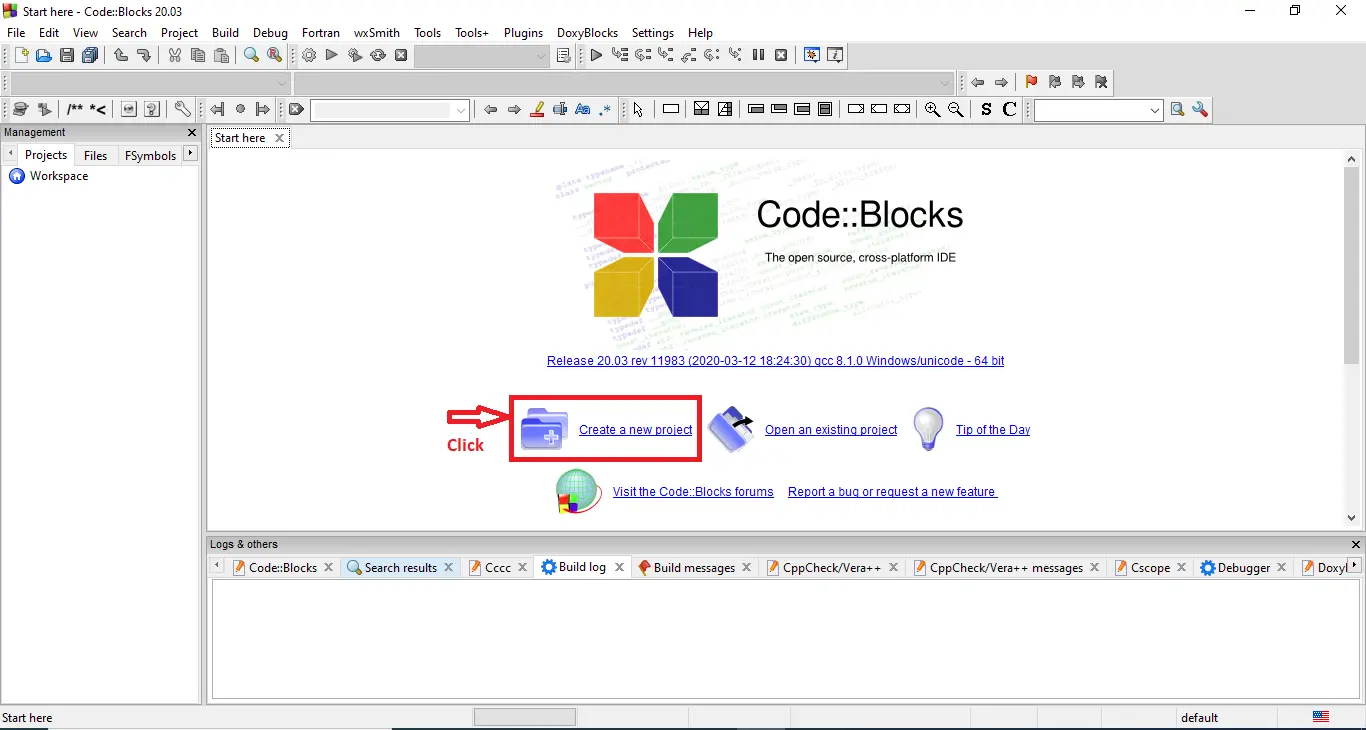
- Step 1: Create a new project.
First open the code blocks IDE and click “create a new project“.

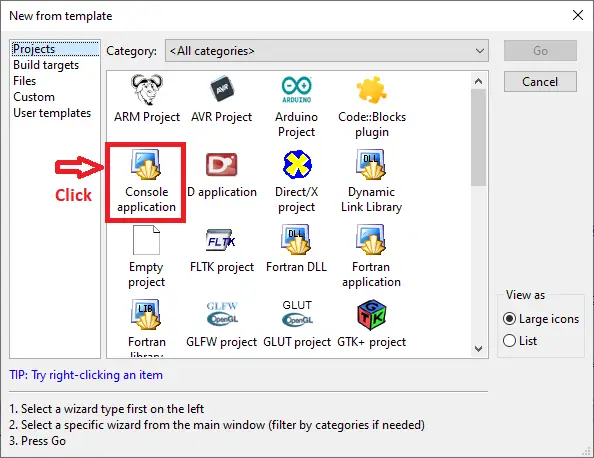
- Step 2: Choose console application.
Next, click the “console application” and after that click “next“.

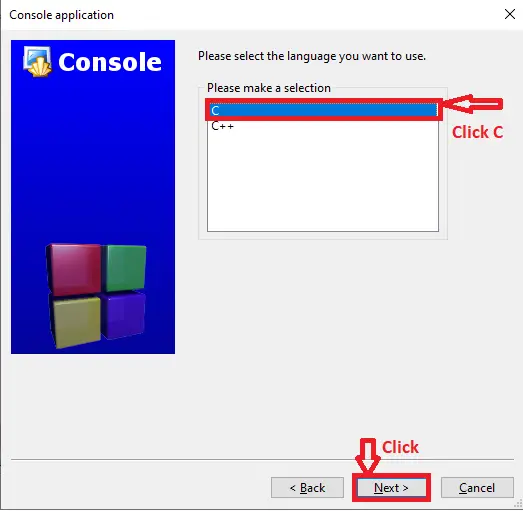
- Step 3: Choose C language.
Then , choose “C language” and click “next“.

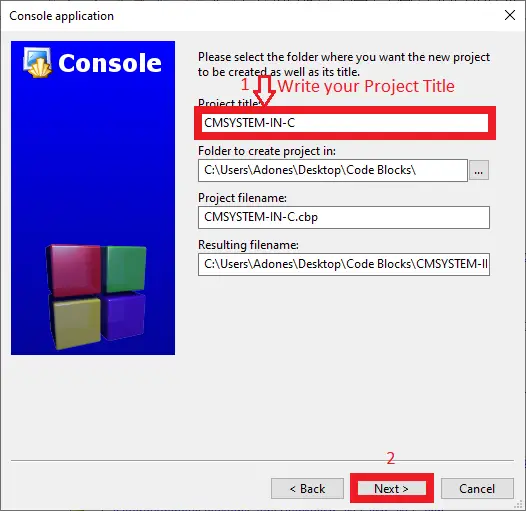
- Step 4: Name your project.
Lastly, name the project you’ve created and click “next” after that click “finish“.

- Step 5: The actual code.
Finally, we will now start adding functionality to our C Framework by adding some functional codes.
Downloadable Source Code
Summary
In summary, this 2021 Mobile Shop Management System Project in C Language w/ Source Code can be useful to students or professional who wants to learn C Programming Language.
This project can also be modified to fit your personal requirements. Hope this project will help you to improve your skills. Happy Coding!
Related Articles
- Shop Management System In Python With Source Code
- Phone Book Management System In C With Source Code
- Repair Shop Management System Project in Django
- Hostel Management System in C with Source Code
- List of VB.Net Projects with Source Code Free Download
Inquiries
If you have any questions or suggestions about Mobile Shop Management System Project in C Language w/ Source Code, please feel free to leave a comment below.
Frequently Asked Questions
How does this C / C++ shop or ecommerce system work?
Console catalog browsing, cart management (struct array), checkout with billing. Foundation for retail-domain BSIT mini-project.
What compiler do I need to run this C or C++ project?
For C: gcc (GNU Compiler Collection) or MinGW (Windows). For C++: g++. IDE options: Code::Blocks (lightweight, built-in compiler), Dev-C++ (classic Philippine BSIT favorite), Visual Studio Code with C/C++ extension, CLion (paid). To compile from terminal: gcc program.c -o program (for C) or g++ program.cpp -o program (for C++), then run with ./program (Linux/macOS) or program.exe (Windows).
How do I run this C / C++ project?
Open the .c or .cpp file in your IDE (Code::Blocks, Dev-C++, VS Code). Click Build (or press F9), then Run (or press F5). From terminal: navigate to project folder, run gcc/g++ command above, then ./program. If using file storage, make sure the data file (e.g. records.txt) is in the same folder as the executable.
Can I use this C / C++ project for a BSIT capstone or thesis?
C/C++ projects are usually accepted for 1st-2nd year mini-projects or as building blocks. For a full capstone you would typically pair them with a more interactive frontend (e.g. wrap C++ logic with a Java/Python/PHP frontend, or extend to GTK/Qt for a real GUI). Standalone console C++ capstones are accepted by some panels but rare in 2026.
Why am I getting ‘undeclared identifier’ or ‘cannot find header’ errors?
Three common C/C++ issues: (1) Missing #include directive, e.g. #include
Where can I find more C or C++ projects with source code?
Browse the C and C++ Projects hub for the full library. For Java desktop alternatives see Java Projects. For higher-level languages see Python Projects. For BSIT capstone idea lists see 150 Best Capstone Project Ideas.

Adones Evangelista
Programmer & Technical Writer at PIES IT Solution
Adones Evangelista is a programmer and writer at PIES IT Solution, author of over 900 tutorials and error-fix guides at itsourcecode.com. Specializes in JavaScript, Django, Laravel, and Python error debugging covering ValueError, TypeError, AttributeError, ModuleNotFoundError, and RuntimeError, plus C/C++ and PHP capstone projects for BSIT students.
Expertise: JavaScript · Python · Django · Laravel · Error Debugging · C/C++ · View all posts by Adones Evangelista →