

The Bus Reservation System In C Language With Source Code is developed using C programming language.
In this bus reservation system in c helps the user to reserve bus tickets.
A source code of bus reservation system in c language user can display the bus schedule, book tickets, cancel reservations, and check the bus status board using this system.
When purchasing tickets, the simple bus reservation system in c programming with source code user must first enter the bus number.
After which the system will show the total number of bus seats along with the passengers’ names, and the user must then enter the number of tickets, seat number, and person’s name.
This bus reservation system in the c program also has a login system, which makes it more stable.
There is no risk of data abuse or loss, and it takes very little time.
This bus reservation system mini project in c design is straightforward and clean, making it easy for users to learn, use, and navigate.
This Console Application also includes a downloadable bus reservation system code in c for free, just find the downloadable source code below and click to start downloading.
These are the following features of the system
- Login System
- Book Tickets
- Cancel Booking
- View Bus Status
Anyway, if you want to level up your knowledge in programming, especially C/C++ Programming Language, try this new article I’ve made for you Best C Projects with Source Code for Beginners Free Download.
To run this bus ticket reservation system in c make sure that you have a Code Blocks or any platform of C installed in your computer.
| ABOUT PROJECT | PROJECT DETAILS |
|---|---|
| Project Name : | bus reservation system |
| Project Platform : | C/C++ |
| Programming Language Used: | C Programming Language |
| Developer Name : | itsourcecode.com |
| IDE Tool (Recommended): | Dev-C++/Codeblocks |
| Project Type : | Desktop Application |
| Database: | Stores data in .DAT file |
| Upload Date and Time: | April 20, 2021-6:19 am |
Bus Reservation System In C Language With Source Code Steps On How To Run The Project
Time needed: 5 minutes
These are the steps on how to run Bus Reservation System In C Language With Source Code
- Step 1: Download
First, download the source code given below.

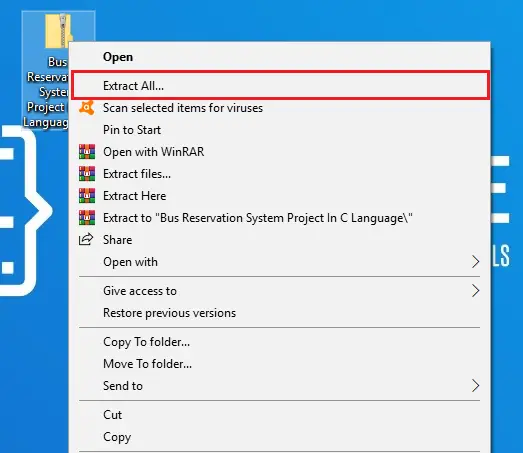
- Step 2: Extract file.
Second, after you finished download the source code, extract the zip file.

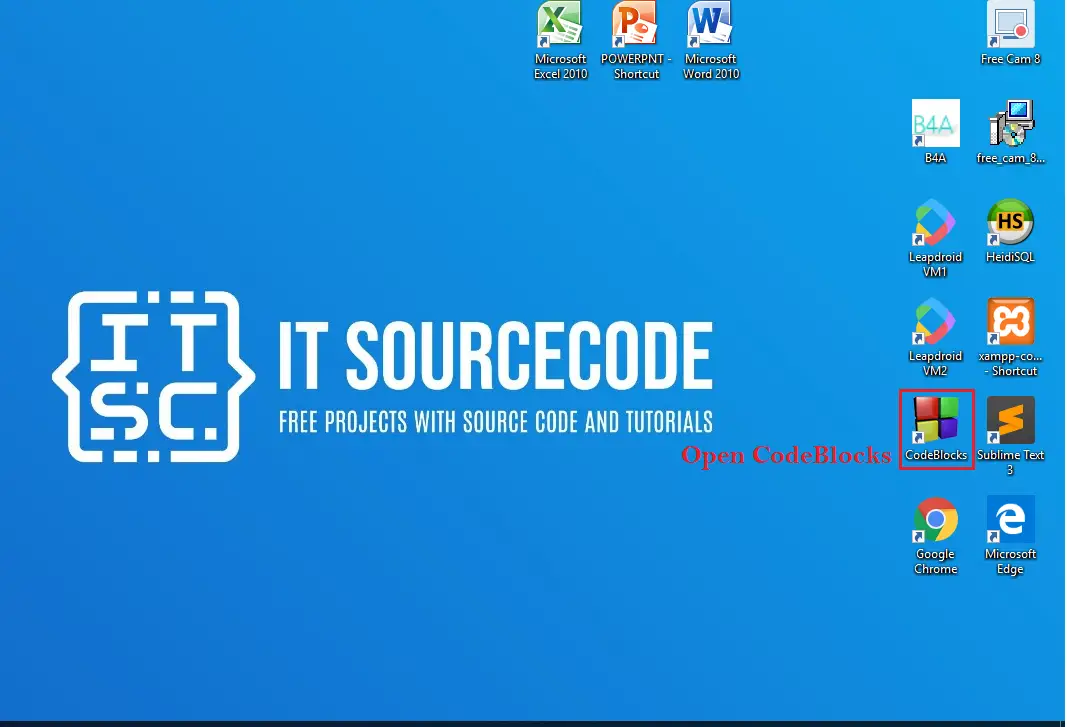
- Step 3: Open CodeBlocks
Third, open “CodeBlocks IDE”.

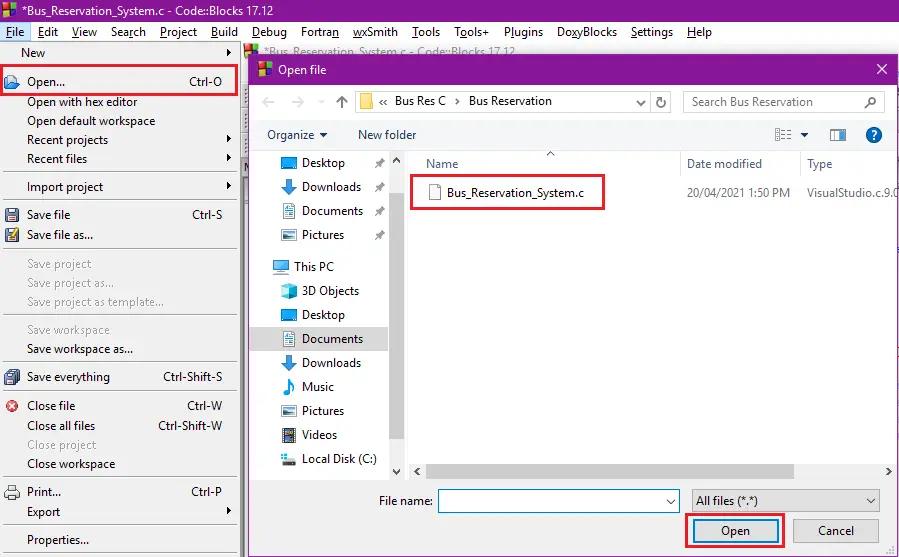
- Step 4: Open Project.
Fourth, open file tab and Open File after that open folder Bus Reservation then click the “Bus_Reservation_System.c“.

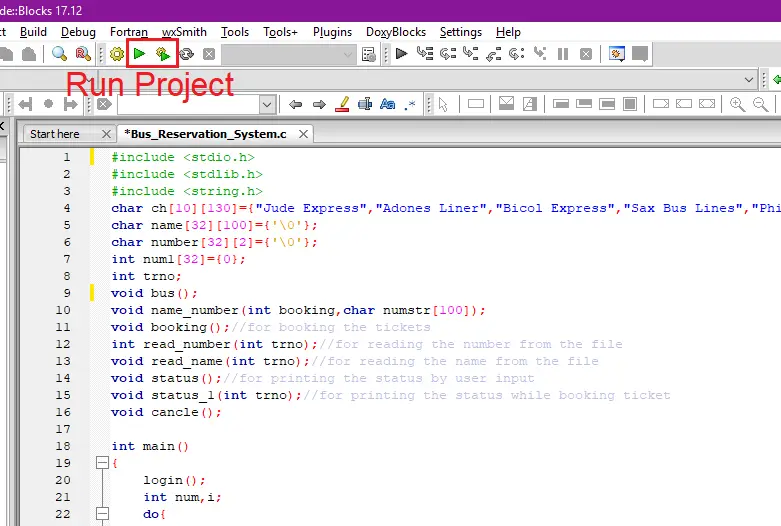
- Step 5: Run Project
Fifth, run the project.

- Step 6: The actual code.
You are free to copy the given source code below or download the downloadable source code given.

Downloadable Source Code
- USERNAME
- user
- PASSWORD
- user
Conclusion
This bus reservation system project in c is only a project made for school requirement purposes only. You can download this source code and modify it to suit your client requirements, since this is a student project it means you cannot really expect 100% functionality from this.
Related Articles
- Bus Reservation System Project In Java With Source Code
- Bus Reservation System Project in Django with Source Code
- Ticket Booking System In Python With Source Code
- Online Bus Reservation System using MySql in PHP
- Bus Reservation System in C++ with Source Code
Inquiries
If you have any questions or suggestions about source code for bus reservation system in c-language, please feel free to leave a comment below.
Frequently Asked Questions
How does this C or C++ project work?
Console application written in C (compiled with gcc) or C++ (compiled with g++). Uses standard library (stdio.h, conio.h, string.h, time.h) or C++ STL (iostream, vector, string, map). File-handling via fopen/fwrite or fstream for persistence. Foundation BSIT 1st-2nd year mini-project.
What compiler do I need to run this C or C++ project?
For C: gcc (GNU Compiler Collection) or MinGW (Windows). For C++: g++. IDE options: Code::Blocks (lightweight, built-in compiler), Dev-C++ (classic Philippine BSIT favorite), Visual Studio Code with C/C++ extension, CLion (paid). To compile from terminal: gcc program.c -o program (for C) or g++ program.cpp -o program (for C++), then run with ./program (Linux/macOS) or program.exe (Windows).
How do I run this C / C++ project?
Open the .c or .cpp file in your IDE (Code::Blocks, Dev-C++, VS Code). Click Build (or press F9), then Run (or press F5). From terminal: navigate to project folder, run gcc/g++ command above, then ./program. If using file storage, make sure the data file (e.g. records.txt) is in the same folder as the executable.
Can I use this C / C++ project for a BSIT capstone or thesis?
C/C++ projects are usually accepted for 1st-2nd year mini-projects or as building blocks. For a full capstone you would typically pair them with a more interactive frontend (e.g. wrap C++ logic with a Java/Python/PHP frontend, or extend to GTK/Qt for a real GUI). Standalone console C++ capstones are accepted by some panels but rare in 2026.
Why am I getting ‘undeclared identifier’ or ‘cannot find header’ errors?
Three common C/C++ issues: (1) Missing #include directive, e.g. #include
Where can I find more C or C++ projects with source code?
Browse the C and C++ Projects hub for the full library. For Java desktop alternatives see Java Projects. For higher-level languages see Python Projects. For BSIT capstone idea lists see 150 Best Capstone Project Ideas.

Adrian Mercurio
Full-Stack Developer at PIES IT Solution
Specializes in building complete capstone projects with full documentation. Strong background in PHP/MySQL development and database design. Has personally built and tested over 30 capstone-ready projects with ER diagrams, DFDs, and chapter-by-chapter thesis documentation.
Expertise: PHP · Laravel · Database Design · Capstone Projects · C# · C · C++ · Python · AI Projects · View all posts by Adrian Mercurio →
This is really nice post.
CW Ticketing System provides Bus Reservation System Project In PHP Language that is really easy to use. We already provide our service in many countries like the USA, UK, Nigeria, Somalinad and many more.