
The attributeerror: ‘tfidfvectorizer’ object has no attribute ‘get_feature_names’ is an error message while working with tfidfvectorizer in Python.
This error indicates that there is an issue with the get_feature_names() method for a tfidfvectorizer object.
If you’ve come across this error and don’t know how to fix it, fortunately, in this article, we’ll explore the causes of the error and provide solutions.
There is an easy way and effective solution to help you troubleshoot this “‘tfidfvectorizer’ object has no attribute ‘get_feature_names_out’” error message.
What is the tfidfvectorizer object?
The “tfidfvectorizer” object is a component of the scikit-learn library that is used for text feature extraction.
In addition to that, tfidfvectorizer is a method used to convert a collection of raw documents into a matrix of TF-IDF features.
TF-IDF stands for “Term Frequency-Inverse Document Frequency,” a statistical measure that reflects the importance of a word in a document or corpus.
Furthermore, tfidfvectorizer can be used for a variety of tasks, such as:
- text classification
- clustering
- and information retrieval
It is a powerful tool for converting raw text data into a format that can be easily used by machine learning algorithms.
What is ‘tfidfvectorizer’ object has no attribute ‘get_feature_names’ error message?
The “attributeerror: ‘tfidfvectorizer’ object has no attribute ‘get_feature_names’” error message indicates that you’re trying to access an attribute that doesn’t exist in the “tfidfvectorizer” object.
In simple words, the “get_feature_names” method is not available in the “tfidfvectorizer” object.
Why does this error occur?
This error could occur for a variety of reasons:
- This could happen if the “tfidfvectorizer” object is not properly initialized.
- If there is a typo in the code that is calling the get_feature_names() method.
- The version of scikit-learn library being used does not support the get_feature_names() method.
Note: This method was introduced in version 0.19 of scikit-learn, so if an older version is being used, it may not be available.
To resolve this error, you should double-check your code to ensure that the “tfidfvectorizer” object is properly initialized and that you are calling the get_feature_names() method correctly.
How to fix “‘tfidfvectorizer’ object has no attribute ‘get_feature_names’”
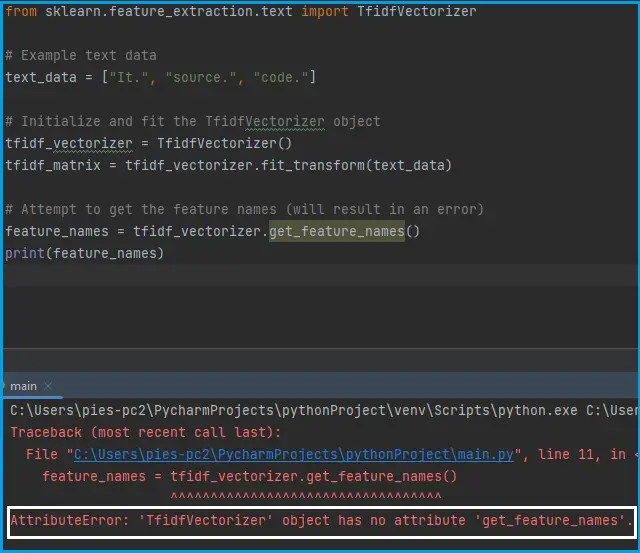
The following are the solutions you can use to fix the “attributeerror: ‘tfidfvectorizer’ object has no attribute ‘get_feature_names’” error message.
Solution 1: Initialize and fit the “tfidfvectorizer” object correctly
Ensure that you have properly initialized the “tfidfvectorizer” object and fitted it to your data.
You can do this by checking that you have called the fit() method on your tfidfvectorizer object before trying to call get_feature_names().
You’ll see two different ways below to initialize and fit the “tfidfvectorizer” object correctly.
from sklearn.feature_extraction.text import TfidfVectorizer

# Example text data
text_data = ["Welcome.", "To.", "Itsourcecode."]

# Initialize and fit the TfidfVectorizer object
tfidf_vectorizer = TfidfVectorizer()
tfidf_matrix = tfidf_vectorizer.fit_transform(text_data)

# Get the feature names
feature_names = tfidf_vectorizer.get_feature_names()
print(feature_names)
Note: If you are using scikit-learn or sklearn version 0.24 you should use the following method get_feature_names().
Output:
['itsourcecode' 'to' 'welcome']Another example:
from sklearn.feature_extraction.text import TfidfVectorizer

# Example text data
text_data = ["Welcome.", "To.", "Itsourcecode."]

# Initialize and fit the TfidfVectorizer object
tfidf_vectorizer = TfidfVectorizer()
tfidf_matrix = tfidf_vectorizer.fit_transform(text_data)

# Get the feature names
feature_names = tfidf_vectorizer.get_feature_names_out()
print(feature_names)
Note: If you are using scikit-learn or sklearn version 1.0 you should use the following method get_feature_names_out().
Output:
['itsourcecode' 'to' 'welcome']Solution 2: Use vocabulary_ attribute
You can use an alternative method to extract feature names.
For example:
from sklearn.feature_extraction.text import TfidfVectorizer

# Example text data
text_data = ["Welcome.", "To.", "Itsourcecode."]

# Initialize and fit the TfidfVectorizer object
tfidf_vectorizer = TfidfVectorizer()
tfidf_matrix = tfidf_vectorizer.fit_transform(text_data)

# Get the feature names using the vocabulary_ attribute
vocabulary = tfidf_vectorizer.vocabulary_
feature_names = list(vocabulary.keys())
print(feature_names)
The vocabulary_ attribute of the tfidfvectorizer object contains a dictionary that maps each feature to its index in the feature matrix.
In the example code, we access the vocabulary_ attribute and convert it to a list of keys using the keys() method.
This list of keys contains the feature names.
Output:
['welcome', 'to', 'itsourcecode']Solution 3: Check sklearn version
Check the version of the scikit-learn library you are using. The get_feature_names() method was introduced in scikit-learn version 0.19.
If you are using an older version, you may need to update scikit-learn to access this method.
To check the scikit-learn or sklearn version, open your terminal or command prompt and enter the following command:
pip show scikit-learnSolution 4: Check for any typos
Check for any typos or errors in your code. Ensure that you have spelled the method name correctly and that you are calling it on the correct object.
Frequently Asked Questions (FAQs)
How can I update the scikit-learn library?
You can update the scikit-learn library using pip, the package installer for Python. Open a terminal or command prompt and enter the following command:
pip install -U scikit-learnHow can I fix the ‘get_feature_names’ error?
You can easily fix the error by initialize and fit the “tfidfvectorizer” object correctly, upgrading scikit-learn, using vocabulary_ attribute, or checking if you are using the correct object.
Related Articles for Python Errors
- Attributeerror can only use str accessor with string values
- Attributeerror: can only use .dt accessor with datetimelike values
- Attributeerror: ‘list’ object has no attribute ‘strip’
Conclusion
By executing the different solutions that this article has given, you can easily fix the “attribute:’tfidfvectorizer’ object has no attribute ‘get_feature_names’” error message when working in Python.
We are hoping that this article provides you with a sufficient solution; if yes, we would love to hear some thoughts from you.
Thank you very much for reading to the end of this article. Just in case you have more questions or inquiries, feel free to comment, and you can also visit our website for additional information.
Official documentation
Frequently Asked Questions
What is Python AttributeError and what causes it?
AttributeError is raised when you access an attribute or method that doesn’t exist on the object. Most common cause: calling a method on None (NoneType has no attribute X). Other causes: typo in method name, wrong object type (str when you expected list), or using a feature removed in a newer library version. The error names exactly which type and which missing attribute.
How do I fix ‘NoneType object has no attribute’?
The variable you’re accessing is None, but you expected an object. Trace back to where it was assigned: a function returning None instead of an object (forgot to return), a database query returning no rows (Model.objects.first() returns None when empty), or an API call that failed silently. Safe pattern: if obj is not None: obj.method() OR use the walrus operator: if (obj := get_obj()): obj.method().
How do I check if an attribute exists before accessing it?
Use hasattr(obj, ‘attr_name’) for runtime check, or getattr(obj, ‘attr_name’, default) to get-with-default. For frequent attribute checks, consider type hints + mypy/pyright which catch most AttributeErrors at static-analysis time before runtime.
How do I prevent AttributeError from None values?
Three patterns: (1) Always validate function returns (if result is None: raise). (2) Use type hints with Optional[X] to make None-ability explicit. (3) Use the walrus operator + early return: if (val := get_val()) is None: return default; use val. Defensive coding around None-able returns prevents 90% of AttributeError in production.
Where can I find more AttributeError fixes?
Browse the AttributeError reference hub for 170+ specific fixes (NoneType, pandas, NumPy, sklearn, Selenium). For related errors see TypeError. For Python debugging fundamentals see Python Tutorial hub.

Caren Bautista
Technical Writer at PIES IT Solution
Responsible for crafting clear, well-structured, and beginner-friendly content across the platform. Handles the writing, proofreading, and editorial review of tutorials, guides, and documentation to ensure every article is accurate, readable, and easy to follow.
Expertise: Technical Writing · Content Creation · Documentation · Editorial Writing · JavaScript · TypeScript · Python · Python Errors · HTTP Errors · MS Excel · View all posts by Caren Bautista →