
A Hospital Management System Project In PHP is a part of health informatics that is mostly concerned with how hospitals run.
About The Project
The Hospital Management System PHP Project is developed using PHP, CSS, Bootstrap, and JavaScript, This Hospital Management System In PHP is able to register a patient for the hospital.
It can store their disease details in the database. Any of the staff members, doctor & admin is able to add, view, edit, update, or delete data.
A Hospital Management System Project In PHP Documentation It contains a doctor’s information and login access to the system. The admin has only access to the doctor’s profile and modifies it if needed.
Using this Hospital Management System Using PHP, the admin can auto-generate patient ID number and stores the details of every patient and staff automatically.
Project Information
| Project Name: | Hospital Management System Project In PHP and MySQL With Source Code |
| Language/s Used: | PHP |
| PHP version (Recommended): | 5.6.3, 7.4.12 |
| Database: | MySQL |
| Type: | Website, Web Application |
| Developer: | IT SOURCECODE |
| Updates: | 0 |
What Can The Project Do?
The Online Hospital Management System Project In PHP keeps the profile and related details in the database and the permissions to add, view, edit, or delete are given only to doctors and the admin of the system.
This Project Report On Hospital Management systems in PHP has a powerful search facility. Users can search all information about any doctor, staff, and the details of a patient using any keyword.
Purpose of Hospital Management System
The purpose of this Hospital Management System PHP Script is to computerize the front office management of the hospital and to develop software that is user-friendly, simple, fast, and cost-effective.
It deals with the collection of patient information, diagnosis details, etc.
To start executing the Hospital Management System, make sure that you have sublime or any platform of PHP and MySQL installed in your computer.
Steps On How To Run The Hospital Management System Project In PHP With Source Code
Time needed: 5 minutes
These are the steps on how to run a Hospital Management System PHP Project With Source Code
- Step 1: Download the source code.
First, download the source code given below.

- Step 2: Extract file.
Second, after you finish downloading the source code, extract the zip file.

- Step 3: Copy the project folder.
Third, copy the project folder and paste it into the xampp/htdocs folder.

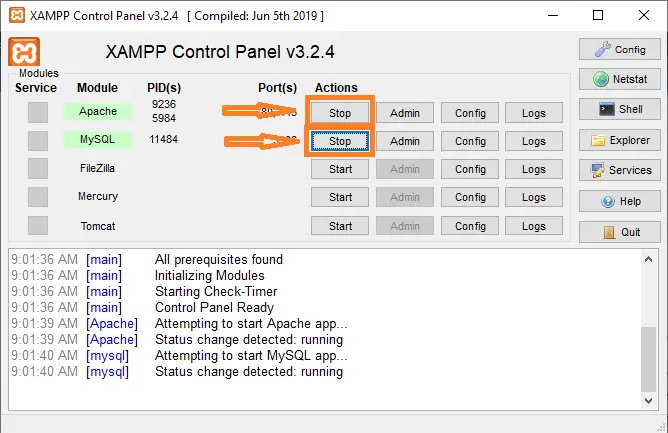
- Step 4: Open xampp.
Fourth, open xampp and start the apache and MySQL.

- Step 5: Open the browser.
Fifth, Open a browser and go to the URL “http://localhost/phpmyadmin/”

- Step 6: Create a database.
Sixth, click on the databases tab and Create a database named “hospitalmanagementsystem”.

- Step 7: Import “hospitalmanagementsystem.sql”.
Seventh, Click on browse file and select the “hospitalmanagementsystem.sql” file which is inside the “database” folder, and after import click “go“.

- Step 8: Open the browser and type the folder name.
Eight, Open a browser and go to the URL “http://localhost/Hospital/”.

- Step 9: Explore manipulating.
Final step, Login from the User’s login side. Just provide the Admin’s login details, and it will redirect you to the Admin panel.





Download the Source Code below
Anyway, if you want to level up your programming knowledge, especially PHP, try this new article I’ve made for you Best PHP Projects With Source Code Free Download.
Summary
This Website Project was developed using PHP, JavaScript, and CSS. Talking about the features of this system, it contains the admin section and the user section.
All the editing, updating, managing doctors, patients, appointments, and editing treatment facilities are from the admin section.
The main feature of this system is to provide the browser to get appointments with a doctor through the internet instead of going there and fixing an appointment.
The design of this system is pretty simple so that the user won’t have any difficulties while working on it.
Technology stack and requirements
To run this PHP project, you need these tools on your development machine:
- XAMPP or WAMP server. Bundles Apache, MySQL, and PHP so you can run PHP on Windows without individual installs. Free from apachefriends.org.
- PHP 8.0 or higher. Included with XAMPP. Older versions (5.x, 7.x) may work but modern PHP features improve security and performance.
- MySQL or MariaDB. Comes with XAMPP. phpMyAdmin manages the database through a browser UI.
- VS Code or PhpStorm. Free code editor with PHP syntax highlighting, IntelliSense, and debugging support.
- Web browser. Chrome, Firefox, or Edge for testing the running app.
Installing the source code
- Download the archive. Get the ZIP file from the download link on this page and extract it.
- Move to htdocs. Place the extracted folder inside C:\xampp\htdocs\ so Apache can serve it.
- Import the database. Open http://localhost/phpmyadmin, click Import, and select the .sql file included in the archive.
- Update database credentials. Open the config.php or connection.php file and set the correct database name, username, and password (default XAMPP: root / empty password).
- Run the project. Start Apache + MySQL in XAMPP, then visit http://localhost/your-project-folder/ in a browser.
Using this project for your BSIT capstone
This PHP project maps cleanly to standard BSIT capstone documentation. Suggested chapter alignment:
- Chapter 1 (Introduction). Discuss the problem the system solves in real-world context. Cite Philippine business or academic use cases where a manual process could be replaced.
- Chapter 2 (Review of Related Literature). Compare this system’s features against 5-10 similar published projects. Cite journals like IJERT or IEEE Access for academic-standard sources.
- Chapter 3 (Methodology). Include Use Case Diagram, Data Flow Diagram, Entity Relationship Diagram, and Activity Diagram covering all major workflows.
- Chapter 4 (Results and Discussion). Screenshot each module of the running system with a caption explaining what data it processes and which user role interacts with it.
- Chapter 5 (Conclusion and Recommendations). Identify features that could be added in a Version 2, such as mobile app, REST API export, or AI-powered analytics.
Modules typical of Hospital Management System Project
- Patient registration. Personal info, contact person, medical history, allergies, and insurance details.
- Appointment scheduling. Book slots by doctor and date, with SMS or email reminder to the patient.
- Consultation notes. Doctor input for chief complaint, diagnosis, prescription, and follow-up plan.
- Pharmacy / medicine dispensing. Link prescriptions to inventory and deduct dispensed quantity.
- Billing and payments. Compute charges, apply insurance discounts, and print official receipts.
- Reports. Daily patient census, revenue per doctor, and patient history logs.
Common enhancements for capstone review
- Electronic health records (EHR). Add complete patient history across visits accessible to any authorized doctor.
- Telemedicine integration. Embed a video-call widget for remote consultations.
- Lab results integration. Import CBC and chemistry lab results with reference-range highlighting.
- Data privacy compliance. Add audit trail and role-based access to meet Data Privacy Act (RA 10173) requirements.
Official documentation
Our first complete capstone bundle is live: PHP + MySQL e-commerce with full Chapter 1-5 documentation, 6 UML diagrams, ERD, installation guide, user manual, and defense presentation template. More bundles (Library, POS, Hospital) coming soon. Save 3 to 4 weeks of capstone work.
Sold via Gumroad. See our affiliate disclosure.
Frequently Asked Questions
How does this PHP hospital management system work?
Standard modules: patient registration, doctor schedule, appointment booking, billing, lab results, pharmacy, ward assignment. Session-based role separation (admin/doctor/nurse/receptionist). Vanilla PHP + MySQL + Bootstrap. Foundation BSIT capstone.
What PHP and MySQL versions does this project require?
Most projects in this batch run on PHP 7.4 to PHP 8.2 with MySQL 5.7+ or MariaDB 10+. A few older projects need PHP 5.6 (deprecated, use XAMPP 7.x). To run: install XAMPP / WAMP / Laragon, extract project to htdocs, import the included .sql file via phpMyAdmin, edit the connection file (usually config.php or db_connect.php) with your DB credentials, browse to the project URL in your browser.
How do I set up the database for this PHP project?
Open phpMyAdmin (http://localhost/phpmyadmin/ on XAMPP), create a new empty database with the name specified in the project’s config.php. Click the Import tab, choose the included .sql file, click Go. Then edit config.php (or includes/connection.php) with: ‘localhost’, your MySQL username (usually ‘root’), your MySQL password (usually blank for XAMPP), and the database name.
Can I use this PHP project for a BSIT capstone or thesis?
Yes, but extend it. A bare CRUD app is too narrow for full capstone scope. Add: user roles via session checks, reports/dashboards (Chart.js + AJAX), PDF exports (TCPDF library), email notifications (PHPMailer), real domain extension (analytics, audit log, multi-branch support). Pair with Chapter 1-5 documentation matching your panel’s rubric.
Why am I getting ‘connection error’ or ‘undefined function mysqli_connect’?
Three common PHP issues: (1) Connection error: Apache + MySQL services not running in XAMPP control panel, OR database name in config.php does not match what you created in phpMyAdmin. (2) ‘undefined function mysqli_connect’: MySQL extension not enabled, in php.ini uncomment extension=mysqli (then restart Apache). (3) ‘No such file or directory’: MySQL socket path wrong, use 127.0.0.1 instead of localhost in the connection string.
Where can I find more PHP projects with source code?
Browse the PHP Projects hub for the full library (300+ vanilla PHP systems). For modern PHP MVC alternatives see Laravel Projects (74 systems) or CodeIgniter Projects (32 systems). For BSIT-focused capstone idea lists see 150 Best Capstone Project Ideas.
Related PHP Projects
- Placement Management System Project In PHP With Source Code
- Apartment Management System Project In PHP With Source Code
- Laundry Management System Project In PHP With Source Code
- Construction Management System Project In PHP With Source Code
- Learning Management System Project In PHP With Source Code
- Barangay Management System Project In PHP With Source Code
Inquiries
If you have any questions or suggestions about the Hospital Management System Project In PHP With Source Code, please feel free to leave a comment below.

Angel Jude Suarez
Full-Stack Developer at PIES IT Solution
Focuses on Python development, machine learning, and AI integration. Has built production AI systems including OpenAI Whisper integration for medical transcription and GPT-4o-powered diagnosis assistance. Strong background in pandas, scikit-learn, and TensorFlow.
Expertise: Python · PHP · Java · VB.NET · ASP.NET · Machine Learning · AI Integration · OpenCV · Django · CodeIgniter · View all posts by Angel Jude Suarez →
Any docu
not working.http error 500
already installed the app. what is the amin account id and password?
What is the admin panel username and password? Thank you
username: admin
password: adminadmin
Hello, I just discovered that the page loads a blank page due to lack of login code.
Could you pleas send the login source code or update the zip file.
Thanks
Seventh, Click on browse file and select “hospitalmanagementsystem.sql” file which is inside “database” folder and after import click “go“. WHERE IS DATASBASE FOLDER?
have u got the database folder because me too getting the same error
Its showing only blank page after I tried to insert the sql also not showing any errors also only blank page wht kind error is this
hi ….. could you please help me the doctor appointment app code for android studio base
Hello, I just discovered that the page loads a blank page due to lack of login code.
Could you pleas send the login source code or update the zip file.
Thanks
not working.http error 500 . the zip file doesnt have folder named database.SQL file is inside backup
it shows not found on the server
Hello, do you guys have a project related to medreps and doctors please
If yes, kindly let me know
yes maam!
Where is source code ? i cant find it
just find the DOWNLOAD button below
Mine too
Please, I need your customization support
why is it showing error and object not found after trying every step?
Error, error, error. Sql file hiding in the backup folder But it’s not working after thoroughly going through the steps. Please, can anyone help? Thanks
Can you show the error?
where can i find hospitalmanagementsystem.sql.zip file?
Its inside in the folder
Hello, I just discovered that the page loads a blank page due to lack of login code.
Could you pleas send the login source code or update the zip file.
Thanks
i have done all steps but i got blank page please solve my issue
Why there is a blank page. you may watch the video on youtube.
https://youtu.be/aFOUl-ZHj6M
i got blank page after all steps please give me a reason
Why there is a blank page. you may watch the video on youtube.
https://youtu.be/aFOUl-ZHj6M
index.html is blank
Can you show me the error?