
Hello Everyone, this source code is all about Student Record System using MySQL in PHP.
This system stores Information or data recorded in any medium including, but not limited to, handwriting, print, tapes, film, microfilm, microfiche, and any electronic storage or retrieval media.
“Student records” are those records directly related to a student and maintained.
Features of the System:
- Adding of Students
- Adding Courses
- Adding of Subjects
- Registration of Students
- Management of Students
- Login system
- Database Security’
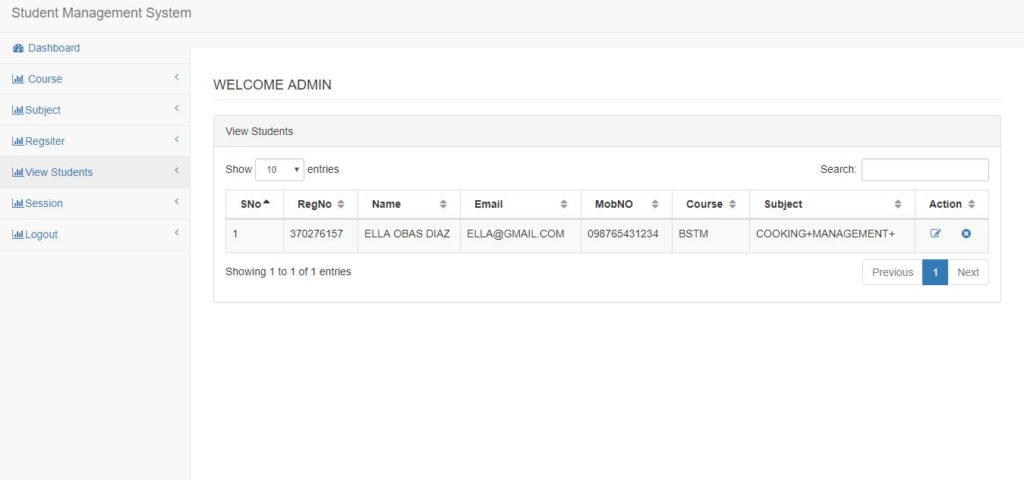
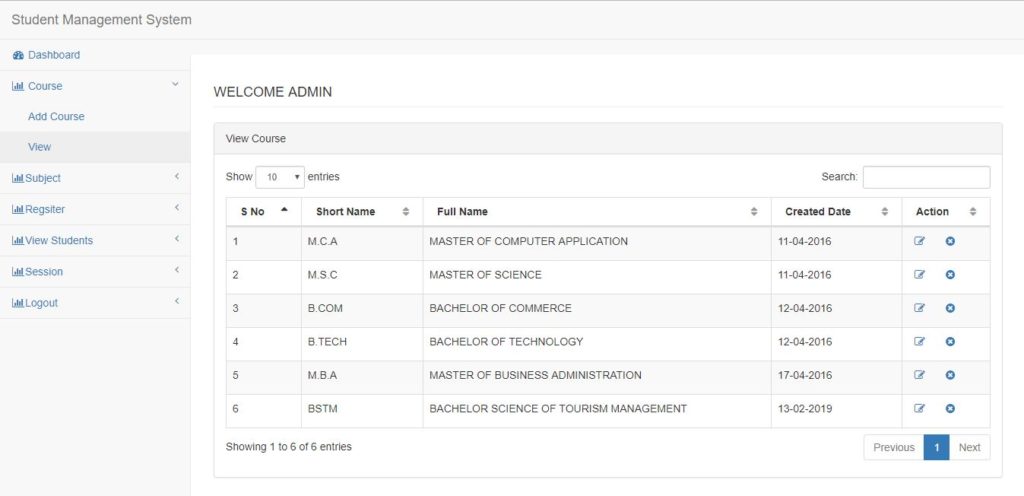
Download Source Code Here:
If you have any comments or suggestions about the Student Record System using MySql in PHP Please message us directly:
Technology stack and requirements
To run this PHP project, you need these tools on your development machine:
- XAMPP or WAMP server. Bundles Apache, MySQL, and PHP so you can run PHP on Windows without individual installs. Free from apachefriends.org.
- PHP 8.0 or higher. Included with XAMPP. Older versions (5.x, 7.x) may work but modern PHP features improve security and performance.
- MySQL or MariaDB. Comes with XAMPP. phpMyAdmin manages the database through a browser UI.
- VS Code or PhpStorm. Free code editor with PHP syntax highlighting, IntelliSense, and debugging support.
- Web browser. Chrome, Firefox, or Edge for testing the running app.
Installing the source code
- Download the archive. Get the ZIP file from the download link on this page and extract it.
- Move to htdocs. Place the extracted folder inside C:\xampp\htdocs\ so Apache can serve it.
- Import the database. Open http://localhost/phpmyadmin, click Import, and select the .sql file included in the archive.
- Update database credentials. Open the config.php or connection.php file and set the correct database name, username, and password (default XAMPP: root / empty password).
- Run the project. Start Apache + MySQL in XAMPP, then visit http://localhost/your-project-folder/ in a browser.
Using this project for your BSIT capstone
This PHP project maps cleanly to standard BSIT capstone documentation. Suggested chapter alignment:
- Chapter 1 (Introduction). Discuss the problem the system solves in real-world context. Cite Philippine business or academic use cases where a manual process could be replaced.
- Chapter 2 (Review of Related Literature). Compare this system’s features against 5-10 similar published projects. Cite journals like IJERT or IEEE Access for academic-standard sources.
- Chapter 3 (Methodology). Include Use Case Diagram, Data Flow Diagram, Entity Relationship Diagram, and Activity Diagram covering all major workflows.
- Chapter 4 (Results and Discussion). Screenshot each module of the running system with a caption explaining what data it processes and which user role interacts with it.
- Chapter 5 (Conclusion and Recommendations). Identify features that could be added in a Version 2, such as mobile app, REST API export, or AI-powered analytics.
Modules typical of Student Record System using MySql
- Student information. Personal info, guardian details, enrollment status, program of study.
- Enrollment / registration. Term-by-term subject selection with prerequisite checking.
- Grading system. Teacher input for quiz, exam, and project scores with weighted average.
- Report card generation. Printable grade slip and transcript of records.
- Library / borrowing (optional). Track book borrowing, return date, fine computation.
- Announcements. Post school-wide bulletins visible from the login screen.
Common enhancements for capstone review
- Online portal. Add PHP or ReactJS portal so parents and students see grades from home.
- SMS grade notification. Auto-send new-grade alerts to parent’s mobile via a service like Semaphore.
- Digital ID card. Print student ID with photo, QR code, and academic year.
- Alumni tracking. Extend the database to include post-graduation contact info.
Project timeline for BSIT capstone
Typical BSIT capstone teams complete a PHP project of this scope in one full academic semester. Suggested timeline:
- Weeks 1-2. Requirements gathering, interview with target user, initial Chapter 1 documentation.
- Weeks 3-4. Design phase: use case, DFD, ER diagram, mockup screens.
- Weeks 5-8. Core development: database in MySQL, main pages in PHP, CRUD operations.
- Weeks 9-11. Reports, printing, user roles. Test with sample data.
- Weeks 12-13. Documentation: Chapter 3 methodology, Chapter 4 screenshots, Chapter 5 conclusion.
- Week 14. Mock defense with adviser, corrections, final panel.
Panel questions this project typically gets
- What existing systems are similar and how is yours different? Prepare a comparison table showing 3-5 alternatives and the specific gaps your project addresses.
- How do you validate data entry? Walk through validation on 2-3 key forms with regex, range, and required-field enforcement.
- How does the system handle concurrent access? Explain your MySQL transaction strategy and locking approach.
- What is your backup and disaster recovery plan? Document a backup schedule and demonstrate a restore.
- How would you deploy this in production? Explain shared-hosting setup or migration to a Laravel-based cloud deployment.
Deployment options after the defense
- Shared hosting. Upload to cPanel-based shared hosting (Hostinger, GoDaddy) for immediate live access with a custom domain.
- VPS or cloud. Move to DigitalOcean, Vultr, or AWS Lightsail for scalable performance.
- Local LAN install. Host XAMPP on one PC and let 3-5 clients access via the office network.
- Laravel migration. Rewrite with Laravel for cleaner architecture, better security, and modern development workflow.
Common defense pitfalls to avoid
- Empty database. Pre-populate 20-50 realistic sample records so demos are meaningful.
- Missing error handling. Wrap SQL queries in try/catch and show user-friendly errors instead of raw exception dumps.
- No printable output. Panel expects at least one printable report (TCPDF or FPDF).
- Untested login. Prepare demo Admin + User accounts and test both before the panel.
- SQL injection vulnerability. Use prepared statements everywhere; panels do check for this.
Where to get help while building
- itsourcecode.com free downloads. Browse other PHP projects for similar patterns.
- PHP official manual. The canonical reference for language syntax and standard functions.
- Stack Overflow PHP tag. Fastest place to get unstuck on a specific error.
- YouTube capstone walkthroughs. Search for demos of similar systems to see defense structure.
- Your adviser. Regular check-ins keep the project on track.
Official documentation
Frequently Asked Questions
How does this PHP student information or enrollment system work?
Records student demographics, enrollment per term, class assignments, grades, attendance, fees. Smaller-scope than full school management, student-centric. Foundation BSIT capstone.
What PHP and MySQL versions does this project require?
Most projects in this batch run on PHP 7.4 to PHP 8.2 with MySQL 5.7+ or MariaDB 10+. A few older projects need PHP 5.6 (deprecated, use XAMPP 7.x). To run: install XAMPP / WAMP / Laragon, extract project to htdocs, import the included .sql file via phpMyAdmin, edit the connection file (usually config.php or db_connect.php) with your DB credentials, browse to the project URL in your browser.
How do I set up the database for this PHP project?
Open phpMyAdmin (http://localhost/phpmyadmin/ on XAMPP), create a new empty database with the name specified in the project’s config.php. Click the Import tab, choose the included .sql file, click Go. Then edit config.php (or includes/connection.php) with: ‘localhost’, your MySQL username (usually ‘root’), your MySQL password (usually blank for XAMPP), and the database name.
Can I use this PHP project for a BSIT capstone or thesis?
Yes, but extend it. A bare CRUD app is too narrow for full capstone scope. Add: user roles via session checks, reports/dashboards (Chart.js + AJAX), PDF exports (TCPDF library), email notifications (PHPMailer), real domain extension (analytics, audit log, multi-branch support). Pair with Chapter 1-5 documentation matching your panel’s rubric.
Why am I getting ‘connection error’ or ‘undefined function mysqli_connect’?
Three common PHP issues: (1) Connection error: Apache + MySQL services not running in XAMPP control panel, OR database name in config.php does not match what you created in phpMyAdmin. (2) ‘undefined function mysqli_connect’: MySQL extension not enabled, in php.ini uncomment extension=mysqli (then restart Apache). (3) ‘No such file or directory’: MySQL socket path wrong, use 127.0.0.1 instead of localhost in the connection string.
Where can I find more PHP projects with source code?
Browse the PHP Projects hub for the full library (300+ vanilla PHP systems). For modern PHP MVC alternatives see Laravel Projects (74 systems) or CodeIgniter Projects (32 systems). For BSIT-focused capstone idea lists see 150 Best Capstone Project Ideas.
May you please provide the database and the log in credential for the system Sir
sir please provide for the log in
login id:-admin
password:- admin