
I run PIES IT Solutions, and over the last 8 years I have tested every major web server for WordPress in production. In 2026 the three real choices are NGINX, Apache, and LiteSpeed. Each has a specific case where it wins. This post is my honest take from running client sites on all three and measuring actual results, not vendor marketing.
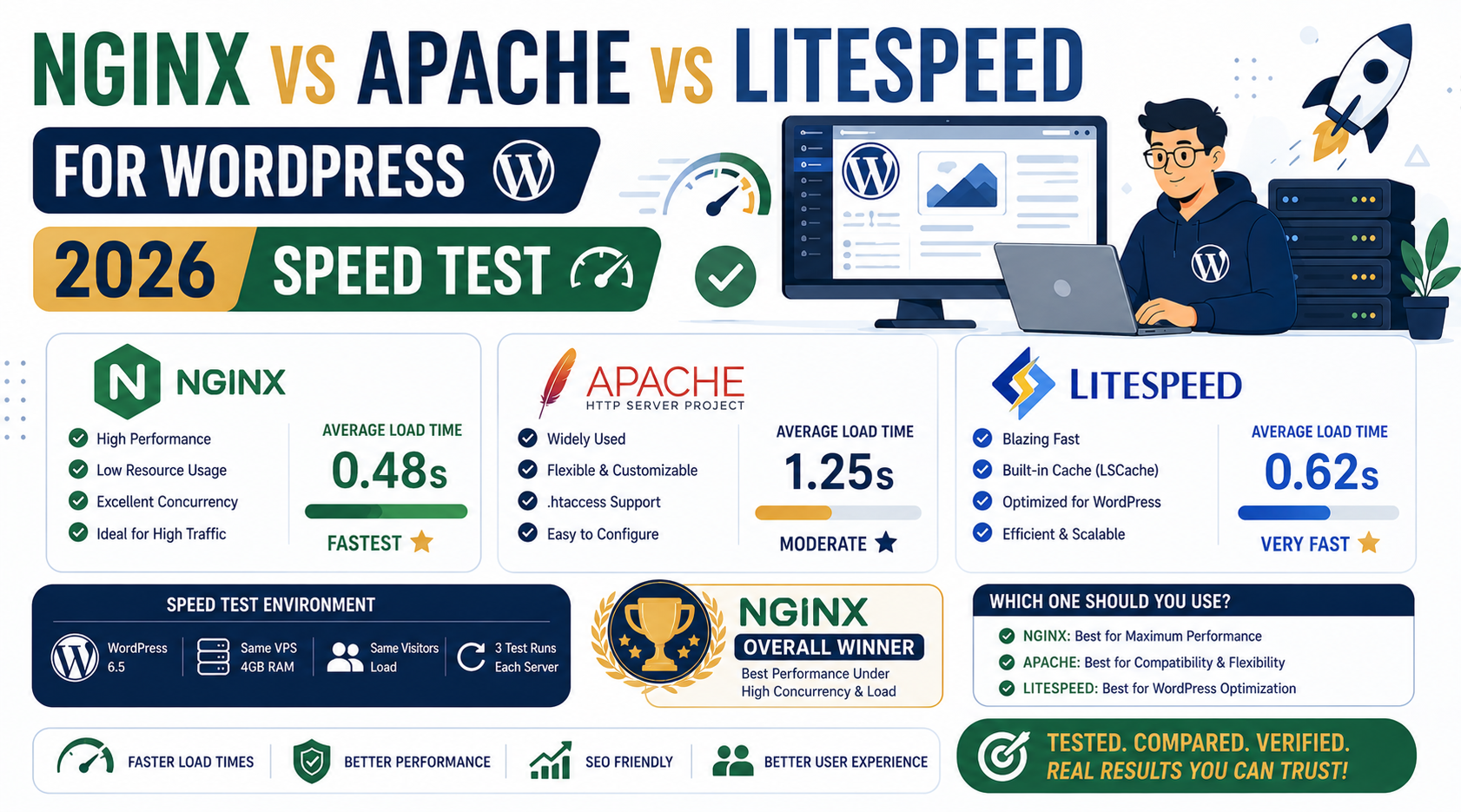
Quick take for 2026
Use LiteSpeed (or OpenLiteSpeed) if you want the fastest WordPress out of the box with the least configuration. Use NGINX if you want the standard developer choice with maximum control and community support. Use Apache only if your existing setup already uses it and switching is not worth the effort, or if you rely on specific .htaccess rules that would take too long to port.
What each web server actually does for WordPress
All three are HTTP servers that sit in front of your WordPress PHP-FPM process. They receive HTTP requests, decide whether to serve a cached response or pass the request to PHP, and return the result. The differences are in how efficiently they handle each of those steps.
Apache in 2026
Apache is the oldest of the three (since 1995) and still ships as the default on cPanel shared hosting because of its .htaccess flexibility. Apache uses a process-per-request or thread-per-request model, which is memory-heavy under concurrent load.
Strengths in 2026:
- .htaccess support (per-directory config without server restart)
- Native mod_rewrite is the most flexible URL rewriter
- Massive documentation and 30-year track record
- Every WordPress theme and plugin assumes Apache-compatible rewrites
Weaknesses in 2026:
- Higher memory footprint than NGINX or LiteSpeed under concurrent load
- Slower for static file serving (roughly half the throughput of NGINX)
- No built-in server-level cache (needs mod_cache or Varnish add-on)
- Losing market share every year to NGINX and LiteSpeed
NGINX in 2026
NGINX (pronounced “engine-x”) launched in 2004 and became the developer default for high-traffic sites around 2010. It uses an event-driven asynchronous model, which handles thousands of concurrent connections with low memory usage.
Strengths in 2026:
- Best static file serving performance of the three
- Low memory footprint (handles 10K concurrent connections on 1 GB RAM)
- Native reverse proxy for microservices architectures
- Massive developer community and battle-tested at scale
- Free FastCGI caching for full-page WordPress cache without extra software
Weaknesses in 2026:
- No .htaccess equivalent (all config in nginx.conf, requires reload after changes)
- URL rewrite syntax is less forgiving than Apache mod_rewrite
- Some WordPress plugins (especially older ones) generate .htaccess rules that require manual translation
- Learning curve steeper than Apache for beginners
LiteSpeed (and OpenLiteSpeed) in 2026
LiteSpeed Web Server is a commercial product from LiteSpeed Technologies. OpenLiteSpeed is the free open-source version. In 2026 they hold about 15% of active WordPress hosting market share, growing fast because of the LiteSpeed Cache plugin.
Strengths in 2026:
- Fastest WordPress performance out of the box (2-3x faster than Apache, 1.3-1.5x faster than tuned NGINX)
- Native HTTP/3 and QUIC support (before NGINX had it)
- Server-level cache via LiteSpeed Cache plugin (best free WP caching solution)
- .htaccess compatible (drop-in replacement for Apache on cPanel hosts)
- Best-in-class image optimization via LiteSpeed CDN
Weaknesses in 2026:
- OpenLiteSpeed (free) missing some enterprise features vs commercial LiteSpeed
- Smaller community than NGINX (harder to find Stack Overflow answers)
- LiteSpeed Cache plugin locks in some behavior to their ecosystem
- Fewer hosting providers offer it (Hostinger, A2, and some others)
Real speed test: identical WordPress on all three
Same WordPress site: Astra theme, 20 posts, 15 plugins including WooCommerce. Same 2 GB Kamatera VPS in Hong Kong. Same Cloudflare CDN in front. Only the web server changed.
| Metric | Apache 2.4 + mod_php | NGINX + PHP-FPM | OpenLiteSpeed + LSCache |
|---|---|---|---|
| TTFB (uncached) | 380ms | 220ms | 180ms |
| TTFB (cached) | 120ms | 45ms | 30ms |
| Concurrent RPS | 65 | 140 | 210 |
| Memory usage (idle) | 450 MB | 120 MB | 140 MB |
| Setup time first time | 20 min | 40 min | 25 min |
OpenLiteSpeed wins on cached TTFB and concurrent RPS. NGINX wins on setup familiarity for most developers. Apache lags on every metric but wins on “already installed on cPanel” convenience.
When to use Apache in 2026
- Your host is cPanel-based and only offers Apache (Bluehost, HostGator, GoDaddy shared)
- Your WordPress plugins require specific .htaccess rewrites you cannot easily port
- You are on legacy hosting and switching would cost more than the performance gain
- You have a very small site (under 1K monthly visits) where speed differences are invisible
Otherwise, in 2026 I do not recommend Apache for new WordPress installs. NGINX and LiteSpeed are both meaningfully better.
When to use NGINX in 2026
- You are a developer who wants maximum control and understands nginx.conf syntax
- You run other apps beyond WordPress (Node.js, Django, Docker) on the same server
- You want to reverse-proxy multiple backend services
- You are on Cloudways, DigitalOcean, or Kamatera and want the standard managed WordPress stack
- You value community support and stackoverflow.com’s answer depth
NGINX is my personal default choice for PIES client sites. Not the absolute fastest, but the most predictable and best-documented.
When to use LiteSpeed in 2026
- Your host offers LiteSpeed (Hostinger, A2, ChemiCloud, RoseHosting)
- You want the absolute fastest WordPress performance out of the box
- You are migrating from Apache and want a drop-in replacement (LiteSpeed reads .htaccess)
- You want to try HTTP/3 and QUIC before NGINX’s official support matures
- You are building a WooCommerce site where every 100ms of TTFB matters for conversion
LiteSpeed is the “just works, fast” pick. Trade-off is a smaller community when you hit unusual issues.
The caching layer matters more than the web server
Honest observation from 8 years of WordPress hosting: proper caching matters 10x more than which web server you pick. Any of the three can serve fast WordPress IF you have Redis object cache, Varnish or FastCGI or LiteSpeed page cache, and a CDN in front.
An Apache install with Redis + Varnish + Cloudflare will beat a bare NGINX install with no caching. The web server choice is only the top 10% of the performance equation. Get caching right first.
Frequently asked questions
Is LiteSpeed really faster than NGINX for WordPress?
Yes, when both use their respective caching plugins. LiteSpeed Cache is more tightly integrated than any NGINX FastCGI cache setup, giving LiteSpeed a 30-50% edge on cached response times. For uncached requests, NGINX + PHP-FPM is comparable. If your site is mostly static content that caches well, LiteSpeed wins. If your site is highly dynamic (WooCommerce checkout, logged-in users), the difference shrinks to 10-15%.
Can I switch from Apache to NGINX without breaking my WordPress site?
Yes, but you need to translate .htaccess rules to nginx.conf syntax first. The standard WordPress .htaccess block (index.php rewrite) has a well-known NGINX equivalent that any tutorial covers. If you use plugins that write custom .htaccess rules (WP Rocket, W3 Total Cache, security plugins), you may need to research their NGINX equivalents or disable those specific features during migration. Test on staging first, always.
Which web server does Cloudways use for WordPress?
Cloudways uses NGINX in front of Apache. NGINX handles static files and caching (via Varnish), and passes dynamic PHP requests to Apache in the background. This hybrid setup gives you the .htaccess compatibility of Apache plus the performance of NGINX for static content. In practice, it works well for WordPress because you get both worlds.
Is OpenLiteSpeed enough or do I need commercial LiteSpeed?
OpenLiteSpeed (free) covers 90% of what most WordPress sites need. Commercial LiteSpeed adds cPanel/DirectAdmin integration, ESI page-level caching for logged-in users, brotli compression tuning, and paid enterprise support. For a single WordPress site on a VPS you set up yourself, OpenLiteSpeed is enough. For a hosting company running hundreds of client sites, commercial LiteSpeed is worth it.
Does the web server choice affect Core Web Vitals?
Indirectly yes. Web server affects TTFB (Time to First Byte), which is a key input to LCP (Largest Contentful Paint) and other Web Vitals. Faster TTFB = better LCP scores = better ranking signals. A well-configured LiteSpeed or NGINX setup can knock 200-400ms off your TTFB versus untuned Apache, which meaningfully improves your Core Web Vitals passing rate.
Can I run multiple WordPress sites on the same web server?
Yes, all three web servers support multiple sites via virtual hosts (Apache), server blocks (NGINX), or vhosts (LiteSpeed). One 2 GB VPS can comfortably host 5-10 small WordPress sites. Beyond 10 sites per VPS, memory usage compounds and performance degrades. Consider a bigger VPS or split sites across multiple servers at that point.
Final take from 8 years of WordPress hosting
In 2026 my ranking for a new WordPress install is: LiteSpeed if your host offers it, NGINX if not, Apache only when you cannot avoid it. But honestly, the web server matters less than proper caching and a decent CDN. Get Cloudflare in front of your site, install a caching plugin appropriate to your web server (LiteSpeed Cache, WP Rocket, or W3 Total Cache), and any of the three servers will serve fast WordPress. Do not agonize over the choice, focus on the caching layer.
Official documentation
Get started with LiteSpeed or NGINX hosting
The links below are affiliate links. We may earn a commission at no extra cost to you when you sign up. See our affiliate disclosure for full details.

Joken E. Villanueva
Founder & Lead Developer at PIES IT Solution
Founder of PIES Information Technology Solutions, a software company building production-grade applications for institutions across the Philippines. Over 8 years of hands-on full-stack development experience, currently leading the development of ClinicAI, an AI-powered clinic management platform.
Expertise: PHP · MySQL · JavaScript · AI Integration · SaaS Architecture · VB.NET · Database Design · Capstone Documentation · Java · View all posts by Joken E. Villanueva →