
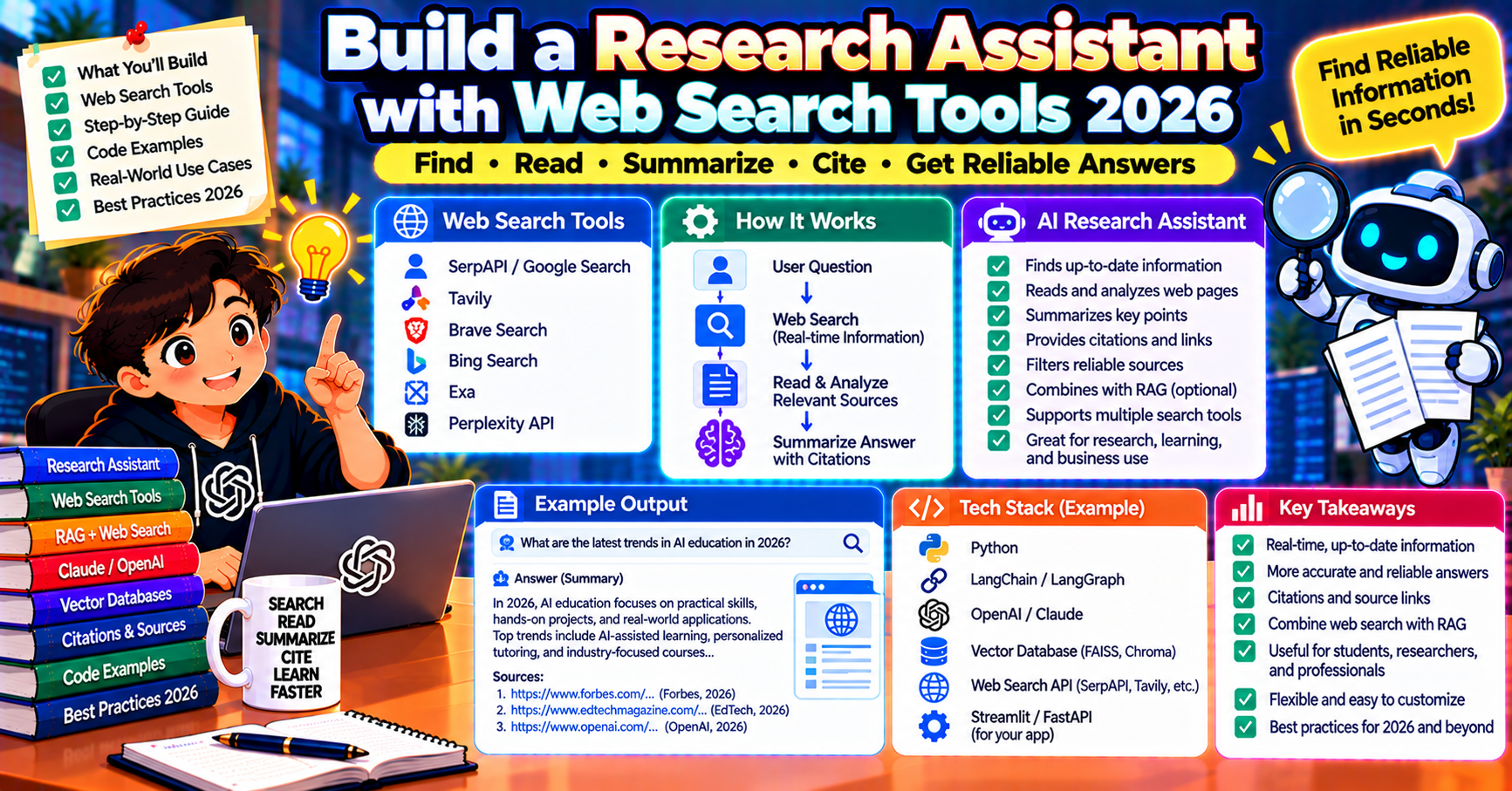
A research assistant that can search the web, read pages, and synthesize an answer is one of the most useful AI applications you can build. In 2026 it is also one of the easiest: every major LLM provider now ships web search as a first-class tool, and the pattern that was a research project in 2023 is a two-day build in 2026. This article walks through building one end to end, including how to pick a search backend, how to combine search with reading, and how to cite sources so users trust the output.
The architecture
- User asks a question
- Agent decides what to search for
- Agent calls a search tool, gets back search results (title, URL, snippet)
- Agent picks the most relevant results and calls a read-page tool for each
- Agent synthesizes an answer with citations back to the sources
- User sees the answer with inline citations
Steps 2 to 5 may loop: the agent might search, read, realize it needs more info, search again, etc.
Picking a search backend
Three categories of search APIs in 2026:
- Provider-native: Anthropic’s web_search tool, OpenAI’s web search preview, Google’s grounding with Google Search. Easiest setup; the provider handles search, retrieval, and citations. Pay per search ($10 per 1000 searches typically).
- Dedicated search APIs: Tavily, Exa, Perplexity Sonar, Brave Search API, Serper. More control; cheaper at scale ($1 to $5 per 1000 searches). Return clean results optimized for LLM consumption.
- Scraper-based: Firecrawl, Jina Reader. Not search engines themselves but handle the “take URL, give me clean markdown” step after a search. Pair with a search API.
For most new builds, use the provider-native tool first (simplest). Switch to Tavily or Exa if you need control over the search backend or cost at scale.
Simplest version: Claude with web_search
from anthropic import Anthropic
client = Anthropic()

response = client.messages.create(
    model="claude-opus-5-5",
    max_tokens=4096,
    tools=[{"type": "web_search_20250305", "name": "web_search", "max_uses": 5}],
    messages=[{"role": "user", "content": "What were the biggest ML research announcements in October 2026?"}],
)
for block in response.content:
    if block.type == "text":
        print(block.text)
    elif block.type == "web_search_tool_result":
        print(f"[Searched: {block.content[0].title}]")
Claude handles the search loop internally: picks query, searches, reads results, cites sources inline. The response includes citation blocks tying each claim back to a URL. Zero plumbing on your end.
Full control: custom agent with Tavily + Firecrawl
When you want to swap search engines, filter results by domain, or add caching, build the loop yourself:
from tavily import TavilyClient
from firecrawl import FirecrawlApp

tavily = TavilyClient(api_key=TAVILY_KEY)
firecrawl = FirecrawlApp(api_key=FIRECRAWL_KEY)

def search_web(query, max_results=5):
    results = tavily.search(query, max_results=max_results)
    return [{"title": r["title"], "url": r["url"], "snippet": r["content"]}
            for r in results["results"]]

def read_page(url):
    page = firecrawl.scrape_url(url, formats=["markdown"])
    return page["markdown"][:8000]  # cap at 8K chars
Then wire them as tools in a Claude or OpenAI tool-use loop (same pattern as the code review agent in the previous article):
tools = [
    {
        "name": "search_web",
        "description": "Search the web for a query. Returns list of {title, url, snippet}.",
        "input_schema": {
            "type": "object",
            "properties": {"query": {"type": "string"}},
            "required": ["query"],
        },
    },
    {
        "name": "read_page",
        "description": "Fetch and return the content of a URL as markdown.",
        "input_schema": {
            "type": "object",
            "properties": {"url": {"type": "string"}},
            "required": ["url"],
        },
    },
]

def dispatch(name, args):
    if name == "search_web": return search_web(args["query"])
    if name == "read_page": return read_page(args["url"])
Loop until the model emits a final text block instead of tool calls. Cap at 10 to 20 steps.
Citations: making the output trustworthy
Users do not trust unsourced LLM output. The agent must cite sources inline. Two patterns:
- Provider-native citations: Anthropic’s web_search returns
citationsblocks that your UI renders as footnotes. OpenAI’s web search returnsannotationswith URL and quote. Easiest path. - Manual citations in the prompt: instruct the model to format inline citations like
[1],[2]with a sources list at the end. Returns are cleaner but you have to parse and validate.
Prompt pattern for manual citations:
system_prompt = """You are a research assistant.
Answer the user's question using information from web searches.
Every factual claim must have a citation marker like [1] after the sentence.
After your answer, include a Sources section listing each marker with its URL.
If you cannot find a reliable source for a claim, say so explicitly."""
Parse the Sources section with a regex after the final response, and render each citation as a clickable link in your UI.
Caching to control cost
Search is expensive at scale (both API cost and latency). Cache aggressively:
- Search result cache: cache
query -> resultsfor 1 hour. Same question asked twice within an hour returns the same results. - Page content cache: cache
url -> markdownfor 24 hours. Pages do not change that fast. - Final answer cache: for popular questions (“what is X?”), cache the full answer for a few hours. Serve directly from cache for duplicate queries.
Redis with TTL on each cache level works great. For a research assistant with 1000 daily users, caching cuts search API spend by 60-80%.
Domain filtering and allow-lists
For professional use cases (medical research, legal, financial), you cannot let the agent cite random blogs. Filter at the search layer:
results = tavily.search(
    query,
    include_domains=["pubmed.ncbi.nlm.nih.gov", "nature.com", "science.org"],
    exclude_domains=["pinterest.com", "reddit.com"],
    max_results=5,
)
Most search APIs support include/exclude lists. Build a per-vertical allow-list and the agent only cites trusted sources.
Streaming the answer
Users hate waiting. Stream the final text while the agent searches and reads in the background. OpenAI, Anthropic, and Google all support streaming responses. The multi-step search loop does not stream (each step is a discrete call), but the final synthesis step does.
Progressive UX: show “Searching the web…” then “Reading sources…” then stream the final answer. Users feel progress even if the full cycle takes 15 to 30 seconds.
Common failure modes
- Low-quality sources: agent cites a content-farm blog. Fix: add exclude_domains, prefer authoritative sources via include_domains or a reranker.
- Hallucinated citations: agent includes a citation marker but the URL does not actually support the claim. Fix: run a post-synthesis fact-check step that verifies each claim is in the cited source (LLM-as-judge).
- Infinite search loops: agent keeps searching variations without converging. Fix: cap at 5 searches per request; if still stuck, return a partial answer saying “I could not find a definitive source”.
- Date confusion: agent treats a 2023 article as current. Fix: add “today’s date is X” to the system prompt and instruct the model to note publication date for each source.
Frequently Asked Questions
Official documentation
How is this different from Perplexity or You.com?
Those are consumer products built on this exact architecture. Build your own when you need vertical specialization (medical research assistant, legal brief writer), when you want control over search sources, or when you want to embed research in a larger product. For general consumer use, Perplexity is already excellent.
Can I use free search instead of paid APIs?
Yes but with caveats. DuckDuckGo’s HTML endpoint is scrapable but rate-limited and brittle. Playwright-driven headless browsers work but are complex. Paid search APIs are $1 to $10 per 1000 queries, which is cheap compared to the LLM cost of a research session.
How accurate are the citations?
With provider-native citations (Claude, OpenAI web search), accuracy is high: the citation ties to the specific chunk the model consumed. With manual citations in a custom agent, accuracy is lower (model may hallucinate URL support); add a fact-check step for critical use cases.
Can the agent follow links on pages it reads?
Yes if you give it a tool for it. Pattern: agent reads page A, sees a reference to page B, calls read_page(B). Cap depth at 2 or 3 to prevent spiraling. Each additional link adds latency and token cost.
What about scraping sites that block bots?
Firecrawl, Browserbase, and Apify handle most anti-bot defenses behind a paid API. Build your own with Playwright + stealth plugins only if you have specific requirements they do not meet. Respect robots.txt and site terms of service.
How much does a typical research query cost?
With Claude Opus 5.5 and 5 web searches plus 3 page reads: $0.20 to $0.60 per query. With Claude Sonnet 5.5: $0.05 to $0.15. For a product-grade service serving 10K queries per day, expect $500 to $5000 per month in LLM + search costs.

Caren Bautista
Technical Writer at PIES IT Solution
Responsible for crafting clear, well-structured, and beginner-friendly content across the platform. Handles the writing, proofreading, and editorial review of tutorials, guides, and documentation to ensure every article is accurate, readable, and easy to follow.
Expertise: Technical Writing · Content Creation · Documentation · Editorial Writing · JavaScript · TypeScript · Python · Python Errors · HTTP Errors · MS Excel · View all posts by Caren Bautista →