
Mini Quiz System Using Visual Basic 2013
This Mini Quiz System contribute not only entertainment to the users but they can also acquire new knowledge about different disciplines.
These tutorials give you ideas how to make a mini quiz system in Visual Studio 2013.
To start with this tutorial, follow the given steps below.
Step 1. Open your Visual Basic 2013. Then click the ‘New’ and ‘Project’
Step 2. Click ‘Visual Basic’, Select ‘Windows Form Application‘, and ‘OK’
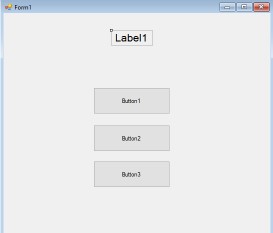
Step 3. Design your form like this; 1 Label, 3 Buttons
Step 4. Find the ‘BackgroundImage‘ from the Properties Window then import your desired background image.
Step 5. Add another form, click ‘Project ‘ then ‘Add Windows Form‘
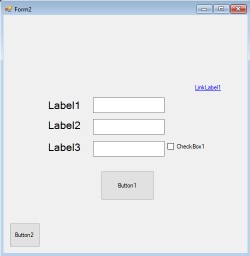
Step 6. Design your new form like this; 1 Link Label, 3 Label, 3 TextBox, and 2 Button
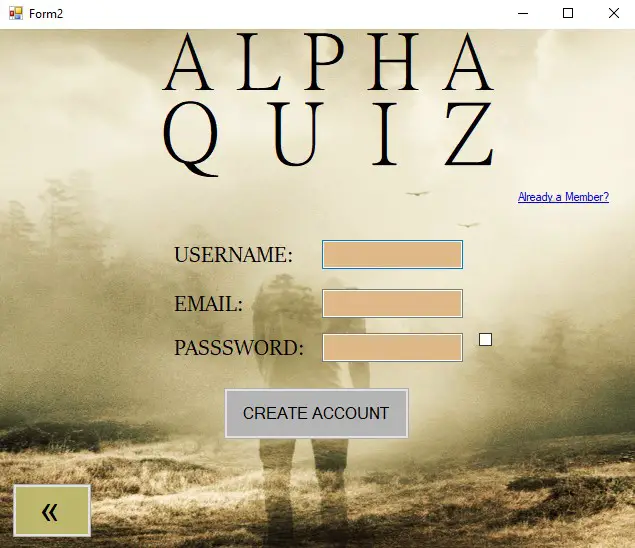
Sample Output with Background Image:
Step 7. To make your account form effective, go to ‘Settings‘
Step 8. Type ‘Username‘ and ‘Password‘ to the Name
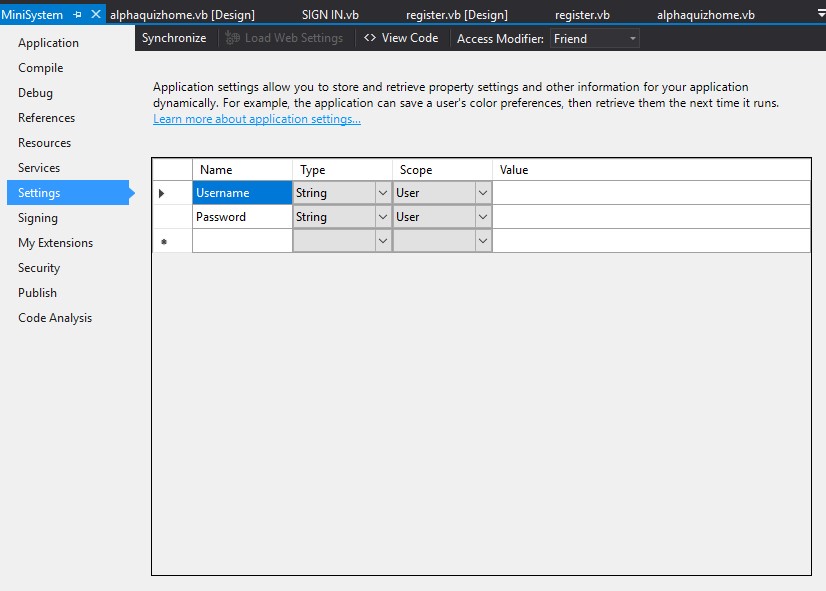
Step 9. Go to form2 then fire the ‘Create Account’ button and type this code.
        My.Settings.Username = username1.Text
        My.Settings.Password = password1.Text
        My.Settings.Save()
        MsgBox("Your Account Has Been Created")
        SIGN_IN.Show()
        Me.Close()
NOTE: Make sure that you already had your Naming Convention!
OUTPUT:
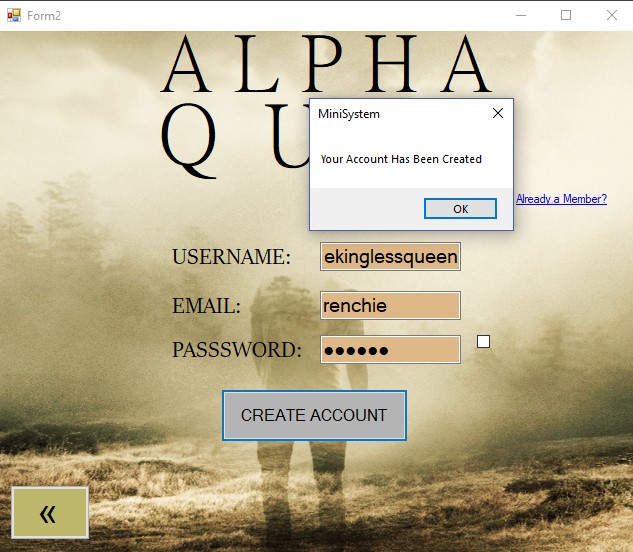
Step 10. Add another form and design this way
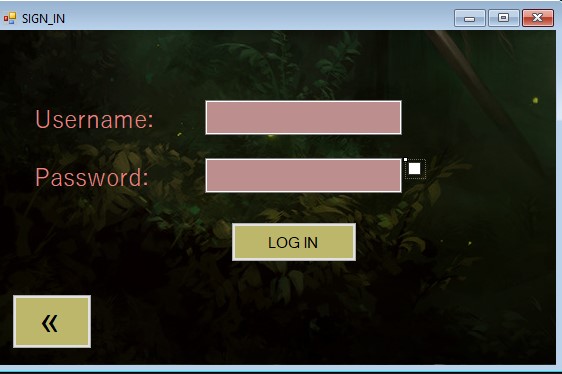
Step 11. Double click the ‘Log In‘ Button and type this code.
  If username2.Text = My.Settings.Username And
            password2.Text = My.Settings.Password = True Then

            Home.Show()
            Me.Close()

        Else
            MsgBox("Incorrect Username Or Password")
            username2.Clear()
            password2.Clear()

        End If
OUTPUT:

Step 11. Add another form to start the game, design the form this way
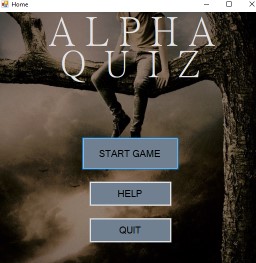
Step 12. Add another form for the questions
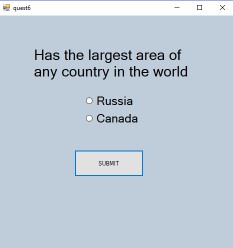
Step 13. Code this to the ‘Submit‘ Button
        Button2.Invalidate()
        If RadioButton4.Checked Then
            MsgBox("You are correct")

            quest8.LBLRIGHT.Text = quest8.LBLRIGHT.Text + 1


        Else
            MsgBox("You are wrong")
            quest8.LBLWRONG.Text = quest8.LBLWRONG.Text + 1
        End If
        Dim quest6 As New quest2


        quest2.Show()
        Me.Hide()
OUTPUT:

NOTE: Make sure that you already had your Naming Convention!
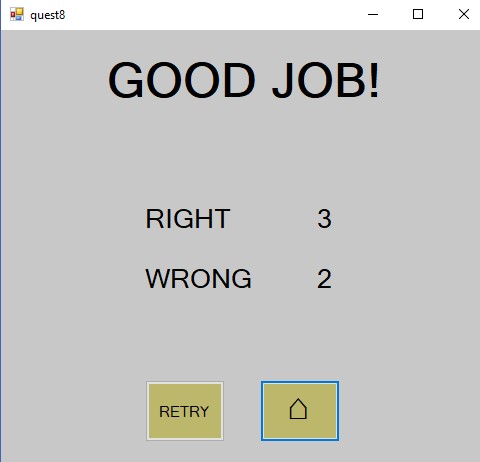
Step 14. Add another form for the summary of scores

OUTPUT:
Download the full source code here. Mini Quiz System
The related article you may like:
Technology stack and requirements
To run this VB.NET project, you need the following on your development machine:
- Visual Studio 2019 or later. The free Community Edition is enough for building, debugging, and running the project.
- .NET Framework 4.7.2 or higher. Most Windows 10 and 11 systems have it preinstalled through Windows Update.
- MySQL Server 8.0 or MSSQL Express 2019. Choose whichever your capstone panel prefers; both work with VB.NET data adapters.
- MySQL Connector/NET or SqlClient library. Add via NuGet Package Manager inside Visual Studio.
- Crystal Reports (optional). Required only if the project generates printable reports; install the runtime redistributable.
Installing the source code
The download link contains a ZIP archive with the full solution. Extract and set up in five steps:
- Extract the archive to a folder outside Program Files (avoids permission issues).
- Open the .sln file in Visual Studio. It loads the full solution with all forms and modules.
- Restore NuGet packages. Right-click the solution then Restore NuGet Packages if prompted.
- Import the database. Locate the .sql file in the archive and import via phpMyAdmin (MySQL) or SQL Server Management Studio.
- Update the connection string in App.config or module code to match your local database name, user, and password.
How to use this project for your BSIT capstone
This VB.NET project maps cleanly to standard BSIT capstone documentation. Suggested chapter alignment:
- Chapter 1 (Introduction). Discuss the problem the system solves in real-world context. Cite Philippine business or academic use cases where a manual process could be replaced.
- Chapter 2 (Review of Related Literature). Compare this system’s features against 5-10 similar published projects. Cite journals like IJERT or IEEE Access for academic-standard sources.
- Chapter 3 (Methodology). Include Use Case Diagram, Data Flow Diagram, Entity Relationship Diagram, and Activity Diagram covering all major workflows in the system.
- Chapter 4 (Results and Discussion). Screenshot each module of the running system with a caption explaining what data it processes and which user role interacts with it.
- Chapter 5 (Conclusion and Recommendations). Identify features that could be added in a Version 2, such as web dashboard, mobile app, or REST API export.
Modules typical of Mini Quiz System Using Visual Basic 2013
- Master data. CRUD forms for the primary entities the system manages, with search and filter.
- Transaction processing. Data entry forms for the day-to-day operations the system automates.
- Reports. Formatted printable output summarizing activity per day, per user, or per category.
- User management. Login with role-based permissions (Admin, Encoder, Viewer).
- Backup and restore. Export database to a .sql or .bak file and restore when needed.
Common enhancements for capstone review
- Modernize the UI. Add Bunifu or Guna UI controls for a more polished, modern appearance.
- Add printable receipts. Integrate a printer preview form with page-setup options.
- Multi-user concurrency. Ensure the database handles simultaneous writes without lost-update errors.
- Web version. Rewrite the front-end in ASP.NET Core or React for a modern deployment path.
Official documentation
Frequently Asked Questions
How does this VB.NET quiz or online examination system work?
Admin creates quizzes (title, time limit, pass mark), questions (multiple choice, true/false), correct answers. Students log in, attempt quiz with countdown Timer, submit answers, system auto-grades.
What Visual Studio and SQL Server versions does this VB.NET project require?
Most projects use VB.NET WinForms on .NET Framework 4.5+ with SQL Server 2012 Express or higher. To run: install Visual Studio 2019 / 2022 (Community is free) with the ‘Desktop development with .NET’ workload, install SQL Server Express + SSMS, open the .sln file, build, run.
How do I set up the database for this VB.NET project?
Open SQL Server Management Studio (SSMS) and connect to your SQL Server (e.g. localhost\SQLEXPRESS). Right-click Databases, choose Restore Database OR New Database then import the included .sql script. Update the connection string in App.config (or in code-behind Module) with your server name + credentials. Rebuild and run.
Can I use this VB.NET project for a BSIT capstone or thesis?
Yes, VB.NET is one of the most accepted languages by Philippine BSIT panels. Extend it: add role-based access (admin/staff/customer login redirect), Crystal Reports or RDLC reports, dashboards with Chart control, audit log, multi-branch support. Pair with Chapter 1-5 documentation matching your panel’s rubric.
Why am I getting ‘connection error’ or ‘cannot find SQL Server’?
Three common VB.NET issues: (1) Connection error: SQL Server isn’t running. Open SQL Server Configuration Manager and verify SQL Server (SQLEXPRESS) service is started. (2) Wrong server name in connection string. Try .\SQLEXPRESS, (local)\SQLEXPRESS, or your machine name. (3) Login failed: SQL Server is set to ‘Windows-only’ authentication. Switch to Mixed Mode in SSMS Server Properties, Security.
Where can I find more VB.NET projects with source code?
Browse the VB.NET Projects hub for the full library. For C# WinForms alternatives see C# Projects. For ASP.NET web alternatives see ASP.NET Projects. For BSIT capstone idea lists see 150 Best Capstone Project Ideas.
To which setting I have to go?
Is it visual studio settings?
Or something else?Please respond as soon as possible.