

In this post, you will learn the solutions to resolve the error modulenotfounderror no module named keras.
Also, we will discuss the meaning of keras and why this error occur.
Before you will learn the solutions to solve the error, we will discuss first what is keras in Python?
What is keras in Python?
Keras is an open-source deep learning framework for Python which is designed to be user-friendly, modular, and extensible.
It was developed by Francois Chollet and first released in 2015.
Furthermore, a keras is built on top of TensorFlow, a popular open-source machine learning library.
It provides a high-level API for building and training deep learning models.
Keras supports a wide range of neural network architectures.
Including convolutional networks (CNNs), recurrent networks (RNNs) and combinations of these architectures.
It also supports a variety of input data formats, including images, text, and time-series data.
Also read the resolved error: Modulenotfounderror: no module named worker worker
Advantages of Keras
- It is simple and easy to use.
- It can quickly build and train deep learning models using just a few lines of code.
- It includes a wide range of pre-built layers, loss functions, and optimization algorithms.
- It is easy to experiment with various model architectures and training configurations.
Why this error no module named keras occur?
The error message “no module named keras” occurs because the Python interpreter cannot find the Keras module installed in your python environment.
This error commonly occurs for multiple reasons, including:
- The Keras is not installed
- The Keras is installed in a different environment
- Wrong spelling when importing the name module
- The Keras version has conflict.
- The Dependency has conflict.
How to solved the error modulenotfounderror: no module named keras?
The common reason is that the Python does not provide keras in its standard library.
You will not install it with pip install keras either.
Rather, you need to install the TensorFlow library using Python’s package manager pip.
Time needed: 3 minutes
Here are the solutions to solve the error modulenotfounderror: no module named keras
- Solutions 1: Install tensorflow
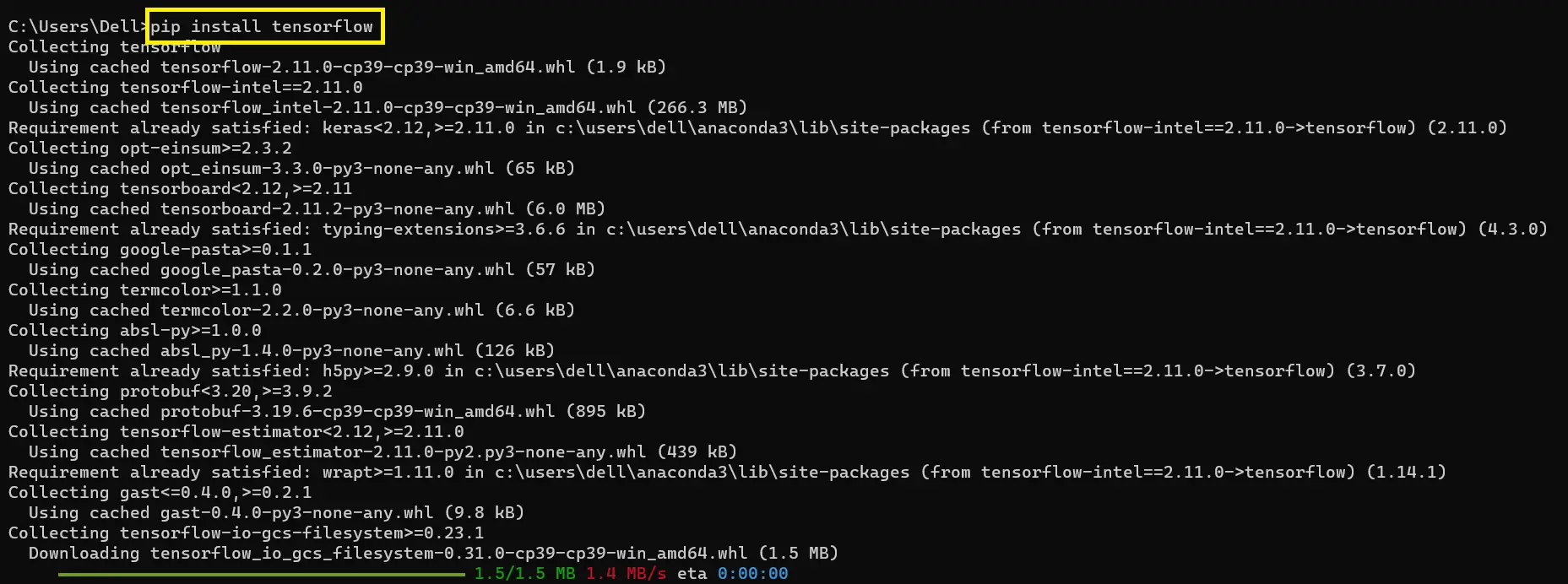
In your project root directory, open the command prompt to terminal windows and here is the following command to install tensorflow:
pip install tensorflow
After you run the command above it will download and install the tensorflow package in your python environment.
We will assume that your pip version is updated. If it is not, you can use the following commands in your terminal windows, command prompt, or shell to update your pip.
python -m pip install –upgrade pip
After you run the command above it will upgrade your pip version.
- Solutions 2: Check the spelling
Make sure that you have spelled ‘keras‘ correctly in your code. The import statement should be
from tensorflow import keras, notimport Kerasorimport keras_module. - Solutions 3: Check your environment
When you are using a virtual environment or conda environment, you will make sure that the Keras is installed in the same environment that you are currently working in.
To activate the correct environment in conda, here are the following commands to install:
conda activate
To activate the correct environment in windows, here are the following commands to install:
source activate - Solutions 4: Install tensorflow module in python 3
In your project root directory, open the command prompt to terminal windows and here is the following command to install tensorflow in python3:
pip3 install tensorflow
After you run the command above it will download and install the tensorflow package in your python3 environmnet.
- Solutions 5: Install module tensorflow in server side
In your project root directory, open the command prompt or terminal windows and here is the following command to install tensorflow in python server side:
pip install --user tensorflow
After you run the command above it will download and install the tensorflow package in your python3 environment.
- Solutions 6: Install module tensorflow in Ubuntu
The following command to install tensorflow in Ubuntu:
sudo apt install tensorflow



What is the Difference Between ImportError and ModuleNotFoundError?
The Difference Between ImportError and ModuleNotFoundError is that the ImportError is more general exception.
That can occur for multiple reasons while importing a module, whereas ModuleNotFoundError is a specific type of ImportError.
That is occurred when the interpreter cannot find the module that is being imported.
Frequently Asked Questions
What is Python ModuleNotFoundError and what causes it?
ModuleNotFoundError (a subclass of ImportError) is raised when Python cannot find the module you tried to import. Common causes: the package isn’t installed (pip install missing), wrong virtual environment activated, typo in module name, or Python can’t find your local module on the import path. The error message names exactly which module is missing.
How do I fix ‘ModuleNotFoundError: No module named X’?
Run pip install X first. If that succeeds but you still get the error, check which Python you’re using (which python OR python –version) vs which pip (which pip OR pip –version), they must match. Common gotcha: pip points to system Python 3.9 but you’re running python3.11 in a venv. Inside the venv, use python -m pip install X to be sure pip matches the active Python.
Why does my code work in one environment but not another?
Different Python versions or different installed packages. To diagnose: pip freeze > requirements.txt on the working environment, then pip install -r requirements.txt on the broken one. Use virtualenv (python -m venv venv) or conda for every project to avoid system-wide package collisions.
Is ModuleNotFoundError the same as ImportError?
ModuleNotFoundError is a subclass of ImportError added in Python 3.6. It specifically means ‘no such module exists.’ Plain ImportError covers a wider set: module exists but a name inside it can’t be imported (e.g. ‘cannot import name X from Y’). except ImportError catches both; except ModuleNotFoundError catches only the missing-module case.
Where can I find more ModuleNotFoundError fixes?
Browse the ModuleNotFoundError reference hub for 198+ specific module fixes (TensorFlow, Flask, Django, pandas, numpy, etc.). For related issues see ImportError. For broader Python setup see Python Tutorial hub.
Conclusion
In conclusion, the “ModuleNotFoundError: No module named ‘keras’” error occurs when the Python interpreter cannot find the Keras module.
This error can have various causes, including a missing installation of Keras, incorrect spelling in the import statement, Keras being installed in a different environment, version conflicts, or dependency conflicts.

Adones Evangelista
Programmer & Technical Writer at PIES IT Solution
Adones Evangelista is a programmer and writer at PIES IT Solution, author of over 900 tutorials and error-fix guides at itsourcecode.com. Specializes in JavaScript, Django, Laravel, and Python error debugging covering ValueError, TypeError, AttributeError, ModuleNotFoundError, and RuntimeError, plus C/C++ and PHP capstone projects for BSIT students.
Expertise: JavaScript · Python · Django · Laravel · Error Debugging · C/C++ · View all posts by Adones Evangelista →