

The Repair Shop Management System Project in Django created based on Python, Django, and SQLITE3 Database. The admin section is in charge of all tasks.
From introducing customers to tracking their completion times, we’ve got you covered. The device is fully accessible to the administrator.
When you bring the product in for maintenance, the administrator will assign it to the appropriate staff.
If your item has been fixed, the administrator will mark it as ready for delivery to the customer. The admin may also check the status of the product.
He can see his Repair Shop store’s annual revenue or even monthly revenue. He can also control the store’s earnings.
The Repair Shop Management System in Django is an easy project for beginners to learn how to build a web-based python Django project.
We will provide you with the complete source code and database for the python project so that you can easily install it on your machine and learn how to program in Python Django.
To start creating a Repair Shop Management System Project in Python Django, makes sure that you have PyCharm Professional IDE Installed in your computer.
This Repair Shop Management System in Django Framework, Also includes a Download Source Code for free, just find the downloadable source code below and click download now.
Checkout the related articles.
- Vehicle Service Management System Project in Django with Source Code
- Car Rental Management System Project In C++ With Source Code
- Stock Management System Project in Java with Source Code
| About Project | Project Details |
|---|---|
| Project Name | Repair Shop Management System Project in Django |
| Python version (Recommended) | 3.8 Version |
| Programming Language Used | Python Django Language |
| Developer Name | itsourcecode.com |
| IDE Tool (Recommended) | Sublime, Visual Studio, PyCharm |
| Project Type | Web Application |
| Database | SQLite |
Admin Features
- Login Page – The page where the system administrator enters their system credentials in order to gain access to the system’s administrative side.
- Manage User- This is the page where an administrator can add, update, and delete user information.
- Manage Enquiries – This is the page where an administrator can add, update, and delete enquiries information.
- Repair Details Management – This is the page where an administrator can view all the customer who inquired.
- Change Password – This is the page where an administrator can change their own password for better security.
User Features
- Login Page – The page where the system user enters their system credentials in order to gain access to the system’s user side.
- Enquiry – This is the page where the user need to enquire about the problem of their computer.
- Update Enquiry – This is the page where the user can update enquire about the problem of their computer.
- Check Status – This is the page where the user can check their status if is can complete, reject or accept their enquiry.
Repair Shop Management System in Django Steps on How to Create a Project
Time needed: 5 minutes
Here are the steps on how to create a Repair Shop Management System in Django with Source Code.
- Step 1: Open file.
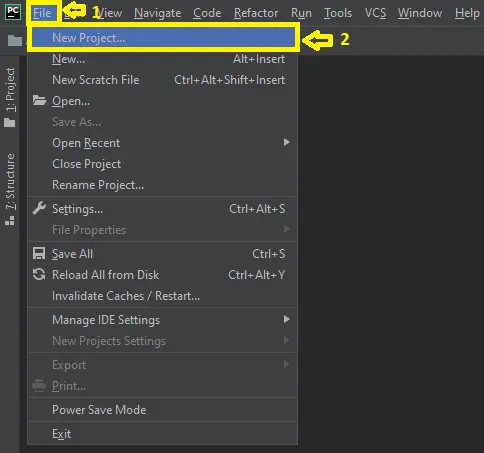
First , open “pycharm professional” after that click “file” and click “new project”.

- Step 2: Choose Django.
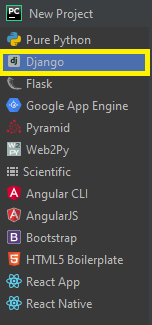
Next, after click “new project“, choose “Django” and click.

- Step 3: Select file location.
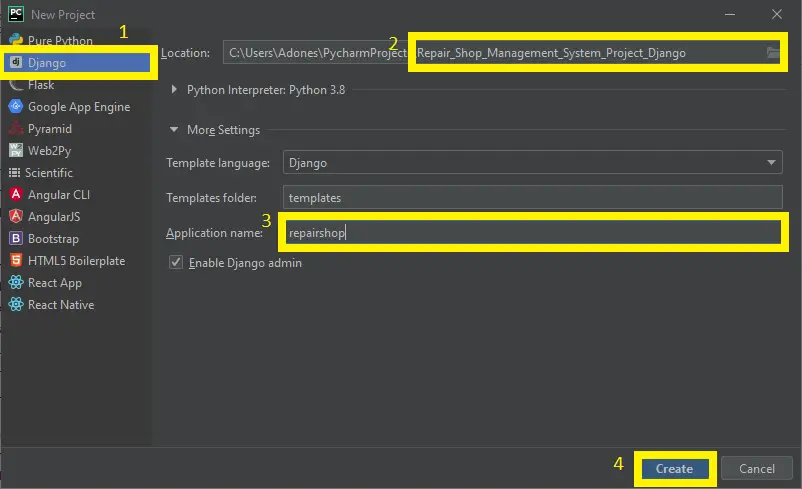
Then, select a file location wherever you want.

- Step 4: Create application name.
After that, name your application.

- Step 5: Click create.
Lastly, finish creating project by clicking “create” button.

- Step 6: Start Coding.
Finally, we will now start adding functionality to our Django Framework by adding some functional codes.


Downloadable Source Code Below.
Anyway, if you want to level up your programming knowledge, especially python, try this new article I’ve made for you Best Python Projects with source code for Beginners.
But If you’re going to focus on web development using Django, you can download here from our list of Best Django Projects with source code based on real-world projects.
How To Run The Repair Shop Management System in Django?
- Step 1: Extract/unzip the file
- Step 2: Go inside the project folder, open cmd and type the following commands to install Django Framework and run the webserver:
- python manage.py migrate
- python manage.py runserver
- Step 3: Finally, open the browser and go to http://127.0.0.1:8000/
Summary
In summary, the Repair Shop Management System Project in Django with Source Code can be useful to students or professional who wants to learn python programming language.
This project can also be modified to fit your personal requirements. Hope this project will help you to improve your skills. Happy Coding!
Inquiries
If you have any questions or suggestions about Repair Shop Management System Project in Django with Source Code, please feel free to leave a comment below.
Official documentation
Frequently Asked Questions
How does this Django ecommerce system work?
Frontend: product catalog with categories, search, cart (session-based), checkout. Backend: order management, payment gateway integration (Stripe, PayPal, Razorpay via django-stripe / django-paypal). Admin: product CRUD, order fulfillment, reports.
What Django and Python versions does this project require?
Most projects in this batch run on Django 4.x or 5.x with Python 3.8+. A few older projects need Django 3.2 with Python 3.7. Check the requirements.txt file for exact versions. To run any: install Python, create a virtualenv (python -m venv venv), activate it, pip install -r requirements.txt, run python manage.py migrate, then python manage.py runserver.
How do I set up the database for this Django project?
Most projects use SQLite (zero setup, auto-creates db.sqlite3 in project root on first migrate). For projects using MySQL or PostgreSQL: install the database server, create an empty database, edit settings.py DATABASES[‘default’] with your credentials, run python manage.py migrate. For sample data: python manage.py loaddata fixtures.json (if a fixture file is included) or create a superuser via python manage.py createsuperuser.
Can I use this Django project for a BSIT capstone or thesis?
Yes, but extend it. A bare CRUD app is too narrow for full capstone scope. Add: user roles via Django Groups, dashboards (Chart.js + AJAX endpoints), PDF exports (ReportLab or WeasyPrint), email notifications (Django send_mail), real domain extension (analytics, audit log, multi-branch). Pair with Chapter 1-5 documentation matching your panel’s rubric.
Why am I getting ModuleNotFoundError, OperationalError, or ‘No such table’ errors?
Three common Django startup issues: (1) ModuleNotFoundError: virtualenv not activated OR pip install -r requirements.txt skipped. (2) OperationalError: database credentials in settings.py don’t match your local MySQL/PostgreSQL. (3) ‘No such table’: you skipped python manage.py migrate. Also: if settings.py imports fail, check Python version compatibility (Django 5 needs Python 3.10+).
Where can I find more Django projects with source code?
Browse the Django Projects hub for the full library. For broader Python capstones see Python Projects (Tkinter desktop, Pygame games, OpenCV vision, ML). For PHP MVC alternatives see Laravel Projects. For BSIT capstone idea lists see 150 Best Capstone Project Ideas.

Adones Evangelista
Programmer & Technical Writer at PIES IT Solution
Adones Evangelista is a programmer and writer at PIES IT Solution, author of over 900 tutorials and error-fix guides at itsourcecode.com. Specializes in JavaScript, Django, Laravel, and Python error debugging covering ValueError, TypeError, AttributeError, ModuleNotFoundError, and RuntimeError, plus C/C++ and PHP capstone projects for BSIT students.
Expertise: JavaScript · Python · Django · Laravel · Error Debugging · C/C++ · View all posts by Adones Evangelista →
what i sthe username and password for https://itsourcecode.com/free-projects/python-projects/repair-shop-management-system-project-in-django-with-source-code/ (“epair-shop-management-system-project-in-django-with-source-code”)project
Username: admin
Password: admin12345
What is the problem? Thanks.
D:\djangoProject\repairshop>python manage.py migrate
Traceback (most recent call last):
File “D:\djangoProject\repairshop\manage.py”, line 22, in
execute_from_command_line(sys.argv)
File “C:\Users\Alekib\AppData\Local\Packages\PythonSoftwareFoundation.Python.3.10_qbz5n2kfra8p0\LocalCache\local-packages\Python310\site-packages\django\core\management\__init__.py”, line 446, in execute_from_command_line
utility.execute()
File “C:\Users\Alekib\AppData\Local\Packages\PythonSoftwareFoundation.Python.3.10_qbz5n2kfra8p0\LocalCache\local-packages\Python310\site-packages\django\core\management\__init__.py”, line 440, in execute
self.fetch_command(subcommand).run_from_argv(self.argv)
File “C:\Users\Alekib\AppData\Local\Packages\PythonSoftwareFoundation.Python.3.10_qbz5n2kfra8p0\LocalCache\local-packages\Python310\site-packages\django\core\management\base.py”, line 402, in run_from_argv
self.execute(*args, **cmd_options)
File “C:\Users\Alekib\AppData\Local\Packages\PythonSoftwareFoundation.Python.3.10_qbz5n2kfra8p0\LocalCache\local-packages\Python310\site-packages\django\core\management\base.py”, line 448, in execute
output = self.handle(*args, **options)
File “C:\Users\Alekib\AppData\Local\Packages\PythonSoftwareFoundation.Python.3.10_qbz5n2kfra8p0\LocalCache\local-packages\Python310\site-packages\django\core\management\base.py”, line 96, in wrapped
res = handle_func(*args, **kwargs)
File “C:\Users\Alekib\AppData\Local\Packages\PythonSoftwareFoundation.Python.3.10_qbz5n2kfra8p0\LocalCache\local-packages\Python310\site-packages\django\core\management\commands\migrate.py”, line 97, in handle
self.check(databases=[database])
File “C:\Users\Alekib\AppData\Local\Packages\PythonSoftwareFoundation.Python.3.10_qbz5n2kfra8p0\LocalCache\local-packages\Python310\site-packages\django\core\management\base.py”, line 475, in check
all_issues = checks.run_checks(
File “C:\Users\Alekib\AppData\Local\Packages\PythonSoftwareFoundation.Python.3.10_qbz5n2kfra8p0\LocalCache\local-packages\Python310\site-packages\django\core\checks\registry.py”, line 88, in run_checks
new_errors = check(app_configs=app_configs, databases=databases)
File “C:\Users\Alekib\AppData\Local\Packages\PythonSoftwareFoundation.Python.3.10_qbz5n2kfra8p0\LocalCache\local-packages\Python310\site-packages\django\core\checks\urls.py”, line 14, in check_url_config
return check_resolver(resolver)
File “C:\Users\Alekib\AppData\Local\Packages\PythonSoftwareFoundation.Python.3.10_qbz5n2kfra8p0\LocalCache\local-packages\Python310\site-packages\django\core\checks\urls.py”, line 24, in check_resolver
return check_method()
File “C:\Users\Alekib\AppData\Local\Packages\PythonSoftwareFoundation.Python.3.10_qbz5n2kfra8p0\LocalCache\local-packages\Python310\site-packages\django\urls\resolvers.py”, line 494, in check
for pattern in self.url_patterns:
File “C:\Users\Alekib\AppData\Local\Packages\PythonSoftwareFoundation.Python.3.10_qbz5n2kfra8p0\LocalCache\local-packages\Python310\site-packages\django\utils\functional.py”, line 57, in __get__
res = instance.__dict__[self.name] = self.func(instance)
File “C:\Users\Alekib\AppData\Local\Packages\PythonSoftwareFoundation.Python.3.10_qbz5n2kfra8p0\LocalCache\local-packages\Python310\site-packages\django\urls\resolvers.py”, line 715, in url_patterns
patterns = getattr(self.urlconf_module, “urlpatterns”, self.urlconf_module)
File “C:\Users\Alekib\AppData\Local\Packages\PythonSoftwareFoundation.Python.3.10_qbz5n2kfra8p0\LocalCache\local-packages\Python310\site-packages\django\utils\functional.py”, line 57, in __get__
res = instance.__dict__[self.name] = self.func(instance)
File “C:\Users\Alekib\AppData\Local\Packages\PythonSoftwareFoundation.Python.3.10_qbz5n2kfra8p0\LocalCache\local-packages\Python310\site-packages\django\urls\resolvers.py”, line 708, in urlconf_module
return import_module(self.urlconf_name)
File “C:\Program Files\WindowsApps\PythonSoftwareFoundation.Python.3.10_3.10.2288.0_x64__qbz5n2kfra8p0\lib\importlib\__init__.py”, line 126, in import_module
return _bootstrap._gcd_import(name[level:], package, level)
File “”, line 1050, in _gcd_import
File “”, line 1027, in _find_and_load
File “”, line 1006, in _find_and_load_unlocked
File “”, line 688, in _load_unlocked
File “”, line 883, in exec_module
File “”, line 241, in _call_with_frames_removed
File “D:\djangoProject\repairshop\Bucks\urls.py”, line 16, in
from django.conf.urls import url, include
ImportError: cannot import name ‘url’ from ‘django.conf.urls’ (C:\Users\Alekib\AppData\Local\Packages\PythonSoftwareFoundation.Python.3.10_qbz5n2kfra8p0\LocalCache\local-packages\Python310\site-packages\django\conf\urls\__init__.py)
You can solve this error through installing lower django version
Thank you first of all.
I have the 4.1.3 now.
What version you reccomend?
This is the new version on how to run the django projects maybe you can try this. because it is 100% working.
Just visit this link and apply it to the repair shop management system.
https://itsourcecode.com/free-projects/django/advance-student-management-system-in-django-with-source-code/
Thank you.
Sorry…at step Step 7: python manage.py makemigrations
there are several message error.
Not working at all.
What is the error shows?