
The Fish Farm Management System in Django keeps track of all the workers information and data.
The Fish Farm Management System features are the following:
- manage dam
- department
- staff/workers
- fish record, sales
- credit sales
- and harvest timeline.
Moving on, we’ve created all of the dam, departments, fish record, sales, and credit sales crud (create, read, update, and delete) operations.
This is a role-based module in which the admin can perform any operation on the data.
Anyway, Read or visit the other interesting language use in farming system.
To start creating a Fish Farm Management System Python Django, makes sure that you have PyCharm Professional IDE Installed in your computer.
This Fish Farm Management System in Django Framework, also includes a Download Source Code for free, just find the downloadable source code below and click download now.
Project Information and Recommended Tools
| About Project | Project Details |
|---|---|
| Project Name | Fish Farm Management System in Django |
| Python version (Recommended) | 3.8 Version |
| Programming Language Used | Python Django Language |
| IDE Tool (Recommended) | Sublime, Visual Studio, PyCharm |
| Database | SQLite |
What is fish farming management?
In order to operate your farm effectively, you must constantly inspect your fish ponds, keep accurate records, and plan ahead for farm operations.
What is the major problem in fish farming?
Therefore, a significant issue in fish farming is the scarcity of high-quality stock.
These fish can now be bred in ponds utilizing hormonal stimulation as a solution to this issue. This has made sure that there is an adequate supply of pure fish stock.
Admin Fish Farm Management System in Django
- Login – By default the admin need to login first to enable to access the system.
- Manage Staff – For the staff, the admin can add, edit, delete staff information.
- Dam Management – For the dam, the admin can add, edit, delete dam information.
- Manage Departments– For the Departments, the admin can add, edit, delete departments information.
- Fish Management – For the fish, the admin can add, edit, and delete fish information.
- Manage Sales– For the sales, the admin can add, edit, and delete sales information.
- Credit Sales Management – For the credit sales, the admin can add, edit, and delete credit sales information.
- Manage Harvest – For the Harvest, the admin can add, edit, and delete Harvest information.
Fish Farm Management System in Django Steps on How to Create a Project
Time needed: 5 minutes
Here are the steps on how to create a Fish Farm Management System in Django
- Step 1: Open file.
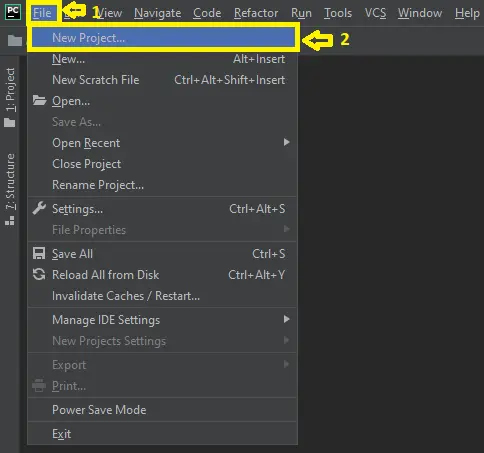
First , open “pycharm professional” after that click “file” and click “new project”.

- Step 2: Choose Django.
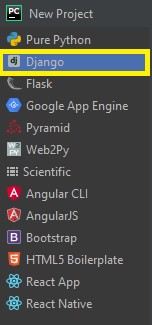
Next, after click “new project“, choose “Django” and click.

- Step 3: Select file location.
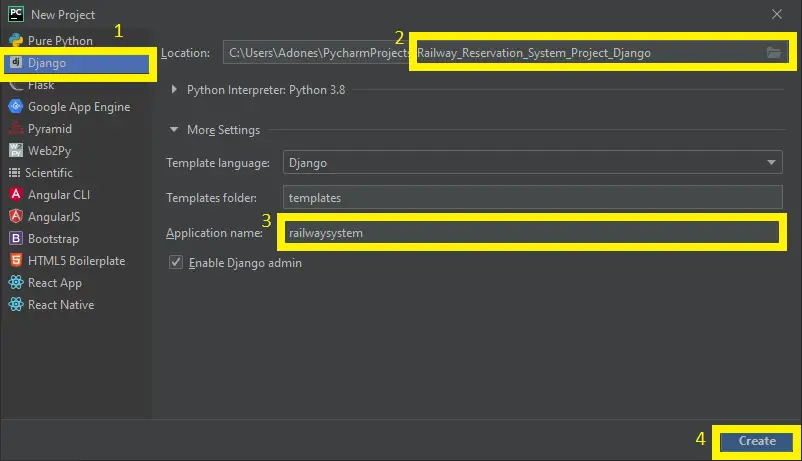
Then, select a file location wherever you want.

- Step 4: Create application name.
After that, name your application.

- Step 5: Click create.
Lastly, finish creating project by clicking “create” button.

- Step 6: Start Coding.
Finally, we will now start adding functionality to our Django Framework by adding some functional codes.


Downloadable Source Code Below.
Anyway, if you want to level up your programming knowledge, especially python, try this new article I’ve made for you Best Python Projects with source code for Beginners.
But If you’re going to focus on web development using Django, you can download here from our list of Best Django Projects with source code based on real-world projects.
How To Run The Fish Farm Management System Project?
- Step 1: Extract/unzip the file
- Step 2: Go inside the project folder, open cmd and type the following commands to install Django Framework and run the webserver:
- python manage.py migrate
- python manage.py createsuperuser
- python manage.py runserver
- Step 3: Finally, open the browser and go to http://127.0.0.1:8000/
Summary
In summary, the Fish Farm Management System Django with Source Code can be useful to students or professional who wants to learn python programming language.
This project can also be modified to fit your personal requirements. Hope this project will help you to improve your skills. Happy Coding!
Inquiries
If you have any questions or suggestions about Fish Farm Management System Project in Django with Source Code, please feel free to leave a comment below.
Technology stack and requirements
To run this Python project on your development machine, you need:
- Python 3.10 or higher. Download from python.org or install via Anaconda if you prefer bundled packages.
- pip package manager. Comes with Python. Used to install project dependencies from requirements.txt.
- Virtual environment. Use venv or conda to isolate project dependencies from your global Python install.
- VS Code or PyCharm. Free code editors with Python syntax highlighting, IntelliSense, and debugging.
- Git. For version control and cloning source code repositories.
Installing the source code
- Download or clone the repository. Get the ZIP archive from the download link on this page and extract it.
- Create a virtual environment. Open a terminal in the project folder and run: python -m venv venv, then activate it (venv\Scripts\activate on Windows or source venv/bin/activate on Mac/Linux).
- Install dependencies. Run pip install -r requirements.txt to install all libraries the project needs.
- Configure environment variables. If the project uses API keys (OpenAI, Anthropic, database), create a .env file and set the required keys.
- Run the project. Follow the run command in the README (usually python main.py or streamlit run app.py).
Using this project for your BSIT capstone
- Chapter 1 (Introduction). Discuss the real-world problem this system solves. Cite Philippine or international use cases where the manual process could be automated.
- Chapter 2 (RRL). Compare your project against 5-10 similar published works. Cite ACM, IEEE, or arXiv papers for academic-standard sources.
- Chapter 3 (Methodology). Document the model architecture, training data, hyperparameters, and evaluation metrics used.
- Chapter 4 (Results). Report accuracy, precision, recall, F1-score, and confusion matrix. Screenshot the running app on real inputs.
- Chapter 5 (Conclusion). Identify features for Version 2: better model, larger dataset, mobile deployment, or REST API.
Modules typical of Fish Farm Management System Project in Django Source Code
- Core Python logic. Main functions implementing the business logic of the system.
- Data storage. SQLite for simple projects, PostgreSQL or MongoDB for larger data.
- User interface. Tkinter for desktop, Streamlit for data dashboards, or Flask/FastAPI for web.
- Input validation. Type checking and range validation before processing user data.
- Reports. CSV or PDF export using pandas.to_csv() or ReportLab.
- Testing. pytest unit tests covering core functions.
Common enhancements for capstone review
- Add REST API. Convert desktop app to FastAPI service for mobile or web front-ends.
- Multi-user support. Add login, roles, and per-user data isolation.
- Cloud deployment. Deploy to Render, Railway, or Fly.io for public access.
- Docker containerization. Package the app in Docker for portable deployment.
Official documentation
Frequently Asked Questions
How does this Django dairy, poultry, or fish farm management system work?
Inventory (livestock, crops, feed, supplies), production tracking (daily egg/milk/yield), expenses, sales, reports. Foundation for agribusiness capstone.
What Django and Python versions does this project require?
Most projects in this batch run on Django 4.x or 5.x with Python 3.8+. A few older projects need Django 3.2 with Python 3.7. Check the requirements.txt file for exact versions. To run any: install Python, create a virtualenv (python -m venv venv), activate it, pip install -r requirements.txt, run python manage.py migrate, then python manage.py runserver.
How do I set up the database for this Django project?
Most projects use SQLite (zero setup, auto-creates db.sqlite3 in project root on first migrate). For projects using MySQL or PostgreSQL: install the database server, create an empty database, edit settings.py DATABASES[‘default’] with your credentials, run python manage.py migrate. For sample data: python manage.py loaddata fixtures.json (if a fixture file is included) or create a superuser via python manage.py createsuperuser.
Can I use this Django project for a BSIT capstone or thesis?
Yes, but extend it. A bare CRUD app is too narrow for full capstone scope. Add: user roles via Django Groups, dashboards (Chart.js + AJAX endpoints), PDF exports (ReportLab or WeasyPrint), email notifications (Django send_mail), real domain extension (analytics, audit log, multi-branch). Pair with Chapter 1-5 documentation matching your panel’s rubric.
Why am I getting ModuleNotFoundError, OperationalError, or ‘No such table’ errors?
Three common Django startup issues: (1) ModuleNotFoundError: virtualenv not activated OR pip install -r requirements.txt skipped. (2) OperationalError: database credentials in settings.py don’t match your local MySQL/PostgreSQL. (3) ‘No such table’: you skipped python manage.py migrate. Also: if settings.py imports fail, check Python version compatibility (Django 5 needs Python 3.10+).
Where can I find more Django projects with source code?
Browse the Django Projects hub for the full library. For broader Python capstones see Python Projects (Tkinter desktop, Pygame games, OpenCV vision, ML). For PHP MVC alternatives see Laravel Projects. For BSIT capstone idea lists see 150 Best Capstone Project Ideas.

Adones Evangelista
Programmer & Technical Writer at PIES IT Solution
Adones Evangelista is a programmer and writer at PIES IT Solution, author of over 900 tutorials and error-fix guides at itsourcecode.com. Specializes in JavaScript, Django, Laravel, and Python error debugging covering ValueError, TypeError, AttributeError, ModuleNotFoundError, and RuntimeError, plus C/C++ and PHP capstone projects for BSIT students.
Expertise: JavaScript · Python · Django · Laravel · Error Debugging · C/C++
· View all posts by Adones Evangelista →
please if you have the documentation for this project attach it on my email adress
So far we don’t have the documentation of this project
Nice project i like it. AM i allow to build ontop of this and add some advanced features
Yes, you can add some features for that
we are unable to run the project
what is the error?