
The Dice Game In Python is a fully functional console based application project that includes all of the components that IT students and computer-related courses will need for their college projects or for leisure time purposes.
I’ve written a simple Python program that shows how some important basic ideas in computer programming work.
The program pretends that two people are taking turns rolling a 6-sided die and keeping score. It uses the three most basic ways to control a program: sequence, selection, and iteration.
This Python Dice Game Code is beneficial for practicing Java development and gaining new skills. This project is quite useful, and the concept and logic are simple to grasp.
The source code is open source and is free to use. Simply scroll down and click the download button.
Table of contents
- Watch These Related Project Snakes And Ladders Game In Python From Start To Finish!
- What Is Dice Game In Python ?
- What Are The Rules Of The Dice Game?
- How To Create A Dice Game In Python?
- Dice Game In Python : Project Output
- About the Project : Dice Game In Python With Source Code
- Dice Game In Python : Project Details And Technology
- Dice Game In Python : Steps on how to run to run the project
- Download Source Code below!
- Summary
- Related Articles
- Inquiries
Watch These Related Project Snakes And Ladders Game In Python From Start To Finish!
What Is Dice Game In Python?
The Dice Roll Game In Python are games that use one or more dice as the main or only part of the game, usually as a way to pick a winner.
What Are The Rules Of The Dice Game?
This Dice Rolling Game In Python each player rolls two dice and writes down the number with the highest value that can be made from the two numbers.
If a player rolls a 6 and a 1, for instance, they would write “61.” The next player throws the dice and tries to get a higher number. The person who has the highest number at the end of a round gets a point.
How To Create A Dice Game In Python?
Let’s take a look at the Python source code for Dice Game.
import random
import time

# Global variable
roll_again = "yes"

while roll_again == "yes" or roll_again == "y":
  print("Rolling the dice...")
  # make a delay of 1 second
  time.sleep(1)
  # create a random number b/w 1 to 6
  dice = random.randint(1, 6)
  # print the number
  print("Dice: ", dice)
  # ask the user to roll_again or not
  roll_again = input("Do you want to roll again? (yes/y)")
  # if the user entered "yes" or "y", the loop continues

# else, if the user entered anything besides "yes" or "y", the loop breaks and game ends
print("You ended the game!")
Dice Game In Python : Project Output
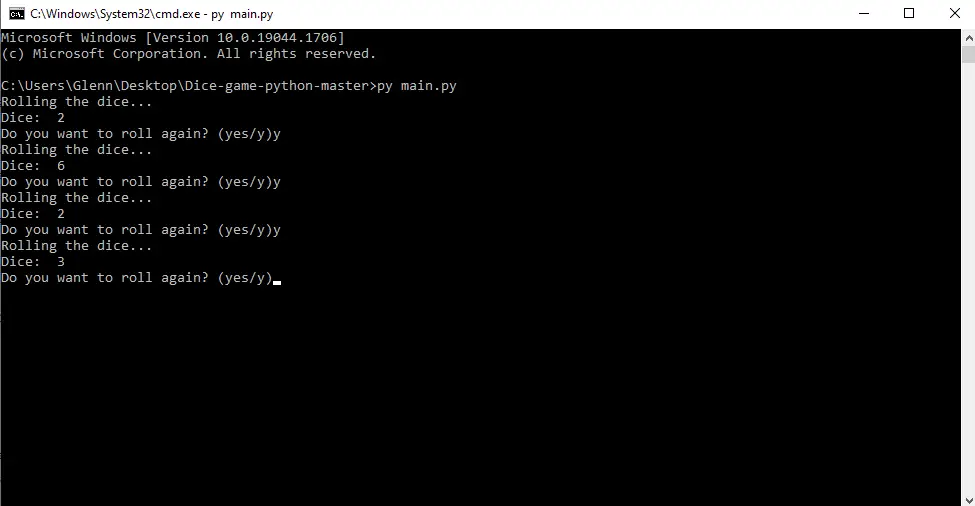
About the Project : Dice Game In Python With Source Code
The Dice Game In Python is a simple console based program built with the programming language Python. With the Python programming language, we can also make very interesting games.
One of these games is Dice Game. The project system file has both a Python script and resource files. The game’s graphics are smooth, and it’s easy to figure out how to play.
This Dice Game Program In Java includes a tutorial and a code development guide. This is a simple and easy-to-understand learning project.
Since the project is open source, you can download the zip file and change it to fit your needs. You can also change this project to fit your needs and make a great advanced-level project out of it.
Dice Game In Python : Project Details And Technology
| Project Name | Dice Game In Python |
| Abstract | This Dice Game In Python is a good fundamental project to use if you want to learn Python or use it to make your own project. This task is one of the most important things you’ll have to do on your way to becoming a Python developer. |
| Language Used | Python |
| IDE Used | PyCharm 2021 3.3 |
| Type | Console Based Application |
| Writer | Glenn Magada Azuelo |
To start executing this Dice Game, make sure you have PyCharm IDE installed in your computer.
By the way if you are new to python programming and you don’t know what would be the the Python IDE to use, I have here a list of Best Python IDE for Windows, Linux, Mac OS that will suit for you. I also have here How to Download and Install Latest Version of Python on Windows.
Dice Game In Python : Steps on how to run to run the project
Time needed: 5 minutes
These are the steps on how to run Dice Game In Python
- Step 1: Download source code.
First, download the source code given below.

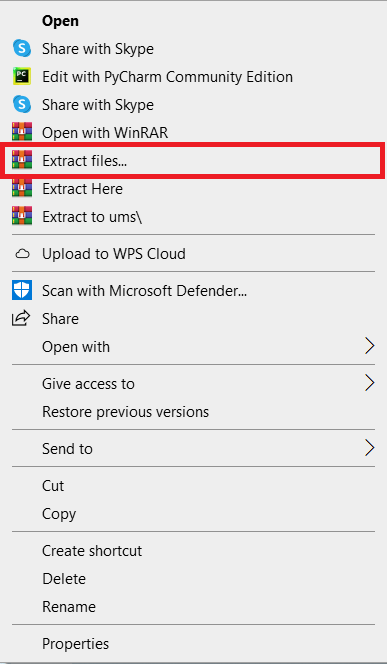
- Step 2: Extract file.
Next, after you finished download the source code, extract the zip file.

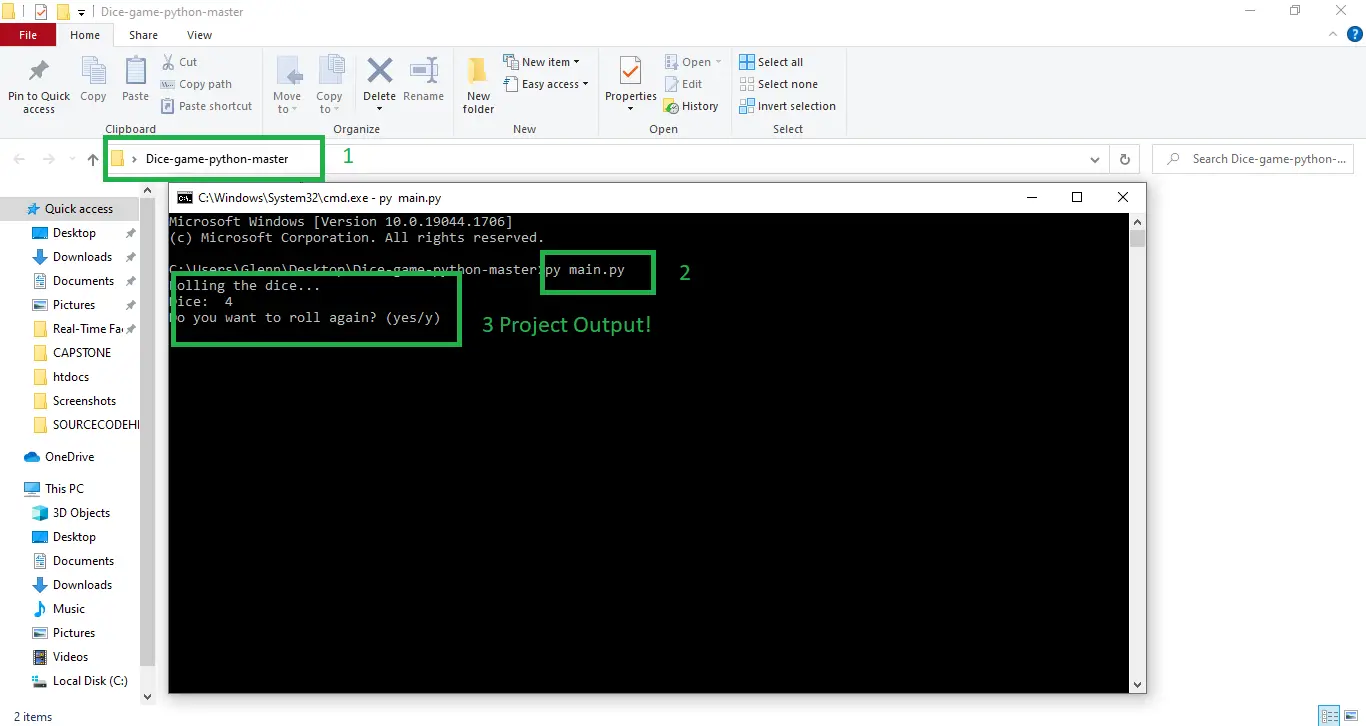
- Step 3: Open Project Path and Open CMD (Command Prompt).
In order for you to run the project, you just need to open the project path and type CMD. The first thing you need to do is type py main.py in the command prompt. After that, just wait for a few seconds to load the system.


Download Source Code below!
Summary
This Dice Game In Python is a quick and easy Python project for beginners and intermediates alike, and it broadens knowledge of Python applications.
Finally, this entire Python project with free source code is an absolute project and a valuable means for users to learn and explore more about it.
Related Articles
- Sales Management System Project in Python with Source Code
- Time Table Management System Project in Python with Source Code
- Cloth Store Management System Project in Python with Source Code
- Pharmacy Management System Project in Python with Source Code
- Fees Management System Project in Python with Source Code
Inquiries
If you have any questions or suggestions about the article please feel free to leave a comment below.
Official documentation
Frequently Asked Questions
How does this Python Dice game work?
Click the Roll button (or press Spacebar) to roll one or two dice. The code uses random.randint(1, 6) to generate each face. Dice images are rendered from 6 separate PNG files corresponding to each face value. Common extension for capstone: change to a 2-player roll-and-track-score game (Yahtzee-style scoring), or build a craps-style betting layer for a more complex demo.
What Python version do I need to run this game?
Python 3.8 or newer works. We recommend Python 3.11 or 3.12 because Pygame ships pre-built wheels for those versions (faster pip install, no compilation errors). Python 3.13 may need a slightly older Pygame release because some wheels lag the latest CPython. Verify your version with python –version on Windows or python3 –version on Mac/Linux.
How do I install Pygame for this project?
Run pip install pygame in your terminal (Windows: open Command Prompt, Mac/Linux: open Terminal). On Windows, if pip is not recognized, try python -m pip install pygame instead. On Linux, you may need sudo apt install python3-pygame if pip fails. Verify with python -c “import pygame; print(pygame.version.ver)”.
Can I use this Python game as my BSIT capstone project?
On its own, no, most Philippine BSIT panels expect a full system with users, data, reports, and a real-world problem. A single Pygame game is too narrow for capstone scope. BUT, you can use this game as ONE module inside a larger capstone (e.g. a gamified learning system, a math practice tool for elementary students with this game as the reward layer, or an arcade-style POS for an internet cafe). Pair the game with a Django backend, a database, and analytics for a defensible capstone.
Can I package this game as a standalone .exe to distribute?
Yes, use PyInstaller. Run pip install pyinstaller then pyinstaller –onefile –windowed your_game.py from the project folder. PyInstaller bundles Python and Pygame into a single .exe (Windows) or .app (Mac) that runs without Python installed on the target machine. Include asset files (images, sounds) with –add-data “assets;assets”. Output goes to the dist/ folder.
Where do I get help if the game does not run?
Check the top 3 most common failures: (1) Pygame is not installed correctly, re-run pip install pygame. (2) The game cannot find an asset file (image/sound), make sure you run python from the project folder so relative paths resolve. (3) Wrong Python version, this code expects Python 3.8+; older Python 2.x or 3.6 raises syntax errors. If you still hit a wall, drop a comment on this article with the exact error message, our team monitors comments daily.

Glenn Azuelo
Programmer & Technical Writer at PIES IT Solution
Glenn Azuelo is a programmer and writer at PIES IT Solution, author of 40+ PHP tutorials, Java capstone projects, and Python game guides at itsourcecode.com. Specializes in PHP built-in functions (string manipulation, arrays, filesystem, magic methods), Java Windows Forms projects for BSIT capstone (chat application, POS, faculty management, memory game), and Python game programming with Pygame (chess, blackjack, dice).
Expertise: PHP · PHP Tutorials · PHP Built-in Functions · PHP String Functions · PHP Array Functions · PHP Magic Methods · Java · Java Swing · Windows Forms · Python · Pygame · Capstone Projects · View all posts by Glenn Azuelo →