
A data flow diagram (DFD) for a Point of Sale (POS) system maps how transactions, inventory, and customer data move between the cashier, manager, customer, and supplier. Panel reviewers in 2026 expect a POS DFD to include current-year features like contactless payment, e-receipt via email or SMS, and real-time inventory sync. This guide covers the three-level DFD structure with defense-ready details for BSIT capstone projects.
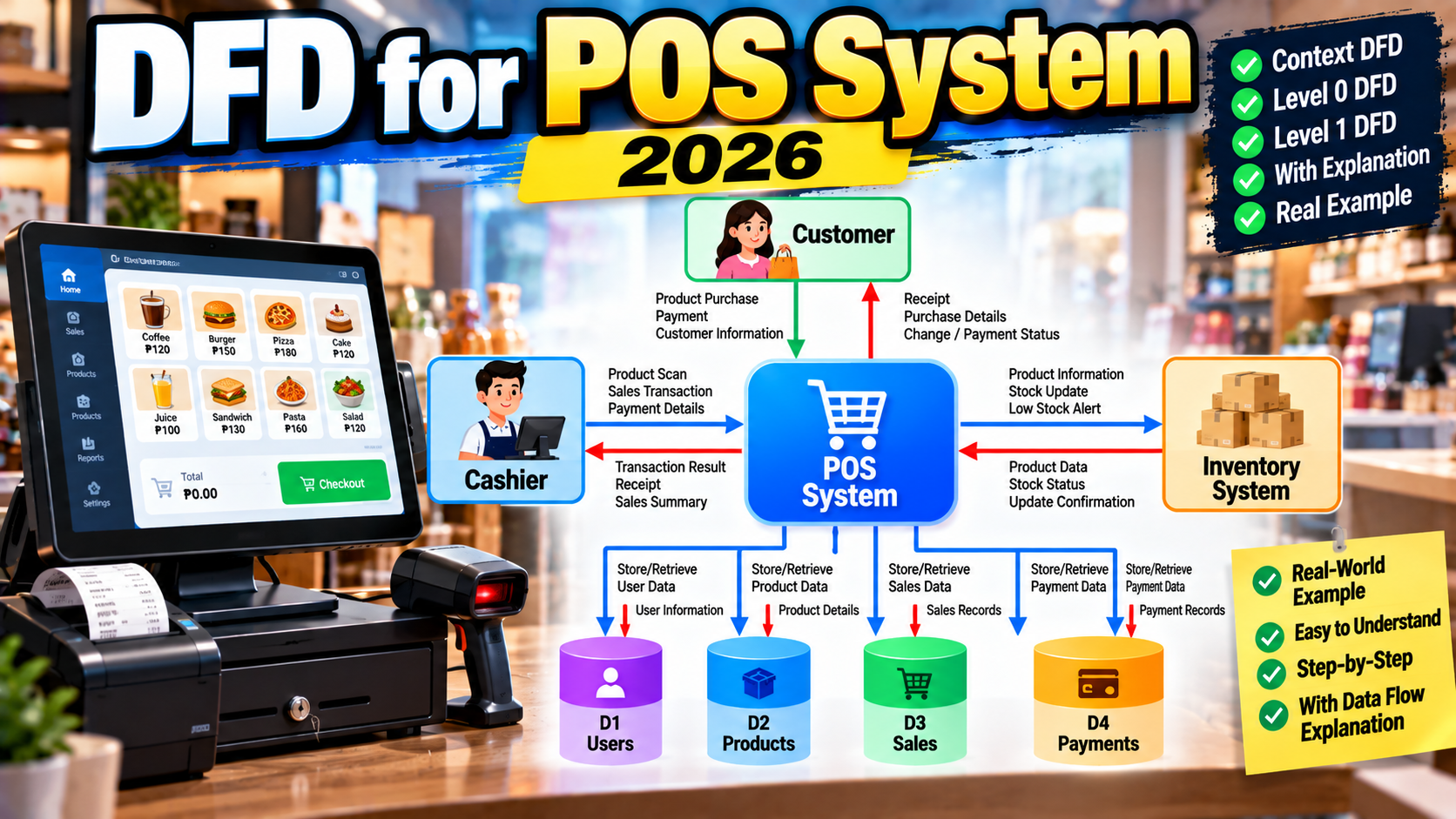
Quick 2026 verdict
A defensible POS DFD in 2026 has 4-5 external entities (Cashier, Manager, Customer, Supplier, Payment Terminal/Gateway), 7-9 processes at Level 1 (Login, Scan/Add Items, Compute Total, Process Payment, Issue Receipt, Adjust Inventory, Handle Returns, Generate Reports, Manage Suppliers), and 6-8 data stores. Add contactless payment support and e-receipt flow to look current-year.
Why POS system DFDs matter in 2026
Point of Sale systems remain one of the top BSIT capstone topics because every business a student can visit uses one. Sari-sari store, drugstore, grocery, restaurant, salon, hardware, laundry: each is a valid POS capstone subject. The DFD is the artifact that proves the student understands transaction data flow, not just the code.
Want to customize this diagram for your capstone?
Open the Point of Sale (POS) System template in CapstoneUML. Drag entities, rename processes, add data flows, then export as PNG, SVG, PowerPoint, or PDF for your Chapter 3 documentation.
Panels in 2026 are stricter than in 2020 about three things: contactless payment support, inventory synchronization with real-time stock adjustments, and receipt delivery (e-receipt to email or SMS in addition to printed paper). A POS DFD missing any of these looks like a 2018 template.
Level 0 (context diagram)
Level 0 represents the entire POS system as one process, connected to all external entities.
Customer -----> [POS System] <----- Cashier
                     ^                 ^
                     |                 |
              Payment Terminal      Manager
                     |                 |
                     v                 v
                                   Supplier
External entities for a 2026 POS DFD:
- Cashier: main user, scans items, enters manual codes, processes payment, prints or emails receipt
- Customer: presents items to buy, provides payment, receives receipt, may provide loyalty or contact information
- Manager: reviews daily sales reports, manages product prices, sets promotions, handles voids and refunds requiring approval
- Payment Terminal / Gateway: hardware for card, GCash QR, contactless; or software for e-wallet integration
- Supplier: sends restock notifications, receives purchase orders, updates delivery status
Level 1 (main process decomposition)
Level 1 expands the POS System process into 7-9 sub-processes:
- 1.0 Login Cashier: input from Cashier (username, PIN); reads and validates against
D1: Users - 2.0 Scan / Add Items: reads product data from
D2: Productsusing barcode or manual SKU; adds toD3: Transactionsin progress - 3.0 Apply Discount / Loyalty: optional; reads from
D4: PromotionsandD5: Loyalty; adjusts transaction total - 4.0 Compute Total: aggregates transaction items, adds VAT (12% in Philippines), computes final amount
- 5.0 Process Payment: sends total to Payment Terminal; supports cash, card, GCash QR, contactless; receives confirmation; writes to
D6: Payments - 6.0 Issue Receipt: prints paper receipt to hardware printer; optionally sends e-receipt via SMS or email to Customer
- 7.0 Adjust Inventory: decrements stock in
D7: Inventorybased on transaction; triggers low-stock alert if threshold hit - 8.0 Handle Returns / Voids: Manager-authorized process; reads original transaction from
D3; issues refund via Payment Gateway; adjusts inventory back - 9.0 Generate Reports: Manager reads sales, inventory, and cashier performance reports from
D3, D6, D7 - 10.0 Manage Suppliers: Manager triggers purchase order to Supplier when stock hits reorder level; updates
D8: SuppliersandD9: PurchaseOrders
Data stores:
D1: Users(cashier or manager credentials, roles, hashed passwords)D2: Products(SKU, name, price, category, VAT-inclusive flag, image, current stock link)D3: Transactions(transaction ID, cashier ID, timestamp, item list, subtotal, VAT, total)D4: Promotions(promo ID, product SKU or category, discount percent or fixed amount, validity dates)D5: Loyalty(customer ID, contact, points balance, membership tier)D6: Payments(payment ID, transaction ID, method, amount, reference number, status)D7: Inventory(SKU, current stock, reorder threshold, last-restock date, supplier ID)D8: Suppliers(supplier ID, name, contact, product categories supplied, lead time)D9: PurchaseOrders(PO ID, supplier ID, items, order date, expected delivery, status)
Level 2 (focused sub-process zoom)
Pick 2-3 of the most complex Level 1 processes for Level 2 decomposition. The three that typically score highest in POS defense:
- 5.0 Process Payment expands into 5.1 Determine Payment Method, 5.2 Communicate with Terminal, 5.3 Handle Approval or Decline, 5.4 Record Payment, 5.5 Trigger Receipt Generation
- 7.0 Adjust Inventory expands into 7.1 Decrement Item Stock, 7.2 Check Reorder Threshold, 7.3 Flag Low Stock Alert, 7.4 Notify Manager, 7.5 Auto-generate Purchase Order (optional)
- 8.0 Handle Returns / Voids expands into 8.1 Verify Transaction Eligibility, 8.2 Get Manager Authorization, 8.3 Process Refund, 8.4 Restock Item, 8.5 Log Return Reason
2026 features every POS DFD should include
- Contactless payment (QR code and tap-to-pay). Show at least GCash QR and one bank tap-to-pay option in the Payment Terminal entity. Cash-only POS looks dated in 2026.
- E-receipt via email or SMS. Include a data flow from Issue Receipt to Customer via email or SMS gateway (Semaphore, Twilio). Reduces paper waste and gives the project a modern-business feel.
- Real-time inventory sync. Adjust Inventory must decrement stock immediately at transaction close, not overnight batch. Panels ask about race conditions when two cashiers sell the last item at the same time.
- Loyalty points integration. Even a simple stamp-card equivalent (buy 10, get 1 free) counts. Show the Loyalty data store and the Apply Discount / Loyalty process.
- Manager approval flow for voids and refunds. Cashier cannot self-void. Show an approval data flow from Handle Returns to Manager.
- VAT inclusion. Compute Total must apply VAT correctly (12% in Philippines, VAT-inclusive vs VAT-exclusive pricing). Panels sometimes ask for a small worked example on the board.
- Data Privacy Act notation on Loyalty and Users stores. If you capture customer name, contact, or email for loyalty, add the RA 10173 consent and retention note.
Common Level 1 mistakes reviewers catch
- Cash-only Payment Terminal with no contactless or e-wallet options
- No Adjust Inventory process (stock decrement missing means the DFD does not connect to real business impact)
- Reports process shown but not connected to any data store
- No Returns / Voids process (every POS has returns; missing it costs points)
- Manager entity absent (a POS with no manager oversight is not realistic)
- Supplier entity not present but the paper claims automatic reorder
- Loyalty data store present but no Apply Loyalty process reads from it
Comparison: types of POS a capstone can target
| POS Type | DFD Focus | Panel Difficulty |
|---|---|---|
| Sari-sari / small retail | Basic transaction, inventory, loyalty | Easy |
| Restaurant / food service | Order taking, kitchen display, table numbers | Medium |
| Drugstore / pharmacy | Prescription verification, batch tracking, expiry | Hard |
| Multi-branch retail | Central inventory, branch-level transactions, stock transfer | Hard |
| Salon / service business | Appointment linkage, service (not product) items, tips | Medium |
Frequently Asked Questions
Do I need a separate DFD level for each cashier action?
No. One Level 1 diagram covers all cashier actions as separate sub-processes. Do not create a Level 2 for “cashier scans item” because that is UI logic, not data flow. Save Level 2 for genuinely complex data flows like Payment or Inventory adjustment.
Should e-receipts show as a data flow to Customer directly?
Yes. Show a data flow labeled “e-receipt” from Issue Receipt process directly to Customer, via SMS gateway or email service if you want to be more specific. This is a 2026 must-have; paper-only POS DFDs look 5 years out of date.
How do I show cash drawer opening in the DFD?
You do not. Cash drawer opening is hardware trigger logic, not data flow. If you must include it, mention it in the technical documentation Chapter 3 alongside the DFD, not inside the DFD itself.
What if my POS has no supplier integration?
Then omit the Supplier external entity and the Manage Suppliers process. Do not include an entity or process for a feature you did not implement. Reviewers cross-check the DFD against the actual system demo and flag mismatches.
Is GCash QR the same as contactless payment for DFD purposes?
Both are contactless in the sense of no card swipe, but they follow different flows. GCash QR is a scan-to-pay flow (customer scans a QR on the cashier’s terminal); tap-to-pay is a NFC card or watch flow. Show both as sub-options in the Process Payment sub-tree at Level 2 if your project supports both.
How detailed should the reports process be?
At Level 1, show Generate Reports as a single process with data flows from Transactions, Payments, and Inventory data stores, and an output data flow to Manager. If reports are a major differentiator in your project (analytics dashboard, predictions), zoom into it at Level 2 to show sub-reports and computation steps.
Related UML tutorials
- DFD for E-commerce Website (Levels 0, 1, 2)
- DFD for Library Management System Data Flow Diagram
- DFD for Hospital Management System Data Flow Diagram
- Class Diagram for Inventory Management System
Official documentation
Official documentation

Mary Grace G. Patulada
Programmer & Technical Writer at PIES IT Solution
Mary Grace G. Patulada (pen name ‘Nym’) is a programmer and writer at PIES IT Solution with a BSIT background from Carlos Hilado Memorial State College, Binalbagan Campus. Authored 370+ UML diagram tutorials and capstone documentation guides at itsourcecode.com. Specializes in UML (class, use case, activity, sequence, component, deployment), DFD, and ER diagrams for BSIT capstone projects.
Expertise: UML Diagrams, DFD, ER Diagrams, Use Case Diagrams, Activity Diagrams, Capstone Documentation, PHP · View all posts by Mary Grace G. Patulada →
Skip the redraw: grab the POS template
All three diagrams (Level 0, Level 1, Level 2) are ready to drag, rename, and export as PNG, SVG, PowerPoint, or PDF for your Chapter 3 documentation. Free preview, no card required.