
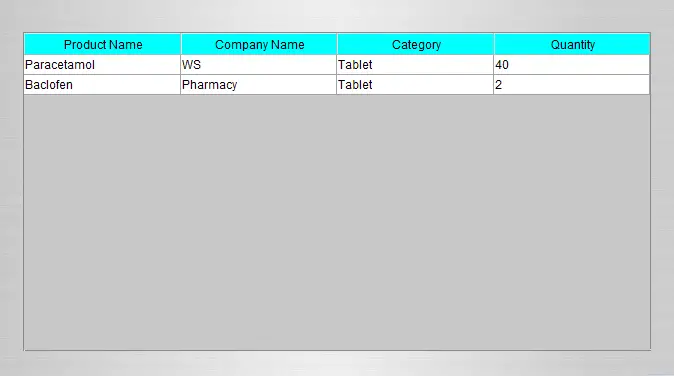
Change the background color of table header in table using Java Tutorial
This tutorial is all about Change the background color of table header in table using Java Tutorial. In this tutorial you will learn how to Change the background color of table header in table using Java Tutorial.
Sometimes you need to change the background color of your table header in order to make your table more presentable and user friendly.
It helps the users to better understand your system and to be more attractive. Please follow all the steps below to complete this tutorial.
Change the background color of table header in table using Java Tutorial steps
First of all, you must create your project by clicking File at the top left of your netbeans and the new project. You can name you project whatever you want.
After creating project, the next is to create your own jframe form by right clicking the Source Packages and then clicking New JFrame Form, Drag one table and copy and paste the code below:
[java]

try{

String sql = "SELECT product_name as 'Product Name',company_name as 'Company Name',product_category as 'Category',quantity as 'Quantity' FROM products";

pst = conn.prepareStatement(sql);

rs = pst.executeQuery();

while(rs.next()){

tableName.setModel(DbUtils.resultSetToTableModel(rs));

}


//code to change the background of a tableheader

JTableHeader theader = tableName.getTableHeader();

theader.setBackground(Color.CYAN);


}catch(Exception e){

JOptionPane.showMessageDialog(null, e);

}

[/java]
Take note that tableName is the variable of the table
Then you’re done, run your project and see if it works.
About The Change the background color of table header in table In Java
<figure class="wp-block-table is-style-stripes">
<table>
<tbody>
<tr>
<td><strong>Project Name:</strong></td>
<td>Change the background color of table header in table</td>
</tr>
<tr>
<td><strong>Language/s Used:</strong></td>
<td>JAVA</td>
</tr>
<tr>
<td><strong>Database:</strong></td>
<td>MySQL</td>
</tr>
<tr>
<td><strong>Type:</strong></td>
<td>Desktop Application</td>
</tr>
<tr>
<td><strong>Developer:</strong></td>
<td>IT SOURCECODE</td>
</tr>
<tr>
<td><strong>Updates:</strong></td>
<td>0</td>
</tr>
</tbody>
</table><figcaption><em><strong>Change the background color of table header in table In Java</strong>- Project Information</em></figcaption></figure>
For questions or any other concerns or thesis/capstone creation with documentation, you can contact me through the following:
E-Mail: ryansalem221996@gmail.com
Facebook: facebook.com/RyyanSalem
Contact No.: +639098911050
Ryan A. Salem
BSIT Graduate, soon to be MIT.
Java Developer / System Developer
Related topic(s) that you make like:
1.) Automated Payroll System using Java
2.) How to resize the column in table using Java
Project timeline for BSIT capstone
Typical BSIT teams complete a Java project of this scope in one full academic semester. Suggested timeline:
- Weeks 1-2. Requirements gathering, interview with target user, Chapter 1 documentation.
- Weeks 3-4. Design: use case, DFD, class diagram, ER diagram, mockup screens.
- Weeks 5-8. Core development: database in MySQL, main JFrames in NetBeans, CRUD operations.
- Weeks 9-11. Reports, printing, user roles. Test with sample data.
- Weeks 12-13. Documentation: Chapter 3-5 with screenshots.
- Week 14. Mock defense with adviser, corrections, final panel.
Panel questions this project typically gets
- Why did you choose Java over other languages? Prepare an answer about Java’s ecosystem (Swing/JavaFX for UI, JDBC for DB, Spring for modernization).
- How does the system handle concurrent access? Explain JDBC transactions, connection pooling, and locking.
- What is your backup and disaster recovery plan? Document backup script + demo restore.
- How would you deploy this in production? JAR bundling, Windows installer via Launch4j, or Spring Boot cloud deployment.
Deployment options after the defense
- Standalone JAR. Package with dependencies via Maven shade plugin, distribute as a single .jar file.
- Windows installer. Wrap the JAR with Launch4j + NSIS for a proper .exe installer.
- Spring Boot web rewrite. Migrate to Spring Boot + Thymeleaf for browser-based deployment.
- Docker container. Package with Dockerfile for portable deployment on any Docker-capable host.
Common defense pitfalls to avoid
- Empty database. Pre-populate 20-50 realistic records for meaningful demos.
- Missing error handling. Wrap SQL calls in try-catch with user-friendly messages.
- SQL injection vulnerability. Use PreparedStatement everywhere, never string-concatenate queries.
- No printable output. Add JasperReports for panel-expected printable reports.
Where to get help while building
- itsourcecode.com Java projects. Browse similar projects for patterns and code you can reuse.
- Oracle Java documentation. Canonical reference for Java SE syntax and standard library classes.
- Stack Overflow Java tag. Fastest place to get unstuck on a specific error message.
- Spring documentation. If migrating to Spring Boot, the reference guide covers auto-configuration and beans.
- Your adviser. Regular check-ins keep the project on track and catch scope drift early.
Common java build tools
- Maven. Dependency management + build automation via pom.xml.
- Gradle. Alternative to Maven with Groovy or Kotlin DSL; faster incremental builds.
- Ant. Legacy build tool still used in some enterprise projects.
- NetBeans built-in. Handles compilation and JAR packaging automatically.
Testing your Java project
- JUnit 5. Standard unit testing framework. Include as a Maven dependency and write @Test methods.
- Mockito. Mock external dependencies (database, network) for isolated testing.
- Integration tests. Test the full flow from JFrame to database and back.
- UI tests. Use AssertJ Swing or TestFX for automated UI testing.
Official documentation
Frequently Asked Questions
How does this Java project work?
Built with Java Swing (NetBeans IDE) and MySQL backend via JDBC. Standard structure: JFrame designer to event handlers to DAO layer to MySQL. Login form for auth. Ready to extend for BSIT capstone scope.
What Java JDK and MySQL versions does this project require?
Most projects in this batch use Java JDK 8 or 11 with MySQL 5.7+ or MariaDB 10+. To run: install JDK (Adoptium / Oracle), install MySQL Server + MySQL Workbench, install NetBeans IDE (15+ supports modern JDK), open the project (.zip extracted folder), right-click + Open Project, add MySQL JDBC driver to Project Libraries, run.
How do I set up the database for this Java project?
Open MySQL Workbench (or phpMyAdmin if you have XAMPP), create a new empty database with the name specified in the project. Import the included .sql file via Server, Data Import in Workbench (or Import tab in phpMyAdmin). Update the connection class (usually DBConnection.java or DatabaseConnection.java) with your MySQL host, port, username, password, and database name.
Can I use this Java project for a BSIT capstone or thesis?
Yes, Java is one of the most accepted languages by Philippine BSIT panels. Extend it: add role-based access (admin/staff/customer login redirect), JasperReports printable reports, dashboards with JFreeChart, audit log, multi-branch support. Pair with Chapter 1-5 documentation matching your panel’s rubric.
Why am I getting ‘ClassNotFoundException: com.mysql.jdbc.Driver’ or ‘No suitable driver’?
Three common Java JDBC issues: (1) MySQL JDBC driver JAR not added to project Libraries. Right-click Project, Properties, Libraries, Add JAR/Folder, select mysql-connector-java-X.X.X.jar. (2) Wrong driver class name. Modern (8.0+) uses com.mysql.cj.jdbc.Driver, legacy (5.x) uses com.mysql.jdbc.Driver. (3) Connection URL missing serverTimezone parameter, add ?serverTimezone=UTC to the URL.
Where can I find more Java projects with source code?
Browse the Java Projects hub for the full library (120+ Java desktop systems). For modern Java web alternatives consider Spring Boot. For other desktop stacks see VB.NET Projects or C# Projects. For BSIT capstone idea lists see 150 Best Capstone Project Ideas.