
The Memory Game In Java is a fully functional desktop application written in the Java programming language that works perfectly.
This Memory Game In Java Source Code is a foundational project for IT students and other computer-related students.
It will assist students in completing college projects and requirements.
This Memory Game Java Code is beneficial for practicing Java development and gaining new skills.
This project is quite useful, and the concept and logic are simple to grasp.
The source code is open source and is free to use. Simply scroll down and click the download button.
Table of contents
- Memory Game In Java : Project Output
- What Is Memory Game In Java?
- Benefits Of Playing Memory Games
- About the Project : Memory Game In Java With Source Code
- Memory Game In Java : Project Details And Technology
- Memory Game In Java : Steps On How To Run The Project
- Download Source Code below
- Summary
- Related Articles
- Inquiries
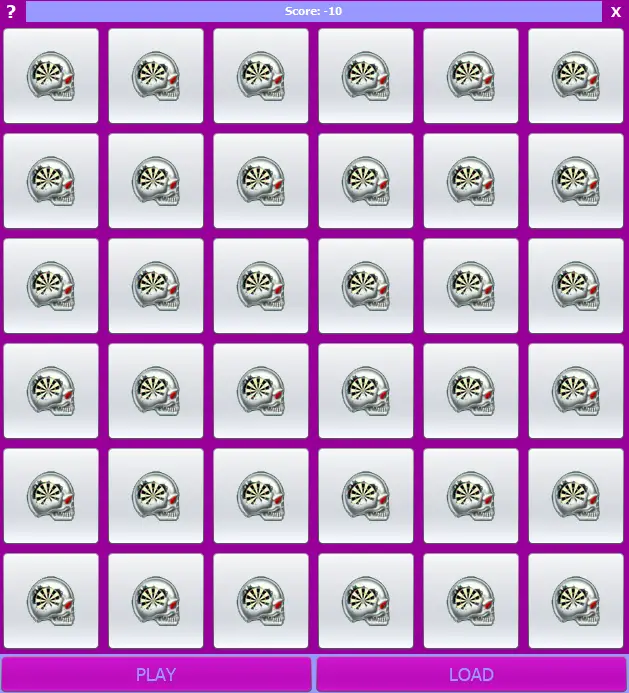
Memory Game In Java : Project Output
What Is Memory Game In Java?
The Memory Game Project In Java is a desktop card game that kids can play or for IT students’ requirements for their school.
On one side of each card, there is a picture, and each picture appears on two cards.
At the start of the game, all of the cards are face down, and each player takes a turn turning over two cards.
Benefits Of Playing Memory Games
- Playing memory games can help improve your ability to pay attention, and concentrate. Memory games give kids a chance to think critically, which helps them develop their attention to detail.
- Memory games can help you remember what you see. Children improve their ability to tell two similar things apart by playing memory games where they have to find the differences or link two similar pictures. This will make it easier for people to tell one picture from another.
- Memory games depend on your ability to remember things quickly, and the more you play them, the better you will get at this. People with good short-term memories also tend to have better long-term memories. Both are connected, and being able to move information from your short-term memory to your long-term memory will help you learn in other ways.
- Memory games give you a short-term boost, but you have to plan your moves as you go. Children can learn how important it is to think ahead and plan their next move by revealing a card and figuring out what to do next.
About the Project : Memory Game In Java With Source Code
The Memory Game In Java was made using Java programming and the NetBeans IDE (Integrated Development Environment).
This Memory games are a fun way to work out your brain and help your memory.
Just like the rest of our bodies, the brain needs to be used often to stay healthy and sharp.
Memory games are fun and help the gray matter in our brains, which helps us remember things, grow and get bigger.
Memory Game In Java: Project Details And Technology
| Project Name : | Memory Game In Java |
| Abstract : | This Memory Game In Java main purpose is to provide a leisure time activity as well as for enhancing memory and for IT students for their college requirements. |
| Language Used : | Java |
| IDE Used : | NetBeans 11.2 |
| Type : | Desktop Application |
| Developer : | Glenn Magada Azuelo |
Anyway, if you want to level up your programming knowledge, especially Java, try this new article I’ve made for you Best Java Projects With Source Code For Beginners Free Download.
To start executing a Memory Game In Java, makes sure that you have NetBeans IDE or any platform of Java installed in your computer.
Memory Game In Java: Steps On How To Run The Project
Time needed: 5 minutes
These are the steps on how to run Memory Game In Java
- Step 1: Download source code.
First, download the source code given below.

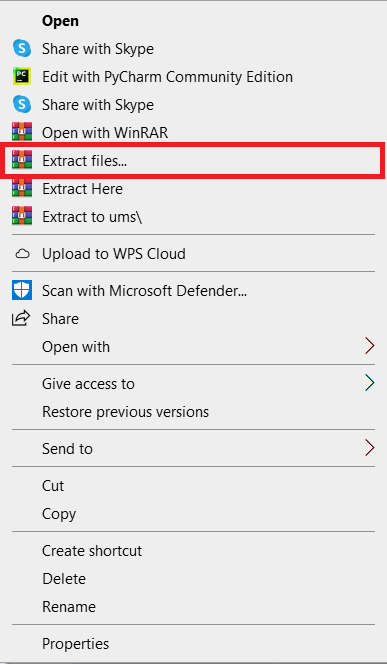
- Step 2: Extract file.
Second, after you finished download the source code, extract the zip file.

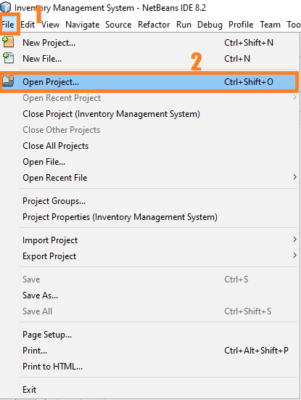
- Step 3: Click open project.
Third, open NetBeans IDE and click open project and choose your download source code.

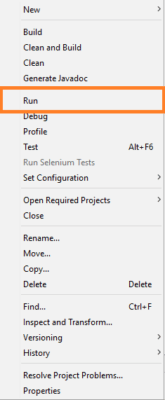
- Step 4: Run the project.
Last, right click the project folder and click run.


Download Source Code below
Summary
The Memory Game, is made entirely out of Java and the MySQL Database.
It has a Graphical User Interface (GUI) with all of the functions that stores need to improve customer satisfaction.
This article shows us how to improve our skills and logic, which is important for using the Java programming language, which is the most popular and widely used programming language in many businesses.
You can also get the source code for this simple project for free.
Related Articles
- Memory Game In Javascript With Source Code
- Chess Game In Python With Source Code
- Brick Breaker Game in Java with Source Code
- Car Racing Game Javascript Code
- Puzzle Game In Python With Source Code
Inquiries
If you have any questions or suggestions about Memory Game, please feel free to leave a comment below.
Official documentation
Frequently Asked Questions
How does this Java game work?
Built with Java Swing + Graphics2D for rendering, Timer for game loop, KeyListener / MouseListener for input. Common starter games: Tic-Tac-Toe, Snake, Tetris, Pong. Foundation BSIT mini-project for 2nd year.
What Java JDK and MySQL versions does this project require?
Most projects in this batch use Java JDK 8 or 11 with MySQL 5.7+ or MariaDB 10+. To run: install JDK (Adoptium / Oracle), install MySQL Server + MySQL Workbench, install NetBeans IDE (15+ supports modern JDK), open the project (.zip extracted folder), right-click + Open Project, add MySQL JDBC driver to Project Libraries, run.
How do I set up the database for this Java project?
Open MySQL Workbench (or phpMyAdmin if you have XAMPP), create a new empty database with the name specified in the project. Import the included .sql file via Server, Data Import in Workbench (or Import tab in phpMyAdmin). Update the connection class (usually DBConnection.java or DatabaseConnection.java) with your MySQL host, port, username, password, and database name.
Can I use this Java project for a BSIT capstone or thesis?
Yes, Java is one of the most accepted languages by Philippine BSIT panels. Extend it: add role-based access (admin/staff/customer login redirect), JasperReports printable reports, dashboards with JFreeChart, audit log, multi-branch support. Pair with Chapter 1-5 documentation matching your panel’s rubric.
Why am I getting ‘ClassNotFoundException: com.mysql.jdbc.Driver’ or ‘No suitable driver’?
Three common Java JDBC issues: (1) MySQL JDBC driver JAR not added to project Libraries. Right-click Project, Properties, Libraries, Add JAR/Folder, select mysql-connector-java-X.X.X.jar. (2) Wrong driver class name. Modern (8.0+) uses com.mysql.cj.jdbc.Driver, legacy (5.x) uses com.mysql.jdbc.Driver. (3) Connection URL missing serverTimezone parameter, add ?serverTimezone=UTC to the URL.
Where can I find more Java projects with source code?
Browse the Java Projects hub for the full library (120+ Java desktop systems). For modern Java web alternatives consider Spring Boot. For other desktop stacks see VB.NET Projects or C# Projects. For BSIT capstone idea lists see 150 Best Capstone Project Ideas.

Glenn Azuelo
Programmer & Technical Writer at PIES IT Solution
Glenn Azuelo is a programmer and writer at PIES IT Solution, author of 40+ PHP tutorials, Java capstone projects, and Python game guides at itsourcecode.com. Specializes in PHP built-in functions (string manipulation, arrays, filesystem, magic methods), Java Windows Forms projects for BSIT capstone (chat application, POS, faculty management, memory game), and Python game programming with Pygame (chess, blackjack, dice).
Expertise: PHP · PHP Tutorials · PHP Built-in Functions · PHP String Functions · PHP Array Functions · PHP Magic Methods · Java · Java Swing · Windows Forms · Python · Pygame · Capstone Projects · View all posts by Glenn Azuelo →
how do we change the photos inside the project? Loading the image using the app itself doesn’t work thank you for your help