
Change the Column in Table using Alias in Java Tutorial
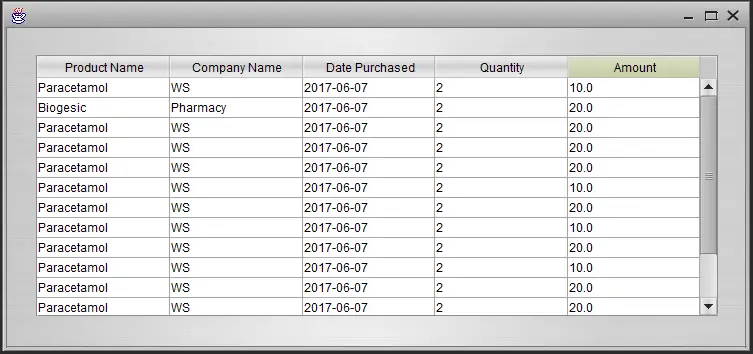
Sometimes the names of columns are so technical that make the query’s output very difficult to understand. To give a column a descriptive name, you use a column alias.
This is all about Change the Column in Table using Alias in Java Tutorial. In this tutorial you will learn how to Change the Column in Table using Alias in Java Tutorial to make it more readable. It allows you to set your own title and display in the table.
This tutorial uses table component in java and Netbeans IDE. Please follow all the steps below to complete this tutorial.
Change the Column in Table using Alias in Java Tutorial steps
First, you need to create a project by right clicking the file at the top left of the netbeans IDE and by selecting New Project you can name your project whatever you want, and then create your jframe form by right clicking the Source Packages and select New JFrame Form.
After creating the form drag a table component in your form.
And then copy paste the code below and paste it inside initComponents Function
[java]

try{

String sql = "SELECT product_name AS 'Product Name',company_name AS 'Company Name',date_of_sale AS 'Date Purchased',quantity AS 'Quantity',amount AS 'Amount' FROM sales_record";

pst = conn.prepareStatement(sql);

rs = pst.executeQuery();

if (rs.next()){

tablename.setModel(DbUtils.resultSetToTableModel(rs));

}

}catch(Exception e){

JOptionPane.showMessageDialog(null, e);

}

[/java]
Then you’re done, run your project and see if it works.
Note the AS keyword is what make the alias work, it changed the column name in order to give a much more descriptive name.
About The Change the Column in Table using Alias In Java
<figure class="wp-block-table is-style-stripes">
<table>
<tbody>
<tr>
<td><strong>Project Name:</strong></td>
<td>Change the Column in Table using Alias</td>
</tr>
<tr>
<td><strong>Language/s Used:</strong></td>
<td>JAVA</td>
</tr>
<tr>
<td><strong>Database:</strong></td>
<td>MySQL</td>
</tr>
<tr>
<td><strong>Type:</strong></td>
<td>Desktop Application</td>
</tr>
<tr>
<td><strong>Developer:</strong></td>
<td>IT SOURCECODE</td>
</tr>
<tr>
<td><strong>Updates:</strong></td>
<td>0</td>
</tr>
</tbody>
</table><figcaption><em><strong>Change the Column in Table using Alias In Java</strong>- Project Information</em></figcaption></figure>
For questions or any other concerns or thesis/capstone creation with documentation, you can contact me through the following:
E-Mail: ryansalem221996@gmail.com
Facebook: facebook.com/RyyanSalem
Contact No.: +639098911050
Ryan A. Salem
BSIT Graduate, soon to be MIT.
System Analyst / System Developer
Related topic(s) that you make like:
1.) How to use Scanner in Java Tutorial using Netbeans IDE
2.) Create Beautiful Bar Chart in Java Tutorial using Netbeans IDE
Technology stack and requirements
To run this Java project on your development machine, you need:
- Java Development Kit (JDK) 17 or higher. Download from adoptium.net (Eclipse Temurin) or oracle.com. JDK 21 LTS is recommended for new projects.
- Apache NetBeans or IntelliJ IDEA. Free IDEs with Java support, debugging, and GUI form designer.
- MySQL Server or MariaDB. Standalone install, or bundled with XAMPP for easier setup.
- MySQL Connector/J. JDBC driver JAR file included in the project’s lib folder or downloadable from dev.mysql.com.
- Git (optional). For version control if you want to extend the project.
Installing the source code
- Extract the ZIP archive to a folder outside Program Files.
- Open the project in NetBeans or IntelliJ. Choose File then Open Project and select the extracted folder.
- Import the database. Open phpMyAdmin (with XAMPP) or MySQL Workbench, create a new database, and import the .sql file from the archive.
- Update the JDBC connection string. Open the DatabaseConnection.java (or config file) and set your database host, name, user, and password.
- Add the MySQL Connector JAR to the classpath. Right-click Libraries then Add JAR, select mysql-connector-java-x.x.x.jar.
- Run the project. Press F6 (NetBeans) or Shift+F10 (IntelliJ) to run the main class.
Using this project for your BSIT capstone
- Chapter 1 (Introduction). Discuss the real-world problem this Java system solves. Cite Philippine business or academic use cases.
- Chapter 2 (RRL). Compare this project against 5-10 similar published works. Cite ACM, IEEE, or IJERT journal papers.
- Chapter 3 (Methodology). Include Use Case Diagram, DFD, ER Diagram, Class Diagram, and Sequence Diagram.
- Chapter 4 (Results). Screenshot each Swing form or JavaFX view with a caption explaining its role.
- Chapter 5 (Conclusion). Identify features for Version 2 (Spring Boot web version, REST API, mobile app).
Modules typical of Change the Column in Table using Alias
- Master data CRUD. JFrame + JTable for the primary entities the system manages.
- Transaction processing. Data entry forms with validation before saving.
- Reports. JasperReports or iText for formatted printable output.
- User management. Login with role-based permissions (Admin, Encoder, Viewer).
- Backup / restore. Export MySQL database to .sql file.
Common enhancements for capstone review
- Modernize UI. FlatLaf or Substance look-and-feel for modern appearance.
- Add REST API. Wrap business logic with Spring Boot for mobile or web front-ends.
- Docker container. Package with Dockerfile for portable deployment.
- Cloud deployment. Deploy to AWS Elastic Beanstalk or Azure App Service.
Project timeline for BSIT capstone
Typical BSIT teams complete a Java project of this scope in one full academic semester. Suggested timeline:
- Weeks 1-2. Requirements gathering, interview with target user, Chapter 1 documentation.
- Weeks 3-4. Design: use case, DFD, class diagram, ER diagram, mockup screens.
- Weeks 5-8. Core development: database in MySQL, main JFrames in NetBeans, CRUD operations.
- Weeks 9-11. Reports, printing, user roles. Test with sample data.
- Weeks 12-13. Documentation: Chapter 3-5 with screenshots.
- Week 14. Mock defense with adviser, corrections, final panel.
Panel questions this project typically gets
- Why did you choose Java over other languages? Prepare an answer about Java’s ecosystem (Swing/JavaFX for UI, JDBC for DB, Spring for modernization).
- How does the system handle concurrent access? Explain JDBC transactions, connection pooling, and locking.
- What is your backup and disaster recovery plan? Document backup script + demo restore.
- How would you deploy this in production? JAR bundling, Windows installer via Launch4j, or Spring Boot cloud deployment.
Deployment options after the defense
- Standalone JAR. Package with dependencies via Maven shade plugin, distribute as a single .jar file.
- Windows installer. Wrap the JAR with Launch4j + NSIS for a proper .exe installer.
- Spring Boot web rewrite. Migrate to Spring Boot + Thymeleaf for browser-based deployment.
- Docker container. Package with Dockerfile for portable deployment on any Docker-capable host.
Common defense pitfalls to avoid
- Empty database. Pre-populate 20-50 realistic records for meaningful demos.
- Missing error handling. Wrap SQL calls in try-catch with user-friendly messages.
- SQL injection vulnerability. Use PreparedStatement everywhere, never string-concatenate queries.
- No printable output. Add JasperReports for panel-expected printable reports.
Official documentation
Frequently Asked Questions
How does this Java project work?
Built with Java Swing (NetBeans IDE) and MySQL backend via JDBC. Standard structure: JFrame designer to event handlers to DAO layer to MySQL. Login form for auth. Ready to extend for BSIT capstone scope.
What Java JDK and MySQL versions does this project require?
Most projects in this batch use Java JDK 8 or 11 with MySQL 5.7+ or MariaDB 10+. To run: install JDK (Adoptium / Oracle), install MySQL Server + MySQL Workbench, install NetBeans IDE (15+ supports modern JDK), open the project (.zip extracted folder), right-click + Open Project, add MySQL JDBC driver to Project Libraries, run.
How do I set up the database for this Java project?
Open MySQL Workbench (or phpMyAdmin if you have XAMPP), create a new empty database with the name specified in the project. Import the included .sql file via Server, Data Import in Workbench (or Import tab in phpMyAdmin). Update the connection class (usually DBConnection.java or DatabaseConnection.java) with your MySQL host, port, username, password, and database name.
Can I use this Java project for a BSIT capstone or thesis?
Yes, Java is one of the most accepted languages by Philippine BSIT panels. Extend it: add role-based access (admin/staff/customer login redirect), JasperReports printable reports, dashboards with JFreeChart, audit log, multi-branch support. Pair with Chapter 1-5 documentation matching your panel’s rubric.
Why am I getting ‘ClassNotFoundException: com.mysql.jdbc.Driver’ or ‘No suitable driver’?
Three common Java JDBC issues: (1) MySQL JDBC driver JAR not added to project Libraries. Right-click Project, Properties, Libraries, Add JAR/Folder, select mysql-connector-java-X.X.X.jar. (2) Wrong driver class name. Modern (8.0+) uses com.mysql.cj.jdbc.Driver, legacy (5.x) uses com.mysql.jdbc.Driver. (3) Connection URL missing serverTimezone parameter, add ?serverTimezone=UTC to the URL.
Where can I find more Java projects with source code?
Browse the Java Projects hub for the full library (120+ Java desktop systems). For modern Java web alternatives consider Spring Boot. For other desktop stacks see VB.NET Projects or C# Projects. For BSIT capstone idea lists see 150 Best Capstone Project Ideas.