
What are tuples in Python?
A tuple is an ordered list of values. It is similar to a list except that each element has its own unique identifier.
Are tuples mutable in Python?
Tuples are immutable in Python, once a tuple is created, its elements cannot be modified.
This means you cannot change, add, or remove individual items within a tuple.
However, you can create a new tuple by concatenating or slicing existing tuples.
Example:
tuple1 = ("Prince", "Grace", 1999, 1998)
tuple2 = (1, 2, 3, 4, 5)
tuple3 = ('A1', 'B2', 'c3', 'D4')
Note: If you’re creating a tuple with a single element, be sure to put a comma after the element.
Similar to how the indices of Python strings start at 0, the indices of tuples can be sliced, concatenated, etc.
Python Access Value in tuple
To access values in a tuple, use the square brackets for slicing in conjunction with the index or indices to acquire the value at that index.
When it comes to accessing tuples, the index operator comes in very helpful.
Example:
tuple1 = ('Prince', 'Grace', 1999, 1998)
tuple2 = (1, 2, 3, 4, 5)

print (tuple1[3])
print (tuple2[1:4])
Output:
1998
(2, 3, 4)
Updating tuples in Python
Updating Tuples means that once you’ve defined them, you cannot modify any of their properties.
You can only add new elements to them.
Example:
tuple1 = ('Prince', 'Grace', 1999, 1998)
tuple2 = (1, 2, 3, 4, 5)
tuple3 = tuple1 + tuple2
print (tuple3)
Output:
('Prince', 'Grace', 1999, 1998, 1, 2, 3, 4, 5)Delete Element from tuple Python
Deleting tuple elements is not possible in Python, you can only use the del operator to delete the variable.
Example:
tuple1 = ['Prince', 'Grace', 1999, 1998];
print (tuple1)
del (tuple1)
print ('The output below will prompt an error')
print (tuple1)
Output:
['Prince', 'Grace', 1999, 1998]
The output below will prompt an error

Traceback (most recent call last):
NameError: name 'tuple1' is not defined. Did you mean: 'tuple'?
The exception was thrown since, after deleting the tuple, the variable tuple1 no longer exists.
Indexing, Slicing, and Matrixes
Due to the fact that tuples are sequences, Indexing, Slicing, and Matrixes operate identically for tuples and strings.
Example:
Consider the following input:
tuple1 = ('code', 'Code', 'CODE!')

print( tuple1[2] )

print( tuple1[-2] )

print( tuple1[1:] )
Output:
CODE!
Code
('Code', 'CODE!')
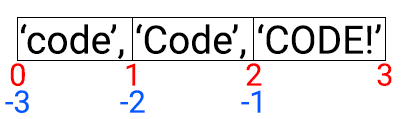
Python is different from other languages because it lets you use positive index and negative indexing. From the right, you can count the negative indices.
Below is an illustration of how the slicing works in Tuples.
No Enclosing Delimiters
In Python, there are no enclosing delimiters needed when accessing an element of a tuple.
Any comma-separated list of multiple objects written without identifying symbols ( brackets for lists, parentheses for tuples, etc.), will be treated as a tuple.
Example:
print ('Prince', 3.14, 55+6.6j, 'ITSC')Output:
Prince 3.14 (55+6.6j) ITSC
Basic Tuple Operations in Python
There are several basic tuple operators that can be performed in Python. These include adding new elements, removing existing elements, and changing the order of the elements.
Example:
print(len(('a', 'b', 'c')))

print((1, 2, 3) + (4, 5, 6))

print(('Hey!') * 4)

print(3 in (1, 2, 3))
Output:
3
(1, 2, 3, 4, 5, 6)
Hey!Hey!Hey!Hey!
True
1
2
3
Built-in Tuple Functions in Python
There are several built-in functions that operate on tuples. These functions are used to extract values from tuples. They’re also used to check whether a tuple contains certain values.
| Function | Description |
|---|---|
| cmp(tuple1, tuple2) | Elements from both tuples are compared. |
| len(tuple) | This function returns the overall length of the tuple. |
| max(tuple) | Returns the item from the tuples with the maximum value. |
| min(tuple) | Returns the item from the tuples with the minimum value. |
| list(seq) | A list is converted into a tuple. |
Example:
tuple1 = ('Prince', 'Grace', 'Mario', 'Ludy', 'Mc  Quinn')

print (len(tuple1))
# max
print (max(tuple1))
# min
print (min(tuple1))


list1 = ['Prince', 'Grace', 'Mario', 'Ludy', 'Mc  Quinn']
# tuple
print (tuple(list1))
Output:
5
Prince
Grace
('Prince', 'Grace', 'Mario', 'Ludy', 'Mc  Quinn')
Thus, if you want to learn more about Python or are just starting out, take a look at our Python Tutorial for Beginners.
Summary
In conclusion, you have gained knowledge about tuples in Python wherein it answers “Are tuples mutable in Python?”.
This tutorial has encompassed several aspects, including accessing, updating, and deleting elements of tuples, as well as exploring the fundamental operators and built-in functions associated with tuples.
In the next post, “Python Sets“, you’ll learn about what is set in Python, the built-in functions, and methods, and how to use them.
Related Python Tutorials
- List Slicing Python With Advanced Examples
- Append To String Python Examples
- Python Set Add Method With Examples
- Python Print Dictionary With Examples
- Python Copy List Method With Examples
- Easy Ways For Python List Concatenate With Example Codes
Python Lists
Python Sets
Common use cases for Are Tuples Mutable
- Data pipelines. Python is the standard for ETL, data analysis, and ML workflows.
- Web development. Django and FastAPI power modern web backends and APIs.
- Automation and scripting. System administration, file processing, web scraping, and cron jobs.
- Machine learning. scikit-learn, PyTorch, TensorFlow, Hugging Face for AI/ML projects.
- Educational tools. Python’s readability makes it the go-to teaching language.
Working code example
from typing import Optional

def process_data(items: list[dict]) -> Optional[dict]:
    """Process a list of items and return summary stats."""
    if not items:
        return None
    return {
        "count": len(items),
        "total": sum(item.get("value", 0) for item in items),
        "avg": sum(item.get("value", 0) for item in items) / len(items),
    }

# Usage
data = [{"value": 10}, {"value": 20}, {"value": 30}]
summary = process_data(data)
print(summary)  # {'count': 3, 'total': 60, 'avg': 20.0}
Best practices
- Use type hints. list[dict], Optional[str], and TypedDict make code self-documenting and enable static analysis.
- Follow PEP 8. Consistent style improves readability. Use black or ruff to auto-format.
- Prefer f-strings. f”{value}” is cleaner than str.format() or % formatting.
- Write tests with pytest. Aim for 70%+ coverage on business-critical modules.
- Use ruff or pylint. Static analysis catches many bugs before code runs.
Common pitfalls
- Mutable default arguments. def f(x=[]) reuses the same list across calls. Use x=None then check.
- Integer division. 5/2 gives 2.5 in Python 3. Use // for floor division.
- Missing self on methods. Class methods need self as first parameter.
- Late binding closures. Loops that create lambdas can capture variables late.