
How to Update Data Using VB.Net and MySQL Database
This tutorial about “How to Update Data Using VB.Net and MySQL Database”, Modifying of data is very important in all Program running with Database.
This feature will allow the user to update the selected information displayed in the application.
This tutorial will teach you on how to update selected information from DataGridView.
Please follow all the steps to complete this tutorial.
What is Visual Basic’s purpose?
The third-generation programming language was created to aid developers in the creation of Windows applications.
It has a programming environment that allows programmers to write code in.exe or executable files.
They can also utilize it to create in-house front-end solutions for interacting with huge databases. Because the language allows for continuing changes, you can keep coding and revising your work as needed.
However, there are some limits to the Microsoft Visual Basic download. If you want to make applications that take a long time to process, this software isn’t for you.
That implies you won’t be able to use VB to create games or large apps because the system’s graphic interface requires a lot of memory and space.
Furthermore, the language is limited to Microsoft and does not support other operating systems.
Update Data Using VB.Net and MySQL Database Steps
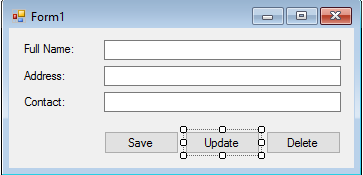
- Add a new button from your toolbox and use it for “update data“.
- Double click your new added button and insert the following codes below.
Try
Str = "UPDATE user SET firstname='" & txtfname.Text.ToUpper & "',lastname='" & txtlname.Text.ToUpper & "'," & _
"WHERE iduser='" & lblid.Text & "'"
conn.Open()
Dim mysc2 As New MySqlCommand(Str, conn)
mysc2.ExecuteNonQuery()
MsgBox("User successfully updated!", MsgBoxStyle.Information)
conn.Close()
Me.Close()
Catch ex As Exception
MsgBox(ex.Message)
conn.Close()
End Try
If you have any comments or suggestions in How to Update Data Using VB.Net and MySQL Database, Please feel free to leave your comment below, use the contact page of this website or use my contact information.
Email: [email protected] | Cell. No.: 09468362375
Previous Topic: How to Save Data Using VB.Net and MySQL Database
Advanced Topic:
- How to Load Data from MySQL Database to DatagridView in VB.Net Application
- How to Load data from DatagridView to Textfield
- How to Delete Data using VB.Net and MySQL Database
Frequently Asked Questions
What does this VB.NET code snippet demonstrate?
Focused VB.NET WinForms code pattern: how to add, insert, save, search, display, print, connect to SQL Server, or perform a common calculation with minimum code. Drop-in pattern you can adapt for your own capstone module.
What Visual Studio and SQL Server versions does this VB.NET project require?
Most projects use VB.NET WinForms on .NET Framework 4.5+ with SQL Server 2012 Express or higher. To run: install Visual Studio 2019 / 2022 (Community is free) with the ‘Desktop development with .NET’ workload, install SQL Server Express + SSMS, open the .sln file, build, run.
How do I set up the database for this VB.NET project?
Open SQL Server Management Studio (SSMS) and connect to your SQL Server (e.g. localhost\SQLEXPRESS). Right-click Databases, choose Restore Database OR New Database then import the included .sql script. Update the connection string in App.config (or in code-behind Module) with your server name + credentials. Rebuild and run.
Can I use this VB.NET project for a BSIT capstone or thesis?
Yes, VB.NET is one of the most accepted languages by Philippine BSIT panels. Extend it: add role-based access (admin/staff/customer login redirect), Crystal Reports or RDLC reports, dashboards with Chart control, audit log, multi-branch support. Pair with Chapter 1-5 documentation matching your panel’s rubric.
Why am I getting ‘connection error’ or ‘cannot find SQL Server’?
Three common VB.NET issues: (1) Connection error: SQL Server isn’t running. Open SQL Server Configuration Manager and verify SQL Server (SQLEXPRESS) service is started. (2) Wrong server name in connection string. Try .\SQLEXPRESS, (local)\SQLEXPRESS, or your machine name. (3) Login failed: SQL Server is set to ‘Windows-only’ authentication. Switch to Mixed Mode in SSMS Server Properties, Security.
Where can I find more VB.NET projects with source code?
Browse the VB.NET Projects hub for the full library. For C# WinForms alternatives see C# Projects. For ASP.NET web alternatives see ASP.NET Projects. For BSIT capstone idea lists see 150 Best Capstone Project Ideas.