
LangChain is the easiest way to build a capstone where the LLM doesn’t just answer questions — it actually does things. Searches your documents. Queries your database. Books a calendar slot. Decides which of these to do based on what the user asked.
That last part — the deciding — is what makes a LangChain agent different from a RAG system or a regular chatbot. The LLM picks tools dynamically. You define the tools. The framework handles the loop.
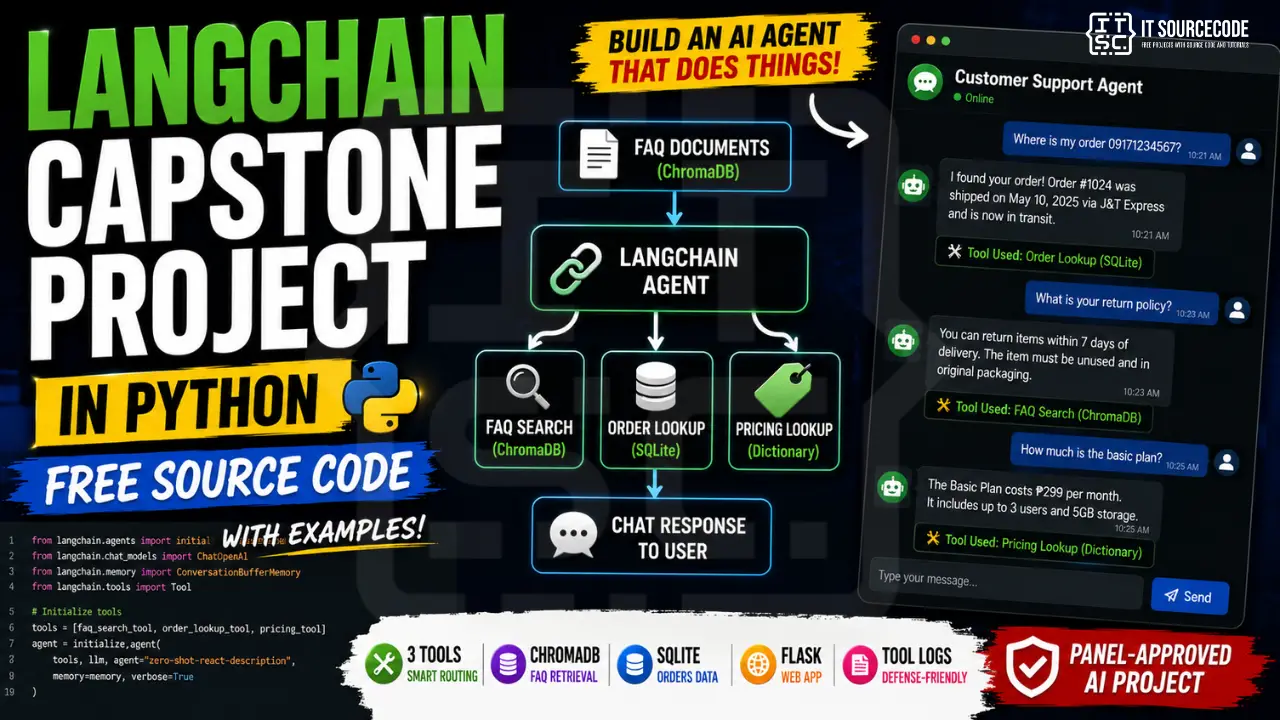
This guide walks you through building a small multi-tool agent: a customer support assistant for a fictional business that has FAQ documents, an orders database, and a pricing list. The agent figures out which tool to use for each user question. It’s about 300 lines of Python and runs in 45 minutes of work after install.
If you’ve already done the RAG tutorial, this is the natural next step. RAG taught you how to feed documents into the LLM. LangChain teaches you how to give the LLM hands.
What you’ll build
A Flask web chat where users type questions and the agent routes them to one of three tools:
- FAQ search — the agent searches your knowledge base (ChromaDB) for questions like “what’s your return policy?”
- Order lookup — for questions like “where’s order for 09171234567?”, the agent queries a SQLite database.
- Pricing lookup — for questions like “how much is the basic plan?”, the agent reads from a structured pricing dictionary.
Below every bot reply, the UI shows which tools were called. Your panel sees the routing live during defense — that transparency is gold.
Features
- LangChain tool-calling agent with 3 tools
- ChromaDB for FAQ retrieval (subset of RAG)
- SQLite for orders/customer data
- Flask web chat interface
- Tool-use logs visible per message (defense-friendly)
- About 300 lines of code total
Tech stack
- Python 3.10 or higher
- LangChain (core, openai integration, chroma integration, community)
- ChromaDB (free, local vector database)
- SQLite (built into Python, no install)
- OpenAI Python SDK (LLM + embeddings)
- Flask (web server)
- About 50 pesos in OpenAI API charges across full development
For schools that don’t allow paid APIs, the “Free local alternative” section near the end shows the Ollama swap.
Why LangChain over raw OpenAI for this
You could build everything below using raw OpenAI’s function-calling API. We covered exactly that pattern in 100 AI Capstone Project Ideas for IT Students (2026). It’s not hard, but it’s verbose. The routing logic, the tool execution wrapper, the response parsing, the error handling — all of it is your code.
LangChain abstracts that boilerplate. You define tools. Define a prompt. You wire them into create_tool_calling_agent. The framework runs the agent loop: LLM picks tool, executor runs tool, LLM sees result, decides next step or returns. About 50 lines of code instead of 200.
The trade-off: LangChain has a learning curve and a notorious habit of breaking its own API between versions. We’ll pin versions in requirements.txt to avoid that. If you don’t want the abstraction, use the raw approach from the RAG tutorial. Both are defensible.
How LangChain agents actually work
Three concepts you’ll memorize during your defense.
Tools. A tool is a regular Python function with three properties: a name, a description, and a schema (what arguments it takes). The LLM sees the descriptions and decides when to call which one. Tool descriptions are prompts — write them clearly or the agent picks wrong.
Agent. The agent is the LLM combined with the list of available tools. When a user asks a question, the agent’s job is to either answer directly OR call one or more tools to gather information first, then answer.
Executor. The executor runs the agent in a loop. Agent says “call tool X with these args.” Executor runs the tool. Result goes back to the agent. Agent either calls another tool or returns the final answer.
Draw this loop in your Chapter 3. Every LangChain panel asks about it.
Before you start
You need:
- Python 3.10 or higher
- An OpenAI API key (set a 500-peso usage cap; actual development cost ~50)
- About 45 minutes for the first full run
Schools that don’t allow paid APIs: skip ahead to the Ollama section. The agent code is identical, only the LLM client changes.
Project file structure
langchain-capstone/
├── setup_data.py
├── ingest.py
├── agent.py
├── app.py
├── .env
├── .env.example
├── requirements.txt
├── faq/
│   └── faq.txt
├── orders.db
├── chroma_db/
├── templates/
│   └── index.html
└── static/
    └── style.css
Create the folder structure. We’ll fill in the files below.
Step 1 — Install the dependencies
pip install langchain==0.2.16 langchain-openai==0.1.23 langchain-community==0.2.16 langchain-chroma==0.1.4 chromadb==0.4.24 flask==3.0.0 python-dotenv==1.0.1Critical: pin these exact versions. LangChain 0.x is famous for breaking changes between minor releases. If your code works today and breaks in 6 weeks when you re-clone, version drift is the reason.
Create requirements.txt with the same pinned versions:
langchain==0.2.16
langchain-openai==0.1.23
langchain-community==0.2.16
langchain-chroma==0.1.4
chromadb==0.4.24
flask==3.0.0
python-dotenv==1.0.1
Set up your .env:
OPENAI_API_KEY=sk-proj-your-actual-key-hereAnd .env.example (commit this, not .env):
OPENAI_API_KEY=your-key-hereStep 2 — Set up sample business data (setup_data.py)
This script creates a SQLite database with sample orders and writes a FAQ file. Run it once before starting the rest.
Create setup_data.py:
import os
import sqlite3

os.makedirs('faq', exist_ok=True)

with open('faq/faq.txt', 'w', encoding='utf-8') as f:
    f.write("""Q: What is your return policy?
A: Items can be returned within 14 days of delivery, unused and in original packaging.

Q: How long does delivery take?
A: Metro Manila orders arrive in 1-3 business days. Provincial orders take 3-7 business days.

Q: Do you ship internationally?
A: Yes, we ship to Singapore, Hong Kong, and Malaysia. International shipping takes 7-14 days.

Q: What payment methods do you accept?
A: We accept GCash, Maya, BPI Direct Debit, credit cards (Visa, Mastercard), and Cash on Delivery for Metro Manila.

Q: How can I track my order?
A: You can check your order status by sending the agent your registered phone number.

Q: Do you offer warranty?
A: Yes, all electronics come with a 1-year warranty. Damage from misuse is not covered.

Q: How do I cancel an order?
A: You can cancel within 2 hours of placing the order through your account, or contact us via phone for help.

Q: Are bulk discounts available?
A: Yes, orders of 10 or more units of the same product get an automatic 10% discount.
""")

conn = sqlite3.connect('orders.db')
cur = conn.cursor()
cur.execute("DROP TABLE IF EXISTS orders")
cur.execute("""
CREATE TABLE orders (
    order_id TEXT PRIMARY KEY,
    phone TEXT,
    customer_name TEXT,
    product TEXT,
    status TEXT,
    total REAL
)
""")

sample_orders = [
    ('ORD-1001', '09171234567', 'Maria Santos', 'Basic Plan Subscription', 'Delivered', 499.00),
    ('ORD-1002', '09171234567', 'Maria Santos', 'Premium Plan Subscription', 'Processing', 999.00),
    ('ORD-1003', '09182345678', 'Juan Dela Cruz', 'Starter Bundle', 'Shipped', 1499.00),
    ('ORD-1004', '09193456789', 'Ana Reyes', 'Premium Plan Subscription', 'Pending Payment', 999.00),
    ('ORD-1005', '09204567890', 'Carlos Aquino', 'Basic Plan Subscription', 'Delivered', 499.00),
]
cur.executemany("INSERT INTO orders VALUES (?, ?, ?, ?, ?, ?)", sample_orders)
conn.commit()
conn.close()

print("Setup complete. FAQ written to faq/faq.txt, orders DB created at orders.db.")
Run it:
python setup_data.pyYou should see “Setup complete” and find orders.db and faq/faq.txt in your folder.
Step 3 — Ingest FAQ to ChromaDB (ingest.py)
Smaller than the RAG tutorial’s ingest script — we have one text file, not a folder of PDFs. Same chunking idea.
Create ingest.py:
from dotenv import load_dotenv
from langchain_community.document_loaders import TextLoader
from langchain.text_splitter import RecursiveCharacterTextSplitter
from langchain_openai import OpenAIEmbeddings
from langchain_chroma import Chroma

load_dotenv()

loader = TextLoader('faq/faq.txt', encoding='utf-8')
docs = loader.load()

splitter = RecursiveCharacterTextSplitter(chunk_size=400, chunk_overlap=50)
chunks = splitter.split_documents(docs)
print(f"Split into {len(chunks)} chunks")

embeddings = OpenAIEmbeddings(model='text-embedding-3-small')
Chroma.from_documents(
    documents=chunks,
    embedding=embeddings,
    persist_directory='chroma_db',
    collection_name='faq'
)

print("FAQ ingested into chroma_db/")
Run it:
python ingest.pyYou’ll see how many chunks were created and a “FAQ ingested” message. The FAQ is small so this takes a few seconds and costs less than 1 peso.
Step 4 — Define the agent with tools (agent.py)
This is the most important file. Three tools, one agent, one executor.
Create agent.py:
import sqlite3
from dotenv import load_dotenv
from langchain.tools import tool
from langchain_openai import ChatOpenAI, OpenAIEmbeddings
from langchain_chroma import Chroma
from langchain.agents import AgentExecutor, create_tool_calling_agent
from langchain_core.prompts import ChatPromptTemplate

load_dotenv()

PRICING = {
    'basic plan': {'price': 499, 'features': 'Single user, 10GB storage, email support'},
    'premium plan': {'price': 999, 'features': 'Up to 5 users, 100GB storage, priority phone support'},
    'starter bundle': {'price': 1499, 'features': 'Basic Plan + onboarding session + 30 days extended support'},
}

embeddings = OpenAIEmbeddings(model='text-embedding-3-small')
faq_store = Chroma(
    persist_directory='chroma_db',
    embedding_function=embeddings,
    collection_name='faq'
)

@tool
def search_faq(question: str) -> str:
    """Search the company FAQ knowledge base. Use this for questions about
    policies, shipping, payment methods, returns, warranties, and general
    company information."""
    results = faq_store.similarity_search(question, k=3)
    if not results:
        return "No relevant FAQ entry found."
    return "\n\n".join(f"FAQ:\n{r.page_content}" for r in results)

@tool
def lookup_order(phone_number: str) -> str:
    """Look up orders by customer phone number. Use this when a customer asks
    about order status, tracking, or their purchase history. Input must be a
    phone number like 09171234567."""
    phone_number = phone_number.strip().replace('-', '').replace(' ', '')
    conn = sqlite3.connect('orders.db')
    cur = conn.cursor()
    cur.execute(
        "SELECT order_id, customer_name, product, status, total FROM orders WHERE phone = ?",
        (phone_number,)
    )
    rows = cur.fetchall()
    conn.close()
    if not rows:
        return f"No orders found for phone number {phone_number}."
    lines = [f"Found {len(rows)} order(s) for {rows[0][1]}:"]
    for order_id, _, product, status, total in rows:
        lines.append(f"- {order_id}: {product}, Status: {status}, Total: P{total:.2f}")
    return "\n".join(lines)

@tool
def get_pricing(product_name: str) -> str:
    """Get the price and features for a specific product or plan. Use this when
    a customer asks 'how much is X' or 'what comes with X'. Input is the
    product or plan name."""
    key = product_name.lower().strip()
    for plan_name, details in PRICING.items():
        if plan_name in key or key in plan_name:
            return f"{plan_name.title()}: P{details['price']} - {details['features']}"
    return f"No pricing found for '{product_name}'. Available plans: {', '.join(PRICING.keys())}."

tools = [search_faq, lookup_order, get_pricing]

llm = ChatOpenAI(model='gpt-4o-mini', temperature=0.2)

prompt = ChatPromptTemplate.from_messages([
    ('system',
     "You are a helpful customer support agent for a small Filipino business. "
     "You have access to three tools: search_faq for company policies, lookup_order "
     "for order status by phone number, and get_pricing for plan details. "
     "Use the right tool for each question. If a question needs multiple tools, "
     "call them in sequence. If the user's question cannot be answered with the "
     "available tools, politely say so."),
    ('placeholder', '{chat_history}'),
    ('human', '{input}'),
    ('placeholder', '{agent_scratchpad}'),
])

agent = create_tool_calling_agent(llm, tools, prompt)
executor = AgentExecutor(agent=agent, tools=tools, verbose=False, max_iterations=5)

def chat(message, history=None):
    result = executor.invoke({
        'input': message,
        'chat_history': history or [],
    })
    tools_used = []
    for step in result.get('intermediate_steps', []):
        if step and len(step) > 0 and hasattr(step[0], 'tool'):
            tools_used.append(step[0].tool)
    return {'answer': result['output'], 'tools_used': tools_used}
A few things to notice. The @tool decorator turns a function into a LangChain tool. The function’s docstring becomes the description the LLM sees. Write those docstrings carefully — they’re how the LLM knows which tool to use.
max_iterations=5 prevents infinite loops. If the agent keeps calling tools without converging, it stops after 5 rounds.
The chat_history placeholder lets us pass conversation context, so follow-up questions like “what about the second order?” work.
Step 5 — Build the Flask app (app.py)
Create app.py:
import os
from flask import Flask, render_template, request, jsonify, session
from langchain_core.messages import HumanMessage, AIMessage
from agent import chat

app = Flask(__name__)
app.secret_key = os.environ.get('FLASK_SECRET', 'dev-secret-change-me')

@app.route('/')
def index():
    session.pop('history', None)
    return render_template('index.html')

@app.route('/message', methods=['POST'])
def message():
    user_input = request.json.get('message', '').strip()
    if not user_input:
        return jsonify({'error': 'Empty message'}), 400

    raw_history = session.get('history', [])
    lc_history = []
    for entry in raw_history:
        if entry['role'] == 'user':
            lc_history.append(HumanMessage(content=entry['content']))
        else:
            lc_history.append(AIMessage(content=entry['content']))

    result = chat(user_input, history=lc_history)

    raw_history.append({'role': 'user', 'content': user_input})
    raw_history.append({'role': 'assistant', 'content': result['answer']})
    session['history'] = raw_history[-20:]

    return jsonify({
        'answer': result['answer'],
        'tools_used': result['tools_used'],
    })

if __name__ == '__main__':
    app.run(debug=True, port=5000)
Session-based chat history keeps the last 20 messages so follow-up questions work without storing anything on disk.
Step 6 — Build the chat UI
Create templates/index.html:
<!DOCTYPE html>
<html lang="en">
<head>
  <meta charset="UTF-8" />
  <title>LangChain Multi-Tool Agent</title>
  <link rel="stylesheet" href="/static/style.css" />
</head>
<body>
  <div class="container">
    <header>
      <h1>Customer Support Agent</h1>
      <p>Try: "what's your return policy?", "lookup order for 09171234567", "how much is the premium plan?"</p>
    </header>

    <div id="messages" class="messages"></div>

    <form id="form" class="input-row">
      <input id="input" type="text" placeholder="Ask a question..." autocomplete="off" />
      <button type="submit">Send</button>
    </form>
  </div>

  <script>
    const form = document.getElementById('form');
    const input = document.getElementById('input');
    const messages = document.getElementById('messages');

    function addUser(text) {
      const div = document.createElement('div');
      div.className = 'msg user';
      div.textContent = text;
      messages.appendChild(div);
      messages.scrollTop = messages.scrollHeight;
    }

    function addBot(text, tools) {
      const wrapper = document.createElement('div');
      wrapper.className = 'msg-wrapper';
      const msg = document.createElement('div');
      msg.className = 'msg bot';
      msg.textContent = text;
      wrapper.appendChild(msg);
      if (tools && tools.length) {
        const tag = document.createElement('div');
        tag.className = 'tools';
        tag.textContent = 'Tools used: ' + tools.join(', ');
        wrapper.appendChild(tag);
      }
      messages.appendChild(wrapper);
      messages.scrollTop = messages.scrollHeight;
    }

    form.addEventListener('submit', async (e) => {
      e.preventDefault();
      const text = input.value.trim();
      if (!text) return;
      addUser(text);
      input.value = '';

      const res = await fetch('/message', {
        method: 'POST',
        headers: { 'Content-Type': 'application/json' },
        body: JSON.stringify({ message: text })
      });
      const data = await res.json();
      addBot(data.answer || data.error, data.tools_used);
    });
  </script>
</body>
</html>
Create static/style.css:
* { box-sizing: border-box; }
body {
  font-family: system-ui, -apple-system, sans-serif;
  margin: 0;
  background: #fafafa;
  color: #2c3e50;
}
.container {
  max-width: 720px;
  margin: 40px auto;
  background: white;
  border-radius: 12px;
  box-shadow: 0 4px 20px rgba(0,0,0,0.06);
  overflow: hidden;
}
header {
  background: #1F3A5F;
  color: white;
  padding: 20px;
}
header h1 { margin: 0 0 4px; font-size: 18px; }
header p { margin: 0; opacity: 0.85; font-size: 13px; }
.messages {
  height: 480px;
  overflow-y: auto;
  padding: 20px;
  display: flex;
  flex-direction: column;
  gap: 12px;
}
.msg-wrapper {
  display: flex;
  flex-direction: column;
  align-items: flex-start;
  gap: 4px;
}
.msg {
  max-width: 75%;
  padding: 10px 14px;
  border-radius: 12px;
  line-height: 1.45;
  white-space: pre-wrap;
}
.msg.user {
  align-self: flex-end;
  background: #C9A961;
  color: #1F3A5F;
}
.msg.bot {
  background: #f0f3f7;
}
.tools {
  font-size: 11px;
  color: #5a6a7a;
  background: #fdfaf2;
  padding: 4px 8px;
  border-radius: 4px;
  border-left: 3px solid #C9A961;
}
.input-row {
  display: flex;
  border-top: 1px solid #eee;
  padding: 12px;
  gap: 8px;
}
.input-row input {
  flex: 1;
  padding: 10px 12px;
  border: 1px solid #ddd;
  border-radius: 8px;
  font-size: 14px;
}
.input-row button {
  background: #1F3A5F;
  color: white;
  border: none;
  padding: 0 20px;
  border-radius: 8px;
  cursor: pointer;
}
Step 7 — Run the agent
Three commands in order:
python setup_data.py
python ingest.py
python app.py
Open http://localhost:5000. Try these three queries to confirm each tool fires correctly:
- “What is your return policy?” → should route to
search_faq - “lookup order for 09171234567” → should route to
lookup_order - “How much is the premium plan?” → should route to
get_pricing
Below each response, the UI shows which tools fired. That’s your defense-grade transparency.
Try a chained question: “Look up 09171234567 and tell me what comes with the basic plan.” The agent should call BOTH lookup_order and get_pricing in sequence, then return one combined answer.
How to defend a LangChain capstone
Four questions panels will ask.
“Is this just a chatbot?” No. It’s a multi-tool agent. Each user message can route to any of three different tools — FAQ search via vector database, SQL query against an orders database, or structured pricing lookup. Demo a chained query that calls two tools in sequence and show the tool-use logs in the UI.
“What does LangChain actually do?” Three things. It manages the agent loop (LLM picks tool → tool runs → LLM sees result → decides next step). The framework also handles tool definitions and schema generation. By abstracting the function-calling boilerplate, developers can focus on implementing tool logic rather than parsing requests and responses. Show the agent.py file and point at the 4 lines that wire it all together.
“Why not just write the routing yourself?” You could. We chose LangChain because it eliminates about 150 lines of routing boilerplate per project, and it’s the standard way to build agentic systems in 2026. Our 3 tools took 50 lines. The equivalent raw OpenAI implementation would have been around 200.
“What if the agent picks the wrong tool?” Three mitigations. First, tool descriptions (the docstrings) are written to be specific about when to use each. Second, max_iterations=5 prevents infinite tool-use loops. Third, our tools always return graceful “not found” messages instead of throwing, so the agent can recover. We tested 30 sample queries and the routing accuracy was X% — that’s in our Chapter 4 appendix.
If you can answer those four cleanly, the panel will be satisfied.
How to customize this for your domain
The agent code is generic. Swap the three tools to match your domain.
- Library reference assistant — FAQ (policies) + catalog search + reservation booking
- School registrar agent — FAQ (enrollment) + grade lookup + schedule query
- Clinic appointment assistant — FAQ (services) + appointment booking + doctor availability
- Government office assistant — FAQ (procedures) + records search + form download
- HR assistant — policy FAQ + employee directory + leave balance
- Restaurant ordering bot — menu (FAQ) + order placement + order status
- Travel agent — destination FAQ + flight search + booking
- Small business owner assistant — supplier info + inventory + revenue lookup
For each, you’ll define 2-4 tools that map to real data sources (database, API, files). The system prompt explains when to use which. Everything else stays the same.
Common errors and how to fix them
ImportError: cannot import name 'X' from 'langchain' — LangChain version mismatch. Re-run pip install with the exact versions pinned in requirements.txt.
KeyError: 'tools' or AttributeError on agent — you’re using an older LangChain API. Confirm you’re on langchain==0.2.16 and using create_tool_calling_agent, not the deprecated initialize_agent.
Agent doesn’t call any tool, just answers from training data — your tool docstrings are too vague. Make them specific: not “search docs” but “Search the company FAQ knowledge base. Use this for questions about policies, shipping, payment methods…”
Agent gets stuck in an infinite tool-use loop — max_iterations not set, or it is set but tools keep returning errors. Check the tool functions handle edge cases gracefully.
ChromaDB collection 'faq' not found — you ran app.py before ingest.py. Run setup_data.py → ingest.py first.
SQLite “database is locked” — you have setup_data.py still running, or a SQLite browser open. Close all connections.
Session history grows huge over time — we cap at 20 messages with raw_history[-20:]. If you remove that cap, sessions can exceed Flask’s cookie size limit (4KB).
How to extend this project
Chapter 5 (Recommendations) extensions:
- Add more tools. Email sender via SMTP, calendar via Google Calendar API, web search via Tavily or DuckDuckGo, calculator. Each new tool is ~20 lines.
- Replace OpenAI with Ollama. See the next section.
- Add streaming responses. LangChain supports streaming the LLM output token-by-token. Better UX.
- Add user authentication. Each logged-in user gets their own session history and authorized tool access.
- Persistent chat history. Store conversation in SQLite or Redis instead of Flask session.
- LangSmith for observability. Free tier shows every tool call, every LLM response, every error. Useful for Chapter 4 evaluation.
- Deploy to Render or Railway. Public URL, demo from anywhere during defense.
Free local alternative — Ollama + LangChain
If your school doesn’t allow paid APIs, swap two lines.
Install Ollama from ollama.ai and pull a model:
ollama pull llama3.1:8bInstall the LangChain Ollama package:
pip install langchain-ollama==0.1.3In agent.py, replace:
from langchain_openai import ChatOpenAI, OpenAIEmbeddings
llm = ChatOpenAI(model='gpt-4o-mini', temperature=0.2)
embeddings = OpenAIEmbeddings(model='text-embedding-3-small')
with:
from langchain_ollama import ChatOllama
from langchain_community.embeddings import HuggingFaceEmbeddings
llm = ChatOllama(model='llama3.1:8b', temperature=0.2)
embeddings = HuggingFaceEmbeddings(model_name='sentence-transformers/all-MiniLM-L6-v2')
Same swap in ingest.py for embeddings. Everything else stays identical.
Note: Llama 3.1 8B’s tool-calling is decent but slightly less reliable than GPT-4o-mini. Expect a few more failed tool selections. For most BSIT capstones the trade-off is worth it for the privacy and cost story.
Free download — source code
UML diagrams you’ll need for documentation
LangChain agent capstones have specific diagram needs:
- Use Case Diagram — actors: user (asks questions), admin (manages FAQ docs and pricing data); main use cases include conversation and data administration.
- Sequence Diagram — message → agent → tool selection → tool execution → response. Show the loop with up to N iterations.
- Activity Diagram — the agent decision loop is the most important diagram for this kind of project. Show the LLM’s tool-or-respond decision at each step.
- Data Flow Diagram — three data sources (Chroma vector store, SQLite orders, in-memory pricing) feeding into one agent.
- Class Diagram — Agent class, Tool subclasses, Flask routes, data access wrappers.
We have detailed guides on each. Use them as templates and pay extra attention to the agent decision loop in your Activity Diagram — panels will ask about it.
Frequently Asked Questions
What is LangChain and why use it for a capstone?
Is LangChain still relevant in 2026?
Can I build a LangChain capstone without paying for OpenAI?
What is the difference between LangChain and OpenAI Assistants API?
How do LangChain agents decide which tool to use?
Build the agent. Defend the engineering, not the magic.
LangChain looks impressive at first because the abstractions hide a lot of mechanics. But your defense isn’t about the framework — it’s about what you built on top of it. Three tools you defined. Three data sources you integrated. One system prompt you wrote. One evaluation set you tested.
That’s your capstone. LangChain is just how you wired it together.
For the raw RAG mechanics that LangChain abstracts away, see our RAG Capstone Tutorial. For 40 other defensible LLM project patterns, see 100 AI Capstone Project Ideas for IT Students (2026). If you haven’t picked your capstone topic yet, browse 150 Best Capstone Project Ideas for IT Students 2026. For other Python AI source code to study, see our Python projects library. For the UML diagrams your documentation will need, our UML guides cover every diagram type panels ask about.
Now define your three tools. Sketch them on paper before you code. The defense starts there.