

This Movie Recommendation System Project In Python is a simple system that can add, view, and search movie items.
A Movie Management System Project In Python is useful as a model of how to construct a simple CRUD system within Python.
Project Information’s
| Project Name: | Movie Recommendation System In Python |
| Language/s Used: | Python Console Based |
| Python version (Recommended): | 2.x or 3.x |
| Database: | None |
| Type: | Python App |
| Developer: | IT SOURCECODE |
| Updates: | 0 |
About The Project
This simple project has an iml file to store the current movie details. Also, this is a simple cmd based project which is easy to understand and use.
The project file contains a python script (main.py). Talking about the system, it allows the user to add and delete movies from the records, view the records, and so on.
While adding movies to record items, the user has to enter the movie name, its director, genre, and year. The system shows the movie record in a list view.
Also, the user can search for an item as it contains a search function too. In short, this projects mainly focus on CRUD with a search function.
To start executing Movie Recommendation System Project In Python, make sure that you have installed Python 3.9 and PyCharm in your computer.
Movie Recommendation System Project In Python With Source Code : Steps on how to run the project
Time needed: 5 minutes
These are the steps on how to run Movie Recommendation System Project In Python With Source Code
- Step 1: Download the given source code below.
First, download the given source code below and unzip the source code.

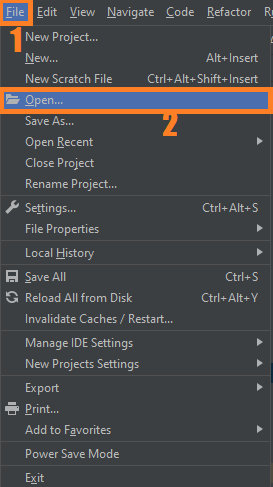
- Step 2: Import the project to your PyCharm IDE.
Next, import the source code you’ve download to your PyCharm IDE.

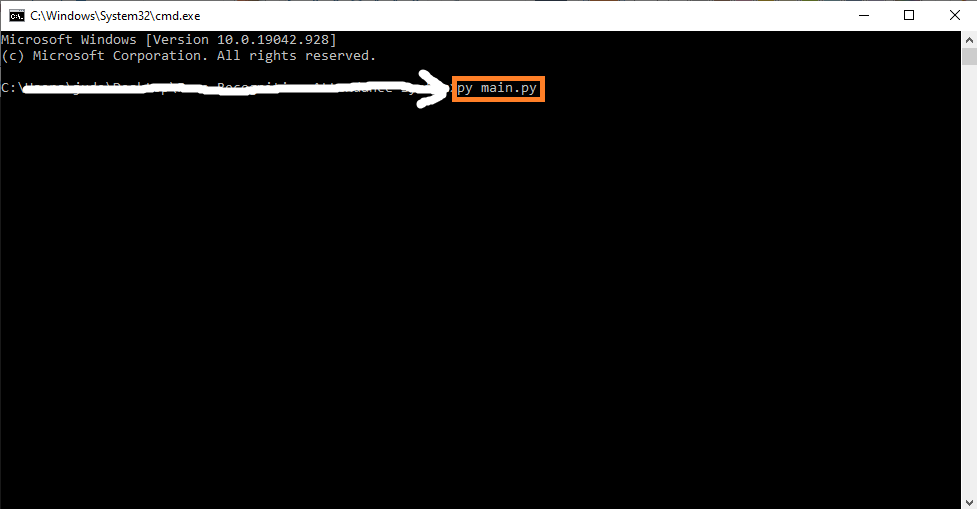
- Step 3: Run the project.
last, run the project with the command “py main.py”

Code Explanations
1. Choices Menu
Code:
movies = []
START = "\nEnter 'a' to add a movie, \n 'l' to see your movies, \n 'f' to find a movie by title, \n or 'q' to quit: "

user_selection = {
    'a': add_movie,
    'l': list_movies,
    'f': find_title
}


def menu():
    selection = input(START).lower()
    while selection != 'q':
        if selection in user_selection:
            selected_action = user_selection[selection]
            selected_action()
        else:
            print("Unknown command. Please choose within available options: 'a', 'f', 'l' or 'q' to close the app.")
        selection = input(START)
    print('Thank you for using the app. See you next time!')


if __name__ == '__main__':
    menu()
Explanation:
The code given above are the menus of the project.
2. Add Movie Function
Code:
def add_movie():
    title = input("Enter title of the film: ")
    director = input("Enter director of the film: ")
    year = input("Enter year of the film: ")
    genre = input("Enter genre of the film: ")
    movies.append({
        'title': title,
        'year': year,
        'director': director,
        'genre': genre
    })
Explanation:
The code given above is the function for adding new film or movie.
3. List of Movie Function
Code:
def list_movies():
    quantity = len(movies)
    titles = [movie['title'] for movie in movies]
    titles = ', '.join(titles)

    if quantity:
        print(f'You have following movies in collection: {titles}. In total you have {quantity} {"movie" if quantity == 1 else "movies"}.')
    else:
        print('There are no movies in you collection.')
Explanation:
The code given above is the function of listing all movies.
4. Print Movie Information’s
Code:
def print_movie_info(movie):
    print('Here is information about requested title')
    print(f'Title: {movie["title"]},')
    print(f'Director: {movie["director"]},')
    print(f'Year: {movie["year"]},')
    print(f'Genre: {movie["genre"]}.')
Explanation:
The code given above is the function to print all movie information’s.
5. Find Movie Title
Code:
def find_title():
    search_title = input('Enter title you are looking for: ')
    for movie in movies:
        if movie['title'] == search_title:
            print_movie_info(movie)
        else:
            print('Requested title was not found in the collection.')
Explanation:
The code given above is the function to filtering movie.
Complete Source Code
movies = []
START = "\nEnter 'a' to add a movie, \n 'l' to see your movies, \n 'f' to find a movie by title, \n or 'q' to quit: "


def add_movie():
    title = input("Enter title of the film: ")
    director = input("Enter director of the film: ")
    year = input("Enter year of the film: ")
    genre = input("Enter genre of the film: ")
    movies.append({
        'title': title,
        'year': year,
        'director': director,
        'genre': genre
    })


def list_movies():
    quantity = len(movies)
    titles = [movie['title'] for movie in movies]
    titles = ', '.join(titles)

    if quantity:
        print(f'You have following movies in collection: {titles}. In total you have {quantity} {"movie" if quantity == 1 else "movies"}.')
    else:
        print('There are no movies in you collection.')


def print_movie_info(movie):
    print('Here is information about requested title')
    print(f'Title: {movie["title"]},')
    print(f'Director: {movie["director"]},')
    print(f'Year: {movie["year"]},')
    print(f'Genre: {movie["genre"]}.')


def find_title():
    search_title = input('Enter title you are looking for: ')
    for movie in movies:
        if movie['title'] == search_title:
            print_movie_info(movie)
        else:
            print('Requested title was not found in the collection.')


user_selection = {
    'a': add_movie,
    'l': list_movies,
    'f': find_title
}


def menu():
    selection = input(START).lower()
    while selection != 'q':
        if selection in user_selection:
            selected_action = user_selection[selection]
            selected_action()
        else:
            print("Unknown command. Please choose within available options: 'a', 'f', 'l' or 'q' to close the app.")
        selection = input(START)
    print('Thank you for using the app. See you next time!')


if __name__ == '__main__':
    menu()
Output

Download Source Code below
Summary
The Movie Recommendation System Project In Python is written in Python using Tkinter. The project file contains a python script (main.py).
Talking about the system, it allows the user to add and delete movies from the records, view the records, and so on.
Inquiries
If you have any questions or suggestions about Movie Recommendation System Project In Python With Source Code, please feel free to leave a comment below.
Official documentation
Frequently Asked Questions
How does this Python recommendation system work?
Two approaches: (1) Collaborative filtering (user-item matrix factorization via SVD/surprise library), (2) Content-based (TF-IDF on item descriptions, cosine similarity for recommendations). Foundation for e-commerce, streaming, news capstone.
What Python version and libraries does this project require?
Most projects in this batch use Python 3.10, 3.11, or 3.12 (avoid 3.13 until library wheels catch up). Standard libs: tkinter (built-in), sqlite3 (built-in). External: pip install pillow opencv-python pygame mysql-connector-python reportlab requests beautifulsoup4. Check the requirements.txt file (if included) for exact versions.
How do I set up the database for this Python project?
For SQLite (most common, no setup needed): the .db file auto-creates on first run. For MySQL: install MySQL Server + MySQL Workbench, create an empty database, import the included .sql file, edit the connection string in db.py (or db_connect.py) with your host, user, password, database name.
Can I use this Python project for a BSIT capstone or thesis?
Yes. Python is rising fast in Philippine BSIT panels. Extend it: add user roles via auth module, dashboards (matplotlib charts), PDF reports (reportlab), email notifications (smtplib), real domain extension (analytics, audit log, multi-branch support). Pair with Chapter 1-5 documentation matching your panel’s rubric.
Why am I getting ‘ModuleNotFoundError’ or ‘No module named X’?
Three common Python issues: (1) Module not installed: pip install
Where can I find more Python projects with source code?
Browse the Python Projects hub for the full library. For computer vision specifically see OpenCV Projects (46 vision systems). For ML / AI capstones see Machine Learning Projects. For BSIT capstone idea lists see 150 Best Capstone Project Ideas.

Angel Jude Suarez
Full-Stack Developer at PIES IT Solution
Focuses on Python development, machine learning, and AI integration. Has built production AI systems including OpenAI Whisper integration for medical transcription and GPT-4o-powered diagnosis assistance. Strong background in pandas, scikit-learn, and TensorFlow.
Expertise: Python · PHP · Java · VB.NET · ASP.NET · Machine Learning · AI Integration · OpenCV · Django · CodeIgniter · View all posts by Angel Jude Suarez →