
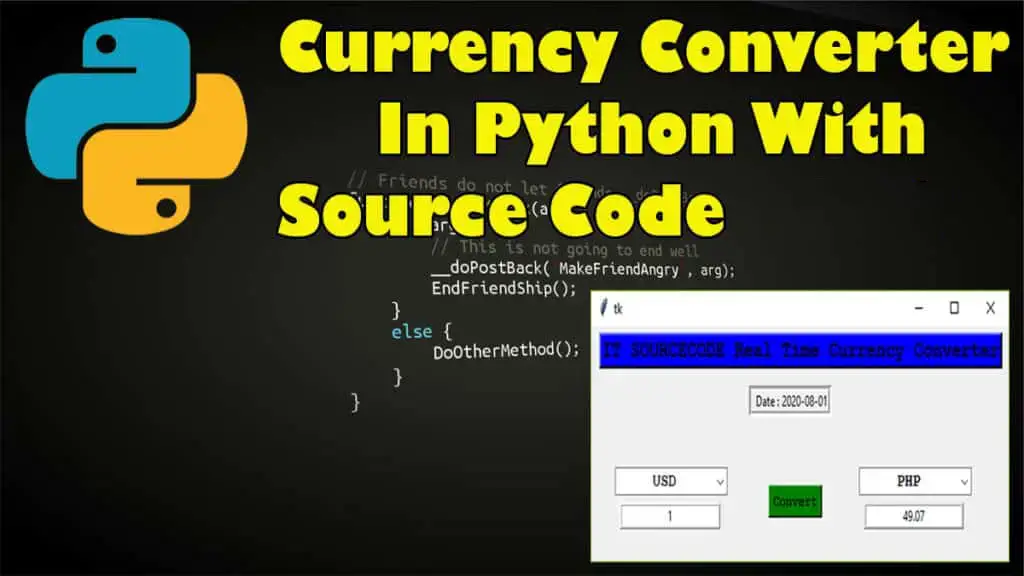
The Currency Conversion Code in Python develops an exciting Python Program project through which you can convert currency exchange rates.
This article contains the Python Currency Converter Script (currency-converter-project.py).
Currency Converter In Python: Project Information
| Project Name: | Currency Conversion Code in Python |
| Language/s Used: | Python (GUI) Based |
| Python version (Recommended): | 2.x or 3.x |
| Database: | None |
| Type: | Python App |
| Developer: | IT SOURCECODE |
| Updates: | 0 |
A Python Currency Converter is an app intermediate level python project which will boost your confidence. For a user interface, we can use Currency Converter Python Tkinter API.
We have provided a downloadable Python Currency Converter Code for free.
To start creating this project Currency Conversion rates In Python, make sure that you have PyCharm IDE installed on your computer.
How to create a Currency Conversion Code in Python? With Source Code
Currency Conversion Code in Python With Source Code
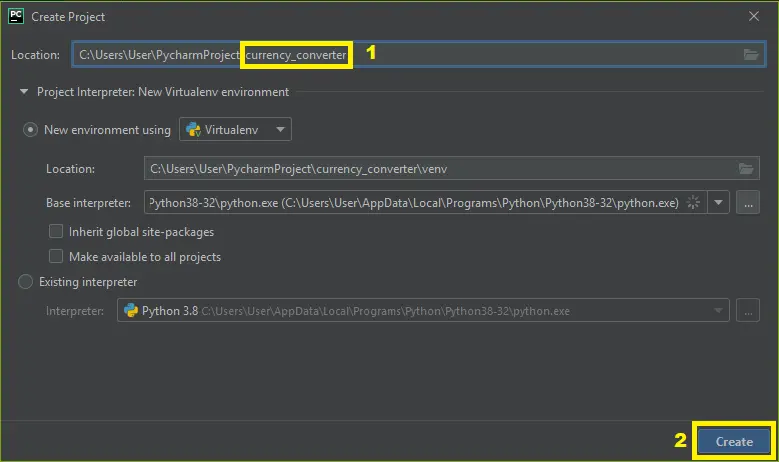
- Step 1: Create a project name.
First, open Pycharm IDE and then create a “project name.” After creating a project name click the “create” button.

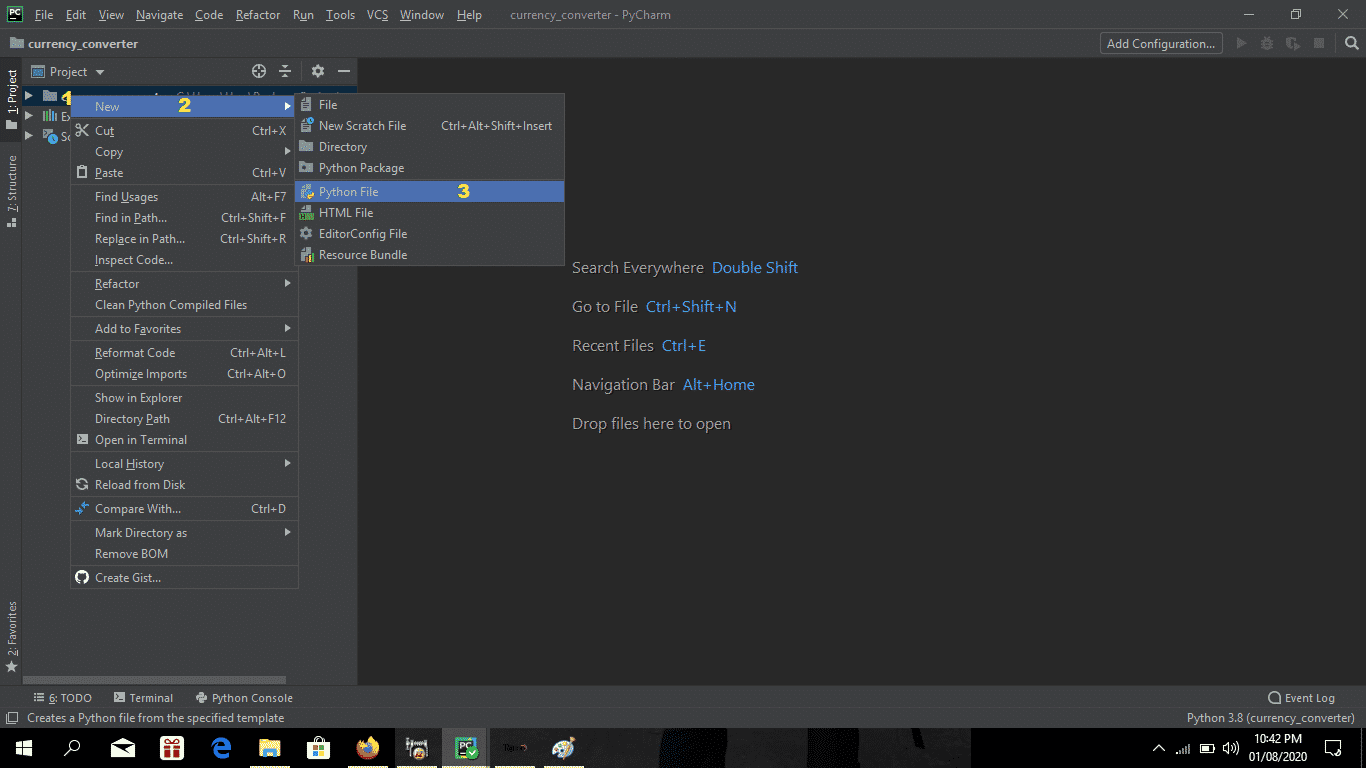
- Step 2: Create a python file.
Second, after creating a project name, “right-click” your project name and then click “new.” After that click the “python file“.

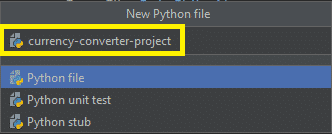
- Step 3: Name your python file.
Third, after creating a Python file, Name your Python file after that click “enter“.

- Step 4: The actual code.
You are free to copy the code given below and download the full source code below.
The Code Given Below Is For Importing Modules.
import requests
from tkinter import *
import tkinter as tk
from tkinter import ttk
In this code which is importing all the modules.
The Code Given Below Is For The Real-time Currency Converter Class
class RealTimeCurrencyConverter():
    def __init__(self,url):
            self.data = requests.get(url).json()
            self.currencies = self.data['rates']

    def convert(self, from_currency, to_currency, amount):
        initial_amount = amount
        if from_currency != 'USD' :
            amount = amount / self.currencies[from_currency]

        # limiting the precision to 4 decimal places
        amount = round(amount * self.currencies[to_currency], 4)
        return amount
This module is the module for the real-time currency converter class.
The Code Given Below Is For Performing The Currency Conversion
 def perform(self):
        amount = float(self.amount_field.get())
        from_curr = self.from_currency_variable.get()
        to_curr = self.to_currency_variable.get()

        converted_amount = self.currency_converter.convert(from_curr,to_curr,amount)
        converted_amount = round(converted_amount, 2)

        self.converted_amount_field_label.config(text = str(converted_amount))

    def restrictNumberOnly(self, action, string):
        regex = re.compile(r"[0-9,]*?(\.)?[0-9,]*$")
        result = regex.match(string)
        return (string == "" or (string.count('.') <= 1 and result is not None))
This module which is performing the currency conversion that you’ve selected.
Complete Source Code of Currency Conversion code in Python:
# # Python Project on Currency Converter

import requests
from tkinter import *
import tkinter as tk
from tkinter import ttk


class RealTimeCurrencyConverter():
    def __init__(self,url):
            self.data = requests.get(url).json()
            self.currencies = self.data['rates']

    def convert(self, from_currency, to_currency, amount):
        initial_amount = amount
        if from_currency != 'USD' :
            amount = amount / self.currencies[from_currency]

        # limiting the precision to 4 decimal places
        amount = round(amount * self.currencies[to_currency], 4)
        return amount

class App(tk.Tk):

    def __init__(self, converter):
        tk.Tk.__init__(self)
        self.title = 'Currency Converter'
        self.currency_converter = converter

        #self.configure(background = 'blue')
        self.geometry("530x200")

        # Label
        self.intro_label = Label(self, text = 'IT SOURCECODE Real Time Currency Converter',  fg = 'black',bg='blue', relief = tk.RAISED, borderwidth = 3)
        self.intro_label.config(font = ('Courier',15,'bold'))

        self.date_label = Label(self, text = f" Date : {self.currency_converter.data['date']}", relief = tk.GROOVE, borderwidth = 5)

        self.intro_label.place(x = 10 , y = 5)
        self.date_label.place(x = 200, y= 50)

        # Entry box
        valid = (self.register(self.restrictNumberOnly), '%d', '%P')
        self.amount_field = Entry(self,bd = 3, relief = tk.RIDGE, justify = tk.CENTER,validate='key', validatecommand=valid)
        self.converted_amount_field_label = Label(self, text = '', fg = 'black', bg = 'white', relief = tk.RIDGE, justify = tk.CENTER, width = 17, borderwidth = 3)

        # dropdown
        self.from_currency_variable = StringVar(self)
        self.from_currency_variable.set("INR") # default value
        self.to_currency_variable = StringVar(self)
        self.to_currency_variable.set("USD") # default value

        font = ("Courier", 12, "bold")
        self.option_add('*TCombobox*Listbox.font', font)
        self.from_currency_dropdown = ttk.Combobox(self, textvariable=self.from_currency_variable,values=list(self.currency_converter.currencies.keys()), font = font, state = 'readonly', width = 12, justify = tk.CENTER)
        self.to_currency_dropdown = ttk.Combobox(self, textvariable=self.to_currency_variable,values=list(self.currency_converter.currencies.keys()), font = font, state = 'readonly', width = 12, justify = tk.CENTER)

        # placing
        self.from_currency_dropdown.place(x = 30, y= 120)
        self.amount_field.place(x = 36, y = 150)
        self.to_currency_dropdown.place(x = 340, y= 120)
        #self.converted_amount_field.place(x = 346, y = 150)
        self.converted_amount_field_label.place(x = 346, y = 150)

        # Convert button
        self.convert_button = Button(self, text = "Convert", fg = "black", bg = "green", command = self.perform)
        self.convert_button.config(font=('Courier', 10, 'bold'))
        self.convert_button.place(x = 225, y = 135)

    def perform(self):
        amount = float(self.amount_field.get())
        from_curr = self.from_currency_variable.get()
        to_curr = self.to_currency_variable.get()

        converted_amount = self.currency_converter.convert(from_curr,to_curr,amount)
        converted_amount = round(converted_amount, 2)

        self.converted_amount_field_label.config(text = str(converted_amount))

    def restrictNumberOnly(self, action, string):
        regex = re.compile(r"[0-9,]*?(\.)?[0-9,]*$")
        result = regex.match(string)
        return (string == "" or (string.count('.') <= 1 and result is not None))

if __name__ == '__main__':
    url = 'https://api.exchangerate-api.com/v4/latest/USD'
    converter = RealTimeCurrencyConverter(url)

    App(converter)
    mainloop()
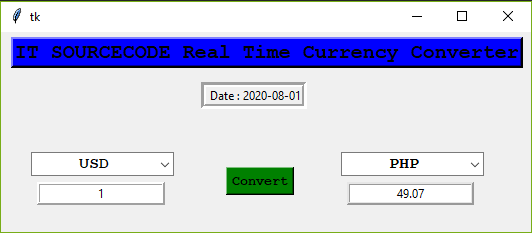
Output:
Downloadable Source Code
I have here the list of Best Python Project with Source code free to download for free, I hope this can help you a lot.
Summary
In this article, we labored at the Python undertaking to construct a Currency Converter.
I hope you discovered new matters and loved constructing this thrilling Python undertaking. Share the item on social media together along with your pals and colleagues.
Related Articles
- Registration Form In Python With Source Code
- Python MySQL UPDATE Query: Step-by-Step Guide in Python
- Bank Management System Project in Python With Source Code
- Python MySQL INSERT Query: Step by Step Guide in Python
- How To Make Game In Python With Source Code
- Complaint Management System Source Code In PHP
Inquiries
If you have any questions or suggestions about Currency Conversion Code in Python, please feel free to leave a comment below.
Official documentation
Frequently Asked Questions
How does this Python project work?
Built with Python 3.10+ and either Tkinter (desktop GUI), Django (web), or Flask (lightweight web). Standard structure: main.py launches the app, modules organized by feature, SQLite/MySQL for persistence.
What Python version and libraries does this project require?
Most projects in this batch use Python 3.10, 3.11, or 3.12 (avoid 3.13 until library wheels catch up). Standard libs: tkinter (built-in), sqlite3 (built-in). External: pip install pillow opencv-python pygame mysql-connector-python reportlab requests beautifulsoup4. Check the requirements.txt file (if included) for exact versions.
How do I set up the database for this Python project?
For SQLite (most common, no setup needed): the .db file auto-creates on first run. For MySQL: install MySQL Server + MySQL Workbench, create an empty database, import the included .sql file, edit the connection string in db.py (or db_connect.py) with your host, user, password, database name.
Can I use this Python project for a BSIT capstone or thesis?
Yes. Python is rising fast in Philippine BSIT panels. Extend it: add user roles via auth module, dashboards (matplotlib charts), PDF reports (reportlab), email notifications (smtplib), real domain extension (analytics, audit log, multi-branch support). Pair with Chapter 1-5 documentation matching your panel’s rubric.
Why am I getting ‘ModuleNotFoundError’ or ‘No module named X’?
Three common Python issues: (1) Module not installed: pip install
Where can I find more Python projects with source code?
Browse the Python Projects hub for the full library. For computer vision specifically see OpenCV Projects (46 vision systems). For ML / AI capstones see Machine Learning Projects. For BSIT capstone idea lists see 150 Best Capstone Project Ideas.

Angel Jude Suarez
Full-Stack Developer at PIES IT Solution
Focuses on Python development, machine learning, and AI integration. Has built production AI systems including OpenAI Whisper integration for medical transcription and GPT-4o-powered diagnosis assistance. Strong background in pandas, scikit-learn, and TensorFlow.
Expertise: Python · PHP · Java · VB.NET · ASP.NET · Machine Learning · AI Integration · OpenCV · Django · CodeIgniter · View all posts by Angel Jude Suarez →
Wow, great blog.Really looking forward to read more. Awesome.
currency conversion source code was not downloading