
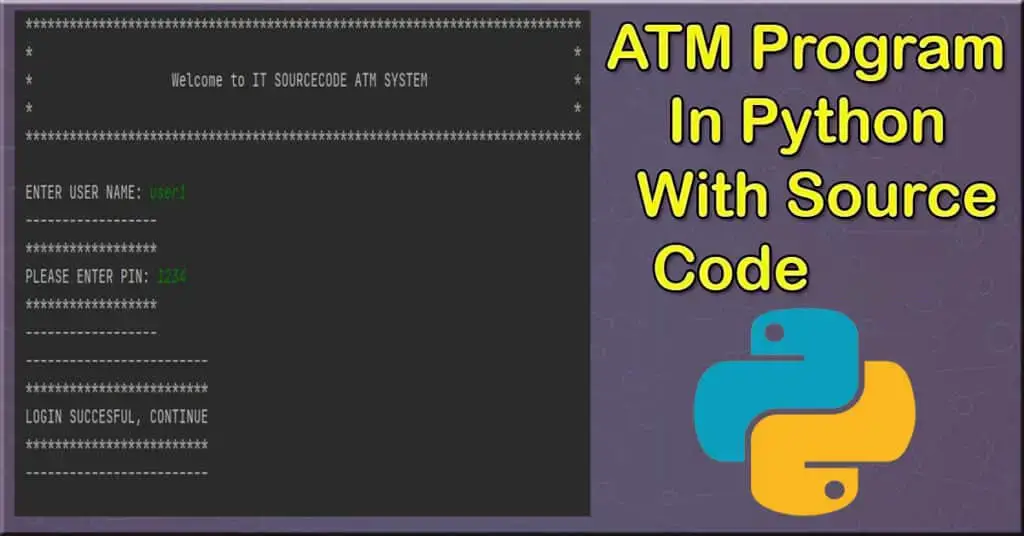
The ATM Program In Python is written in Python programming language, This Article ATM Software Python Project is a simple console-based system that is very easy to use.
Talking about the system ATM Program In Python Using Function, it contains various functions which include Account Statements, Withdrawing, Depositing amounts, and changing the PIN.
Here, at first, the user has to enter an existing username, when the username matches the system proceeds toward the next procedure i.e. asking pin number.
When a user passes all these sign-in procedures, he/she can use all those features. It is very easy to use, he/she can check their respective account statements.
ATM In Python: Project Information
| Project Name: | ATM Program In Python |
| Language/s Used: | Python (GUI) Based |
| Python version (Recommended): | 2.x or 3.x |
| Database: | None |
| Type: | Python App |
| Developer: | IT SOURCECODE |
| Updates: | 0 |
An ATM Software In Python is a simple console-based ATM simulator that provides the simple account balance management of a respective account. It contains all the essential features.
There is no database connection or neither any external text or other files used in this mini project to save user’s data. Everything is set inside the source code whether its pin code or the amount.
This Article ATM Machine In Python also includes the downloadable ATM Machine Python Code for free.
To start creating an ATM Program In Python, make sure that you have Pycharm IDE installed on your computer.
By the way, if you are new to Python programming and don’t know what Python IDE to use, I have here a list of the Best Python IDE for Windows, Linux, and Mac OS that will suit you. I also have here How to Download and Install Latest Version of Python on Windows.
Steps on how to create an ATM Program In Python With Source Code
Time needed: 5 minutes
ATM Program In Python With Source Code
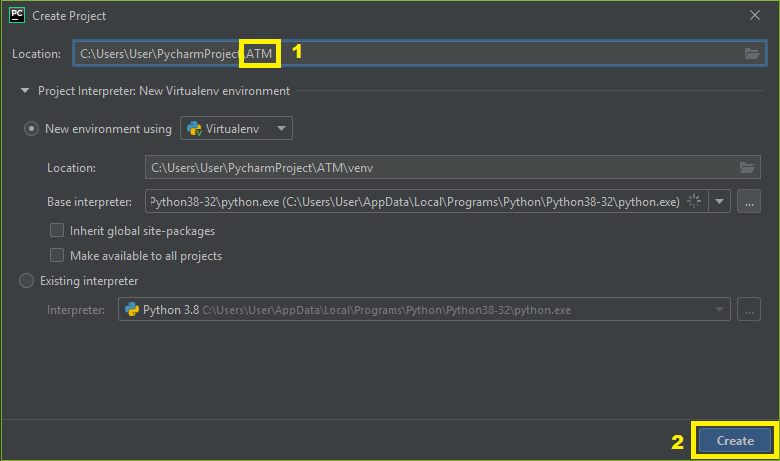
- Step 1: Create a project name.
First, open Pycharm IDE and then create a “project name.” After creating a project name click the “create” button.

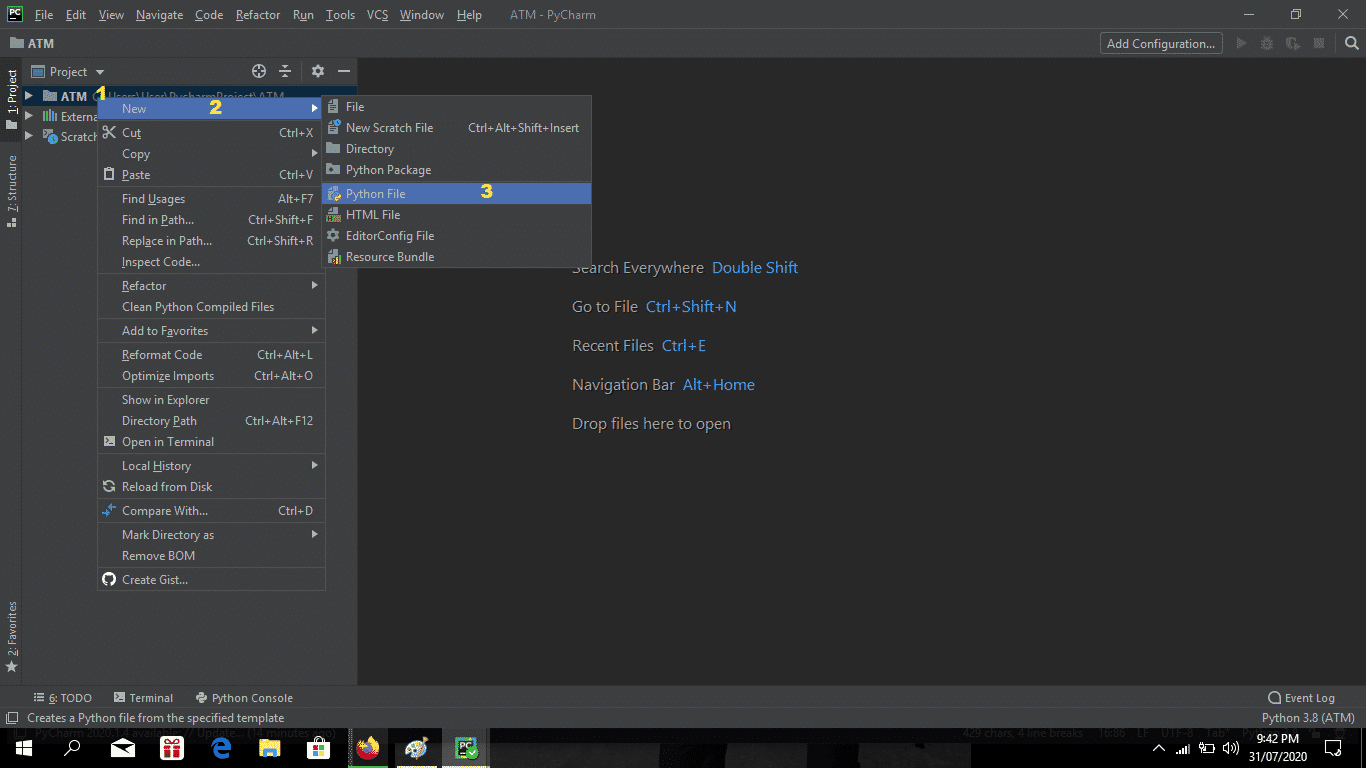
- Step 2: Create a python file.
Second, after creating a project name, “right click” your project name and then click “new” after that click the “python file“.

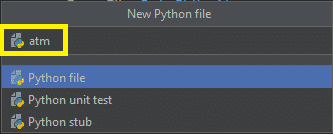
- Step 3: Name your python file.
Third, after creating a Python file, Name your Python file after that click “enter“.

- Step 4: The actual code.
You are free to copy the code given below and download the full source code below.
The Code Given Below Is For Importing Modules:
import getpass
import string
import os
In this line of code which is importing and declaring the modules.
The Code Given Below Is For Declaring Variables:
users = ['user1', 'user2', 'user3']
pins = ['1234', '2222', '3333']
amounts = [1000, 2000, 3000]
count = 0
This module declares the variables and their value to be called in public.
Complete Source Code of a simple ATM Program in Python
import getpass
import string
import os

# creatinga lists of users, their PINs and bank statements
users = ['user1', 'user2', 'user3']
pins = ['1234', '2222', '3333']
amounts = [1000, 2000, 3000]
count = 0
# while loop checks existance of the enterd username
print("****************************************************************************")
print("*                                                                          *")
print("*                   Welcome to IT SOURCECODE ATM SYSTEM                    *")
print("*                                                                          *")
print("****************************************************************************")
while True:
	user = input('\nENTER USER NAME: ')
	user = user.lower()
	if user in users:
		if user == users[0]:
			n = 0
		elif user == users[1]:
			n = 1
		else:
			n = 2
		break
	else:
		print('----------------')
		print('****************')
		print('INVALID USERNAME')
		print('****************')
		print('----------------')

# comparing pin
while count < 3:
	print('------------------')
	print('******************')
	pin = input('PLEASE ENTER PIN: ')
	print('******************')
	print('------------------')
	if pin.isdigit():
		if user == 'user1':
			if pin == pins[0]:
				break
			else:
				count += 1
				print('-----------')
				print('***********')
				print('INVALID PIN')
				print('***********')
				print('-----------')
				print()

		if user == 'user2':
			if pin == pins[1]:
				break
			else:
				count += 1
				print('-----------')
				print('***********')
				print('INVALID PIN')
				print('***********')
				print('-----------')
				print()

		if user == 'user3':
			if pin == pins[2]:
				break
			else:
				count += 1
				print('-----------')
				print('***********')
				print('INVALID PIN')
				print('***********')
				print('-----------')
				print()
	else:
		print('------------------------')
		print('************************')
		print('PIN CONSISTS OF 4 DIGITS')
		print('************************')
		print('------------------------')
		count += 1

# in case of a valid pin- continuing, or exiting
if count == 3:
	print('-----------------------------------')
	print('***********************************')
	print('3 UNSUCCESFUL PIN ATTEMPTS, EXITING')
	print('!!!!!YOUR CARD HAS BEEN LOCKED!!!!!')
	print('***********************************')
	print('-----------------------------------')
	exit()

print('-------------------------')
print('*************************')
print('LOGIN SUCCESFUL, CONTINUE')
print('*************************')
print('-------------------------')
print()
print('--------------------------')
print('**************************')
print(str.capitalize(users[n]), 'welcome to ATM')
print('**************************')
print('----------ATM SYSTEM-----------')
# Main menu
while True:
	#os.system('clear')
	print('-------------------------------')
	print('*******************************')
	response = input('SELECT FROM FOLLOWING OPTIONS: \nStatement__(S) \nWithdraw___(W) \nLodgement__(L)  \nChange PIN_(P)  \nQuit_______(Q) \nType The Letter Of Your Choices: ').lower()
	print('*******************************')
	print('-------------------------------')
	valid_responses = ['s', 'w', 'l', 'p', 'q']
	response = response.lower()
	if response == 's':
		print('---------------------------------------------')
		print('*********************************************')
		print(str.capitalize(users[n]), 'YOU HAVE ', amounts[n],'EURO ON YOUR ACCOUNT.')
		print('*********************************************')
		print('---------------------------------------------')

	elif response == 'w':
		print('---------------------------------------------')
		print('*********************************************')
		cash_out = int(input('ENTER AMOUNT YOU WOULD LIKE TO WITHDRAW: '))
		print('*********************************************')
		print('---------------------------------------------')
		if cash_out%10 != 0:
			print('------------------------------------------------------')
			print('******************************************************')
			print('AMOUNT YOU WANT TO WITHDRAW MUST TO MATCH 10 EURO NOTES')
			print('******************************************************')
			print('------------------------------------------------------')
		elif cash_out > amounts[n]:
			print('-----------------------------')
			print('*****************************')
			print('YOU HAVE INSUFFICIENT BALANCE')
			print('*****************************')
			print('-----------------------------')
		else:
			amounts[n] = amounts[n] - cash_out
			print('-----------------------------------')
			print('***********************************')
			print('YOUR NEW BALANCE IS: ', amounts[n], 'EURO')
			print('***********************************')
			print('-----------------------------------')

	elif response == 'l':
		print()
		print('---------------------------------------------')
		print('*********************************************')
		cash_in = int(input('ENTER AMOUNT YOU WANT TO LODGE: '))
		print('*********************************************')
		print('---------------------------------------------')
		print()
		if cash_in%10 != 0:
			print('----------------------------------------------------')
			print('****************************************************')
			print('AMOUNT YOU WANT TO LODGE MUST TO MATCH 10 EURO NOTES')
			print('****************************************************')
			print('----------------------------------------------------')
		else:
			amounts[n] = amounts[n] + cash_in
			print('----------------------------------------')
			print('****************************************')
			print('YOUR NEW BALANCE IS: ', amounts[n], 'EURO')
			print('****************************************')
			print('----------------------------------------')
	elif response == 'p':
		print('-----------------------------')
		print('*****************************')
		new_pin = str(getpass.getpass('ENTER A NEW PIN: '))
		print('*****************************')
		print('-----------------------------')
		if new_pin.isdigit() and new_pin != pins[n] and len(new_pin) == 4:
			print('------------------')
			print('******************')
			new_ppin = str(getpass.getpass('CONFIRM NEW PIN: '))
			print('*******************')
			print('-------------------')
			if new_ppin != new_pin:
				print('------------')
				print('************')
				print('PIN MISMATCH')
				print('************')
				print('------------')
			else:
				pins[n] = new_pin
				print('NEW PIN SAVED')
		else:
			print('-------------------------------------')
			print('*************************************')
			print('   NEW PIN MUST CONSIST OF 4 DIGITS \nAND MUST BE DIFFERENT TO PREVIOUS PIN')
			print('*************************************')
			print('-------------------------------------')
	elif response == 'q':
		exit()
	else:
		print('------------------')
		print('******************')
		print('RESPONSE NOT VALID')
		print('******************')
		print('------------------')
ATM Program In Python Downloadable Source Code
I have here the list of Best Python Projects with Source code free to download for free, I hope this can help you a lot.
In order to run the project, you must have installed Python, on your PC. This is a simple Console-based system, specially written for beginners.
ATM Program In Python with source code is free to download. Use for education purposes only! For the project demo, have a look at the YouTube Video Above.
Summary
This article is made for educational purposes only for students who want to learn programming, especially Python, This system fully functional console-based system that is easy to use.
Official documentation
Frequently Asked Questions
How does this Python ATM simulation work?
Card+PIN auth, balance inquiry, withdrawal, deposit, transfer, mini-statement. Tkinter full-screen kiosk mode + SQLite.
What Python version and libraries does this project require?
Most projects in this batch use Python 3.10, 3.11, or 3.12 (avoid 3.13 until library wheels catch up). Standard libs: tkinter (built-in), sqlite3 (built-in). External: pip install pillow opencv-python pygame mysql-connector-python reportlab requests beautifulsoup4. Check the requirements.txt file (if included) for exact versions.
How do I set up the database for this Python project?
For SQLite (most common, no setup needed): the .db file auto-creates on first run. For MySQL: install MySQL Server + MySQL Workbench, create an empty database, import the included .sql file, edit the connection string in db.py (or db_connect.py) with your host, user, password, database name.
Can I use this Python project for a BSIT capstone or thesis?
Yes. Python is rising fast in Philippine BSIT panels. Extend it: add user roles via auth module, dashboards (matplotlib charts), PDF reports (reportlab), email notifications (smtplib), real domain extension (analytics, audit log, multi-branch support). Pair with Chapter 1-5 documentation matching your panel’s rubric.
Why am I getting ‘ModuleNotFoundError’ or ‘No module named X’?
Three common Python issues: (1) Module not installed: pip install
Where can I find more Python projects with source code?
Browse the Python Projects hub for the full library. For computer vision specifically see OpenCV Projects (46 vision systems). For ML / AI capstones see Machine Learning Projects. For BSIT capstone idea lists see 150 Best Capstone Project Ideas.

Angel Jude Suarez
Full-Stack Developer at PIES IT Solution
Focuses on Python development, machine learning, and AI integration. Has built production AI systems including OpenAI Whisper integration for medical transcription and GPT-4o-powered diagnosis assistance. Strong background in pandas, scikit-learn, and TensorFlow.
Expertise: Python · PHP · Java · VB.NET · ASP.NET · Machine Learning · AI Integration · OpenCV · Django · CodeIgniter · View all posts by Angel Jude Suarez →
But program is not running i have error in line 17
Sir what is the algorithm of this code?
Bro…
Why u r using os module in this programme?
Pls tell me
Thank you for this code.
It seems like it doesn’t work for PIN change!
Please try it once.
what do you mean pin change?