

The File Upload in PHP project was created using PHP, HTML, CSS, and a MySQL database as the back end.
This project with source code is useful when we want to upload different file types to our systems or websites.
In this tutorial, I will explain how to create a file upload and download feature using PHP. You will learn the easy way of uploading and downloading files in formats such as .pdf, .txt, .docx, and more.
This simple project also allows you to download the files you upload to the system.
To start creating this project, make sure you have Sublime Text or any PHP and MySQL platform installed on your computer.
Moreover, Filestack provides a simple yet powerful HTML file upload solution, making it easy to integrate secure file uploading, transformation, and delivery into web applications.
File Upload In PHP With Source Code: Steps on how to create the project
Follow the step by step procedure on how to make File Upload and Download. See it below.
Lets Begin:
File Upload MySQL Database
First, create a database in the MySQL and name it “dbupload“.
Second, create a table in the database that you have created.
CREATE TABLE `dbupload`.`tblfiles` (
`ID` INT NOT NULL AUTO_INCREMENT PRIMARY KEY ,
`FileName` VARCHAR( 30 ) NOT NULL ,
`Location` VARCHAR( 90 ) NOT NULL
) ENGINE = INNODB;
File Upload Code
Third, create a landing page and name it “index.php“.
Fourth, create CSS Style of the page.
<style>
.form{
width: 100%;
display: inline-block;
position: inherit;
padding: 6px;
}

.label {
padding: 10px;
width: 10%;
}
.input{
position: inherit;
padding: 3px;
margin-left: 2.3%;
}

.btn{
margin-left: 6.5%;
background-color: blue;
color: white;
}
</style>
Fifth, do the following code for uploading the file.
<?php
$con = mysqli_connect("localhost","root","","dbupload");
if (mysqli_connect_errno()) {
echo "Unable to connect to MySQL! ". mysqli_connect_error();
}
if (isset($_POST['save'])) {
$target_dir = "Uploaded_Files/";
$target_file = $target_dir . date("dmYhis") . basename($_FILES["file"]["name"]);
$uploadOk = 1;
$imageFileType = pathinfo($target_file,PATHINFO_EXTENSION);

if($imageFileType != "jpg" || $imageFileType != "png" || $imageFileType != "jpeg" || $imageFileType != "gif" ) {
if (move_uploaded_file($_FILES["file"]["tmp_name"], $target_file)) {
$files = date("dmYhis") . basename($_FILES["file"]["name"]);
}else{
echo "Error Uploading File";
exit;
}
}else{
echo "File Not Supported";
exit;
}
$filename = $_POST['filename'];
$location = "Uploaded_Files/" . $files;
$sqli = "INSERT INTO `tblfiles` (`FileName`, `Location`) VALUES ('{$filename}','{$location}')";
$result = mysqli_query($con,$sqli);
if ($result) {
echo "File has been uploaded";
};
}
?>

<center>
<h1>Upload and Download</h1>
<form class="form" method="post" action="" enctype="multipart/form-data">
<label>Filename:</label>
<input type="text" name="filename" > <br/>
<div style="margin-left: 9%">
<label>File:</label>
<input type="file" name="file"> <br/>
</div>
<button type="submit" name="save" class="btn"><i class="fa fa-upload fw-fa"></i> Upload</button>
</form>
</center>
Sixth, do the following code for downloading the file.
<br>
<div class="container">
<table id="demo" class="table table-bordered">
<thead>
<tr>
<td>FileName</td>
<td>Download</td>
</tr>
</thead>
<tbody>
<?php
$sqli = "SELECT * FROM `tblfiles`";
$res = mysqli_query($con, $sqli);
while ($row = mysqli_fetch_array($res)) {
echo '<tr>';
echo '<td>'.$row['FileName'].'</td>';
echo '<td><a class="btn" href="'.$row['Location'].'">Download</a></td>';
echo '</tr>';
}
mysqli_close($con);
?>
</tbody>
</table>
</div>
Complete Source Code
<!DOCTYPE html>
<html>
<head>
  <title>IT SOURCECODE | Upload and Download File</title>
  <link rel="stylesheet" href="https://maxcdn.bootstrapcdn.com/bootstrap/4.0.0/css/bootstrap.min.css" integrity="sha384-Gn5384xqQ1aoWXA+058RXPxPg6fy4IWvTNh0E263XmFcJlSAwiGgFAW/dAiS6JXm" crossorigin="anonymous">
</head>
<body>
<style>
.form{
width: 100%;
display: inline-block;
position: inherit;
padding: 6px;
}

.label {
padding: 10px;
width: 10%;
}
.input{
position: inherit;
padding: 3px;
margin-left: 2.3%;
}

.btn{
margin-left: 6.5%;
background-color: blue;
color: white;
}
</style>
<?php
$con = mysqli_connect("localhost","root","","dbupload");
if (mysqli_connect_errno()) {
echo "Unable to connect to MySQL! ". mysqli_connect_error();
}
if (isset($_POST['save'])) {
$target_dir = "Uploaded_Files/";
$target_file = $target_dir . date("dmYhis") . basename($_FILES["file"]["name"]);
$uploadOk = 1;
$imageFileType = pathinfo($target_file,PATHINFO_EXTENSION);

if($imageFileType != "jpg" || $imageFileType != "png" || $imageFileType != "jpeg" || $imageFileType != "gif" ) {
if (move_uploaded_file($_FILES["file"]["tmp_name"], $target_file)) {
$files = date("dmYhis") . basename($_FILES["file"]["name"]);
}else{
echo "Error Uploading File";
exit;
}
}else{
echo "File Not Supported";
exit;
}
$filename = $_POST['filename'];
$location = "Uploaded_Files/" . $files;
$sqli = "INSERT INTO `tblfiles` (`FileName`, `Location`) VALUES ('{$filename}','{$location}')";
$result = mysqli_query($con,$sqli);
if ($result) {
echo "File has been uploaded";
};
}
?>
<center>
<h1>Upload and Download</h1>
<form class="form" method="post" action="" enctype="multipart/form-data">
<label>Filename:</label>
<input type="text" name="filename" > <br/>
<div style="margin-left: 9%">
<label>File:</label>
<input type="file" name="file"> <br/>
</div>
<button type="submit" name="save" class="btn"><i class="fa fa-upload fw-fa"></i> Upload</button>
</form>
</center>
<br>
<div class="container">
<table id="demo" class="table table-bordered">
<thead>
<tr>
<td>FileName</td>
<td>Download</td>
</tr>
</thead>
<tbody>
<?php
$sqli = "SELECT * FROM `tblfiles`";
$res = mysqli_query($con, $sqli);
while ($row = mysqli_fetch_array($res)) {
echo '<tr>';
echo '<td>'.$row['FileName'].'</td>';
echo '<td><a class="btn" href="'.$row['Location'].'">Download</a></td>';
echo '</tr>';
}
mysqli_close($con);
?>
</tbody>
</table>
</div>
<script src="https://code.jquery.com/jquery-3.2.1.slim.min.js" integrity="sha384-KJ3o2DKtIkvYIK3UENzmM7KCkRr/rE9/Qpg6aAZGJwFDMVNA/GpGFF93hXpG5KkN" crossorigin="anonymous"></script>
<script src="https://cdnjs.cloudflare.com/ajax/libs/popper.js/1.12.9/umd/popper.min.js" integrity="sha384-ApNbgh9B+Y1QKtv3Rn7W3mgPxhU9K/ScQsAP7hUibX39j7fakFPskvXusvfa0b4Q" crossorigin="anonymous"></script>
<script src="https://maxcdn.bootstrapcdn.com/bootstrap/4.0.0/js/bootstrap.min.js" integrity="sha384-JZR6Spejh4U02d8jOt6vLEHfe/JQGiRRSQQxSfFWpi1MquVdAyjUar5+76PVCmYl" crossorigin="anonymous"></script>
<script type="text/javascript">
</script>
</body>
</html>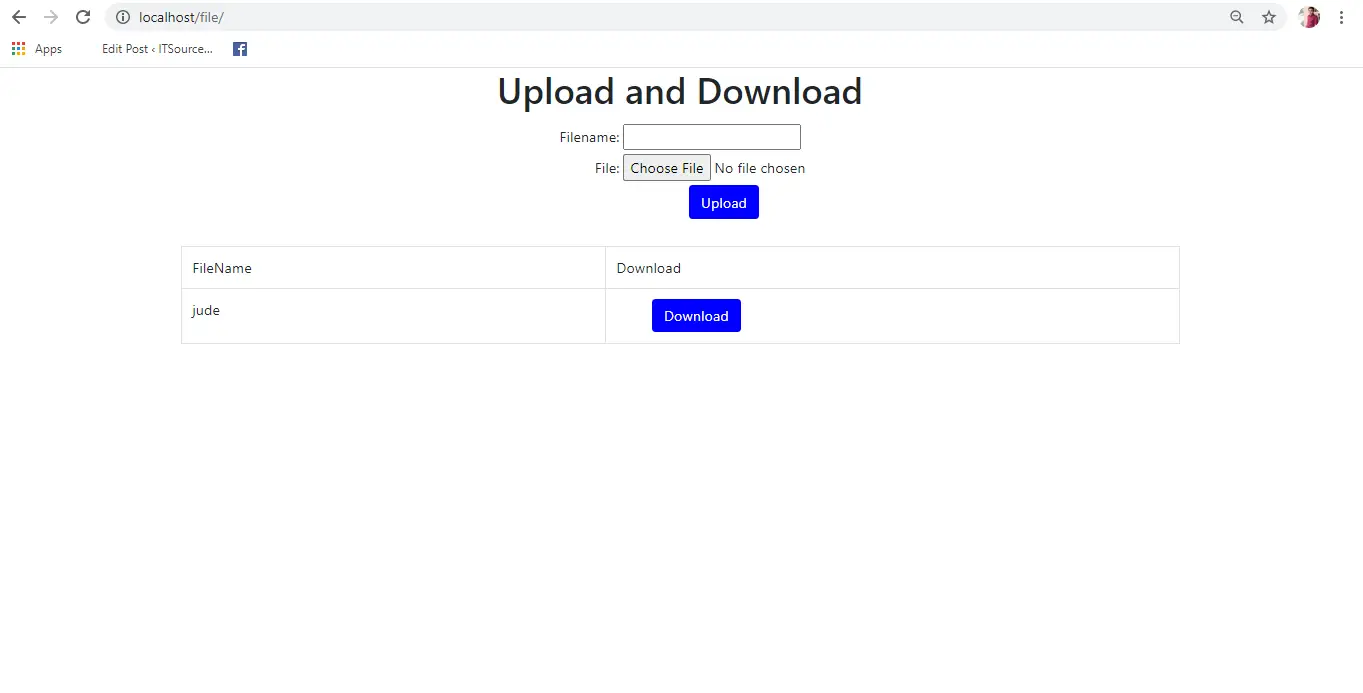
Download Source Code below
Anyway, if you want to level up your programming knowledge, especially PHP, try this new article I’ve made for you Best PHP Projects With Source Code Free Download.
Official documentation
Frequently Asked Questions
How does PHP file upload work in this example?
Form with enctype=’multipart/form-data’, PHP move_uploaded_file() for filesystem storage. Validate via $_FILES[‘file’][‘type’] + filesize check. Track filename + path in MySQL. Display via standard or .
What PHP and MySQL versions does this project require?
Most projects in this batch run on PHP 7.4 to PHP 8.2 with MySQL 5.7+ or MariaDB 10+. A few older projects need PHP 5.6 (deprecated, use XAMPP 7.x). To run: install XAMPP / WAMP / Laragon, extract project to htdocs, import the included .sql file via phpMyAdmin, edit the connection file (usually config.php or db_connect.php) with your DB credentials, browse to the project URL in your browser.
How do I set up the database for this PHP project?
Open phpMyAdmin (http://localhost/phpmyadmin/ on XAMPP), create a new empty database with the name specified in the project’s config.php. Click the Import tab, choose the included .sql file, click Go. Then edit config.php (or includes/connection.php) with: ‘localhost’, your MySQL username (usually ‘root’), your MySQL password (usually blank for XAMPP), and the database name.
Can I use this PHP project for a BSIT capstone or thesis?
Yes, but extend it. A bare CRUD app is too narrow for full capstone scope. Add: user roles via session checks, reports/dashboards (Chart.js + AJAX), PDF exports (TCPDF library), email notifications (PHPMailer), real domain extension (analytics, audit log, multi-branch support). Pair with Chapter 1-5 documentation matching your panel’s rubric.
Why am I getting ‘connection error’ or ‘undefined function mysqli_connect’?
Three common PHP issues: (1) Connection error: Apache + MySQL services not running in XAMPP control panel, OR database name in config.php does not match what you created in phpMyAdmin. (2) ‘undefined function mysqli_connect’: MySQL extension not enabled, in php.ini uncomment extension=mysqli (then restart Apache). (3) ‘No such file or directory’: MySQL socket path wrong, use 127.0.0.1 instead of localhost in the connection string.
Where can I find more PHP projects with source code?
Browse the PHP Projects hub for the full library (300+ vanilla PHP systems). For modern PHP MVC alternatives see Laravel Projects (74 systems) or CodeIgniter Projects (32 systems). For BSIT-focused capstone idea lists see 150 Best Capstone Project Ideas.
Related PHP Projects
- CodeIgniter Download File From Database With Source Code
- CodeIgniter Projects With Source Code Free Download
- Laravel Human Resource Management System Free Full Download
- Water Refilling System Free Download Template In Bootstrap And PHP
- Open Source Job Portal In PHP Free Download
- Event Calendar In PHP Free Download
Inquiries
If you have any questions or suggestion about File Upload and Download Using PHP, please feel free to contact us at our contact page. You can subscribe this site to see more of my tutorials.

Angel Jude Suarez
Full-Stack Developer at PIES IT Solution
Focuses on Python development, machine learning, and AI integration. Has built production AI systems including OpenAI Whisper integration for medical transcription and GPT-4o-powered diagnosis assistance. Strong background in pandas, scikit-learn, and TensorFlow.
Expertise: Python · PHP · Java · VB.NET · ASP.NET · Machine Learning · AI Integration · OpenCV · Django · CodeIgniter · View all posts by Angel Jude Suarez →
how to enable uploading mp3 files by using this code ?
nie da sie
the tutorial was not clear
Can we have the source code
Thanks alot
I want to display the pdf file and its contents once I click a button. how?