
The Modal Popup in JavaScript is widely used on many system development for user interactivity in storing and updating data.
The modal will be generic, allowing you to utilize it for whatever reason you see fit.
We will make a simple modal with CSS and JavaScript. In fact, for the feedback option at the end of this lesson, we’ll use the same code and structure as the modal used.
We also tackle on How To Create JavaScript Popup Modals (popup windows) without using a framework or a third-party library.
Lastly, we will create everything from the ground up, allowing us complete control over how it functions and appears.
What is Modal In JavaScript
In JavaScript, Modal is a (popup window or a dialog box) which is displayed on the top of the current web page.
In addition, they are commonly used to drive newsletter signups, display notifications/alerts, and manage register and login forms, among other things.
How To Call Modal Popup In JavaScript?
In the same way, a page can have several open triggers (elements with the data-open attribute).
The related modal dialog should become visible with a fade-in animation each time a trigger is clicked. Keep in mind that the data-open attribute value must match the modal’s ID.
How To Close Modal Popup In JavaScript?
The <button> inside the header has a data-dismiss = “modal” overlay attribute which closes the modal if the user click on it.
Furthermore, you can also use the JS (hide method) to open the modal, just click the launch button and the modal will automatically popup, if you want it too close you just need to click the backdrop button.
This JavaScript Project With Source Code also includes a downloadable JavaScript source code for free, just find the downloadable source code below and click to start downloading.
I have here a suggested list of Best JavaScript Projects with Source Code Free to download and I’m sure this can help you to improve your skills in JavaScript programming and web development as a whole.
To start executing a Modal Popup In JavaScript With Source Code, makes sure that you have any platform in creating a JavaScript, CSS, bootstrap, and HTML installed in your computer, in my case I will use Sublime Text.
Project details and technology:
| ABOUT PROJECT | PROJECT DETAILS |
|---|---|
| Project Name : | Modal Popup In JavaScript |
| Project Platform : | JavaScript |
| Programming Language Used: | JavaScript, HTML, and CSS |
| Developer Name : | itsourcecode.com |
| IDE Tool (Recommended): | Sublime |
| Project Type : | Web Application |
| Database: | None |
| Upload Date: | 9 / 25 / 2022 |
Modal Popup In JavaScript With Source Code : Steps on how to create the project
Time needed: 5 minutes
These are the steps on how to create a Modal Popup In JavaScript With Source Code
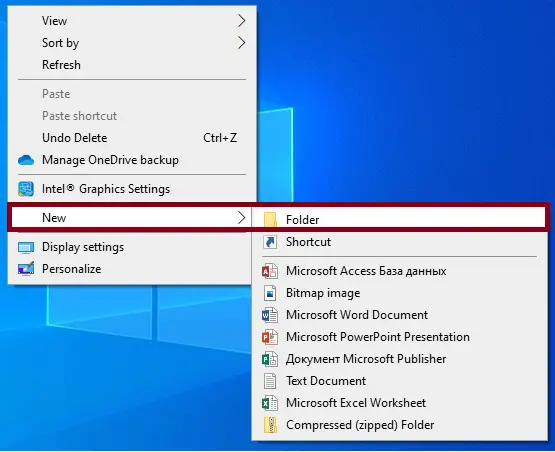
- Step 1: Create a folder.
First, create a folder and named it.

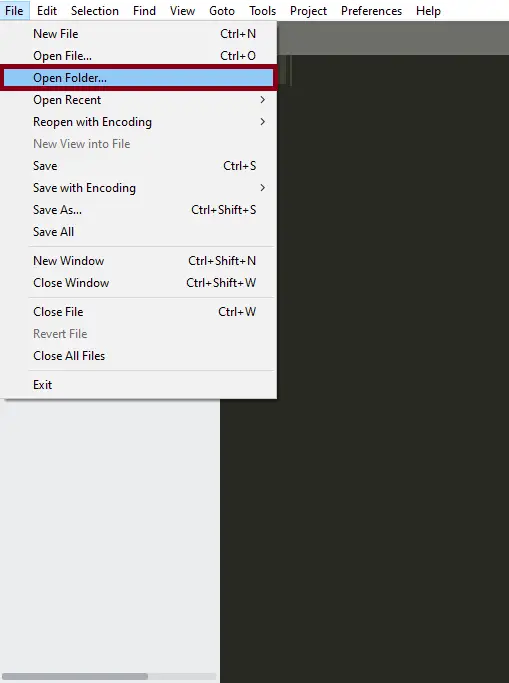
- Step 2: Open the folder in “Sublime Text”.
Second ,after creating a folder, open it in “sublime text“.

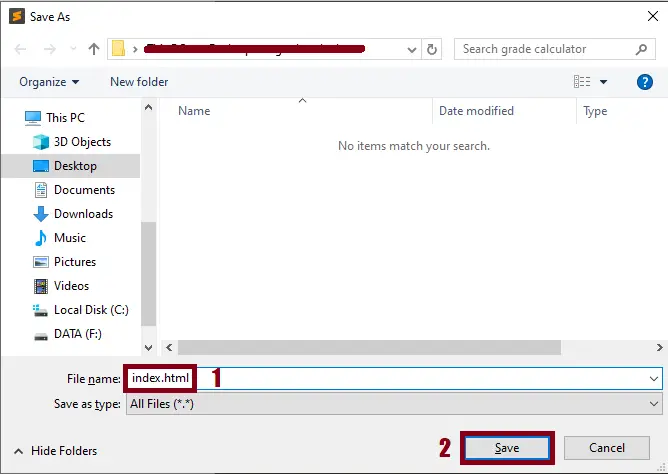
- Step 3: Create a html file.
Third, create a “html” file and save it as “index.html“

The code given below is for the html module
<button class="trigger">Click here to trigger the modal!</button>
<div class="modal">
<div class="modal-content">
<!-- html markup and event listener-->
<span class="close-button">×</span>
<h1>Hello, I am a modal!</h1>
</div>
</div>The first is a basic button that, when clicked, causes the modal to appear. Then there’s the modal’s parent container, which is where the modal is stored. Finally, we have the content for the modal, as well as a close button.
The code given below is for the css module
<style>
      .modal {
        position: fixed;
        left: 0;
        top: 0;
        width: 100%;
        height: 100%;
        background-color: rgba(0, 0, 0, 0.5);
        opacity: 0;
        visibility: hidden;
        transform: scale(1.1);
        transition: visibility 0s linear 0.25s, opacity 0.25s 0s, transform 0.25s;
    }
    .modal-content {
         <!-- width and height, width 100 height -->
        position: absolute;
        top: 50%;
        left: 50%;
        transform: translate(-50%, -50%);
        background-color: white;
        padding: 1rem 1.5rem;
        width: 24rem;
        border-radius: 0.5rem;
    }
    .close-button {
        float: right;
        width: 1.5rem;
        line-height: 1.5rem;
        text-align: center;
        cursor: pointer;
        border-radius: 0.25rem;
        <!-- display flex align items center justify content center -->
        background-color: lightgray;
    }
    .close-button:hover {
        background-color: darkgray;
    }
    .show-modal {
        opacity: 1;
        visibility: visible;
        transform: scale(1.0);
        transition: visibility 0s linear 0s, opacity 0.25s 0s, transform 0.25s;
    }
    </style>
The styles should be straightforward, but if you need a refresher, here’s a nice lesson on CSS.
The code given below is for the javascript module
<script>
      const modal = document.querySelector(".modal");
    const trigger = document.querySelector(".trigger");
    const closeButton = document.querySelector(".close-button");

    function toggleModal() {
        modal.classList.toggle("show-modal");
    }

    function windowOnClick(event) {
        if (event.target === modal) {
            toggleModal();
        }
    }

    trigger.addEventListener("click", toggleModal);
    closeButton.addEventListener("click", toggleModal);
    window.addEventListener("click", windowOnClick);
    </script>
Great! The modal should now seamlessly animate between the states if we press the trigger or close button. It’s all about the beautiful animations here.
Project Output

Downloadable Source Code
Summary
Modal boxes are widely used, and you now have a clear example to utilize for yourself. I hope you found this lesson helpful, and I wish you luck in coming up with creative applications for them!
This JavaScript Project With Source Code is simply in HTML, CSS, and JavaScript. To start creating this Simple JavaScript Project With Source Code, make sure that you have basic knowledge in HTML, CSS and JavaScript.
This JavaScript Game Project also includes a downloadable JavaScript Game Project With Source Code for free.
Related Articles
- Todo List In JavaScript With Source Code
- Currency Converter Project in JavaScript with Source Code
- Calculator In JavaScript Source Code
- [SOLVED] How To Make A Live Chat In JavaScript With Source Code
Inquiries
If you have any questions or suggestions about Modal Popup In JavaScript, please feel free to leave a comment below.
Official documentation
Frequently Asked Questions
What does this JavaScript widget example demonstrate?
Standard UI component pattern (slider, carousel, modal, dropdown, accordion, tabs) implemented in vanilla JS. Foundation for any frontend project.
What JavaScript runtime or browser does this project need?
Pure frontend projects (vanilla JS, Vue, jQuery) run in any modern browser (Chrome 90+, Firefox 88+, Safari 14+, Edge 90+) – no install needed. Node.js projects need Node.js 18 LTS or 20 LTS (download from nodejs.org). Run: npm install in project folder, then npm start or node app.js.
How do I run this JavaScript project locally?
For pure HTML/CSS/JS: open index.html in your browser, or use VS Code Live Server extension for auto-reload. For Vue projects: npm install then npm run dev (Vite) or npm run serve (Vue CLI). For Node.js: npm install then npm start. For projects with backend (PHP+MySQL): place in XAMPP htdocs, start Apache + MySQL, browse to localhost/project.
Can I use this JavaScript project for a BSIT capstone or thesis?
Yes. Extend it: add user authentication (JWT for SPA, sessions for traditional), role-based access, real backend (Node.js+Express+MongoDB or PHP+MySQL), responsive design (Bootstrap/Tailwind), PDF exports (jsPDF), real-time features (Socket.IO). Pair with Chapter 1-5 documentation matching your panel’s rubric.
Why am I getting ‘Uncaught ReferenceError’ or ‘Cannot read property of undefined’?
Three common JavaScript issues: (1) Script tag placement wrong, put

Angel Jude Suarez
Full-Stack Developer at PIES IT Solution
Focuses on Python development, machine learning, and AI integration. Has built production AI systems including OpenAI Whisper integration for medical transcription and GPT-4o-powered diagnosis assistance. Strong background in pandas, scikit-learn, and TensorFlow.
Expertise: Python · PHP · Java · VB.NET · ASP.NET · Machine Learning · AI Integration · OpenCV · Django · CodeIgniter · View all posts by Angel Jude Suarez →
Looking for similar projects or tutorials?
Search for more source code, capstone projects, or programming tutorials