
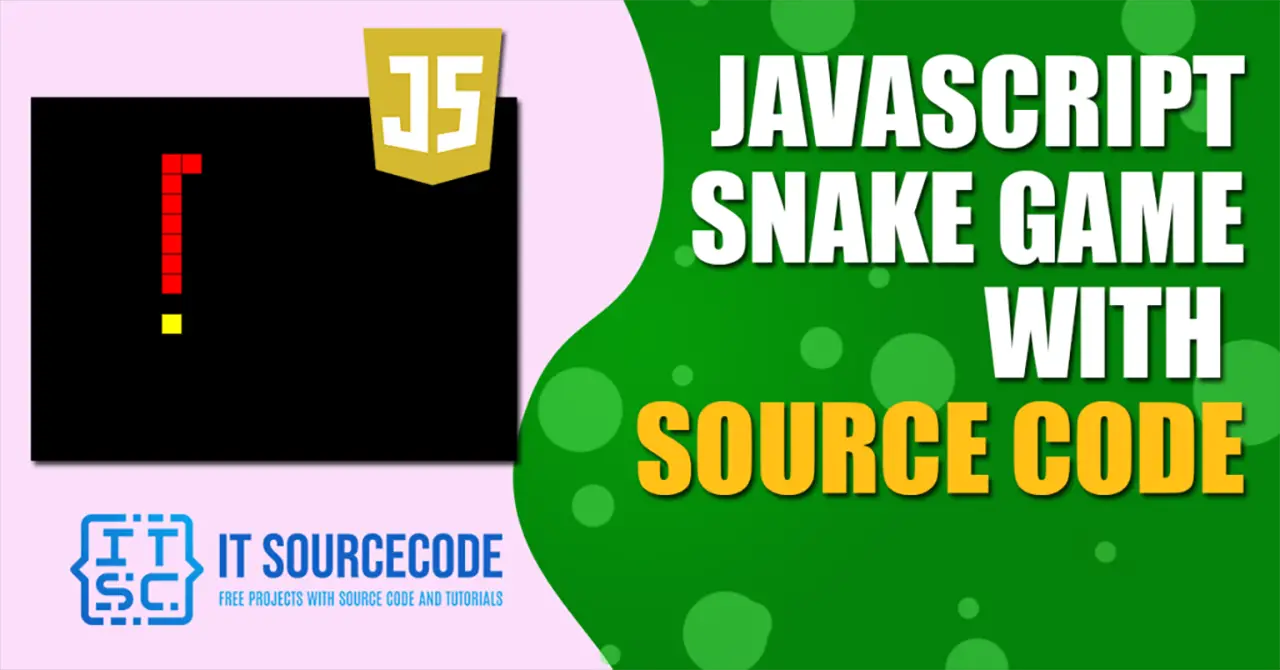
JavaScript Snake Game with Source Code
The JavaScript Snake Game is created in JavaScript using html and CSS platform.
This Snake Game in JavaScript is a desktop web application. Basically, tutorials and guides for creating code are included in the project.
Also, the project provides code creation tutorials and guides. The project is also open source, where users can download and edit zips as required.
This simple mini project for JavaScript snake game code is complete and totally error free and also includes a downloadable Source Code for free, just find the downloadable source code below and click to start downloading. Before you start to click the download now first you must click the Run Quick Scan for secure Download.
In addition, this snake game using JavaScript is a basic snake game like the typical one that we normally play.
Users can switch the controls from their desktop to the left arrow key, right right arrow key, up arrow key and down arrow key. Otherwise, you can lose the match until the snake reaches the boundary.
I have here a suggested list of Best JavaScript Projects with Source Code Free to download and I’m sure this can help you to improve your skills in JavaScript programming and web development as a whole.
Anyway if you want level up your knowledge in programming especially JavaScript Programming, try this new article I’ve made for you Best JavaScript Projects With Source Code For Beginners.
To start creating a Javascript Snake Game with Source Code, make sure that you have any platform in creating a JavaScript, bootstrap, and HTML installed in your computer, in my case I will use Sublime Text.
JavaScript Snake Game with Source Code
Time needed: 5 minutes
Here’s the Steps on how to create a JavaScript Snake Game with Source Code
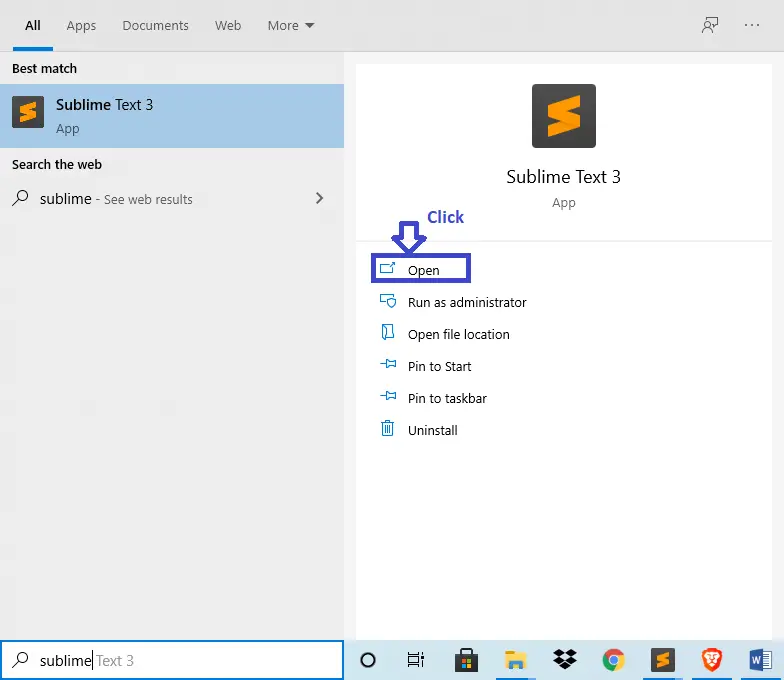
- Step 1: Open Sublime Text.
First, after installing sublime text IDE, click “open” to start.

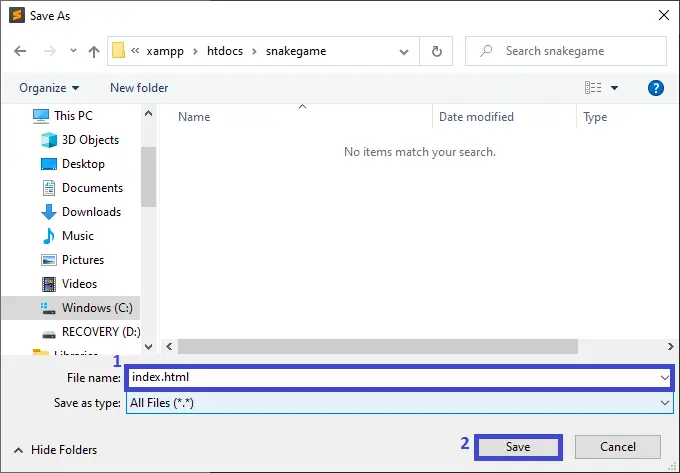
- Step 2: Create a HTML file.
Next, click “file” and select “save as” and named it “index.html“

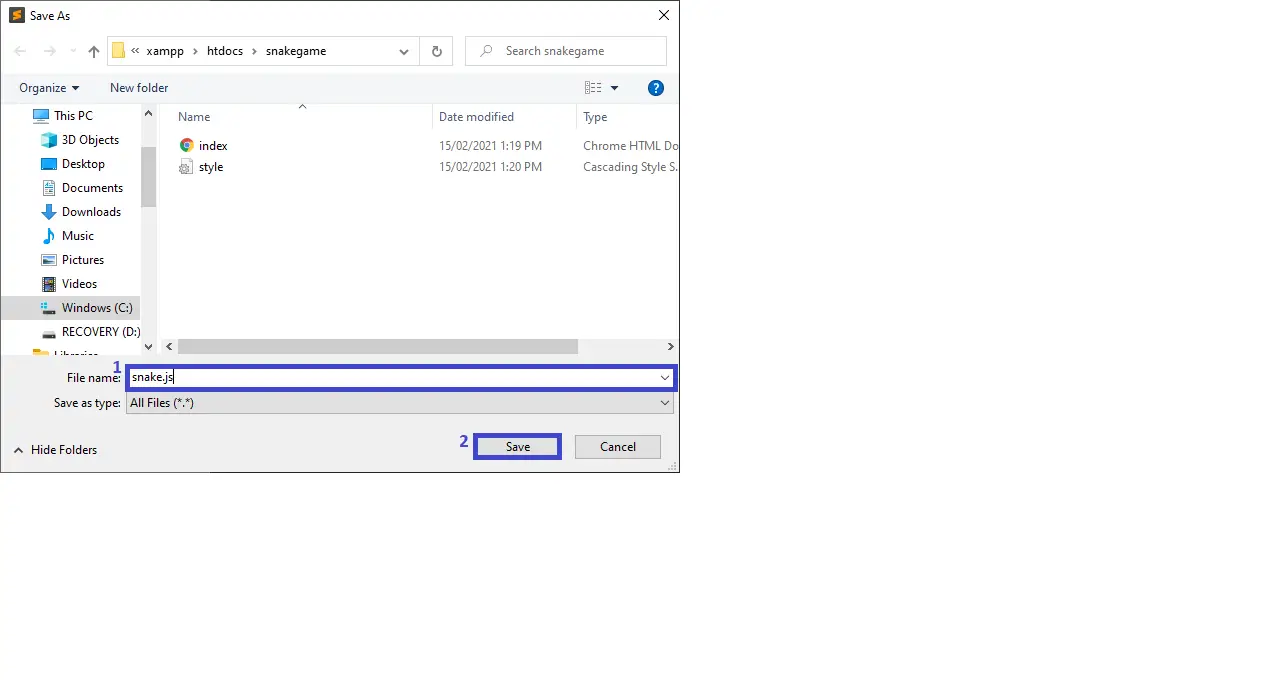
- Step 3: Create a JavaScript file.
Then, click “file” and select “save as” and named it “snake.js“

- Step 4: Create a CSS file.
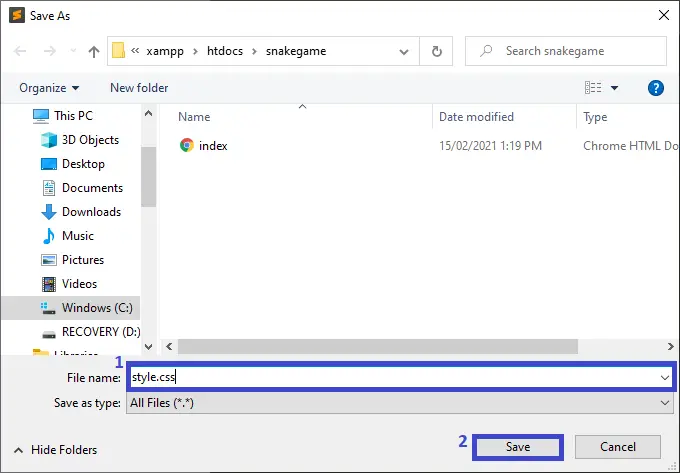
Last, click “file” and select “save as” and named it “style.css“
- Step 5: The actual code.
Finally, You are free to copy the code given below and paste to your different file created.
Code for the index.html in Snake Game in JavaScript
In the code given below, which is the code contains the interface of the application. This code will show the form that will be use in html.
<!doctype html>
<html lang="en">
<head>
  <meta charset="utf-8">
  <meta name="viewport" content="width=device-width, initial-scale=1">
  <meta name="mobile-web-app-capable" content="yes">
  <meta name="apple-mobile-web-app-title" content="Snake Game">
  <title>Itsourcecode Snake Game</title>
  <link rel="stylesheet" href="https://fonts.googleapis.com/css?family=Press+Start+2P">
  <link rel="stylesheet" href="https://cdnjs.cloudflare.com/ajax/libs/normalize/8.0.0/normalize.min.css">
  <link rel="stylesheet" href="./style.css">
</head>
<body>
  <div id="app" class="app">
    <div class="start-screen animated bounceIn">
      <h3>Itsourcecode Snake Game</h3>

      <div class="options">
        <h3>Choose Difficulty</h3>
        <p class="end-score"></p>
        <button data-difficulty="100" class="active">Easy</button>
        <button data-difficulty="75">Average</button>
        <button data-difficulty="50">Hard</button>
      </div>

      <button class="play-btn">Play</button>
    </div>

    <canvas></canvas>

    <div class="score">0</div>
  </div>

  <script src="./snake.js"></script>
</body>
</html>
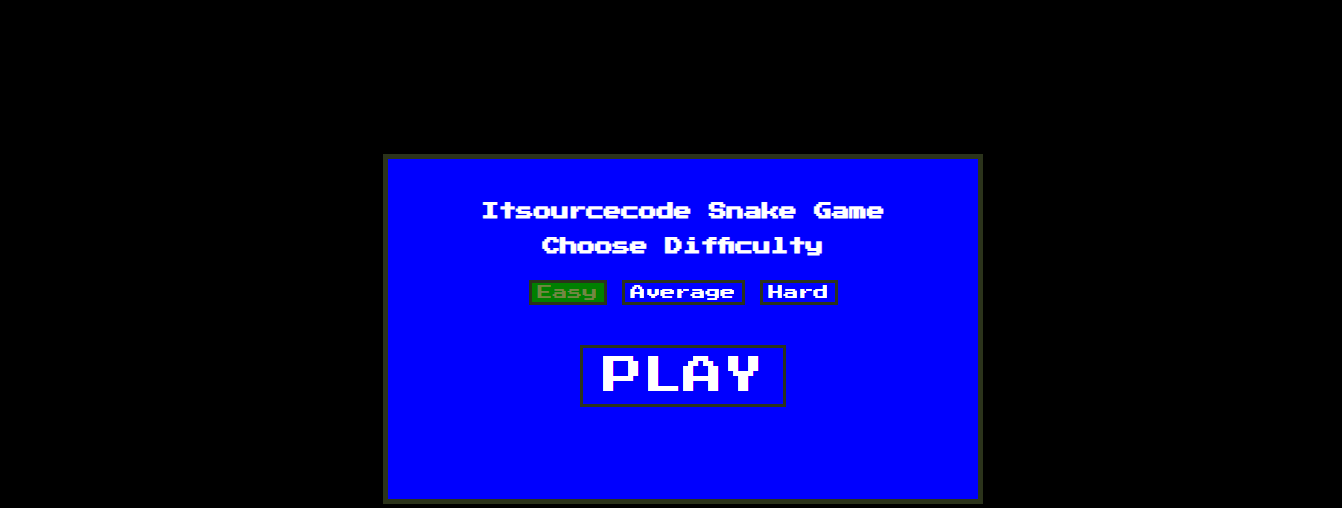
After adding the code, you may test the code. The output should look like as shown below.(Snake Game in Javascript)
Code for the style.css Snake Game in JavaScript
In the code given below, which is the code contains the interface design of the application. This code will show the form that will be use for designing.
html {
  box-sizing: border-box;
}

*,
*:before,
*:after {
  box-sizing: inherit;
}

body {
  font: normal 15px 'Press Start 2P', cursive;
  overflow: hidden;
  color: red;
  background: black;
  user-select: none;
}

a {
  text-decoration: none;
}

.app {
  text-align: center;
}

.app .score {
  display: none;
  position: fixed;
  bottom: 0;
  right: 0;
  font-size: 65px;
  padding: 20px;
}

.app .start-screen {
  position: absolute;
  top: 50%;
  left: 50%;
  width: 600px;
  height: 350px;
  margin: -175px 0 0 -300px;
  padding: 25px;
  background: blue;
  color: white;
  border: 5px solid #2B331B;
  z-index: 1;

}

.app .start-screen h2 {
  font-size: 50px;
  margin: 0;
}

.app .start-screen button {
  border: 3px solid #2B331B;
  background: none;
  cursor: pointer;
  color: inherit;
  outline: 0;
}

.app .start-screen button:hover,
.app .start-screen button.active {
  background: green;
  color: #728744;
}

.app .start-screen .options {
  margin-bottom: 40px;
}

.app .start-screen .options h3 {
  margin-bottom: 25px;
}

.app .start-screen .play-btn {
  font-size: 40px;
  padding: 5px 20px;
  text-transform: uppercase
}

/* Game In Progress */
.app.game-in-progress .score {
  display: block;
}

.app.game-in-progress .start-screen {
  display: none;
}

/* Game Over */
.app.game-over canvas {
  opacity: 0.3;
}

/* @Credit: https://github.com/daneden/animate.css/ */
.animated {
  -webkit-animation-duration: 1s;
  animation-duration: 1s;
  -webkit-animation-fill-mode: both;
  animation-fill-mode: both;
}

@-webkit-keyframes bounceIn {
  from,
  20%,
  40%,
  60%,
  80%,
  to {
    -webkit-animation-timing-function: cubic-bezier(0.215, 0.61, 0.355, 1);
    animation-timing-function: cubic-bezier(0.215, 0.61, 0.355, 1);
  }

  0% {
    opacity: 0;
    -webkit-transform: scale3d(0.3, 0.3, 0.3);
    transform: scale3d(0.3, 0.3, 0.3);
  }

  20% {
    -webkit-transform: scale3d(1.1, 1.1, 1.1);
    transform: scale3d(1.1, 1.1, 1.1);
  }

  40% {
    -webkit-transform: scale3d(0.9, 0.9, 0.9);
    transform: scale3d(0.9, 0.9, 0.9);
  }

  60% {
    opacity: 1;
    -webkit-transform: scale3d(1.03, 1.03, 1.03);
    transform: scale3d(1.03, 1.03, 1.03);
  }

  80% {
    -webkit-transform: scale3d(0.97, 0.97, 0.97);
    transform: scale3d(0.97, 0.97, 0.97);
  }

  to {
    opacity: 1;
    -webkit-transform: scale3d(1, 1, 1);
    transform: scale3d(1, 1, 1);
  }
}

@keyframes bounceIn {
  from,
  20%,
  40%,
  60%,
  80%,
  to {
    -webkit-animation-timing-function: cubic-bezier(0.215, 0.61, 0.355, 1);
    animation-timing-function: cubic-bezier(0.215, 0.61, 0.355, 1);
  }

  0% {
    opacity: 0;
    -webkit-transform: scale3d(0.3, 0.3, 0.3);
    transform: scale3d(0.3, 0.3, 0.3);
  }

  20% {
    -webkit-transform: scale3d(1.1, 1.1, 1.1);
    transform: scale3d(1.1, 1.1, 1.1);
  }

  40% {
    -webkit-transform: scale3d(0.9, 0.9, 0.9);
    transform: scale3d(0.9, 0.9, 0.9);
  }

  60% {
    opacity: 1;
    -webkit-transform: scale3d(1.03, 1.03, 1.03);
    transform: scale3d(1.03, 1.03, 1.03);
  }

  80% {
    -webkit-transform: scale3d(0.97, 0.97, 0.97);
    transform: scale3d(0.97, 0.97, 0.97);
  }

  to {
    opacity: 1;
    -webkit-transform: scale3d(1, 1, 1);
    transform: scale3d(1, 1, 1);
  }
}

.bounceIn {
  -webkit-animation-duration: 0.75s;
  animation-duration: 0.75s;
  -webkit-animation-name: bounceIn;
  animation-name: bounceIn;
}
Code for the snake.js Snake Game in JavaScript
In the code given below, which is the code contains the interface function of the application. This code will show the form that will be use in html.
class SnakeGame {
  constructor() {
    this.$app = document.querySelector('#app');
    this.$canvas = this.$app.querySelector('canvas');
    this.ctx = this.$canvas.getContext('2d');
    this.$startScreen = this.$app.querySelector('.start-screen');
    this.$score = this.$app.querySelector('.score');

    this.settings = {
      canvas: {
        width: window.innerWidth,
        height: window.innerHeight,
        background: '#000000',
        border: '#000'
      },
      snake: {
        size: 30,
        background: '#FF0000',
        border: '#000'
      }
    };

    this.game = {
      // "direction" (set in setUpGame())
      // "nextDirection" (set in setUpGame())
      // "score" (set in setUpGame())
      speed: 100,
      keyCodes: {
        38: 'up',
        40: 'down',
        39: 'right',
        37: 'left'
      }
    };

    this.soundEffects = {
      score: new Audio('./sounds/score.mp3'),
      gameOver: new Audio('./sounds/game-over.mp3')
    };

    this.setUpGame();
    this.init();
  }

  init() {
    // Choose difficulty
    // Rather than using "this.$startScreen.querySelectorAll('button')" and looping over the node list
    // and attaching seperate event listeners on each item, it's more efficient to just listen in on the container and run a check at runtime
    this.$startScreen.querySelector('.options').addEventListener('click', event => {
      this.chooseDifficulty(event.target.dataset.difficulty);
    });

    // Play
    this.$startScreen.querySelector('.play-btn').addEventListener('click', () => {
      this.startGame();
    });
  }

  chooseDifficulty(difficulty) {
    if(difficulty) {
      this.game.speed = difficulty;
      this.$startScreen.querySelectorAll('.options button').forEach(btn => btn.classList.remove('active'));
      event.target.classList.add('active');
    }
  }

  setUpGame() {
    // The snake starts off with 5 pieces
    // Each piece is 30x30 pixels
    // Each following piece must be n times as far from the first piece
    const x = 300;
    const y = 300;

    this.snake = [
      { x: x, y: y },
      { x: x - this.settings.snake.size, y: y },
      { x: x - (this.settings.snake.size * 2), y: y },
      { x: x - (this.settings.snake.size * 3), y: y },
      { x: x - (this.settings.snake.size * 4), y: y }
    ];

    this.food = {
      active: false,
      background: '#FFFF00',
      border: '#73AA24',
      coordinates: {
        x: 0,
        y: 0
      }
    };

    this.game.score = 0;
    this.game.direction = 'right';
    this.game.nextDirection = 'right';
  }

  startGame() {
    // Stop the game over sound effect if a new game was restarted quickly before it could end
    this.soundEffects.gameOver.pause();
    this.soundEffects.gameOver.currentTime = 0;

    // Reset a few things from the prior game
    this.$app.classList.add('game-in-progress');
    this.$app.classList.remove('game-over');
    this.$score.innerText = 0;

    this.generateSnake();

    this.startGameInterval = setInterval(() => {
      if(!this.detectCollision()) {
        this.generateSnake();
      } else {
        this.endGame();
      }
    }, this.game.speed);

    // Change direction
    document.addEventListener('keydown', event => {
      this.changeDirection(event.keyCode);
    });
  }

  changeDirection(keyCode) {
    const validKeyPress = Object.keys(this.game.keyCodes).includes(keyCode.toString()); // Only allow (up|down|left|right)

    if(validKeyPress && this.validateDirectionChange(this.game.keyCodes[keyCode], this.game.direction)) {
      this.game.nextDirection = this.game.keyCodes[keyCode];
    }
  }

  // When already moving in one direction snake shouldn't be allowed to move in the opposite direction
  validateDirectionChange(keyPress, currentDirection) {
    return (keyPress === 'left' && currentDirection !== 'right') ||
      (keyPress === 'right' && currentDirection !== 'left') ||
      (keyPress === 'up' && currentDirection !== 'down') ||
      (keyPress === 'down' && currentDirection !== 'up');
  }

  resetCanvas() {
    // Full screen size
    this.$canvas.width = this.settings.canvas.width;
    this.$canvas.height = this.settings.canvas.height;

    // Background
    this.ctx.fillStyle = this.settings.canvas.background;
    this.ctx.fillRect(0, 0, this.$canvas.width, this.$canvas.height);
  }

  generateSnake() {
    let coordinate;

    switch(this.game.direction) {
      case 'right':
        coordinate = {
          x: this.snake[0].x + this.settings.snake.size,
          y: this.snake[0].y
        };
      break;
      case 'up':
        coordinate = {
          x: this.snake[0].x,
          y: this.snake[0].y - this.settings.snake.size
        };
      break;
      case 'left':
        coordinate = {
          x: this.snake[0].x - this.settings.snake.size,
          y: this.snake[0].y
        };
      break;
      case 'down':
        coordinate = {
          x: this.snake[0].x,
          y: this.snake[0].y + this.settings.snake.size
        };
    }

    // The snake moves by adding a piece to the beginning "this.snake.unshift(coordinate)" and removing the last piece "this.snake.pop()"
    // Except when it eats the food in which case there is no need to remove a piece and the added piece will make it grow
    this.snake.unshift(coordinate);
    this.resetCanvas();

    const ateFood = this.snake[0].x === this.food.coordinates.x && this.snake[0].y === this.food.coordinates.y;

    if(ateFood) {
      this.food.active = false;
      this.game.score += 10;
      this.$score.innerText = this.game.score;
      this.soundEffects.score.play();
    } else {
      this.snake.pop();
    }

    this.generateFood();
    this.drawSnake();
  }

  drawSnake() {
    const size = this.settings.snake.size;

    this.ctx.fillStyle = this.settings.snake.background;
    this.ctx.strokestyle = this.settings.snake.border;

    // Draw each piece
    this.snake.forEach(coordinate => {
      this.ctx.fillRect(coordinate.x, coordinate.y, size, size);
      this.ctx.strokeRect(coordinate.x, coordinate.y, size, size);
    });

    this.game.direction = this.game.nextDirection;
  }

  generateFood() {
    // If there is uneaten food on the canvas there's no need to regenerate it
    if(this.food.active) {
      this.drawFood(this.food.coordinates.x, this.food.coordinates.y);
      return;
    }

    const gridSize = this.settings.snake.size;
    const xMax = this.settings.canvas.width - gridSize;
    const yMax = this.settings.canvas.height - gridSize;

    const x = Math.round((Math.random() * xMax) / gridSize) * gridSize;
    const y = Math.round((Math.random() * yMax) / gridSize) * gridSize;

    // Make sure the generated coordinates do not conflict with the snake's present location
    // If so recall this method recursively to try again
    this.snake.forEach(coordinate => {
      const foodSnakeConflict = coordinate.x == x && coordinate.y == y;

      if(foodSnakeConflict) {
        this.generateFood();
      } else {
        this.drawFood(x, y);
      }
    });
  }

  drawFood(x, y) {
    const size = this.settings.snake.size;

    this.ctx.fillStyle = this.food.background;
    this.ctx.strokestyle = this.food.border;

    this.ctx.fillRect(x, y, size, size);
    this.ctx.strokeRect(x, y, size, size);

    this.food.active = true;
    this.food.coordinates.x = x;
    this.food.coordinates.y = y;
  }

  detectCollision() {
    // Self collison
    // It's impossible for the first 3 pieces of the snake to self collide so the loop starts at 4
    for(let i = 4; i < this.snake.length; i++) {
      const selfCollison = this.snake[i].x === this.snake[0].x && this.snake[i].y === this.snake[0].y;

      if(selfCollison) {
        return true;
      }
    }

    // Wall collison
    const leftCollison = this.snake[0].x < 0;
    const topCollison = this.snake[0].y < 0;
    const rightCollison = this.snake[0].x > this.$canvas.width - this.settings.snake.size;
    const bottomCollison = this.snake[0].y > this.$canvas.height - this.settings.snake.size;

    return leftCollison || topCollison || rightCollison || bottomCollison;
  }

  endGame() {
    this.soundEffects.gameOver.play();

    clearInterval(this.startGameInterval);

    this.$app.classList.remove('game-in-progress');
    this.$app.classList.add('game-over');
    this.$startScreen.querySelector('.options h3').innerText = 'Game Over';
    this.$startScreen.querySelector('.options .end-score').innerText = `Score: ${this.game.score}`;

    this.setUpGame();
  }
}

const snakeGame = new SnakeGame();
| ABOUT PROJECT | PROJECT DETAILS |
|---|---|
| Project Name : | JavaScript Snake Game |
| Project Platform : | JavaScript |
| Programming Language Used: | php,javascript,html,css |
| Developer Name : | itsourcecode.com |
| IDE Tool (Recommended): | Sublime |
| Project Type : | Web Application |
| Database: | None |
| Upload Date: | February 16, 2021 |
Downloadable Source Code
Summary
In summary, the JavaScript Snake Game with Source Code can be useful to students or professional who wants to learn web development using technologies like HTML, CSS and JavaScript.
This project can also be modified to fit your personal requirements. Hope this project will help you to improve your skills. Happy coding!
Related Articles
- To Do List Project in Python with Source Code
- Currency Converter In Python With Source Code
- Music Player In JavaScript With Source Code
- CRUD Operation In JavaScript With Source Code
- Fibonacci Series In JavaScript With Source Code
- Calculator In JavaScript Source Code
- Library System in JavaScript with Source Code
- Random Password Generator in JavaScript with Source Code
- Ecommerce in Javascript Framework with Source Code
Inquiries
If you have any questions or suggestions about JavaScript Snake Game with Source Code, please feel free to leave a comment below.
Official documentation
Frequently Asked Questions
How does this JavaScript game work?
Built with vanilla JS + HTML5 Canvas API. Game loop via requestAnimationFrame. Input via document.addEventListener(‘keydown’). Common: Snake, Tic-Tac-Toe, Tetris, Pong, Hangman, Flappy Bird. Drop-in browser play, no install needed. Foundation BSIT 1st-2nd year mini-project.
What JavaScript runtime or browser does this project need?
Pure frontend projects (vanilla JS, Vue, jQuery) run in any modern browser (Chrome 90+, Firefox 88+, Safari 14+, Edge 90+) – no install needed. Node.js projects need Node.js 18 LTS or 20 LTS (download from nodejs.org). Run: npm install in project folder, then npm start or node app.js.
How do I run this JavaScript project locally?
For pure HTML/CSS/JS: open index.html in your browser, or use VS Code Live Server extension for auto-reload. For Vue projects: npm install then npm run dev (Vite) or npm run serve (Vue CLI). For Node.js: npm install then npm start. For projects with backend (PHP+MySQL): place in XAMPP htdocs, start Apache + MySQL, browse to localhost/project.
Can I use this JavaScript project for a BSIT capstone or thesis?
Yes. Extend it: add user authentication (JWT for SPA, sessions for traditional), role-based access, real backend (Node.js+Express+MongoDB or PHP+MySQL), responsive design (Bootstrap/Tailwind), PDF exports (jsPDF), real-time features (Socket.IO). Pair with Chapter 1-5 documentation matching your panel’s rubric.
Why am I getting ‘Uncaught ReferenceError’ or ‘Cannot read property of undefined’?
Three common JavaScript issues: (1) Script tag placement wrong, put

Adones Evangelista
Programmer & Technical Writer at PIES IT Solution
Adones Evangelista is a programmer and writer at PIES IT Solution, author of over 900 tutorials and error-fix guides at itsourcecode.com. Specializes in JavaScript, Django, Laravel, and Python error debugging covering ValueError, TypeError, AttributeError, ModuleNotFoundError, and RuntimeError, plus C/C++ and PHP capstone projects for BSIT students.
Expertise: JavaScript · Python · Django · Laravel · Error Debugging · C/C++ · View all posts by Adones Evangelista →
Looking for similar projects or tutorials?
Search for more source code, capstone projects, or programming tutorials