
Javascript Drum Kit With Source Code
The Javascript Drum Kit was developed using JavaScript, CSS and HTML, A drum kit is a set of drums, cymbals, and other percussion instruments that you may have seen at a performance or elsewhere.
But, with the help of a scripting language, have you ever considered creating that drum kit virtually? So, here we are, with the purpose of this article being to create a browser-based drum kit software.
A Drum Kit Javascript major principles are DOM, key events, and CSS animations. So, at the conclusion of this post, you’ll not only know how to add event listeners to buttons and keystrokes so that you can detect when a user is tapping on the keyboard or clicking on a certain button on your Website and respond appropriately, but you’ll also have an awesome Website to show off.
This Javascript Project With Source Code also includes a downloadable javascript source code for free, just find the downloadable source code below and click to start downloading.
I have here a suggested list of Best JavaScript Projects with Source Code Free to download and I’m sure this can help you to improve your skills in JavaScript programming and web development as a whole.
To start executing a Javascript Drum Kit With Source Code, makes sure that you have any platform in creating a JavaScript, CSS, bootstrap, and HTML installed in your computer, in my case I will use Sublime Text.
Javascript Drum Kit With Source Code : Steps on how to create the project
Time needed: 5 minutes
These are the steps on how to create Javascript Drum Kit With Source Code
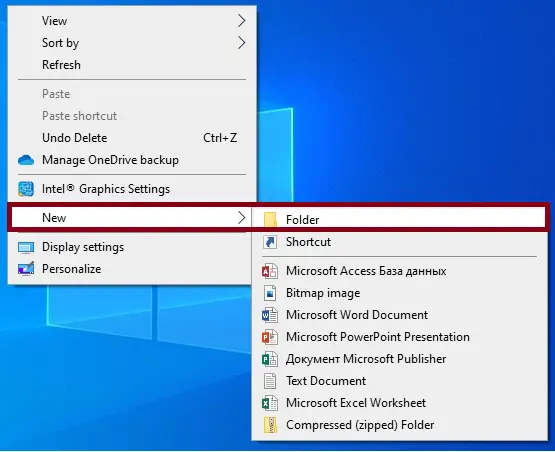
- Step 1: Create a folder.
First, create a folder and named it.

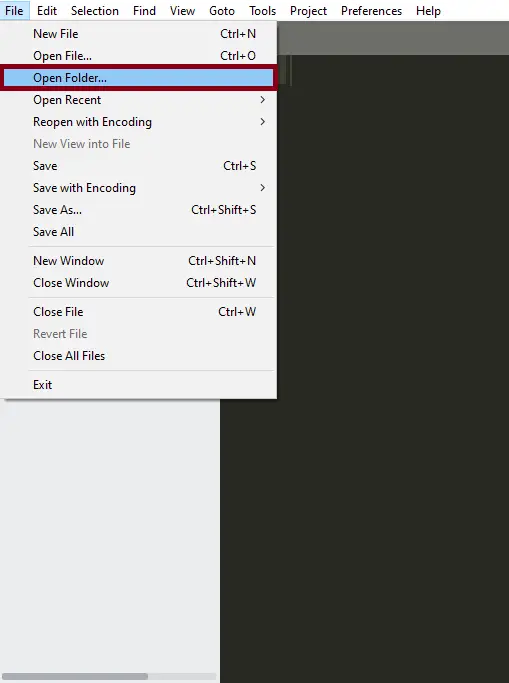
- Step 2: Open the folder in “Sublime Text”.
Second ,after creating a folder, open it in “sublime text“.

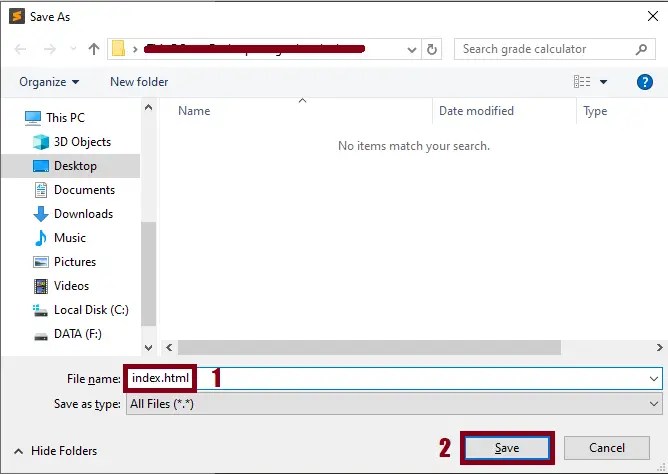
- Step 3: Create a html file.
Third, create a “html” file and save it as “index.html“

The code given below is for the html module
<main>
  <section class="main-wrapper">
    <div class="key-map-wrapper">
      <h2>Key Mapping</h2>
      <ul class="key-map-list">
        <li>
          <kbd class="key-code">E</kbd>
          <span class="key-sound">Crash</span>
        </li>
        <li>
          <kbd class="key-code">R</kbd>
          <span class="key-sound">Ride</span>
        </li>
        <li>
          <kbd class="key-code">F</kbd>
          <span class="key-sound">Floor tom</span>
        </li>
        <li>
          <kbd class="key-code">G</kbd>
          <span class="key-sound">Mid tom</span>
        </li>
        <li>
          <kbd class="key-code">H</kbd>
          <span class="key-sound">High tom</span>
        </li>
        <li>
          <kbd class="key-code">V</kbd>
          <kbd class="key-code">B</kbd>
          <span class="key-sound">Kick</span>
        </li>
        <li>
          <kbd class="key-code">J</kbd>
          <span class="key-sound">Snare</span>
        </li>
        <li>
          <kbd class="key-code">I</kbd>
          <span class="key-sound">Hi-Hat Open</span>
        </li>
        <li>
          <kbd class="key-code">K</kbd>
          <span class="key-sound">Hi-Hat Closed</span>
        </li>
      </ul>
    </div>
    <h1 class="main-title">JavaScript Drum Kit</h1><br><br><br>
    <div class="drum-kit-wrapper">
      <img id="crash-ride" class="crash-cymbal" src="" alt="Crash cymbal">
      <img id="hihat-top" class="hihat-top-cymbal" src="" alt="Hi Hat cymbal">
      <div data-key="74" class="key snare">
        <kbd>J</kbd>
      </div>
      <div data-key="66" class="key kick">
        <kbd>B</kbd>
      </div>
      <div data-key="86" class="key kick2">
        <kbd>V</kbd>
      </div>
      <div data-key="72" class="key tom-high">
        <kbd>H</kbd>
      </div>
      <div data-key="71" class="key tom-mid">
        <kbd>G</kbd>
      </div>
      <div data-key="70" class="key tom-low">
        <kbd>F</kbd>
      </div>
      <div data-key="69" class="key crash">
        <kbd>E</kbd>
      </div>
      <div data-key="82" class="key ride">
        <kbd>R</kbd>
      </div>
      <div data-key="73" class="key hihat-open">
        <kbd>I</kbd>
      </div>
      <div data-key="75" class="key hihat-close">
        <kbd>K</kbd>
      </div>
      <img class="drum-kit" src="drum.png" alt="Drum Kit" />
    </div>
  </section>
</main>
<audio data-key="74" src="https://raw.githubusercontent.com/ArunMichaelDsouza/javascript-30-course/master/src/01-javascript-drum-kit/sounds/snare.wav"></audio>
<audio data-key="66" src="https://raw.githubusercontent.com/ArunMichaelDsouza/javascript-30-course/master/src/01-javascript-drum-kit/sounds/kick.wav"></audio>
<audio data-key="86" src="https://raw.githubusercontent.com/ArunMichaelDsouza/javascript-30-course/master/src/01-javascript-drum-kit/sounds/kick.wav"></audio>
<audio data-key="72" src="https://raw.githubusercontent.com/ArunMichaelDsouza/javascript-30-course/master/src/01-javascript-drum-kit/sounds/tom-high.wav"></audio>
<audio data-key="71" src="https://raw.githubusercontent.com/ArunMichaelDsouza/javascript-30-course/master/src/01-javascript-drum-kit/sounds/tom-mid.wav"></audio>
<audio data-key="70" src="https://raw.githubusercontent.com/ArunMichaelDsouza/javascript-30-course/master/src/01-javascript-drum-kit/sounds/tom-low.wav"></audio>
<audio data-key="69" src="https://raw.githubusercontent.com/ArunMichaelDsouza/javascript-30-course/master/src/01-javascript-drum-kit/sounds/crash.wav"></audio>
<audio data-key="82" src="https://raw.githubusercontent.com/ArunMichaelDsouza/javascript-30-course/master/src/01-javascript-drum-kit/sounds/ride.wav"></audio>
<audio data-key="73" src="https://raw.githubusercontent.com/ArunMichaelDsouza/javascript-30-course/master/src/01-javascript-drum-kit/sounds/hihat-open.wav"></audio>
<audio data-key="75" src="https://raw.githubusercontent.com/ArunMichaelDsouza/javascript-30-course/master/src/01-javascript-drum-kit/sounds/hihat-close.wav"></audio>
In this module which is the html module of the simple project.
The code given below is for the css module
<style type="text/css">
  @import url(https://fonts.googleapis.com/css?family=Handlee|Pacifico);

html,
body {
  padding: 0;
  margin: 0;
  background-color: #fff;
}

.main-wrapper {
  margin: 30px auto 0;
  width: 1080px;
  text-align: center;
}

.main-title {
  font-family: 'jokerman', cursive;
  text-align: center;
  font-size: 3.2em;
  color:blue;
  text-shadow: 1px 1px 1px #5a0b0d;
}

.drum-kit-wrapper {
  position: relative;
  width: 600px;
  margin: -100px auto 0;
}

.drum-kit {
  width: 100%;
  height: 520px;
  position: relative;
}

.crash-cymbal {
  position: absolute;
  top: 114px;
    left: 80px;
    transform: rotate(-7.2deg) scale(1.5);
    transition: all ease-in-out .042s;
}

.hihat-top-cymbal {
  position: absolute;
    top: 166px;
    right: 71px;
    transform: scale(1.35);
    z-index: 0;
    transition: all ease-in-out .042s;
}

.key {
  display: inline-block;
  transition: all ease-in-out .042s;
  position: absolute;
  background: #eaeaea;
    font-size: 1.5em;
    height: 32px;
    width: 32px;
    text-align: center;
    border-radius: 4px;
    border: 3px solid #aaa;
    color: #444;
    box-shadow: 1px 1px 1px rgba(0,0,0,.65);
    z-index: 2;
}

.key.kick {
  top: 355px;
    right: 250px;
}

.key.kick2 {
    top: 355px;
    right: 308px;
}

.key.snare {
  right: 145px;
    top: 280px;
}

.key.tom-high {
  right: 227px;
    top: 240px;
}

.key.tom-mid {
  left: 222px;
    top: 220px;
}

.key.tom-low {
  top: 320px;
    left: 133px;
}

.key.crash {
  top: 80px;
    left: 75px;
}

.key.ride {
  left: 165px;
    top: 87px;
}

.key.hihat-open {
  right: 165px;
    top: 144px;
}

.key.hihat-close {
  right: 60px;
    top: 150px;
}

.playing {
  transform: scale(1.12);
}

.key-map-wrapper {
  position: absolute;
    right: 0;
    top: 0;
    height: 700px;
    background: skyblue;
    width: 250px;
    z-index: 3;
}

.key-map-wrapper > h2 {
  color: #fff;
  font-family: 'Handlee', cursive;
  margin-bottom: 35px;
  border-bottom: 1px solid #fff;
    padding-bottom: 20px;
}

.key-map-list {
  list-style: none;
  color: #fff;
  text-align: left;
}

.key-map-list > li {
  margin-bottom: 25px;
}

.key-code {
  color: #444;
    background-color: #eaeaea;
    font-size: 1.25em;
    padding: 5px 10px;
    border-radius: 4px;
    border: 3px solid #aaa;
}

.key-sound {
  font-size: 1.2em;
  margin-left: 10px;
  font-family: 'Handlee', cursive;
  vertical-align: middle;
}
</style>
In this module which is the css module of the simple project.
The code given below is for the javascript module
<script type="text/javascript">
  {
  const playingClass = 'playing',
    crashRide = document.getElementById('crash-ride'),
    hiHatTop = document.getElementById('hihat-top');

  const animateCrashOrRide = () => {
    crashRide.style.transform = 'rotate(0deg) scale(1.5)';
  };

  const animateHiHatClosed = () => {
    hiHatTop.style.top = '171px';
  };

  const playSound = e => {
    const keyCode = e.keyCode,
      keyElement = document.querySelector(`div[data-key="${keyCode}"]`);

    if(!keyElement) return;

    const audioElement = document.querySelector(`audio[data-key="${keyCode}"]`);
    audioElement.currentTime = 0;
    audioElement.play();

    switch(keyCode) {
      case 69:
      case 82:
        animateCrashOrRide();
        break;
      case 75:
        animateHiHatClosed();
        break;
    }

    keyElement.classList.add(playingClass);
  };

  const removeCrashRideTransition = e => {
    if(e.propertyName !== 'transform') return;

    e.target.style.transform = 'rotate(-7.2deg) scale(1.5)';
  };

  const removeHiHatTopTransition = e => {
    if(e.propertyName !== 'top') return;

    e.target.style.top = '166px';
  };

  const removeKeyTransition = e => {
    if(e.propertyName !== 'transform') return;

    e.target.classList.remove(playingClass)
  };

  const drumKeys = Array.from(document.querySelectorAll('.key'));

  drumKeys.forEach(key => {
    key.addEventListener('transitionend', removeKeyTransition);
  });

  crashRide.addEventListener('transitionend', removeCrashRideTransition);
  hiHatTop.addEventListener('transitionend', removeHiHatTopTransition);

  window.addEventListener('keydown', playSound);
}
</script>
In this module which is the javascript module of the simple project.
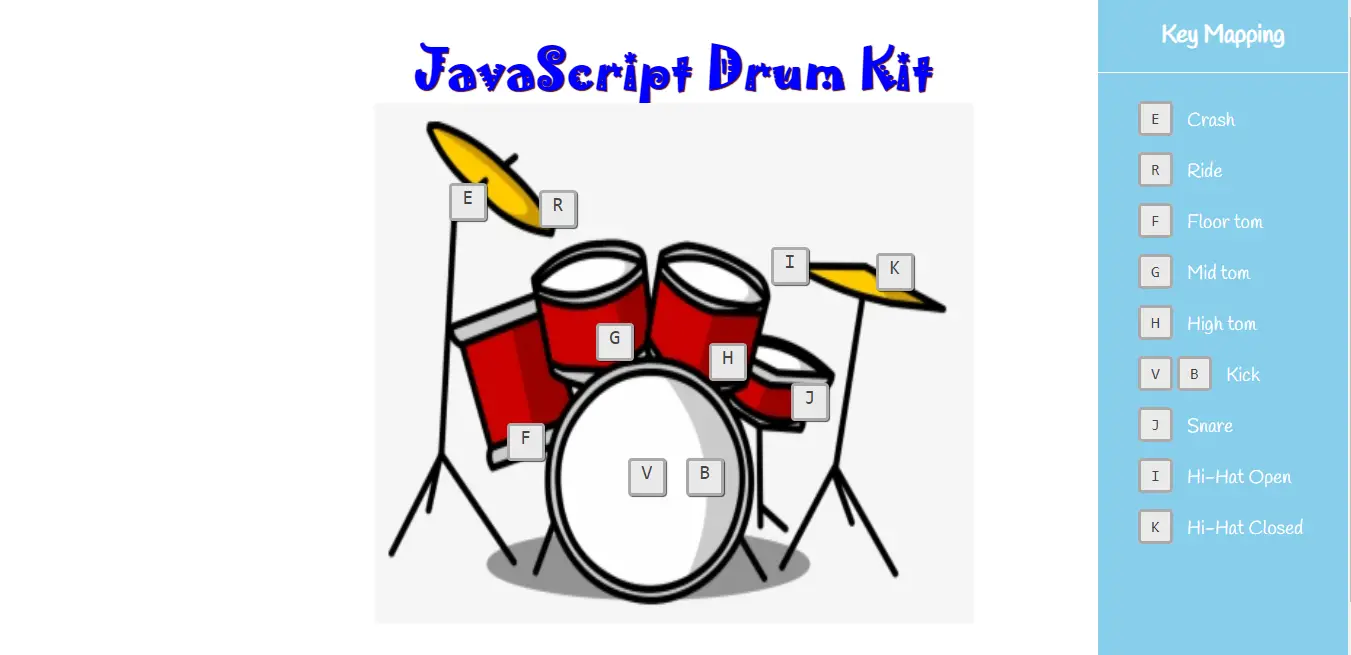
Project Output
| ABOUT PROJECT | PROJECT DETAILS |
|---|---|
| Project Name : | Javascript Drum Kit |
| Project Platform : | JavaScript |
| Programming Language Used: | php,javascript,html,css |
| Developer Name : | itsourcecode.com |
| IDE Tool (Recommended): | Sublime |
| Project Type : | Web Application |
| Database: | None |
| Upload Date: | July 16, 2021 |
Downloadable Source Code
Summary
This JavaScript Project With Source Code is simply in HTML, CSS, and JavaScript. To start creating this Simple Javascript Project With Source Code, make sure that you have basic knowledge in HTML, CSS and Javascript.
This Javascript Game Project also includes a downloadable Javascript Game Project With Source Code for free.
Related Articles
- Todo List In JavaScript With Source Code
- Currency Converter Project in JavaScript with Source Code
- Calculator In JavaScript Source Code
- [SOLVED] How To Make A Live Chat In JavaScript With Source Code
Inquiries
If you have any questions or suggestions about Javascript Drum Kit With Source Code , please feel free to leave a comment below.
Official documentation
Frequently Asked Questions
How does this JavaScript project work?
Built with vanilla JavaScript (no framework) or Vue/Node. HTML structure, CSS styling, JS logic via DOM manipulation + event listeners. Backend optional (Node.js or PHP). Ready to extend for BSIT capstone scope.
What JavaScript runtime or browser does this project need?
Pure frontend projects (vanilla JS, Vue, jQuery) run in any modern browser (Chrome 90+, Firefox 88+, Safari 14+, Edge 90+) – no install needed. Node.js projects need Node.js 18 LTS or 20 LTS (download from nodejs.org). Run: npm install in project folder, then npm start or node app.js.
How do I run this JavaScript project locally?
For pure HTML/CSS/JS: open index.html in your browser, or use VS Code Live Server extension for auto-reload. For Vue projects: npm install then npm run dev (Vite) or npm run serve (Vue CLI). For Node.js: npm install then npm start. For projects with backend (PHP+MySQL): place in XAMPP htdocs, start Apache + MySQL, browse to localhost/project.
Can I use this JavaScript project for a BSIT capstone or thesis?
Yes. Extend it: add user authentication (JWT for SPA, sessions for traditional), role-based access, real backend (Node.js+Express+MongoDB or PHP+MySQL), responsive design (Bootstrap/Tailwind), PDF exports (jsPDF), real-time features (Socket.IO). Pair with Chapter 1-5 documentation matching your panel’s rubric.
Why am I getting ‘Uncaught ReferenceError’ or ‘Cannot read property of undefined’?
Three common JavaScript issues: (1) Script tag placement wrong, put

Angel Jude Suarez
Full-Stack Developer at PIES IT Solution
Focuses on Python development, machine learning, and AI integration. Has built production AI systems including OpenAI Whisper integration for medical transcription and GPT-4o-powered diagnosis assistance. Strong background in pandas, scikit-learn, and TensorFlow.
Expertise: Python · PHP · Java · VB.NET · ASP.NET · Machine Learning · AI Integration · OpenCV · Django · CodeIgniter · View all posts by Angel Jude Suarez →
Looking for similar projects or tutorials?
Search for more source code, capstone projects, or programming tutorials