
A hardware 2FA key is a physical device (usually USB-A, USB-C, or NFC) that proves you are you when logging into a website. Unlike TOTP apps like Google Authenticator or Authy, a hardware key is physically phishing-resistant. Even if an attacker steals your password and tricks you into entering a code on a fake site, they cannot use a hardware key remotely.
This matters because credential-phishing attacks in 2026 have gotten sophisticated enough to bypass SMS 2FA and even TOTP codes in real time. A hardware key is the only 2FA method that remains uncompromised against modern man-in-the-middle phishing kits. Every developer, agency owner, and freelance dev with production credentials should own at least two.
Quick verdict
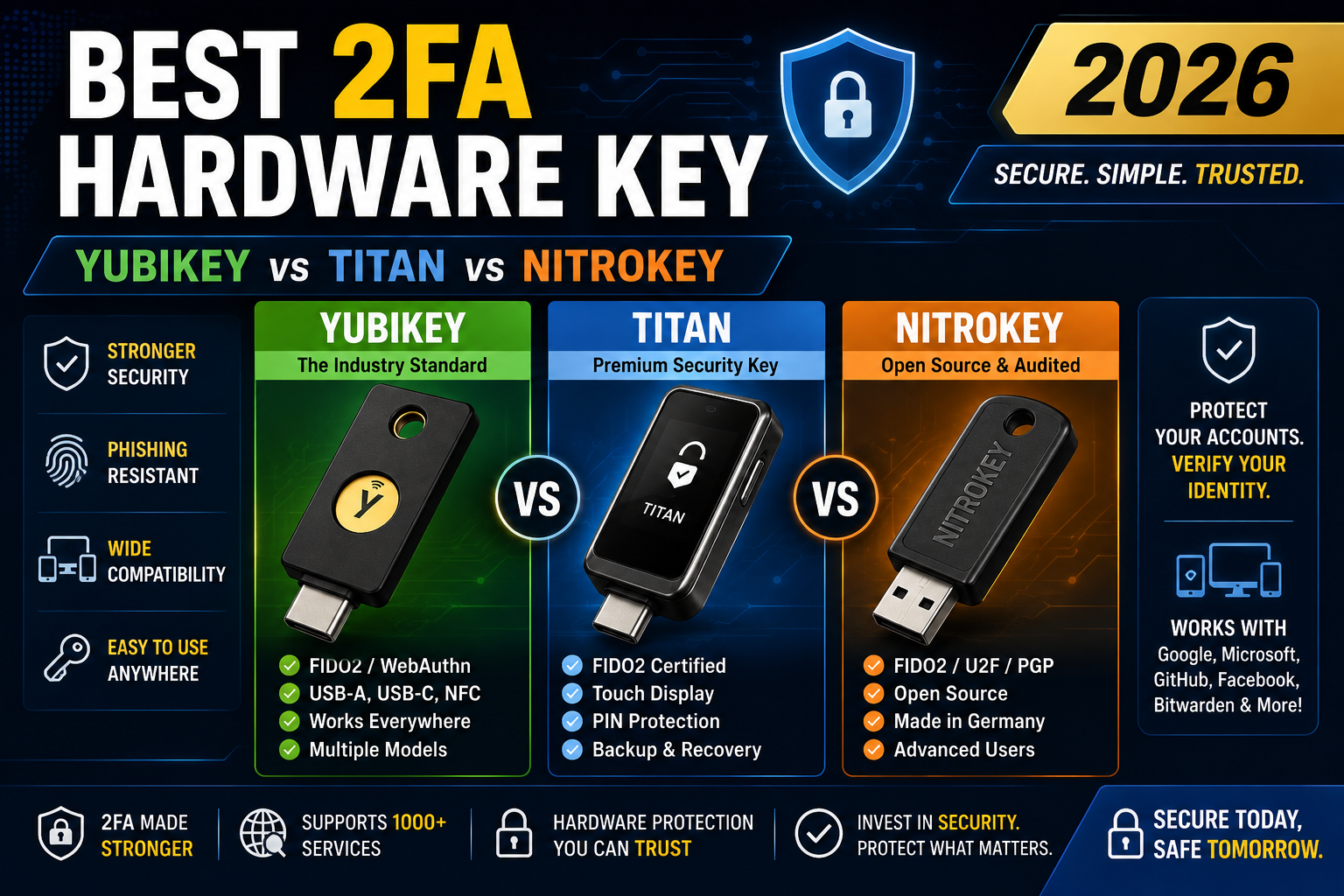
- Best overall for most people: YubiKey 5C NFC (USD 55). Works on USB-C phones and laptops, taps NFC on older iPhones, supports every major 2FA protocol.
- Best budget option: Google Titan Key USB-C (USD 30). Half the price of YubiKey, does the essentials, backed by Google’s audit history.
- Best for privacy-focused developers: Nitrokey 3 (USD 60). Open source firmware, made in Germany, no proprietary chips.
- Skip: Cheap FIDO2 keys under USD 15 from unknown Amazon brands. Firmware quality is unverifiable and some have failed security audits.
What to look for in a 2FA hardware key
Five specs matter, in this order:
- FIDO2 or WebAuthn support. This is the modern phishing-resistant protocol. Without it, the key is only useful for legacy U2F (still phishing-resistant but limited to Chrome-family browsers).
- Connector type. USB-A for older laptops, USB-C for modern laptops and Android phones, NFC for iPhone (older) and Android tap-to-authenticate, Lightning for iPhone (legacy).
- Supported protocols beyond FIDO2. OATH-TOTP (backup TOTP codes on the key itself), OpenPGP (encryption keys), Smart Card (Windows login), OTP (Yubico OTP legacy protocol).
- Number of resident keys. How many websites can register a discoverable credential on the key. YubiKey 5 supports 100, Titan supports 25, Nitrokey 3 supports over 200.
- Physical durability. Waterproof, crush-resistant, keychain-friendly form factor. Cheap keys often crack in pockets after 6-12 months.
1. YubiKey 5C NFC at USD 55 (best overall)
Specs: USB-C + NFC. FIDO2, U2F, OATH-TOTP, OpenPGP, Smart Card, Yubico OTP, PIV. 100 FIDO2 resident keys. IP68 waterproof.
Best for: Anyone with a USB-C laptop (MacBook 2016+, most Windows laptops 2020+) or USB-C Android phone. NFC lets you tap on iPhones (except very old ones with Lightning). Effectively works on every current device.
Real usage in 2025-2026: Registered YubiKey 5C NFC on GitHub, AWS, Google Workspace, Cloudflare, and 20+ other services. Zero failed logins in 8 months of daily use. Battery-free (draws power from USB or NFC field). Survived several washing machine incidents in pockets.
Weakness: Expensive versus Titan for budget-conscious users. Yubico’s firmware is closed source (potential concern for privacy-focused users).
2. YubiKey 5 Series (5, 5C, 5C Nano, 5Ci) at USD 45-70 (form factor variety)
The YubiKey 5 Series covers every physical form factor:
- YubiKey 5 (USB-A): USD 45. For older laptops with USB-A ports.
- YubiKey 5C (USB-C): USD 50. No NFC. For laptops but not phones.
- YubiKey 5C Nano: USD 60. Fits flush inside a USB-C port, no physical protrusion. Great for laptops you carry constantly.
- YubiKey 5Ci (USB-C + Lightning): USD 70. Dual connector for old iPhone (Lightning) + laptop (USB-C).
Best for: Users with specific form factor needs (Nano for permanent laptop install, 5Ci for older iPhones without USB-C).
Weakness: Higher prices than the 5C NFC. For most people the 5C NFC is the right pick.
3. Google Titan Security Key USB-C at USD 30 (best budget)
Specs: USB-C + NFC. FIDO2, U2F. No OATH-TOTP, no OpenPGP, no Smart Card. 25 FIDO2 resident keys.
Best for: Users who need FIDO2 phishing protection at the lowest reliable price. Google audits and certifies the firmware. Works on every major service that supports FIDO2 (which is almost all of them in 2026).
Real usage: Titan keys work exactly as advertised for the primary use case (phishing-resistant 2FA). No experience of a Titan key failing on any FIDO2-compliant login.
Weakness: Missing OATH-TOTP means you cannot store TOTP backup codes on the key itself. Missing OpenPGP and Smart Card means less useful for developers who want SSH key protection or email encryption. If you only need 2FA login, this limitation does not matter.
4. Nitrokey 3 at USD 60 (best for privacy-focused developers)
Specs: USB-C + NFC. FIDO2, U2F, OATH-TOTP, OpenPGP, Smart Card. Open source firmware. Made in Germany.
Best for: Developers, journalists, and privacy advocates who want to inspect and audit the firmware themselves. The only mainstream hardware key where you can compile and verify the firmware from source.
Real usage: Nitrokey 3 works on every FIDO2 service tested. Firmware updates are transparent and version-controlled on GitHub. Smart Card mode supports GnuPG smart card use for signing Git commits and SSH.
Weakness: Slightly slower response than YubiKey (100-200ms delay on FIDO2 tap). Smaller ecosystem of tooling. Not as widely tested against edge-case websites as YubiKey.
5. Feitian ePass FIDO NFC at USD 20 (bulk deployment budget)
Specs: USB-A + NFC. FIDO2, U2F. 50 FIDO2 resident keys.
Best for: Small agencies or teams deploying 5-20 hardware keys and needing to keep total cost under budget. FIDO2 compliant, works on all major services.
Real usage: Feitian is an established Chinese security hardware maker (used in enterprise deployments across Asia). ePass keys pass FIDO Alliance certification. Reliable for the standard 2FA use case.
Weakness: USB-A only (no USB-C variant at this price). Some users prefer to avoid Chinese-origin security hardware for supply chain reasons. NFC works but is slower than YubiKey NFC in testing.
6. SoloKeys Solo 2 at USD 40 (open source alternative)
Specs: USB-C or USB-A. FIDO2, U2F. Open source firmware. Made in USA.
Best for: Developers who want open source firmware without paying the Nitrokey 3 premium. US-manufactured supply chain (no China concerns).
Real usage: Solo 2 keys work on all FIDO2 services tested. Firmware is transparent on GitHub. Smaller company means potential long-term availability risk versus Yubico or Google.
Weakness: No NFC. Smaller ecosystem than Nitrokey. Company future is less certain than the mainstream vendors.
The critical rule: always buy TWO keys
Every hardware key guide should hammer this: always buy at least 2 keys and register both on every important account. One key is your daily driver, the second is a backup stored in a secure location (home safe, safety deposit box, or with a trusted family member).
If you only register one key and lose it, you are locked out of accounts that use hardware 2FA as the primary factor. Recovery flows exist but are painful (proof of identity, waiting periods, sometimes account frozen for weeks). Two keys eliminates this risk entirely.
Recommended combos:
- Primary: YubiKey 5C NFC (USD 55). Backup: YubiKey 5 (USB-A, USD 45). Total: USD 100.
- Budget primary: Titan USB-C (USD 30). Backup: another Titan USB-C. Total: USD 60.
- Developer: Nitrokey 3 (USD 60). Backup: SoloKeys Solo 2 USB-C (USD 40). Total: USD 100.
Setup workflow (the same for all keys)
Once your keys arrive:
- Register both keys on your Google account first (as backup path for other services). Settings → Security → 2-Step Verification → Add security key.
- Register both on your primary email provider if not Google (ProtonMail, Fastmail, etc.).
- Register both on GitHub, GitLab, AWS, Azure, DigitalOcean, Cloudflare, all developer accounts.
- Register both on financial accounts that support FIDO2 (US banks like Chase, PH banks are still catching up in 2026).
- Print recovery codes from every service and store them physically. Never rely on hardware keys as the ONLY recovery path.
The whole setup takes 30-60 minutes for a typical developer with 15-25 accounts to secure. Worth doing in one sitting.
What about phones and biometrics as 2FA
iOS Face ID and Android fingerprint are convenient but not equivalent to hardware keys. They are stored on your phone, so a compromised phone compromises your 2FA. A hardware key stays separate from your device and cannot be extracted remotely.
Best practice: use biometrics for convenience-level 2FA (unlocking apps you have open often) and hardware keys for critical accounts (email, bank, GitHub, cloud console).
Bottom line
For most people, YubiKey 5C NFC at USD 55 is the correct answer. It supports every protocol you might ever need, works on every form factor, and Yubico’s firmware track record is impeccable. Buy two.
If budget is tight, Google Titan Key USB-C at USD 30 is the alternative. It does the essential 2FA job and Google backs it. Two Titans is USD 60 total, still cheaper than a single YubiKey 5C NFC.
For developers who need OpenPGP and open source firmware, Nitrokey 3 is the correct answer. Slightly more expensive but the transparency is worth it for people who take supply chain seriously.
Whatever you pick, get two. Register both on every important account. Store one securely. Feel free to comment below if you have questions about protocols, edge-case sites, or setup for specific services.
Official documentation
Buy hardware keys (affiliate via Amazon)
Links below are affiliate links via Skimlinks. We may earn a commission at no extra cost to you. See our affiliate disclosure.
- YubiKey 5C NFC on Amazon, our top pick for most users
- Google Titan Key on Amazon, best budget FIDO2 option
- Nitrokey 3 official store, best for open source firmware fans
- Feitian ePass on Amazon, cheapest FIDO2-certified option
Frequently asked questions
What happens if I lose my only hardware key?
If you registered only one key on a service and lose it, you fall back to the service’s account recovery flow. This usually involves proof of identity (government ID, video call), waiting periods (24-72 hours), and sometimes account freeze during verification. To avoid this, always register at least 2 keys on every important account AND save printed recovery codes as a third fallback.
Is a hardware key better than Google Authenticator or Authy?
Yes, for critical accounts. TOTP apps like Google Authenticator can be phished in real time by modern attack kits (attacker’s fake site takes your code, immediately submits it to the real site). Hardware keys are physically bound to the real site’s URL and refuse to sign into fake sites. This is the fundamental phishing-resistance advantage that TOTP cannot match.
Does my hardware key need battery replacement?
No. YubiKey, Google Titan, Nitrokey, and most other hardware keys are battery-free. They draw power from the USB port when plugged in, or from the NFC field of your phone when tapped. Lifespan is essentially unlimited (Yubico warranties YubiKeys for the lifetime of the product, expected to last 10+ years of daily use).
Can I use one hardware key across multiple accounts?
Yes. A single YubiKey 5 can be registered on 100+ different websites, and the key stores separate cryptographic keys for each. You do NOT need one hardware key per account. One primary + one backup is enough for most people, covering dozens of accounts.
Do PH banks support hardware keys yet?
Mostly not yet in 2026. PH banks still rely on SMS OTP and TOTP apps for 2FA. The largest US banks (Chase, Bank of America, Fidelity) support FIDO2, and PH digital banks like Maribank and Tonik are experimenting but not shipped yet. For now, use hardware keys on Google Workspace, Microsoft 365, developer accounts, and any US financial accounts you have.
What is the difference between FIDO2 and U2F?
FIDO2 is the modern standard that supports passwordless login and phishing-resistant 2FA on any browser that supports WebAuthn (all major browsers in 2026). U2F is the older Chrome-only standard from 2014. All FIDO2 keys are backward-compatible with U2F. When buying a hardware key, always confirm it says “FIDO2” in specs, not just “U2F”.

Angel Jude Suarez
Full-Stack Developer at PIES IT Solution
Focuses on Python development, machine learning, and AI integration. Has built production AI systems including OpenAI Whisper integration for medical transcription and GPT-4o-powered diagnosis assistance. Strong background in pandas, scikit-learn, and TensorFlow.
Expertise: Python · PHP · Java · VB.NET · ASP.NET · Machine Learning · AI Integration · OpenCV · Django · CodeIgniter · View all posts by Angel Jude Suarez →