
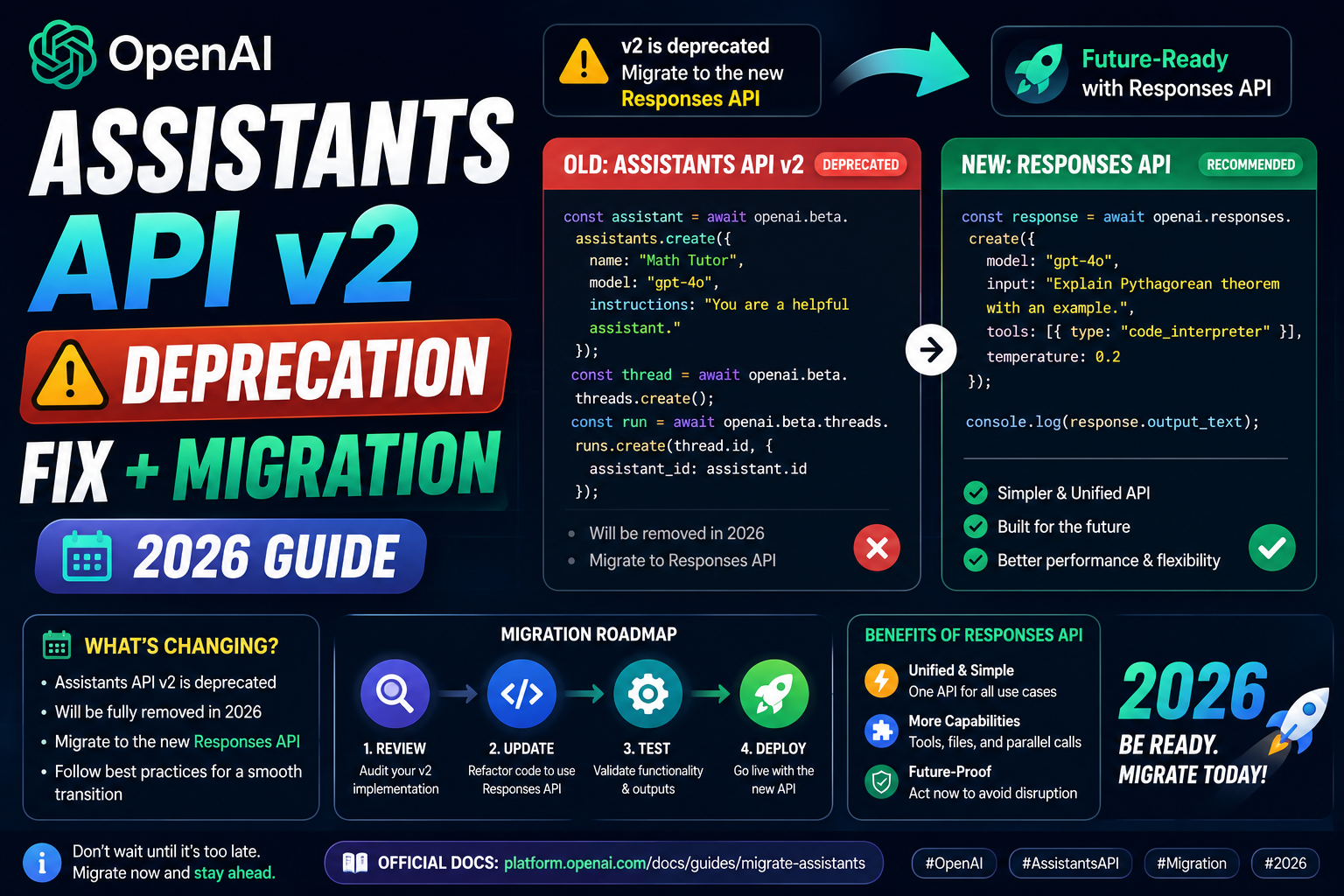
OpenAI announced the sunset of the Assistants API v2 with the release of the Responses API. If your app still calls client.beta.assistants or client.beta.threads, you have a migration window before those endpoints stop responding. This guide walks you through the shift from Assistants v2 to the Responses API with real code, and covers tool use, memory, and vector stores.
Why OpenAI is deprecating Assistants API v2
The Assistants API was designed as a stateful chat framework with server-side threads. It was useful but locked you into OpenAI’s storage model and made your app dependent on OpenAI keeping thread data around. The Responses API is stateless and closer to the raw Chat Completions API, but with first-class support for tool use, structured output, and hosted vector search when you want it.
The tradeoffs of moving:
- You lose automatic thread storage. You manage the conversation history yourself.
- You gain a cleaner API surface with fewer object types to reason about.
- Your app becomes portable across providers (Anthropic, Google, self-hosted models) with minor changes.
- You still get server-side file search when you use OpenAI’s vector store integration.
Before and after: a basic call
Assistants API v2 pattern:
from openai import OpenAI
client = OpenAI()

assistant = client.beta.assistants.create(
    name="Doctor Helper",
    instructions="Extract key medical info from patient notes.",
    model="gpt-4o",
)
thread = client.beta.threads.create()
client.beta.threads.messages.create(
    thread_id=thread.id, role="user",
    content="Summarize this note: ...")
run = client.beta.threads.runs.create_and_poll(
    thread_id=thread.id, assistant_id=assistant.id)
Responses API equivalent:
from openai import OpenAI
client = OpenAI()

response = client.responses.create(
    model="gpt-4o",
    instructions="Extract key medical info from patient notes.",
    input="Summarize this note: ...",
)
print(response.output_text)
No assistant object, no thread object, no polling. One call, one response. The instructions field replaces what used to be the assistant’s system prompt.
Handle conversation history
The Responses API is stateless, so you keep history in your app. But you also get an optional previous_response_id parameter that OpenAI uses to chain calls without you resending the full history:
first = client.responses.create(
    model="gpt-4o",
    input="My name is Ana.",
)

second = client.responses.create(
    model="gpt-4o",
    input="What is my name?",
    previous_response_id=first.id,
)
print(second.output_text)  # "Your name is Ana."
If you want full control and portability, manage the history in your own list and pass it as structured input each call. If you prefer convenience and you are OK with OpenAI holding the chain state, use previous_response_id.
Migrate tool use (function calling)
The tool schema is very similar. Assistants v2:
tools = [{
  "type": "function",
  "function": {
    "name": "get_weather",
    "description": "Get current weather",
    "parameters": {
      "type": "object",
      "properties": {"city": {"type": "string"}},
      "required": ["city"],
    },
  },
}]
Responses API keeps the same shape:
response = client.responses.create(
    model="gpt-4o",
    input="What is the weather in Manila?",
    tools=tools,
)

for tool_call in response.output:
    if tool_call.type == "function_call":
        args = json.loads(tool_call.arguments)
        result = get_weather(args["city"])
        # Send result back with previous_response_id
        client.responses.create(
            model="gpt-4o",
            previous_response_id=response.id,
            input=[{
                "type": "function_call_output",
                "call_id": tool_call.call_id,
                "output": json.dumps(result),
            }],
        )
The tool-use loop is simpler than the Assistants API’s required-action polling. No more submit_tool_outputs intermediate step. You just send the result as the next input.
Migrate file search to vector stores
File search in Assistants v2 used a vector store attached to the assistant. In the Responses API, you attach the vector store directly to the request:
# Create a vector store and upload files (one-time setup)
store = client.vector_stores.create(name="patient-records")
client.vector_stores.files.upload_and_poll(
    vector_store_id=store.id,
    file=open("records.pdf", "rb"),
)

# Query with file search
response = client.responses.create(
    model="gpt-4o",
    input="What allergies does patient 123 have?",
    tools=[{
        "type": "file_search",
        "vector_store_ids": [store.id],
    }],
)
The vector store lives independently, so you can attach it to any Responses API call. This is more flexible than the assistant-scoped file search in v2.
What breaks during migration
- Threads and messages endpoints stop working. Replace with your own history management or
previous_response_id. - Runs and run steps stop working. One
responses.createcall replaces the whole run lifecycle. - Assistant objects go away. The system prompt lives in each request’s
instructionsfield or you inline it in the input. - Streaming API changes. The Responses API uses the same server-sent events approach but with different event names. Update your event handlers.
- Cost accounting. You are billed the same way (input + output tokens) but the tool_use output tokens are now itemized separately in the response object, which is easier to track.
Migration checklist
- Audit your codebase for
client.beta.assistants,client.beta.threads, andclient.beta.runsreferences. - Refactor one flow at a time. Start with the simplest chat endpoint.
- Replace assistant instructions with the
instructionsfield onresponses.create. - Replace threads with either your own history storage or
previous_response_id. - Update tool-use loops to use
function_call_outputinstead ofsubmit_tool_outputs. - Migrate file search vector stores to standalone objects.
- Run both APIs in parallel with a feature flag for a week. Compare outputs and cost.
- Cut over the flag when you are confident. Delete the Assistants v2 code.
Official documentation
Frequently asked questions
When does OpenAI Assistants API v2 fully stop working?
OpenAI has announced a 12-month sunset window from the Responses API general availability. Endpoints will start returning warnings well before the cutoff. Check the OpenAI deprecation page for the exact cutoff date and any extended support offers for paying customers.
Do my existing threads and messages get deleted?
Not immediately, but they become read-only when the sunset takes effect. Export any threads you need to preserve before the cutoff. The Assistants v2 dashboard has a bulk export option that gives you JSON for every thread and its messages.
Is the Responses API cheaper than the Assistants API v2?
Token pricing is the same per model. What changes is that you avoid the overhead of thread and run objects, which slightly reduces total tokens over a full conversation. File search costs are identical since they map to the same vector store operations.
Should I migrate to Responses API or move to a different provider?
Depends on your priorities. If you want to stay on OpenAI, migrate to Responses API. If you want portability, migrate to Responses API in a way that abstracts the client (a thin adapter layer), which makes a later Anthropic or Google migration a one-file change.
Does the Responses API support the o1 reasoning models?
Yes, and the o1 support is actually cleaner in Responses API than in Assistants v2. The API surfaces reasoning tokens separately, so you can see how much thinking the model did before it produced the visible answer. This helps with cost tracking on reasoning-heavy workloads.
Can I run Responses API and Assistants v2 side by side?
Yes, and this is the recommended migration approach. Use a feature flag to route a percentage of traffic to Responses API. Compare outputs, cost, and latency. Increase the percentage as confidence grows. Cut over fully when the metrics match your expectations.