

Simple class diagram for hospital management system is a designed diagram the shows the system’s relationships and classes. This UML Class Diagram is made to guide programmers along with the hospital system development.
It contains the class attributes, methods as well as the relationships between classes. These mentioned contents makes sure that your Hospital management system development must inline with what should be its functions.
How to Design your UML class diagram for online hospital management system?
You must be informed that a Hospital Management system is a computer system that supports in the efficient management of health-care information and the work completion of health-care practitioners. They are in charge of data from all areas of healthcare, including clinical, financial and laboratory aspects.
It allows healthcare professionals to review clinical documentation, diagnoses, patient data, and other pertinent information in one place, allowing them to make timely decisions.
How to Construct Hospital Management System Class Diagram?
Now, to create the diagram for the hospital management system, you will first determine the classes. So the classes that must be made in a hospital are patients, users, physicians, nurses, admission, and transactions.
The classes mentioned were just general. If you want a more complex or wider scope for your hospital management system, then you can add your desired classes. You must also include the database on your class diagram for your system.
Free tool
Generate this Class Diagram in 3 minutes
You have the structure. Now build it with your own entities. The Hospital Management template comes pre-filled, so you rename what does not match your project and export straight into your Chapter 3.
Open the Hospital Management template →3 free diagrams every week. No credit card needed.
How to create the Class Diagram Hospital Management System?
Below we will show you the sample hospital management system class diagram. It was provided with its attributes and matching methods. This is constructed with a simple idea derived from the common function of a hospital system.
Class Diagram Hospital Management System Construction
The illustration shown in this article gives you a hint on how to design your own UML class diagram. It gives a simple idea of how the class diagram works. It resembles a flowchart in which classes are represented as boxes with three rectangles inside each box.
The top rectangle has the class’s name; the middle rectangle contains the class’s properties; and the bottom rectangle contains the class’s methods, commonly known as “operations.”
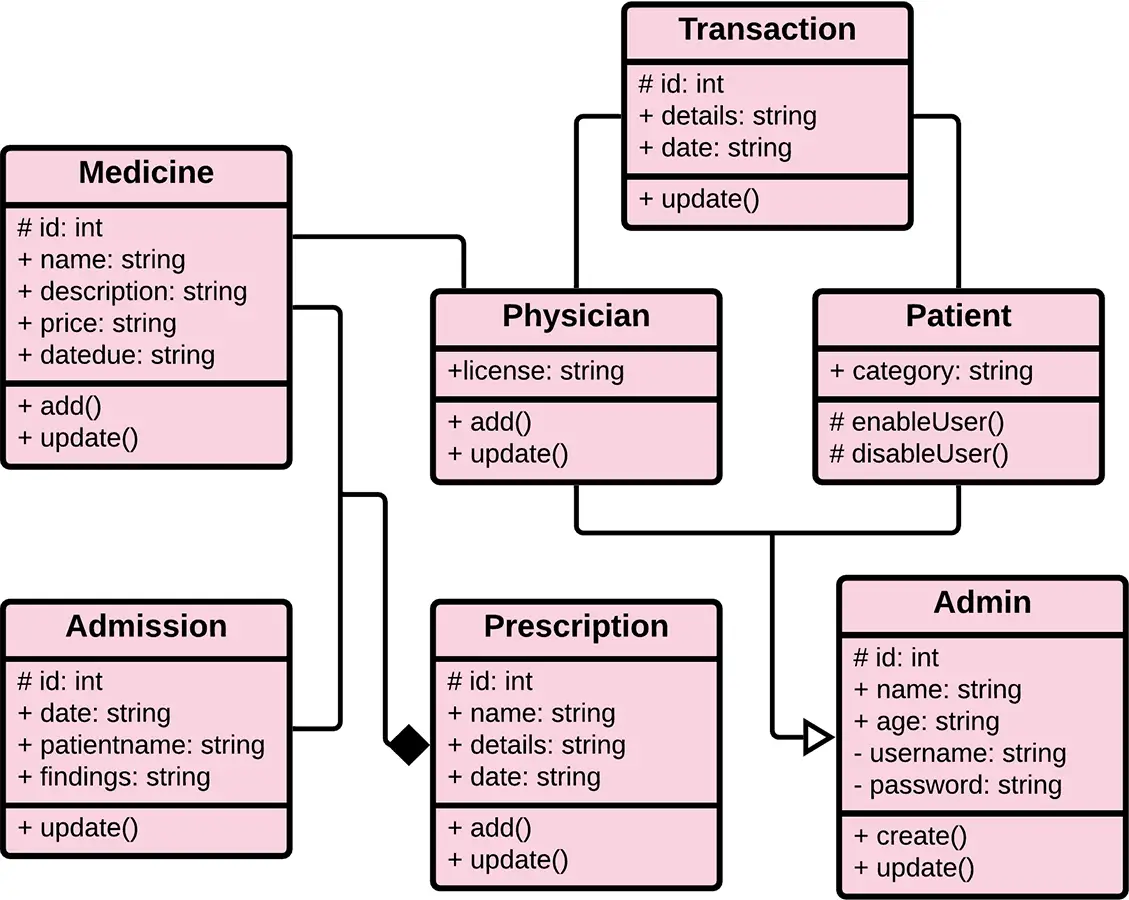
As you can see through the illustration, the classes were determined, which are symbolized by boxes.
They were designated with their corresponding attributes and show the class’ methods. Their relationships are also plotted to show the connections between classes and their multiplicity.
Hospital Management System Class Diagram in Java (2026 Code Example)
Below is a complete Java implementation following the Class Diagram structure. You can copy these classes directly into your capstone project as a starting point:
Patient Class
import java.util.ArrayList;
import java.util.Date;
import java.util.List;

public class Patient {
    private String patientId;
    private String name;
    private int age;
    private String gender;
    private List<Transaction> transactions;

    public Patient(String patientId, String name, int age, String gender) {
        this.patientId = patientId;
        this.name = name;
        this.age = age;
        this.gender = gender;
        this.transactions = new ArrayList<>();
    }

    public void requestMedicine(Medicine medicine, int quantity) {
        Transaction transaction = new Transaction(this, medicine, new Date(), quantity);
        transactions.add(transaction);
    }

    public List<Transaction> getTransactions() {
        return transactions;
    }
}
Medicine Class
public class Medicine {
    private String medicineId;
    private String name;
    private String type;
    private int stockQuantity;

    public Medicine(String medicineId, String name, String type, int stockQuantity) {
        this.medicineId = medicineId;
        this.name = name;
        this.type = type;
        this.stockQuantity = stockQuantity;
    }

    public void reduceStock(int quantity) {
        this.stockQuantity -= quantity;
    }

    public void addStock(int quantity) {
        this.stockQuantity += quantity;
    }
}
Transaction Class
import java.util.Date;

public class Transaction {
    private Patient patient;
    private Medicine medicine;
    private Date transactionDate;
    private int quantity;

    public Transaction(Patient patient, Medicine medicine, Date transactionDate, int quantity) {
        this.patient = patient;
        this.medicine = medicine;
        this.transactionDate = transactionDate;
        this.quantity = quantity;
    }

    public void updateQuantity(int quantity) {
        this.quantity = quantity;
    }
}
Hospital Management System Class Diagram in PHP (2026 Code Example)
Here’s the same Class Diagram implemented in modern PHP 8.x. This pattern works well for Laravel and CodeIgniter capstones:
Patient.php
<?php

class Patient {
    private string $patientId;
    private string $name;
    private int $age;
    private string $gender;
    private array $transactions = [];

    public function __construct(
        string $patientId,
        string $name,
        int $age,
        string $gender
    ) {
        $this->patientId = $patientId;
        $this->name = $name;
        $this->age = $age;
        $this->gender = $gender;
    }

    public function requestMedicine(Medicine $medicine, int $quantity): void {
        $this->transactions[] =
            new Transaction($this, $medicine, new DateTime(), $quantity);
    }

    public function getTransactions(): array {
        return $this->transactions;
    }
}
Medicine.php
<?php

class Medicine {
    private string $medicineId;
    private string $name;
    private string $type;
    private int $stockQuantity;

    public function __construct(
        string $medicineId,
        string $name,
        string $type,
        int $stockQuantity
    ) {
        $this->medicineId = $medicineId;
        $this->name = $name;
        $this->type = $type;
        $this->stockQuantity = $stockQuantity;
    }

    public function reduceStock(int $quantity): void {
        $this->stockQuantity -= $quantity;
    }

    public function addStock(int $quantity): void {
        $this->stockQuantity += $quantity;
    }
}
Transaction.php
<?php

class Transaction {
    private Patient $patient;
    private Medicine $medicine;
    private DateTime $transactionDate;
    private int $quantity;

    public function __construct(
        Patient $patient,
        Medicine $medicine,
        DateTime $transactionDate,
        int $quantity
    ) {
        $this->patient = $patient;
        $this->medicine = $medicine;
        $this->transactionDate = $transactionDate;
        $this->quantity = $quantity;
    }

    public function updateQuantity(int $quantity): void {
        $this->quantity = $quantity;
    }
}
UML Class Diagram Symbols, Complete Reference Table
Use this reference table to read or draw any UML Class Diagram correctly. These symbols are standard across all UML modeling tools:
| Symbol | Name | Meaning |
|---|---|---|
| ― | Association | Solid line , basic “uses” or “knows about” relationship |
| ―◇ | Aggregation | Hollow diamond , weak “has-a” (part can exist without whole) |
| ―◆ | Composition | Filled diamond , strong “contains-a” (part dies with whole) |
| ―▷ | Inheritance / Generalization | Hollow triangle , “is-a” parent/child relationship |
| – – – ▷ | Realization | Dashed line with hollow triangle , interface implementation |
| – – – ► | Dependency | Dashed arrow , temporary “uses” relationship |
| + | Public visibility | Attribute or method accessible from anywhere |
| – | Private visibility | Attribute or method accessible only inside the class |
| # | Protected visibility | Accessible within the class and subclasses |
| ~ | Package visibility | Accessible within the same package (mostly Java) |
| 1, 0..1, 0..*, 1..* | Multiplicity | Cardinality at relationship endpoints (how many instances) |
How to Draw Hospital Management System Class Diagram, Step by Step
Step 1, Open draw.io
Go to app.diagrams.net → create blank diagram → enable UML shapes.
Step 2, Draw Patient class
Patient
- patientId: String
- name: String
- age: int
- gender: String
Methods:
- requestMedicine(medicine: Medicine, quantity: int): void
- getTransactions(): List
Step 3, Draw Medicine class
Medicine
- medicineId: String
- name: String
- type: String
- stockQuantity: int
Methods:
- reduceStock(quantity: int): void
- addStock(quantity: int): void
Step 4, Draw Transaction (Association Class)
Transaction
- transactionDate: Date
- quantity: int
Method:
- updateQuantity(quantity: int): void
Transaction connects Patient ↔ Medicine.
Step 5, Draw relationships
- Patient → Transaction (1 to 0..*)
- Medicine → Transaction (1 to 0..*)
- Patient → Medicine (Association, 1 to 0..*)
Transaction is the event that records medicine issuance.
Step 6, Add multiplicity
Always label:
- Patient: 1 → Transaction: 0..*
- Medicine: 1 → Transaction: 0..*
Export
- PNG (1200px minimum) for slides
- PDF for documentation
Common Mistakes Students Make with Class Diagrams
Mistake #1, Treating Transaction as just history
Transaction is NOT just a log. It is an association class linking Patient and Medicine.
Mistake #2, Missing multiplicity
Always include:
- Patient 1 → 0..* Transactions
- Medicine 1 → 0..* Transactions
Missing labels = incomplete diagram.
Mistake #3, Mixing database and UML design
Do NOT use:
- patient_table
- medicine_tbl
Use object names only:
- Patient
- Medicine
- Transaction
Mistake #4, Wrong relationship (composition everywhere)
Medicine is NOT owned by Patient. Medicines exist independently in the hospital inventory.
Use association, not composition.
Mistake #5, No behavior in classes
Each class must answer:
- Patient: requests medicine
- Medicine: manages stock
- Transaction: records issuance
Empty classes lose marks in defense.
Mistake #6, Low-quality export
Always export:
- PNG ≥ 1200px
- PDF for printing
Blurry diagrams are a common defense panel complaint.
Working hospital management source code that implements this diagram
The diagram above defines the flows; these are the actual hospital management systems on itsourcecode.com that implement them. Pick one in your team’s stack and you have a working reference to point your panel at when they ask “show me where this flow actually runs in code.”

PHP: Hospital Management System in PHP
Vanilla PHP + MySQL. The classes in your diagram (Patient, Doctor, Appointment, Bill) map 1:1 to the tables here.

Java: Hospital Management System in Java
Java Swing + JDBC + MySQL. OOP-first build, every class in your UML has a matching .java file.

ASP.NET MVC: Hospital Management System in ASP.NET MVC
C# + SQL Server + Entity Framework. EF model classes mirror your class diagram.

VB.NET: Hospital Information Management in VB.NET
VB.NET + MySQL. Windows Forms with one form-class per UML entity.

Django (Python): Django Hospital Management System
Django 4 + Bootstrap. Django models are literally the class diagram in Python form.

Laravel (PHP): Online Hospital Management in Laravel
Laravel 9 + Eloquent ORM. Each Eloquent model corresponds to one class in your UML.

CodeIgniter (PHP): Complete Clinic Management in CodeIgniter
CI3 + Bootstrap. Closest analogue when your class diagram focuses on outpatient/clinic flows.
How to use this for your Chapter 3 (Methodology): download the project in your stack, then map each process and data store in this diagram to a specific module, controller, or table in the downloaded source. That mapping IS the bridge between your design chapter and your implementation chapter, the single thing panels want to see traced end to end.
Official documentation
Working source code for this system
Download the actual implementation of this system in your preferred language. Each project includes source code, database, and setup instructions for BSIT capstone use.
- PHP: Hospital Management System Project In PHP With Source Code
- VB.NET: Hospital Management System Database Design
- Java: Project On Hospital Management System In Java Source Code
- Python: Django Online Medical Management System with Source Code
- Django: Django Online Medical Management System with Source Code
- Laravel: Clinic Management System Project in Laravel with Source Code
Frequently Asked Questions
What is a Class Diagram for Hospital Management System?
A Class Diagram for Hospital Management System is a UML structural diagram showing the classes (Patient, Doctor, Appointment, MedicalRecord, Prescription, Bill, Pharmacy), their attributes (patient_id, doctor_name, diagnosis), methods (registerPatient, bookAppointment, prescribeMedicine), and relationships (Patient has Appointments, Doctor creates MedicalRecord, Bill includes Charges). It’s the foundation for healthcare software development.
What are the main classes in Hospital Class Diagram?
Main classes in Hospital Management System are: Patient (patient_id, name, age, contact, blood_type), Doctor (doctor_id, name, specialization, schedule), Appointment (appointment_id, date, time, status), MedicalRecord (record_id, diagnosis, treatment), Prescription (prescription_id, medicines, dosage), Bill (bill_id, charges, payment_status), Pharmacy (medicine_id, stock), and Department (dept_id, name).
What relationships exist in Hospital Class Diagram?
Class relationships in Hospital Management System include: Patient ‘books’ Appointment (one to many), Doctor ‘has’ Appointments (one to many), Appointment ‘generates’ MedicalRecord (one to one), MedicalRecord ‘contains’ Prescription (one to many), Patient ‘receives’ Bill (one to many), Bill ‘includes’ Charges (one to many), Doctor ‘belongs to’ Department (many to one), and Pharmacy ‘manages’ Medicines (one to many).
How is patient confidentiality shown in Class Diagram?
Patient confidentiality in Hospital Class Diagram is shown through: private attributes for sensitive data (medical_history, diagnosis), restricted access via methods (only authorized doctors can view), access control levels (Patient sees own data, Doctor sees assigned patients, Admin sees all with audit log), encryption for stored data, and HIPAA/data privacy compliance markers. AuditLog class tracks all access for accountability.
What technologies implement Hospital Class Diagram?
To implement Hospital Management Class Diagram: Java with Spring Boot is professional choice (strong typing, security). PHP with Laravel + MySQL is common for capstones (rapid development). For mobile apps: React Native or Flutter. For ClinicAI-style AI integration: Python with FastAPI for AI/ML backend. Database: MySQL or PostgreSQL with proper indexing for medical records. HTTPS/SSL mandatory for healthcare data.
Conclusion
The hospital system is a modeled diagram that explains its classes and relationships. The diagram depicts the names and attributes of the classes, as well as their links and methods. It is the most essential type of UML diagram, which is critical in software development.
It is an approach to showing the system’s structure in detail, including its properties and operations.
The hostel management system must have a diagram to define the classes needed for the desired outcome. It is used to model the items that make up the system, depict their relationships, and define what those objects perform and the services they provide.
And that completes our discussion, fellas! I hope that this article about the UML class diagram for the hospital management system will help you a lot.
Read the linked and suggested articles below to learn more about Diagrams and other details.
- Hospital Management System Project UML Diagrams
- Use Case Diagram for Hospital Management
- Component Diagram for Hospital Management Sys1tem
- Activity Diagram for Hospital Management
- DFD for Hospital Management System – Data Flow Diagram
- Hospital Management System Sequence Diagram
- Deployment Diagram for Hospital Management System
Inquiries
Now let me ask you something. What have you learned through the discussion?
May this article help you with your projects in the future!
If you have inquiries or suggestions about Hospital Management System Class Diagram | UML just leave us your comments below.
Keep us updated, and good day!

Mary Grace G. Patulada
Programmer & Technical Writer at PIES IT Solution
Mary Grace G. Patulada (pen name ‘Nym’) is a programmer and writer at PIES IT Solution with a BSIT background from Carlos Hilado Memorial State College, Binalbagan Campus. Authored 370+ UML diagram tutorials and capstone documentation guides at itsourcecode.com. Specializes in UML (class, use case, activity, sequence, component, deployment), DFD, and ER diagrams for BSIT capstone projects.
Expertise: UML Diagrams · DFD · ER Diagrams · Use Case Diagrams · Activity Diagrams · Capstone Documentation · PHP
· View all posts by Mary Grace G. Patulada →