
If your BSIT or BSCS capstone is an E-commerce Website, the panel will not just ask “did you build it?”, they will ask “did you design it?” That is what the UML diagrams answer. A capstone that ships working code without the diagram set behind it gets sent back. A capstone that walks in with a clean, consistent set of UML diagrams almost always passes the design review on the first try.
This 2026 guide gives you the complete UML diagram set for an E-commerce Website project: Class, Use Case, Sequence, Activity, ER, Component, and Deployment, with the actors, classes, flows, and entities your panel expects to see. By the end you will know which diagram goes in which chapter, what order to draw them in, and which sibling guide on itsourcecode.com has the deep-dive walkthrough for each diagram type.
Last updated: June 2026, written by PIES Information Technology Solutions, drawn from 10+ years of guiding BSIT and BSCS capstones through panel reviews in the Philippines, India, and the United States.
📌 Quick answer: An E-commerce Website capstone needs seven UML diagrams: Use Case (Customer, Admin, Payment Gateway actors), Class (User, Product, Cart, Order, Payment classes with attributes and methods), Sequence (Checkout and Add-to-Cart flows over time), Activity (Place Order workflow with decision branches), ER (database schema, users, products, orders, order_items, payments), Component (UI, business logic, database, payment gateway integration), and Deployment (web server, app server, DB server, CDN). Draw them in that order. Class and ER are mandatory; the others strengthen your defense.
Which UML Diagrams Do I Need for an E-commerce Capstone?
Different schools require different subsets, but the typical Philippine, Indian, and US BSIT/BSCS programs ask for the seven diagrams below. Class and ER are non-negotiable. Use Case and Sequence are nearly always required. Activity, Component, and Deployment are the diagrams that separate a “passing” capstone from a “commendation” one.
| UML Diagram | What it shows | Chapter section | Required? |
|---|---|---|---|
| Use Case | Who uses the system and what they can do | Chapter 3.4 | Yes |
| Class | Object structure, attributes, methods, relationships | Chapter 3.5 | Yes (mandatory) |
| Sequence | Object interactions over time for a single flow | Chapter 3.5 | Yes |
| Activity | Workflow with decisions, parallel paths, swim lanes | Chapter 3.5 | Often |
| ER Diagram | Database schema, entities, attributes, relationships | Chapter 3.7 | Yes (mandatory) |
| Component | Software components and their interfaces | Chapter 3.8 | Often |
| Deployment | Physical infrastructure, servers, network nodes | Chapter 3.8 | Often |
If your school only requires Class and ER, this guide still gives you the rest as bonus material for your defense Q&A, panels routinely ask “do you have a sequence diagram?” even when the rubric doesn’t list it.

1. Use Case Diagram for E-commerce Website
The Use Case diagram answers the first question every panel asks: who uses this system and what can they do? For an e-commerce website, you have at least three actors, and getting the actor list right is half the battle, because every later diagram depends on it.
Actors in an E-commerce Use Case
- Customer (Guest + Registered): browse products, search, add to cart, register, log in, checkout, track orders, leave reviews.
- Administrator: manage product catalog, manage categories, approve sellers (if multi-vendor), process refunds, generate sales reports, manage user accounts.
- Seller / Vendor (multi-vendor stores only), list products, manage inventory, view orders for their products, update shipment status.
- Payment Gateway (external system actor), process payment, return success/failure status. Drawn as a rectangle outside the system boundary, connected via <<include>> to the Checkout use case.
- Shipping Provider (external system actor), receive shipment requests, return tracking numbers. Often omitted for first-year capstones; include it if your scope mentions courier integration.
Core Use Cases (group these into 4 packages)
- Account Management: Register, Log In, Log Out, Reset Password, Update Profile, Manage Addresses
- Product Discovery: Browse Categories, Search Products, Filter by Price/Brand/Rating, View Product Detail, Read Reviews
- Cart & Checkout: Add to Cart, Update Quantity, Remove from Cart, Apply Coupon, Checkout, Make Payment, Place Order
- Order Management: View Order History, Track Order, Cancel Order, Request Refund, Leave Review
- Admin: Manage Products, Manage Categories, Manage Users, Manage Orders, Generate Reports, Manage Coupons
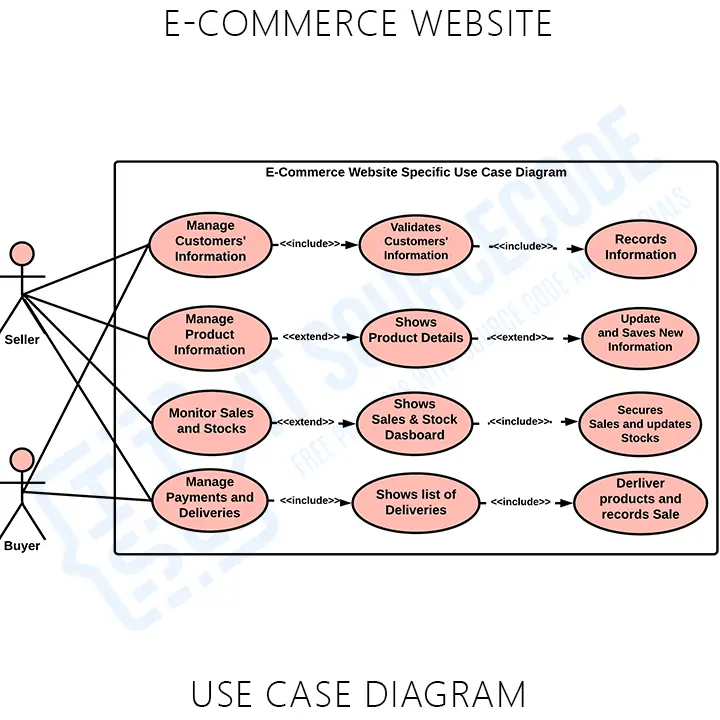
Use <<include>> when a use case always calls another (Checkout always includes Make Payment). Use <<extend>> when a use case sometimes calls another (Checkout extends Apply Coupon, only if the user has a coupon code).
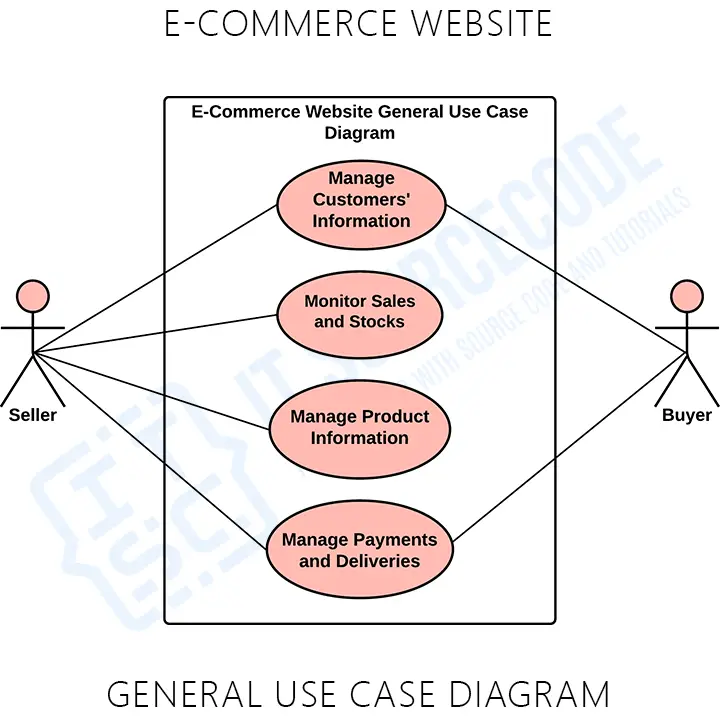
For the full walkthrough, including the detailed customer-side and admin-side use case diagrams with all actor associations, see our dedicated E-commerce Website Use Case Diagram guide.
2. Class Diagram for E-commerce Website
The Class diagram is the most-scrutinized diagram in the entire capstone defense. It is the blueprint for your code: every class becomes (roughly) a model in Laravel/Django/Spring, every attribute becomes a column, every method becomes a controller action. Get the class set right and the implementation almost writes itself.
Core Classes for an E-commerce Website
| Class | Key Attributes | Key Methods |
|---|---|---|
| User | userId, name, email, password, phone, role | register(), login(), logout(), updateProfile() |
| Customer (extends User) | customerId, defaultAddress, loyaltyPoints | placeOrder(), trackOrder(), writeReview() |
| Admin (extends User) | adminId, permissions | manageProducts(), generateReport(), approveSeller() |
| Product | productId, name, description, price, stock, imageUrl, categoryId | getDetails(), updateStock(), applyDiscount() |
| Category | categoryId, name, parentId, slug | listProducts(), addSubcategory() |
| Cart | cartId, customerId, createdAt | addItem(), removeItem(), updateQuantity(), getTotal(), clear() |
| CartItem | itemId, cartId, productId, quantity, unitPrice | getSubtotal() |
| Order | orderId, customerId, orderDate, status, totalAmount, shippingAddress | placeOrder(), updateStatus(), cancel(), generateInvoice() |
| OrderItem | orderItemId, orderId, productId, quantity, priceAtPurchase | getLineTotal() |
| Payment | paymentId, orderId, method, amount, status, transactionRef | process(), refund(), verify() |
| Shipment | shipmentId, orderId, courier, trackingNumber, status | ship(), updateStatus(), markDelivered() |
| Review | reviewId, customerId, productId, rating, comment, createdAt | post(), edit(), delete() |
Relationships Your Panel Will Probe
- User ←|, Customer / Admin / Seller: generalization (inheritance)
- Customer 1, 0..1 Cart: composition (a cart cannot exist without its customer)
- Cart 1, 0..* CartItem: composition
- CartItem *..1 Product: association
- Customer 1, 0..* Order: association
- Order 1, 1..* OrderItem: composition
- Order 1, 1 Payment: composition
- Order 1, 0..1 Shipment: composition (no shipment until paid)
- Product 1, 0..* Review: association
- Category 1, 0..* Product: association (one-to-many)
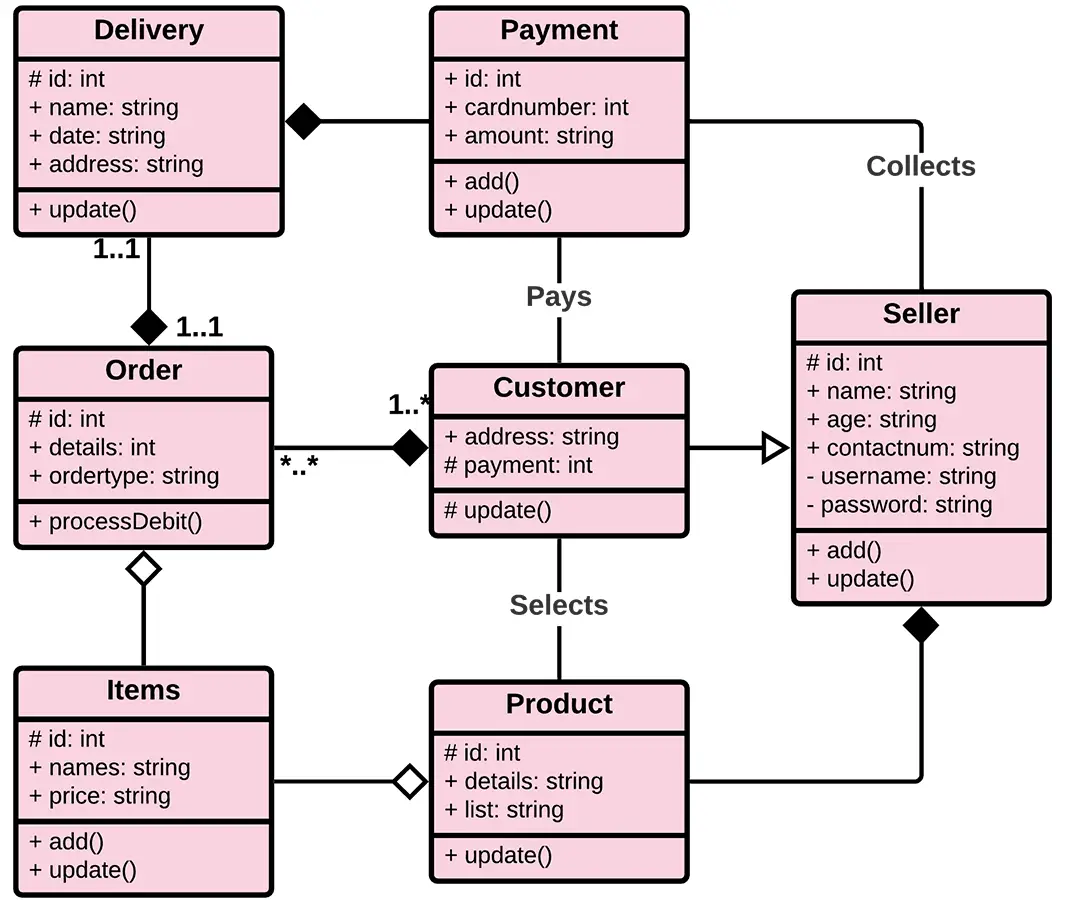
For the full UML notation (visibility markers, parameter signatures, abstract classes) and the printable PDF version of this diagram, see our E-commerce Website Class Diagram guide.
3. Sequence Diagram for E-commerce Website
A Sequence diagram shows objects exchanging messages over time. Time flows top-to-bottom; objects (lifelines) sit side-by-side at the top. For an e-commerce capstone you need two sequence diagrams: Add to Cart and Checkout / Place Order. The Checkout diagram is the one panels grill hardest, because it touches the most objects.
Checkout Sequence: Step-by-step Message Flow
- Customer → UI: click “Proceed to Checkout”
- UI → CartController: getCart(customerId)
- CartController → CartRepository: findByCustomer(customerId)
- CartRepository → Database: SELECT cart + cart_items
- CartController → UI: return Cart object with line items
- UI → Customer: render shipping address form
- Customer → UI: submit address + payment method
- UI → OrderController: placeOrder(cartId, address, paymentMethod)
- OrderController → Order: new Order()
- OrderController → PaymentGateway: processPayment(amount, method, token)
- PaymentGateway → OrderController: return PaymentResult (success / failure)
- alt [success] OrderController → Order: save() —— else [failure] return error to UI
- OrderController → CartRepository: clear(cartId)
- OrderController → EmailService: sendOrderConfirmation(customerEmail, orderId)
- OrderController → UI: return orderConfirmation(orderId)
- UI → Customer: redirect to “Order Placed” page
Use activation bars (thin rectangles on the lifeline) to show when an object is “busy” handling a message. Use the alt combined fragment to show the success/failure branch on payment. Use a return arrow (dashed) for every synchronous reply.
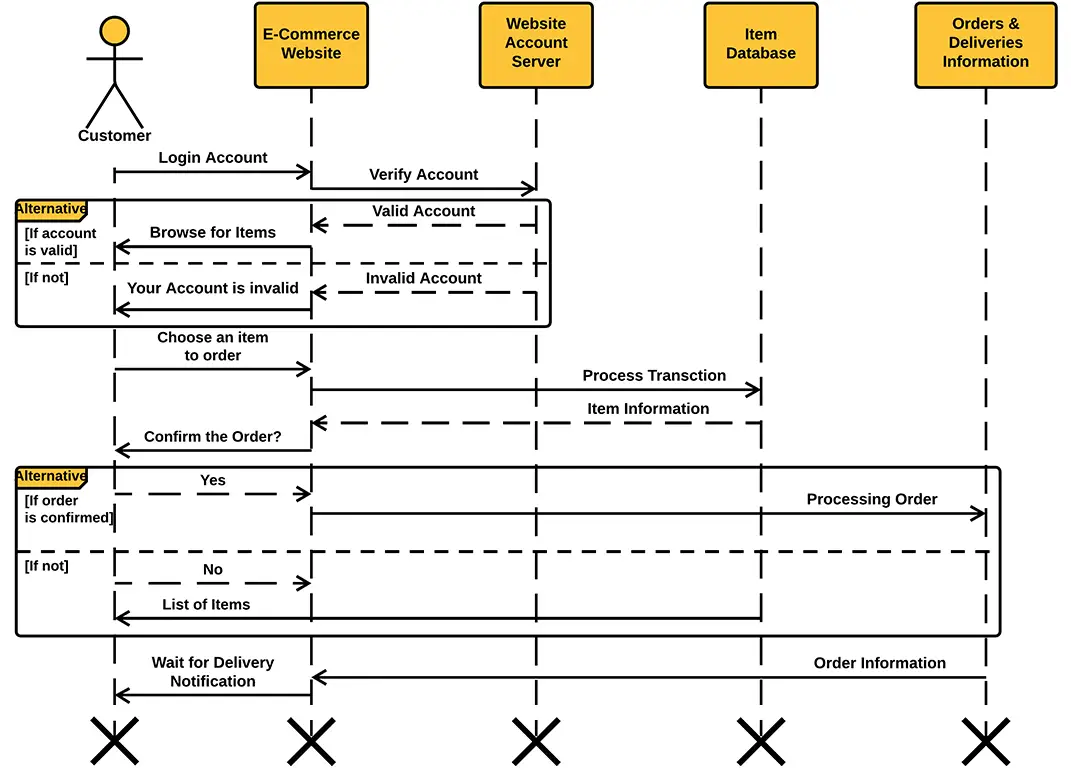
For the full Add-to-Cart sequence, the alternate-flow exception sequences (out of stock, payment declined, session expired), and the printable PDF, see our E-commerce Website Sequence Diagram guide.
4. Activity Diagram for E-commerce Website
An Activity diagram looks like a flowchart but with stricter UML semantics. It is the right diagram for the Place Order workflow because that workflow has decision points (in stock?, payment successful?, address valid?), parallel actions (send email AND update inventory), and swim lanes (Customer / System / Payment Gateway).
Place Order: Activity Flow
- Start node → Customer: Add items to cart
- Customer: Click “Checkout”
- Decision <Logged in?> — No → Login/Register → back to flow; Yes → continue
- Customer: Enter / confirm shipping address
- Customer: Select payment method
- System: Validate cart (stock check, price recalculation)
- Decision <All items in stock?> — No → Show error, return to cart; Yes → continue
- System → Payment Gateway: Submit payment
- Decision <Payment successful?> — No → Show failure, retry payment; Yes → continue
- Fork node — run in parallel: (a) System: Update inventory, (b) System: Create order record, (c) System: Send confirmation email
- Join node — wait for all three parallel actions to complete
- System: Display order confirmation with tracking number
- End node
Draw it with three swim lanes (Customer, System, Payment Gateway) so the panel can see which actor performs each action at a glance. The fork/join nodes are what make this an Activity diagram rather than a plain flowchart, make sure to use the thick horizontal bar notation, not flowchart parallelograms.
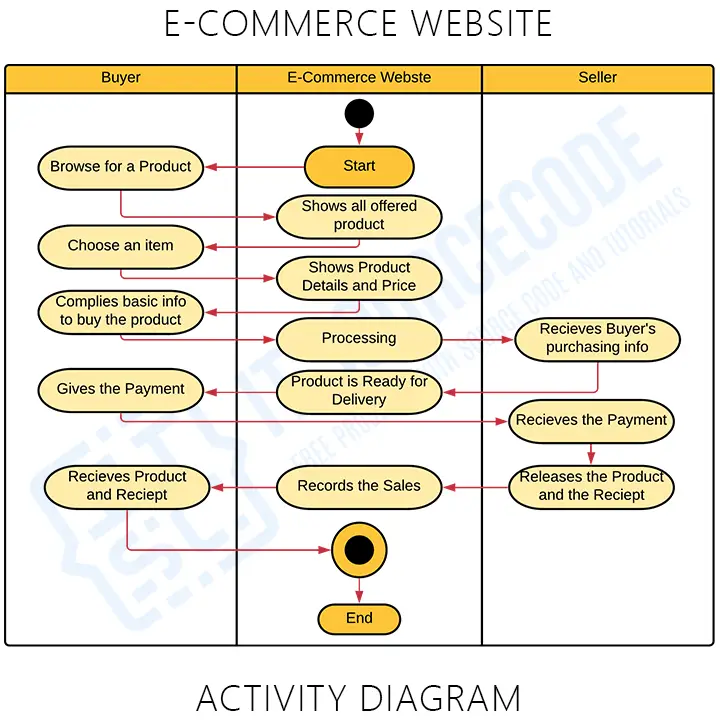
For the customer-side and admin-side activity diagrams drawn separately (Place Order, Cancel Order, Process Refund, Manage Inventory), see our E-commerce Website Activity Diagram guide.
5. ER Diagram for E-commerce Website
The Entity-Relationship (ER) diagram is your database schema in visual form. It is not strictly a UML diagram (UML’s equivalent is the Class diagram), but every Philippine, Indian, and US BSIT/BSCS capstone rubric requires an ER diagram in Chapter 3 alongside the UML set. Panels use it to verify your database is normalized and your foreign keys are sane.
Entities and Key Attributes
- users — user_id (PK), name, email (unique), password_hash, phone, role, created_at
- addresses — address_id (PK), user_id (FK), line1, city, province, postal_code, country, is_default
- categories — category_id (PK), name, parent_id (FK self), slug
- products — product_id (PK), name, description, price, stock_qty, image_url, category_id (FK), seller_id (FK, nullable), created_at
- carts — cart_id (PK), user_id (FK, unique), created_at, updated_at
- cart_items — cart_item_id (PK), cart_id (FK), product_id (FK), quantity, unit_price
- orders — order_id (PK), user_id (FK), shipping_address_id (FK), status, total_amount, created_at
- order_items — order_item_id (PK), order_id (FK), product_id (FK), quantity, price_at_purchase
- payments — payment_id (PK), order_id (FK, unique), method, amount, status, transaction_ref, paid_at
- shipments — shipment_id (PK), order_id (FK, unique), courier, tracking_number, status, shipped_at
- reviews — review_id (PK), user_id (FK), product_id (FK), rating, comment, created_at
- coupons — coupon_id (PK), code (unique), discount_pct, valid_from, valid_until, max_uses
Key Cardinalities
- users 1 ↔ 0..* orders — one customer, many orders
- orders 1 ↔ 1..* order_items — one order has at least one line
- orders 1 ↔ 1 payments — one order, one payment record
- orders 1 ↔ 0..1 shipments — shipment is created only after successful payment
- products *..1 categories — every product belongs to exactly one category
- products 1 ↔ 0..* reviews — one product, many reviews
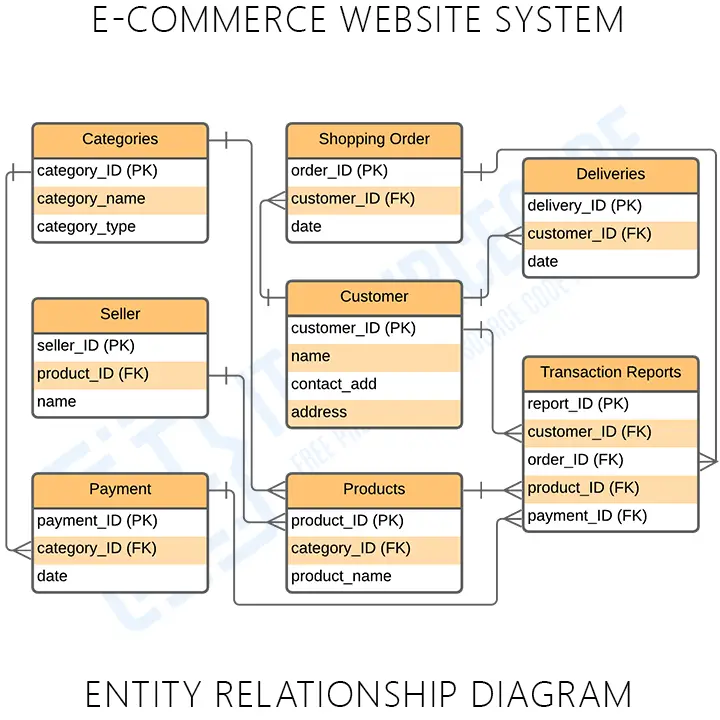
For the full crow’s-foot notation diagram, the normalized 3NF schema with all constraints, and the CREATE TABLE SQL scripts, see our E-commerce Website ER Diagram guide.
6. Component Diagram for E-commerce Website
A Component diagram shows the chunks of software your system is made of and the interfaces between them. For an e-commerce website the components are: Web UI (React/Vue/Blade), API / Business Logic (Laravel/Django/Spring), Database (MySQL/PostgreSQL), Authentication Module (JWT or session), Payment Gateway Adapter (PayMongo/Stripe/Razorpay), Email Service (SMTP/Mailgun), and File Storage (local disk or S3 for product images).
Draw each component as a rectangle with the component icon (two small squares on the left edge). Show provided interfaces as lollipops and required interfaces as sockets. The Payment Gateway Adapter requires the external Payment Gateway interface; the Web UI requires the API’s REST interface, and so on. Component diagrams live in Chapter 3.8 (Software Architecture).
7. Deployment Diagram for E-commerce Website
The Deployment diagram shows the physical infrastructure, the actual servers and network nodes your system runs on. Typical nodes for an e-commerce website: Client Device (browser / mobile), CDN (Cloudflare for static assets), Web Server (Nginx/Apache), Application Server (PHP-FPM/Gunicorn/Tomcat), Database Server (MySQL/PostgreSQL), Payment Gateway (external), and SMTP Server (external).
Draw each node as a 3D cube. Connect them with labeled associations showing the protocol (HTTPS, MySQL/TCP 3306, SMTP). For a simple capstone you can collapse Web Server + App Server into one node (typical shared-hosting setup); for a more ambitious capstone, split them to show a real production topology.
Bonus: DFD for E-commerce Website
If your school requires Data Flow Diagrams alongside UML, you also need DFD Level 0, Level 1, and Level 2 for the e-commerce system. DFDs are not strictly UML, they belong to structured analysis, but most Filipino BSIT programs require both in Chapter 3.6.
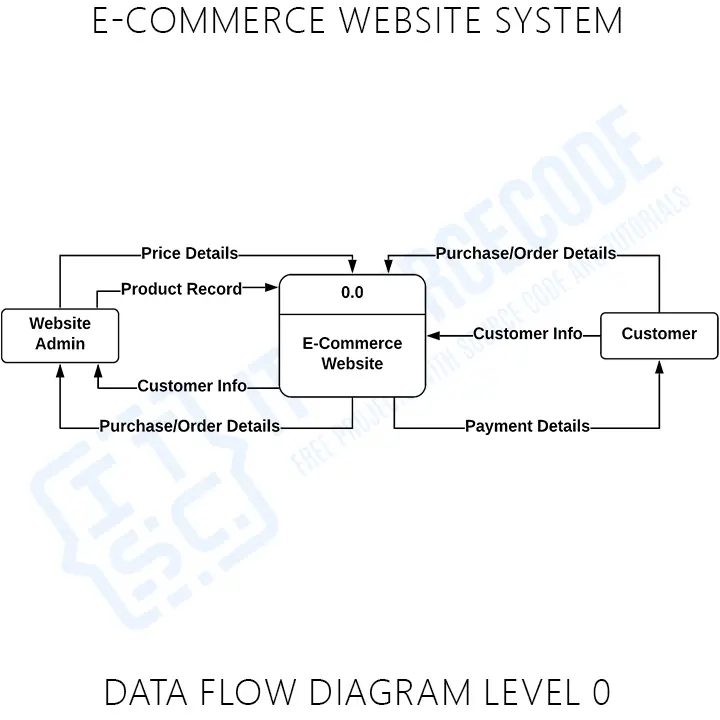
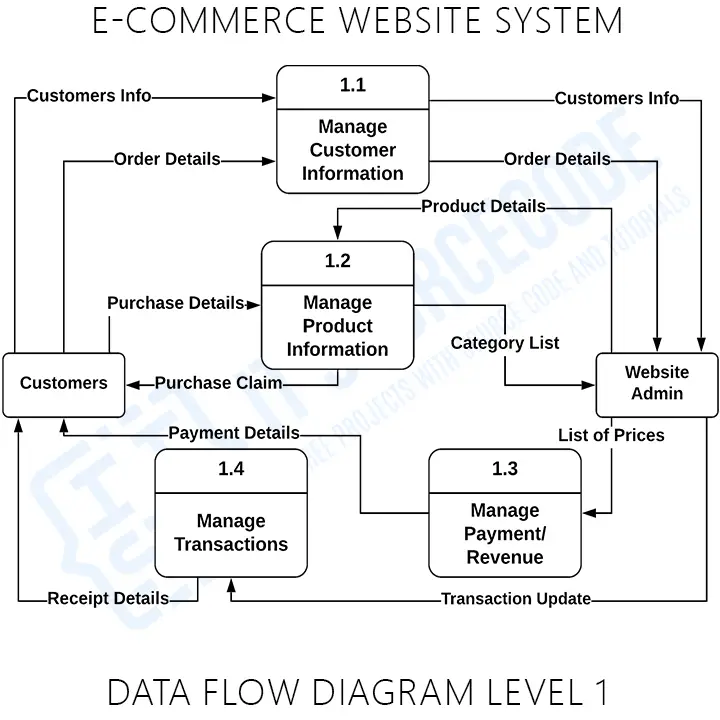
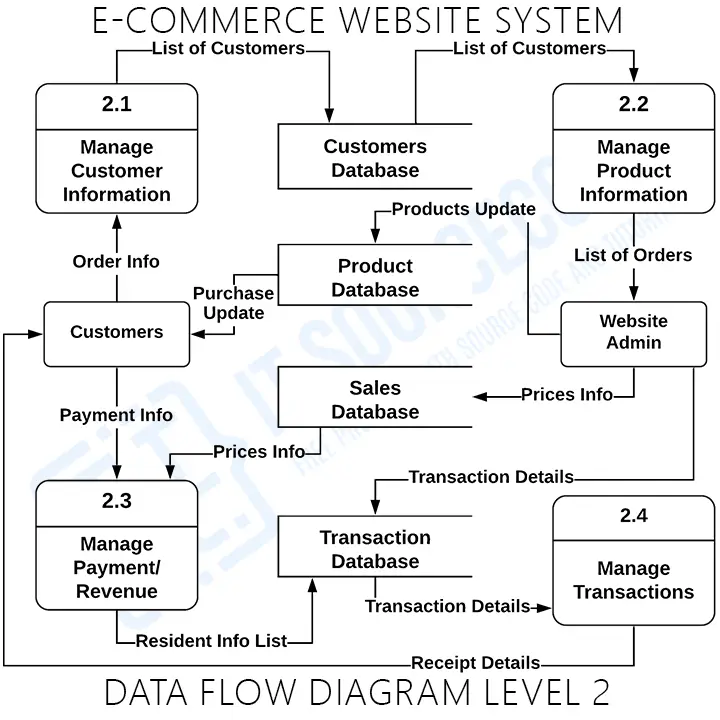
For the full Level 0/1/2 walkthrough with external entities (Customer, Admin, Payment Gateway), processes (Manage Account, Browse Products, Manage Cart, Process Order, Process Payment, Generate Reports), and data stores (D1 Users, D2 Products, D3 Orders, D4 Payments), see our E-commerce Website DFD guide.
What Order Should You Draw the UML Diagrams In?
Most capstone teams draw their diagrams in the wrong order, then spend two weeks redoing them because the early diagrams contradict the later ones. Use this proven sequence:
- Use Case diagram — lock down actors and what they can do. Do this first. Everything else depends on it.
- Activity diagram — for each major use case (especially Place Order), draw the workflow. This forces you to think through edge cases before you commit to a class structure.
- Class diagram — now that you know the actors and the workflows, identify the classes. Every noun in your use cases is a class candidate.
- ER diagram — convert the persistent classes into entities. Map composition relationships to foreign keys.
- Sequence diagram — pick the 2-3 most complex flows (Checkout, Add to Cart, Place Order) and draw object-level interactions. This is your validation step: if you can’t draw the sequence, your class design is wrong.
- Component diagram — group classes into modules. Show how the front-end, back-end, database, and external services connect.
- Deployment diagram — finally, the physical infrastructure. Quickest diagram of the set.
💡 Tip: Draw all seven on paper first. Spend one afternoon sketching the whole set in pencil before you open draw.io or Lucidchart. You will find inconsistencies on paper that would take days to fix once you have polished digital versions.
Common Mistakes Capstone Panels Will Catch
- Use Case diagram with too many use cases. If you have more than ~20 use cases on one diagram, the panel cannot read it. Split into per-actor diagrams (Customer Use Cases, Admin Use Cases) instead.
- Class diagram missing methods. Attributes alone are not enough — the panel wants to see at least 2-3 methods per class. “What does the Cart class actually do?” is the question.
- Sequence diagram with no return arrows. Every synchronous call needs a dashed return arrow. Without them, the diagram is incomplete.
- Activity diagram drawn as a flowchart. Flowcharts have no swim lanes, no fork/join, no proper UML notation. Use rounded rectangles for actions, diamonds for decisions, thick bars for fork/join, and swim lanes for actors.
- ER diagram with no foreign keys labeled. Every relationship line should be annotated with the FK column name. “user_id” goes on the orders side of the user-to-orders relationship, not floating in space.
- Inconsistency between diagrams. If your Class diagram has a “Cart” class but your ER diagram has no “carts” table, the panel will ask why. They check for consistency across the whole set.
- No payment gateway on Sequence and Component diagrams. Real e-commerce requires payment processing. Leaving it out signals you do not understand the system.
Defense Tips for E-commerce UML
🎓 What panels actually ask
- “Walk me through what happens when a customer clicks Checkout.” → Point to your Sequence diagram and trace the messages.
- “What if the payment fails?” → Point to the alt fragment in your Sequence diagram and the decision diamond in your Activity diagram.
- “Why is Customer a separate class from User?” → Show the generalization arrow on the Class diagram and explain Admin and Seller also inherit from User.
- “What database tables do you have?” → Point to the ER diagram; rattle off the 12 entities with confidence.
- “Where does the payment gateway live in your architecture?” → Point to the Component diagram (as an external adapter) and the Deployment diagram (as an external system node).
If you can answer all five of these by pointing at the diagrams you drew, you will pass the design review without breaking a sweat. The whole purpose of the UML set is to make these questions easy to answer — not to look pretty.
📌 Need the working source code, not just diagrams?
Pair this diagram set with a working capstone: grab our complete Laravel E-commerce project with source code, the E-commerce website in Django, or the JavaScript framework e-commerce build. The classes and entities in those repos map directly to the diagrams above — perfect for cross-referencing during your defense.
Working e-commerce source code for your capstone (every major language)
The UML diagrams above describe the design; these are the actual working e-commerce capstones you can clone, study, and adapt. We host one in every major web stack students use, so pick the one your panel knows or your team is most comfortable with.

PHP: E-commerce Website in PHP
Vanilla PHP + MySQL. Complete cart, checkout, admin panel.

CodeIgniter: Complete E-commerce in CodeIgniter
CI4 + Bootstrap. MVC structure with admin dashboard.

Laravel: Complete Laravel E-commerce
Laravel 10 + Tailwind. Multi-vendor support, Stripe ready.
ASP.NET: E-commerce Website in ASP.NET
ASP.NET MVC + SQL Server. Classic capstone-ready stack.

Django (Python): Django E-commerce
Django 4 + Bootstrap. Class-based views, payment integration.

Python (Flask): Online Shopping in Python
Python + Flask + SQLite. Lightweight option for beginners.

JavaScript / Vue: Vue.js + Firebase Shopping Cart
Vue 3 + Firebase realtime DB. Modern SPA approach.

Node.js: Node.js E-commerce
Node + Express + MongoDB. Full-stack JavaScript option.
How to use this: download one, run it locally, then use the UML diagrams above as your Chapter 3 documentation. The diagrams already match the patterns these projects implement (users, products, cart, order, payment entities, checkout sequence flow, etc.).
Frequently Asked Questions
Official documentation
Working source code for this system
Download the actual implementation of this system in your preferred language. Each project includes source code, database, and setup instructions for BSIT capstone use.
Get the ready-to-defend package: complete PHP + MySQL source code, full Chapter 1-5 documentation, 6 UML diagrams, ERD, installation guide, user manual, and defense presentation template. Save 3 to 4 weeks of capstone work.
Sold via Gumroad. See our affiliate disclosure.
What UML diagrams are required for an E-commerce Website capstone?
How many classes should the E-commerce Class diagram have?
What are the main actors in an E-commerce Use Case diagram?
Which sequence diagrams should I draw for an E-commerce project?
What goes in the Activity diagram for Place Order?
How many tables should the E-commerce ER diagram have?
What is the difference between a Class diagram and an ER diagram?
What tool should I use to draw E-commerce UML diagrams?
In what order should I draw the UML diagrams for E-commerce?
Do I need DFDs as well as UML diagrams for E-commerce?
Related E-commerce and UML Guides on itsourcecode.com
- E-commerce Website Class Diagram (detailed walkthrough)
- E-commerce Website Use Case Diagram
- E-commerce Website Sequence Diagram
- E-commerce Website Activity Diagram
- E-commerce Website ER Diagram
- E-commerce Website DFD Levels 0, 1, 2
- Online Shopping Complete UML Diagrams (sister system)
- Point of Sale (POS) System UML Diagrams
- Full UML diagram library
- 150 Best Capstone Project Ideas for IT Students 2026
Final Recommendation
If you take only one habit from this guide, make it this: draw all seven diagrams in the order recommended above, on paper, in one sitting. Most teams who get sent back by their panel did not finish the diagram set — they had a Use Case and a Class diagram but no Sequence, or an ER but no Activity. Panels notice the gaps and assume your understanding is equally incomplete.
Lock down the actor list today. Sketch the Place Order activity flow by tomorrow. Draw your Class diagram by the end of the week. Convert it to an ER diagram the next day. Add the Checkout sequence over the weekend. By next Monday you will have a defensible UML set and your Chapter 3 will pass the design review on diagram completeness alone.
- Sketch the Use Case diagram — 3 actors, 4 use case packages, all associations labeled
- Sketch the Activity diagram for Place Order — 3 swim lanes, fork/join for parallel actions
- Sketch the Class diagram — 12 classes with attributes, methods, and relationships
- Convert to ER diagram — 12 entities with PKs, FKs, and 3NF normalization
- Draw the Checkout Sequence diagram — all 16 messages, alt fragment for payment branch
- Add Component + Deployment diagrams for Chapter 3.8 architecture section
- Redraw all seven in draw.io using proper UML notation
- Pair the diagrams with a working build — Laravel E-commerce source code or Django E-commerce source code
Stuck on a specific diagram or need help mapping classes to entities? Drop a comment with your scope and we will help you map it out.

Mary Grace G. Patulada
Programmer & Technical Writer at PIES IT Solution
Mary Grace G. Patulada (pen name ‘Nym’) is a programmer and writer at PIES IT Solution with a BSIT background from Carlos Hilado Memorial State College, Binalbagan Campus. Authored 370+ UML diagram tutorials and capstone documentation guides at itsourcecode.com. Specializes in UML (class, use case, activity, sequence, component, deployment), DFD, and ER diagrams for BSIT capstone projects.
Expertise: UML Diagrams · DFD · ER Diagrams · Use Case Diagrams · Activity Diagrams · Capstone Documentation · PHP · View all posts by Mary Grace G. Patulada →