

The Airline Reservation System Activity Diagram is one of the UML activity diagrams that is used to illustrate the behavior of the system towards its users. This activity diagram was created in order to understand how the system would process an airline ticket reservation online.
It shows the flows of interactions and activities that happen in the processing of an airline ticket booking system, as well as the transaction management performed at the back end of the system.
The users of this Online Airline Ticket Reservation System would be the passengers and the airline staff, and they are essential in creating its activity diagram.
By determining the users of the system, it would be much easier for you to build the interactions and activities in the system.
Then you will be able to foresee the behavior of the system towards its users. and this will make you aware that your system must be user-friendly and effective for its users.
Get the full working source code (PHP + MySQL, Java + NetBeans, Python + Django, or VB.NET) plus Chapter 1-5 documentation templates:
An Activity Diagram for an Airline Reservation System shows every step a passenger and the system take from “I want to fly somewhere” to “I have my e-ticket.” For BSIT and BSCS capstone projects, it’s the single most important UML diagram your panel will read , because it answers the panel’s primary defense question: “can you describe what your system actually does, step by step?”
This guide gives you the full Activity Diagram (with every action, decision point, and swimlane), explains why each part exists, and shows you how to adapt it for your own airline, bus, train, or hotel reservation system capstone. The same template works for almost any booking-and-confirmation workflow.
Last updated: June 12, 2026 , refreshed with detailed walkthrough, FAQ section, and capstone integration notes.
What is an Online Airline Ticket Reservation System Activity Diagram?
To have a clear understanding of it, let me tell you about the system activity diagram’s purpose and role. The Airline Reservation System must include an activity diagram so that programmers can determine how the software should interact with its users.
It is because the activity diagram guides the programmer in creating the software and its must-have behavior. So, if you want friendly and effective software that is easy to use, you must also finish the activity diagram.
Through the activity diagram, you’ll be able to illustrate the flow of activities and know what should be the interactions between the system and its users.
The activity diagram will also guide your readers and users on how to use the system. So it is best for you to explain your thoughts on the airline reservation system through an activity diagram.
Activity Diagram Symbols:
Before we create the activity diagram of the airline reservation system, you must first know the symbols used to make it. And here are the symbols used in the activity diagram.
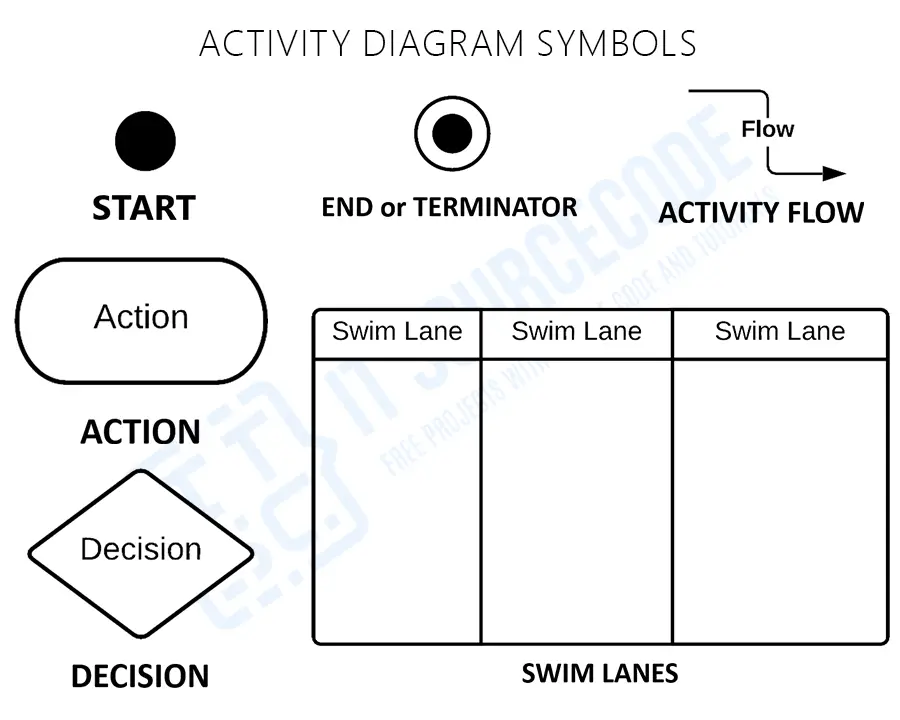
You must be familiar with these symbols in order for you to distinguish what should go in the illustration to avoid misunderstandings.
This is also to educate you about the activity diagram symbols used, so you and the users will understand the system’s behavior.
In addition to that, being familiar with these activity diagram symbols will help you show the detailed parts and interactions that should happen when you develop the system.
Then this thought enables you to have the right ideas on how to develop the system that you want.
Activity Diagram of Online Airline Ticket Reservation System
Time needed: 5 minutes
Here’s the activity diagram samples of the Online Airline Ticket Reservation System that you may use for your final year project.
Note that you may change the ideas given in this activity diagram to meet the scope of the student management system project that you desire. The given ideas here are sorted based on the system users to give you more detailed examples.
- Designed Activity Diagram of Airline Reservation for Passenger Side

Now here’s the designed activity diagram that shows the behavior of the system when the passenger makes an airline ticket reservation online. You can see through the diagram the interactions between the user and the system.You can also modify this illustration if you want to add more efficiency for the user. This activity diagram was made from the general idea of making a ticket reservation on airlines website via systems online. So you can modify this diagram with the features that you want.
- Designed Activity Diagram of Airline Reservation
This activity diagram was made from the idea of the ticket reservation management happening on online airlines, which is applied to software or systems. So you can modify this diagram with the features that you want.Now you can see how the flow of activities happens on the management side. And the users of the back end are the reservation staff or the airline management.
You could add more interactions to this activity diagram if you have enough knowledge about the Online Airline Ticket Reservation System.
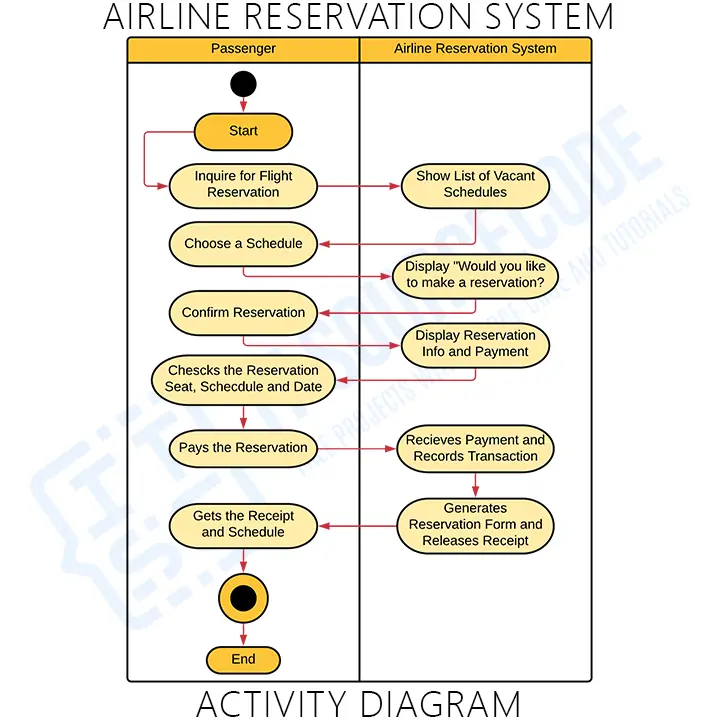
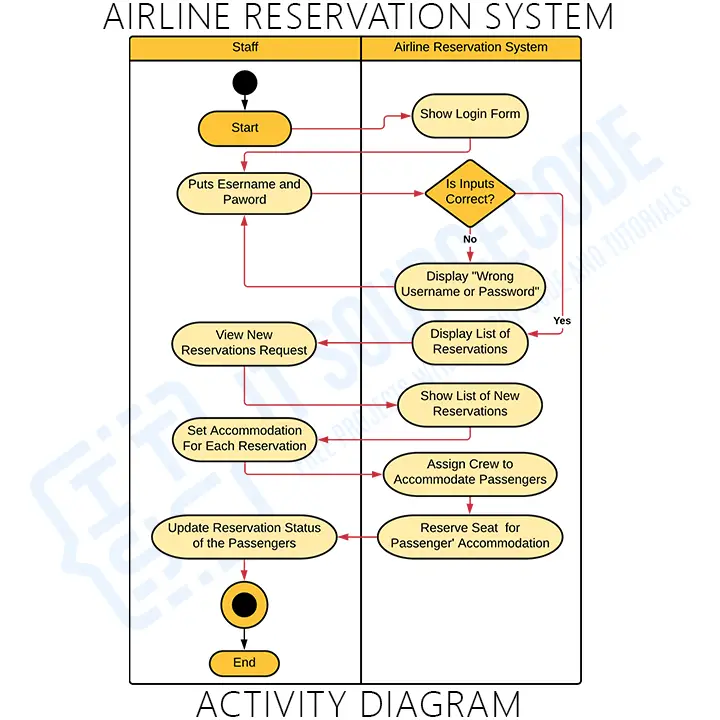
These diagrams can be modified to achieve your desired system behavior. Note that you can also create your own unique system function to meet all of your clients’ needs. And if you want, you can copy the ideas presented here, so you won’t need to create a new one.
Step-by-step walkthrough of the Airline Reservation Activity Diagram
The diagram above looks dense, but every shape has a specific purpose. Walking through it from top to bottom:
1. Start node (filled black circle)
The diagram begins when a passenger opens the airline reservation system , typically a web app at home, a mobile app on a phone, or a kiosk at an airport partner agency. The Start node has no logic; it just marks the entry point.
2. Action: “Search for Flight”
The first action asks the passenger for travel parameters , origin city, destination city, travel date, return date (if round-trip), number of passengers, and class of service. This action queries the flight database and returns matching flights. In your capstone, this is typically a SELECT query joining the flights, airports, and seat_availability tables.
3. Decision: “Flights available?”
If no flights match, the system loops back to the search form with an error message. If flights are found, the system displays them ranked by price (cheapest first) or by departure time depending on user preference. This decision diamond is what separates a usable system from one that crashes when no flights match.
4. Action: “Select Flight”
The passenger picks a specific flight from the list. The system locks that seat temporarily (usually for 10-15 minutes) to prevent double-booking while the passenger completes the rest of the process. Most capstone implementations use a database seat_locks table with timestamp expiration for this.
5. Decision: “Logged in?”
If the passenger isn’t logged in, they’re redirected to login or registration. After successful login, the flow returns to the seat-selection step (with the temporary lock still active). This is a common point where capstone systems fail , students often forget to handle the case where the seat lock expires during login.
6. Action: “Enter Passenger Details”
Name, date of birth, passport number, contact email, phone number. For domestic flights, fewer fields; for international, additional fields like visa status and emergency contact. Validation happens here , invalid passport formats, expired dates, etc. , before proceeding.
7. Action: “Select Seat”
The passenger picks a specific seat from a visual seat map. The system marks the seat as “selected” in real-time. Adjacent seats for family bookings, accessibility-required seats, and emergency-exit seats are handled with different visual indicators.
8. Action: “Process Payment”
The payment gateway is invoked , GCash, Maya, PayPal, credit card, or bank transfer for Philippine systems. The diagram shows payment as a single action node, but in real systems this is typically a sub-process with its own diagram. Your panel may ask you to draw that sub-process separately.
9. Decision: “Payment successful?”
If payment fails (insufficient funds, network timeout, card declined), the system returns to the payment step OR releases the seat lock and returns to flight selection. If payment succeeds, the booking is finalized.
10. Action: “Generate E-Ticket”
The system creates the e-ticket PDF, stores a copy in the database, and emails it to the passenger. The seat lock is converted to a confirmed booking.
11. End node (filled circle with ring)
The activity completes when the passenger receives confirmation. The system then sends an SMS (optional), updates the seat availability for that flight, and triggers any downstream processes like loyalty points or partner notifications.
Actors and swimlanes in the diagram
Most professional Activity Diagrams use swimlanes to show who does what. For an Airline Reservation System, the typical swimlanes are:
- Passenger , searches, selects, fills forms, pays
- System / Application , validates, locks, processes
- Database , queries flights, stores bookings
- Payment Gateway , external service (GCash, Maya, Stripe, PayPal)
- Email/SMS Service , sends confirmations (external service)
If your capstone panel asks “why didn’t you draw swimlanes?” the answer is: “The diagram is for high-level overview; swimlanes are in the more detailed sub-process diagrams in Appendix B.” Then have a swimlaned version ready in your appendix.
How to adapt this diagram for your specific capstone
The Airline Reservation Activity Diagram template works for many similar booking systems with minor tweaks. Common capstone variations:
- Bus Reservation System , replace “Flight” with “Route,” remove the “International/Domestic” decision, add “Seat Type” (sleeper, semi-sleeper, regular) action
- Train Ticket Reservation , add “Quota” decision (general, tatkal, ladies, senior citizen) and “Class” (1A, 2A, 3A, sleeper, general)
- Movie Ticket Booking , replace “Flight Search” with “Movie + Showtime Search,” add “Snack Bundle” optional action
- Hotel Reservation System , replace “Flight” with “Room Type,” add “Check-in / Check-out date” decisions, add “Special Requests” action
- Restaurant Reservation , replace “Flight Search” with “Date + Time + Party Size,” remove payment step (often pay at venue)
- Concert/Event Booking , add “Seat Section” (VIP, premium, general) decision, add “Hold Time” for cart abandonment handling
If you’re working through the full capstone documentation, our Chapter 3: Methodology guide explains where Activity Diagrams fit (Section 3.6 System Design) and how to defend your design choices to the panel.
Related diagrams you’ll need for your capstone
An Activity Diagram alone isn’t enough for a complete BSIT/BSCS capstone Chapter 3. Most schools require at least these UML diagrams alongside it:
- Complete Online Airline Reservation System UML Diagrams (Use Case + Class + Activity + Sequence + ER all together)
- Airline Reservation System Sequence Diagram (shows message order between actors)
- Airline Reservation System DFD (Level 0, 1, 2) (data flow perspective)
- ER Diagram for Airline Reservation System (database design)
Browse our complete UML Diagrams Library (302 free diagrams) for other system types if you’re not building airline-specific.
Official documentation
Working source code for this system
Download the actual implementation of this system in your preferred language. Each project includes source code, database, and setup instructions for BSIT capstone use.
Frequently Asked Questions
What is the difference between an Activity Diagram and a Sequence Diagram for an Airline Reservation System?
How many activities should an Airline Reservation Activity Diagram have?
What tools can I use to draw an Activity Diagram for my capstone?
Can I use the same Activity Diagram for an Airline, Bus, and Hotel reservation system?
Do I need swimlanes in my Activity Diagram for a BSIT capstone?
What is the difference between an Activity Diagram and a Flowchart for an Airline System?
How do I include this Activity Diagram in my capstone Chapter 3?
What other UML diagrams do I need for an Airline Reservation System capstone?
Can I download a working Airline Reservation System with this Activity Diagram for free?
This Activity Diagram is one of several UML diagrams you’ll need for Chapter 3 (Methodology). For the complete capstone documentation workflow:
- Chapter 1: Introduction , Background, Statement of the Problem, Objectives
- Chapter 2: Review of Related Literature (RRL)
- Chapter 3: Methodology (where this diagram lives , Section 3.6)
- Chapter 4: Results and Implementation
- Chapter 5: Summary, Conclusions, Recommendations
- 150+ Best Capstone Project Ideas (2026)
Now that you understand the activity diagram, grab the working source code and finish your capstone faster:
Conclusion
It is essential for you to know the diagrams used to design and develop the airline reservation system. This is due to the fact that, without it, it is impossible to create a fully functional system.
But if you create this activity diagram, you will know the inputs and scenarios that the system should perform. You will also figure out what business processes are needed and link them to the other UML diagrams.
By filling out the Activity Diagrams for each module or process, you will easily get to the system you want.
Related Articles
- Online Airline Reservation System UML Diagrams
- Component Diagram for Airline Reservation System
- Airline Reservation System Class Diagram
- Use Case Diagram for Airline Reservation System
- Deployment Diagram for Airline Reservation System
- Airline Reservation System Sequence Diagram
- Airline Reservation System ER Diagram
Inquiries
Now, what have you learned through our discussion? Have you determined the diagrams that you must create? What project do you have in mind?
And, if you have any suggestions or questions about our discussion, please leave them in the comments section. Those are highly appreciated. Thank you so much and have a good day!
Check out our related and recommended articles for more learning and information.

Mary Grace G. Patulada
Programmer & Technical Writer at PIES IT Solution
Mary Grace G. Patulada (pen name ‘Nym’) is a programmer and writer at PIES IT Solution with a BSIT background from Carlos Hilado Memorial State College, Binalbagan Campus. Authored 370+ UML diagram tutorials and capstone documentation guides at itsourcecode.com. Specializes in UML (class, use case, activity, sequence, component, deployment), DFD, and ER diagrams for BSIT capstone projects.
Expertise: UML Diagrams · DFD · ER Diagrams · Use Case Diagrams · Activity Diagrams · Capstone Documentation · PHP
· View all posts by Mary Grace G. Patulada →