
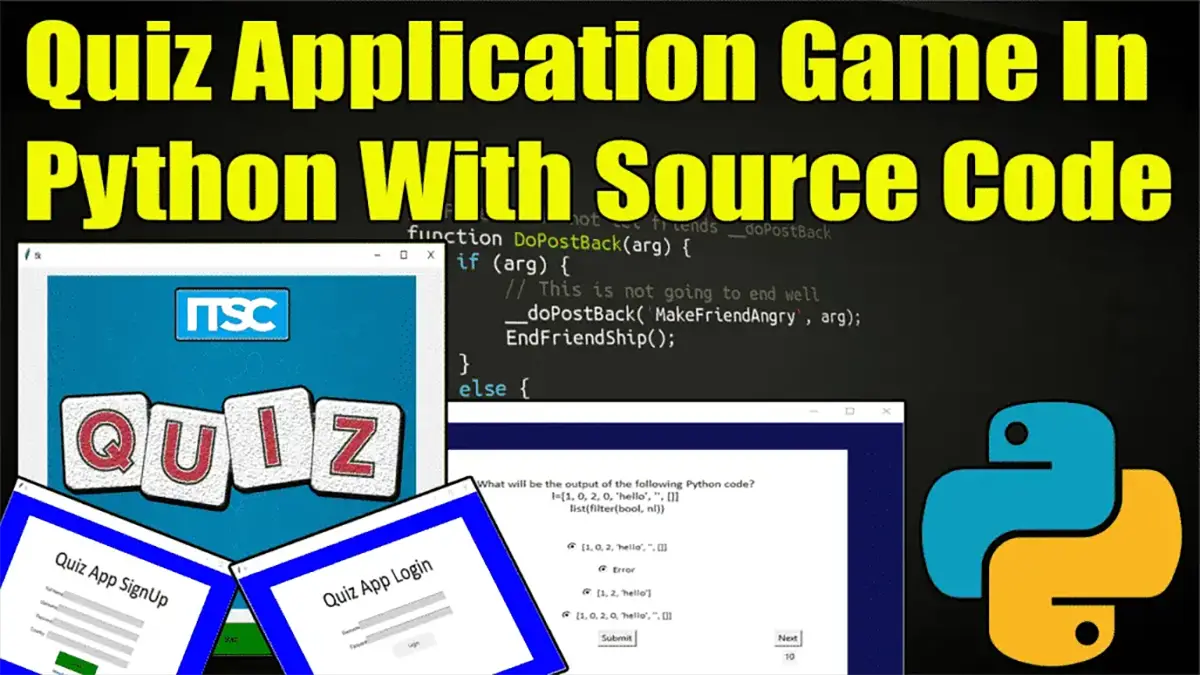
The Python Quiz is written in Python programming language, this Simple Quiz On Python Programming is a simple project for testing one’s knowledge power in the given topic examination.
A project Quiz In Python contains only the user side. The user must log in or sign up first to start the Quiz On Python.
Also, there is a time duration set for solving the questions. The user should solve the questions before the time is up.
Quiz Application In Python: Project Information
| Project Name: | Quiz Application In Python |
| Language/s Used: | Python (GUI) Based |
| Python version (Recommended): | 2.x or 3.x |
| Database: | None |
| Type: | Python App |
| Developer: | IT SOURCECODE |
| Updates: | 0 |
This Quiz Project In Python just contains the user section. The user can log in to take the exam. After taking the exam, the user can see their score and evaluate themselves.
The design of this project Quiz Program Using Tkinter is pretty simple so that the user won’t find any difficulties while working on it.
Anyway, if you want to level up your knowledge in programming especially games in Python, try this new article I’ve made for you Code For Game in Python: Python Game Projects With Source Code.
This Quiz On Python Code also includes a downloadable Quiz Game Source Code, just find the downloadable source code below and click to start downloading.
To start creating a Quiz Application In Python, make sure that you have PyCharm IDE installed on your computer.
By the way, if you are new to Python programming and don’t know what Python IDE to use, I have here a list of the Best Python IDE for Windows, Linux, and Mac OS that will suit you.
I also have here How to Download and Install the Latest Version of Python on Windows.
How to Create a Python Quiz Application? A step-by-step Guide with Source Code
Time needed: 5 minutes
Python Quiz Application With Source Code
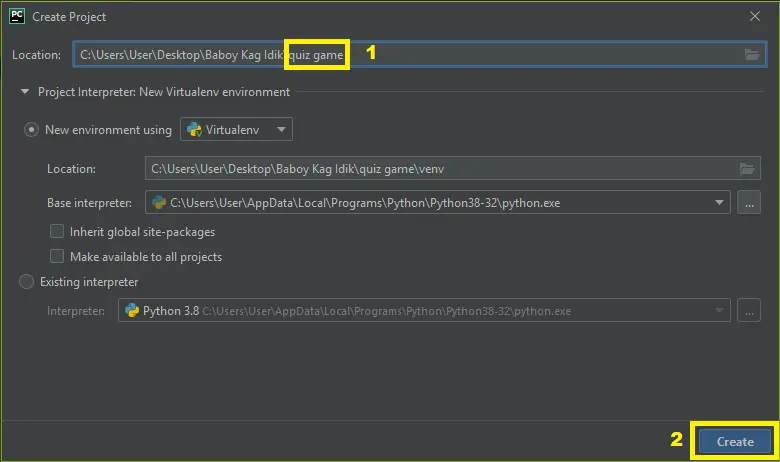
- Step 1: Create a project name.
First, open Pycharm IDE and then create a “project name.” After creating a project name click the “create” button.

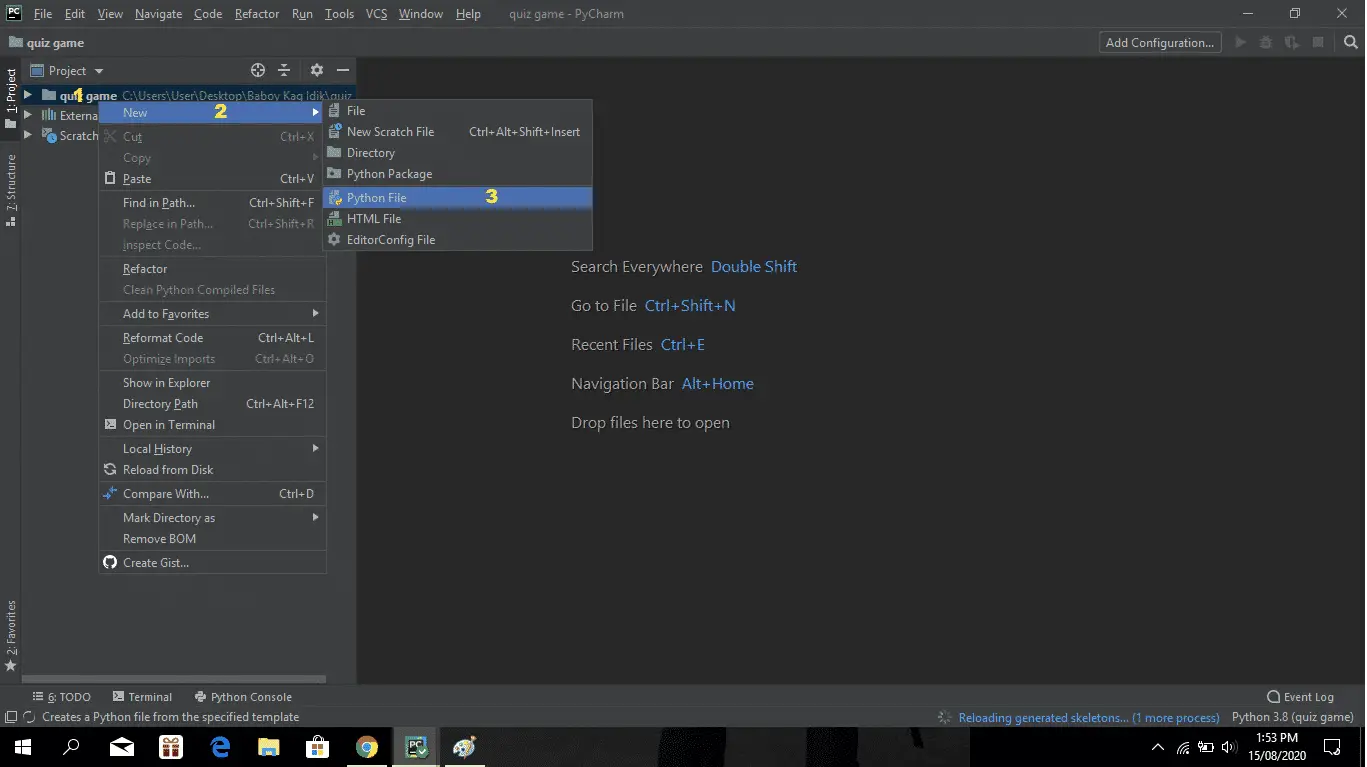
- Step 2: Create a Python file.
Second, after creating a project name, “right-click” your project name and then click “new.” After that click the “python file“.

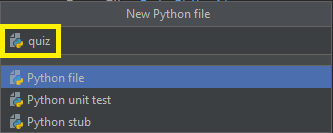
- Step 3: Name your python file.
Third, after creating a Python file, Name your Python file after that click “enter“.

- Step 4: The actual code.
You are free to download the full source code below.
Downloadable Source Code
I have here the list of Best Python Projects with Source code free to download for free, I hope this can help you a lot.
Summary
The Quiz Application In Python is written in Python programming language, Python is very smooth to research the syntax emphasizes readability and it is able to reduce time ingesting in developing.
This application Python quiz has multiple choice questions that are good for the Python learner to test their skills in Python and to test knowledge in Python, you need to familiarize the Python functions, data structures, and data types.
Also, this tutorial is the simplest way for beginners or students to enhance their logical skills in programming. and also this game project is a way for students or beginners to design and develop games.
Technology stack and requirements
To run this Python project on your development machine, you need:
- Python 3.10 or higher. Download from python.org or install via Anaconda if you prefer bundled packages.
- pip package manager. Comes with Python. Used to install project dependencies from requirements.txt.
- Virtual environment. Use venv or conda to isolate project dependencies from your global Python install.
- VS Code or PyCharm. Free code editors with Python syntax highlighting, IntelliSense, and debugging.
- Git. For version control and cloning source code repositories.
Installing the source code
- Download or clone the repository. Get the ZIP archive from the download link on this page and extract it.
- Create a virtual environment. Open a terminal in the project folder and run: python -m venv venv, then activate it (venv\Scripts\activate on Windows or source venv/bin/activate on Mac/Linux).
- Install dependencies. Run pip install -r requirements.txt to install all libraries the project needs.
- Configure environment variables. If the project uses API keys (OpenAI, Anthropic, database), create a .env file and set the required keys.
- Run the project. Follow the run command in the README (usually python main.py or streamlit run app.py).
Using this project for your BSIT capstone
- Chapter 1 (Introduction). Discuss the real-world problem this system solves. Cite Philippine or international use cases where the manual process could be automated.
- Chapter 2 (RRL). Compare your project against 5-10 similar published works. Cite ACM, IEEE, or arXiv papers for academic-standard sources.
- Chapter 3 (Methodology). Document the model architecture, training data, hyperparameters, and evaluation metrics used.
- Chapter 4 (Results). Report accuracy, precision, recall, F1-score, and confusion matrix. Screenshot the running app on real inputs.
- Chapter 5 (Conclusion). Identify features for Version 2: better model, larger dataset, mobile deployment, or REST API.
Modules typical of Python Quiz Application
- Core Python logic. Main functions implementing the business logic of the system.
- Data storage. SQLite for simple projects, PostgreSQL or MongoDB for larger data.
- User interface. Tkinter for desktop, Streamlit for data dashboards, or Flask/FastAPI for web.
- Input validation. Type checking and range validation before processing user data.
- Reports. CSV or PDF export using pandas.to_csv() or ReportLab.
- Testing. pytest unit tests covering core functions.
Common enhancements for capstone review
- Add REST API. Convert desktop app to FastAPI service for mobile or web front-ends.
- Multi-user support. Add login, roles, and per-user data isolation.
- Cloud deployment. Deploy to Render, Railway, or Fly.io for public access.
- Docker containerization. Package the app in Docker for portable deployment.
Official documentation
Frequently Asked Questions
How does this Python quiz or examination system work?
Admin creates quizzes (title, time limit, pass mark), questions, answers. Students attempt quiz with countdown Timer, system auto-grades.
What Python version and libraries does this project require?
Most projects in this batch use Python 3.10, 3.11, or 3.12 (avoid 3.13 until library wheels catch up). Standard libs: tkinter (built-in), sqlite3 (built-in). External: pip install pillow opencv-python pygame mysql-connector-python reportlab requests beautifulsoup4. Check the requirements.txt file (if included) for exact versions.
How do I set up the database for this Python project?
For SQLite (most common, no setup needed): the .db file auto-creates on first run. For MySQL: install MySQL Server + MySQL Workbench, create an empty database, import the included .sql file, edit the connection string in db.py (or db_connect.py) with your host, user, password, database name.
Can I use this Python project for a BSIT capstone or thesis?
Yes. Python is rising fast in Philippine BSIT panels. Extend it: add user roles via auth module, dashboards (matplotlib charts), PDF reports (reportlab), email notifications (smtplib), real domain extension (analytics, audit log, multi-branch support). Pair with Chapter 1-5 documentation matching your panel’s rubric.
Why am I getting ‘ModuleNotFoundError’ or ‘No module named X’?
Three common Python issues: (1) Module not installed: pip install
Where can I find more Python projects with source code?
Browse the Python Projects hub for the full library. For computer vision specifically see OpenCV Projects (46 vision systems). For ML / AI capstones see Machine Learning Projects. For BSIT capstone idea lists see 150 Best Capstone Project Ideas.

Angel Jude Suarez
Full-Stack Developer at PIES IT Solution
Focuses on Python development, machine learning, and AI integration. Has built production AI systems including OpenAI Whisper integration for medical transcription and GPT-4o-powered diagnosis assistance. Strong background in pandas, scikit-learn, and TensorFlow.
Expertise: Python · PHP · Java · VB.NET · ASP.NET · Machine Learning · AI Integration · OpenCV · Django · CodeIgniter
· View all posts by Angel Jude Suarez →
do u have any report sir pls forward us
if we don’t want login and signup page which changes we have to make?
and sup.destory() is for what?
Not working at 224 for me.
Now it is working.. Thank you. I made mistake..