
Object Measuring Size OpenCV Python With Source Code
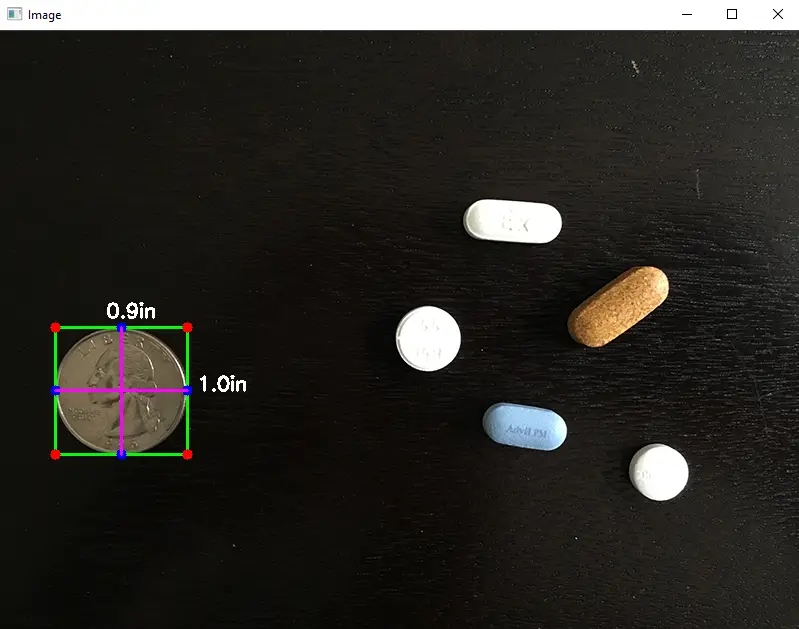
The Object Measuring Size OpenCV Python was developed using Python OpenCV, the project provides a script to read an image and based on the dimensions of a reference object find the dimensions of other objects in a scene.
A Object Measuring we will learn how to perform object measurement using OpenCV and Python. We will use an image as our guide and find the measurement size of objects placed in this region.
In this Python OpenCV Project also includes a downloadable Python Project With Source Code for free, just find the downloadable source code below and click to start downloading.
By the way, if you are new to Python programming and you don’t know what Python IDE to use, I have here a list of the Best Python IDE for Windows, Linux, and Mac OS that will suit you.
I also have here How to Download and Install the Latest Version of Python on Windows.
To start executing Object Measuring Size With Source Code, make sure that you have installed Python 3.9 and PyCharm on your computer.
Object Measuring Size OpenCV Python With Source Code: Steps on how to run the project
Time needed: 5 minutes
These are the steps on how to run Object Measuring Size OpenCV Python With Source Code
- Step 1: Download the given source code below.
First, download the given source code below and unzip the source code.

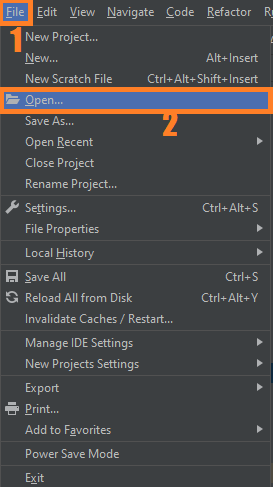
- Step 2: Import the project to your PyCharm IDE.
Next, import the source code you’ve downloaded to your PyCharm IDE.

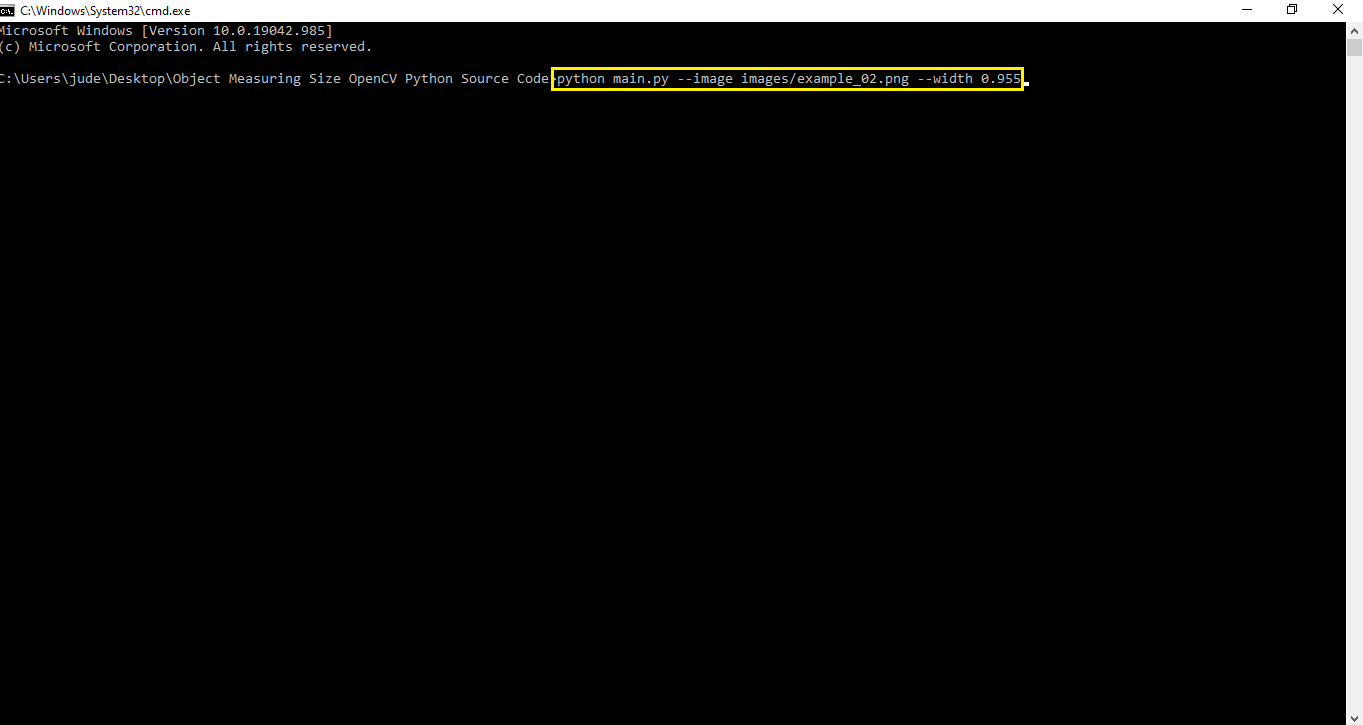
- Step 3: Run the project.
Lastly, run the project with the command “python main.py –image images/example_02.png –width 0.955”

Installed Libraries
from scipy.spatial import distance as dist
from imutils import perspective
from imutils import contours
import numpy as np
import argparse
import imutils
import cv2
Complete Source Code
# USAGE
# python object_size.py --image images/example_01.png --width 0.955
# python object_size.py --image images/example_02.png --width 0.955
# python object_size.py --image images/example_03.png --width 3.5

# import the necessary packages
from scipy.spatial import distance as dist
from imutils import perspective
from imutils import contours
import numpy as np
import argparse
import imutils
import cv2

def midpoint(ptA, ptB):
	return ((ptA[0] + ptB[0]) * 0.5, (ptA[1] + ptB[1]) * 0.5)

# construct the argument parse and parse the arguments
ap = argparse.ArgumentParser()
ap.add_argument("-i", "--image", required=True,
	help="path to the input image")
ap.add_argument("-w", "--width", type=float, required=True,
	help="width of the left-most object in the image (in inches)")
args = vars(ap.parse_args())

# load the image, convert it to grayscale, and blur it slightly
image = cv2.imread(args["image"])
gray = cv2.cvtColor(image, cv2.COLOR_BGR2GRAY)
gray = cv2.GaussianBlur(gray, (7, 7), 0)

# perform edge detection, then perform a dilation + erosion to
# close gaps in between object edges
edged = cv2.Canny(gray, 50, 100)
edged = cv2.dilate(edged, None, iterations=1)
edged = cv2.erode(edged, None, iterations=1)

# find contours in the edge map
cnts = cv2.findContours(edged.copy(), cv2.RETR_EXTERNAL,
	cv2.CHAIN_APPROX_SIMPLE)
cnts = imutils.grab_contours(cnts)

# sort the contours from left-to-right and initialize the
# 'pixels per metric' calibration variable
(cnts, _) = contours.sort_contours(cnts)
pixelsPerMetric = None

# loop over the contours individually
for c in cnts:
	# if the contour is not sufficiently large, ignore it
	if cv2.contourArea(c) < 100:
		continue

	# compute the rotated bounding box of the contour
	orig = image.copy()
	box = cv2.minAreaRect(c)
	box = cv2.cv.BoxPoints(box) if imutils.is_cv2() else cv2.boxPoints(box)
	box = np.array(box, dtype="int")

	# order the points in the contour such that they appear
	# in top-left, top-right, bottom-right, and bottom-left
	# order, then draw the outline of the rotated bounding
	# box
	box = perspective.order_points(box)
	cv2.drawContours(orig, [box.astype("int")], -1, (0, 255, 0), 2)

	# loop over the original points and draw them
	for (x, y) in box:
		cv2.circle(orig, (int(x), int(y)), 5, (0, 0, 255), -1)

	# unpack the ordered bounding box, then compute the midpoint
	# between the top-left and top-right coordinates, followed by
	# the midpoint between bottom-left and bottom-right coordinates
	(tl, tr, br, bl) = box
	(tltrX, tltrY) = midpoint(tl, tr)
	(blbrX, blbrY) = midpoint(bl, br)

	# compute the midpoint between the top-left and top-right points,
	# followed by the midpoint between the top-righ and bottom-right
	(tlblX, tlblY) = midpoint(tl, bl)
	(trbrX, trbrY) = midpoint(tr, br)

	# draw the midpoints on the image
	cv2.circle(orig, (int(tltrX), int(tltrY)), 5, (255, 0, 0), -1)
	cv2.circle(orig, (int(blbrX), int(blbrY)), 5, (255, 0, 0), -1)
	cv2.circle(orig, (int(tlblX), int(tlblY)), 5, (255, 0, 0), -1)
	cv2.circle(orig, (int(trbrX), int(trbrY)), 5, (255, 0, 0), -1)

	# draw lines between the midpoints
	cv2.line(orig, (int(tltrX), int(tltrY)), (int(blbrX), int(blbrY)),
		(255, 0, 255), 2)
	cv2.line(orig, (int(tlblX), int(tlblY)), (int(trbrX), int(trbrY)),
		(255, 0, 255), 2)

	# compute the Euclidean distance between the midpoints
	dA = dist.euclidean((tltrX, tltrY), (blbrX, blbrY))
	dB = dist.euclidean((tlblX, tlblY), (trbrX, trbrY))

	# if the pixels per metric has not been initialized, then
	# compute it as the ratio of pixels to supplied metric
	# (in this case, inches)
	if pixelsPerMetric is None:
		pixelsPerMetric = dB / args["width"]

	# compute the size of the object
	dimA = dA / pixelsPerMetric
	dimB = dB / pixelsPerMetric

	# draw the object sizes on the image
	cv2.putText(orig, "{:.1f}in".format(dimA),
		(int(tltrX - 15), int(tltrY - 10)), cv2.FONT_HERSHEY_SIMPLEX,
		0.65, (255, 255, 255), 2)
	cv2.putText(orig, "{:.1f}in".format(dimB),
		(int(trbrX + 10), int(trbrY)), cv2.FONT_HERSHEY_SIMPLEX,
		0.65, (255, 255, 255), 2)

	# show the output image
	cv2.imshow("Image", orig)
	cv2.waitKey(0)
Output:
Download the Source Code below
Click the button below to download the complete source code:
Summary
The Object Measuring Size was developed using Python OpenCV, the project provides a script to read an image and based on the dimensions of a reference object find the dimensions of other objects in a scene.
It Also Includes a downloadable project with source code for free.
Related Articles
- Code For Game in Python: Python Game Projects With Source Code
- Best Python Projects With Source Code FREE DOWNLOAD
- How to Make a Point of Sale In Python With Source Code
- Python Code For Food Ordering System | FREE DOWNLOAD
- Inventory Management System Project in Python With Source Code
Inquiries
If you have any questions or suggestions about Object Measuring Size OpenCV Python With Source Code, please feel free to leave a comment below.
Official documentation
Frequently Asked Questions
How does object size measurement work in OpenCV?
The technique uses a reference object of known dimensions (typically a coin or A4 paper) placed next to the target object. OpenCV detects contours, calculates the pixels-per-metric ratio using the reference, then applies that ratio to the target object’s bounding rectangle. Accuracy depends on a flat camera angle, good lighting, and a clearly contrasting reference.
What OpenCV version do I need to run this project?
Use OpenCV 4.5 or newer. Install with pip install opencv-python (the standard build for desktop projects). Some projects also need opencv-contrib-python which adds extra modules (SIFT, SURF, advanced trackers). The pip install command auto-downloads pre-built wheels so no compilation is needed on Windows, Mac, or Linux.
How do I install OpenCV and the dependencies for this project?
Open a terminal, then: pip install opencv-python numpy. Most projects also need one of these: mediapipe (for face / hand / pose detection), pyzbar (for barcode and QR), pytesseract (for OCR), Pillow (for image manipulation), pyautogui (for screen capture). Pin Python version to 3.10, 3.11, or 3.12 for maximum library compatibility.
Can I use this OpenCV project for a BSIT or CSE capstone?
Yes, but extend it. A single OpenCV demo (face detection alone, lane detection alone) is too narrow for full capstone scope. Combine it with a real domain (attendance system using face recognition, traffic monitoring system using lane detection, fitness coach app using pose detection), add a database to log results, build a simple Tkinter or Streamlit UI, and document the whole pipeline in Chapter 3.
Why am I getting AttributeError or ImportError when running this code?
Three most common causes: (1) You installed opencv-python but the code needs opencv-contrib-python (extra modules like xfeatures2d). Reinstall with pip install opencv-contrib-python. (2) You are on Python 3.13 but some wheels (mediapipe) lag behind, downgrade to Python 3.11 or 3.12. (3) NumPy version mismatch, pin numpy to a version your other libraries support.
Where do I find more OpenCV and Machine Learning project ideas?
Browse our Machine Learning Projects hub for 23+ OpenCV demos with source code. For capstone-scale AI ideas (RAG, NLP, recommendation systems), see 100+ AI Capstone Project Ideas. For broader Python project ideas, our Python Projects library has 250+ working capstones.

Angel Jude Suarez
Full-Stack Developer at PIES IT Solution
Focuses on Python development, machine learning, and AI integration. Has built production AI systems including OpenAI Whisper integration for medical transcription and GPT-4o-powered diagnosis assistance. Strong background in pandas, scikit-learn, and TensorFlow.
Expertise: Python · PHP · Java · VB.NET · ASP.NET · Machine Learning · AI Integration · OpenCV · Django · CodeIgniter · View all posts by Angel Jude Suarez →