

Student Management System In Javascript With Source Code
The Student Management System In Javascript was developed using JavaScript, CSS and HTML, In this Javascript Project With Source Code is a fascinating undertaking. Only the administrative part of the project is included.
The goal of the project is to compile a list of all of the students’ records. The management system for this project employs CRUD operations, which include adding, removing, and updating student data.
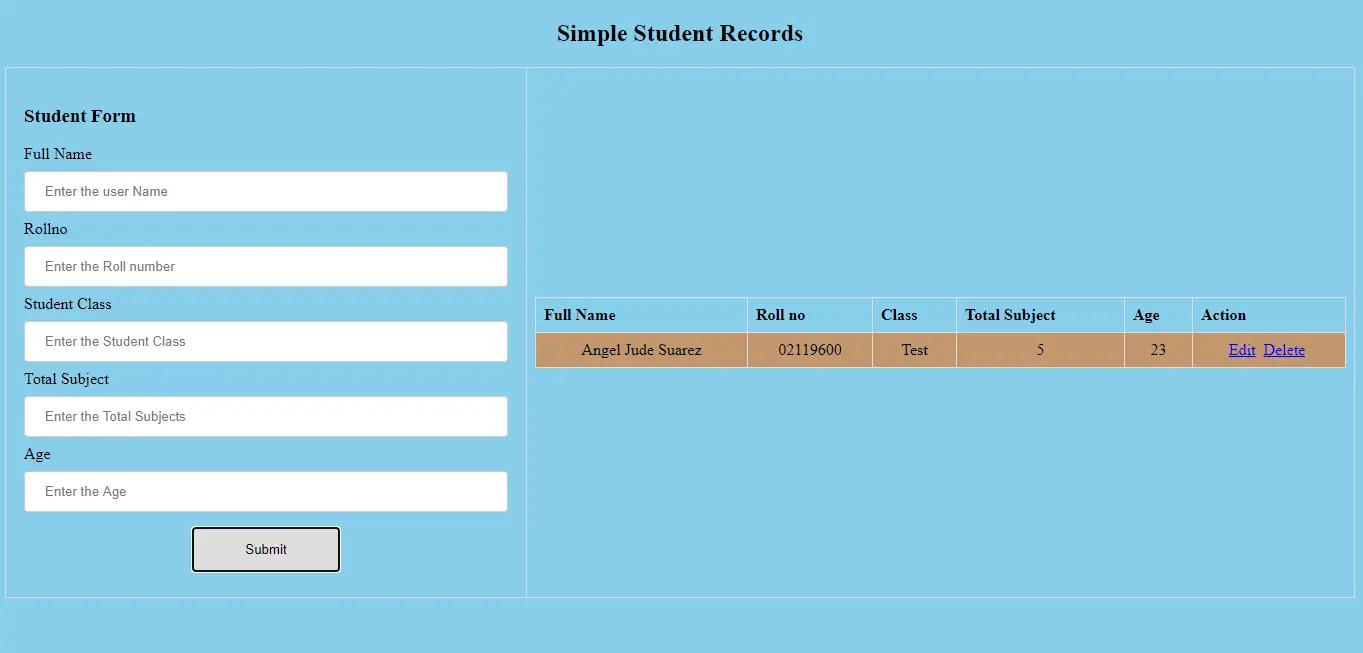
A Student Management System Project In Javascript, Many students’ records can be added, including their name, roll number, class, total subjects, and age.
The user can add data, delete data at any time, and alter the specifics of the records if they need to update certain information. This project uses a lot of javascript to validate different aspects of the project.
This Javascript Project With Source Code also includes a downloadable javascript source code for free, just find the downloadable source code below and click to start downloading.
I have here a suggested list of Best JavaScript Projects with Source Code Free to download and I’m sure this can help you to improve your skills in JavaScript programming and web development as a whole.
To start executing a Student Management System In Javascript With Source Code, makes sure that you have any platform in creating a JavaScript, CSS, bootstrap, and HTML installed in your computer, in my case I will use Sublime Text.
Student Management System In Javascript With Source Code : Steps on how to create the project
Time needed: 5 minutes
These are the steps on how to create Student Management System In Javascript With Source Code
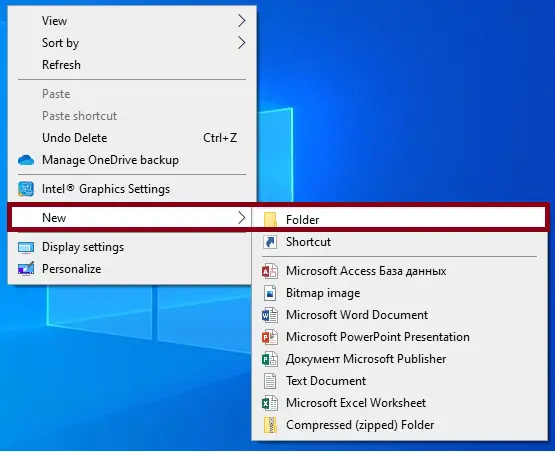
- Step 1: Create a folder.
First, create a folder and named it.

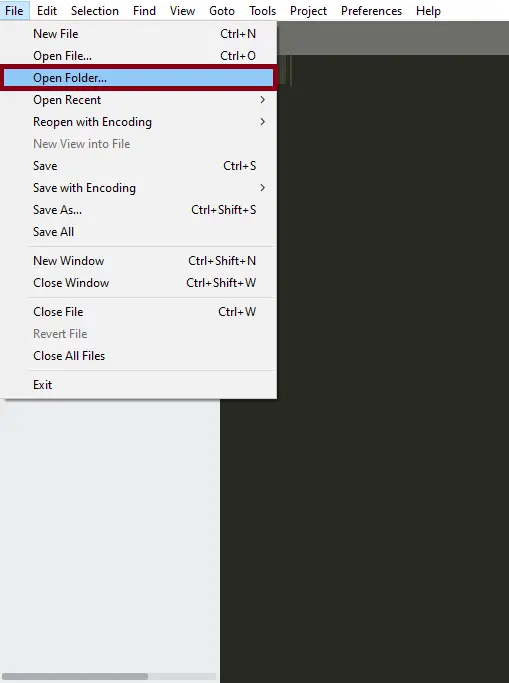
- Step 2: Open the folder in “Sublime Text”.
Second ,after creating a folder, open it in “sublime text“.

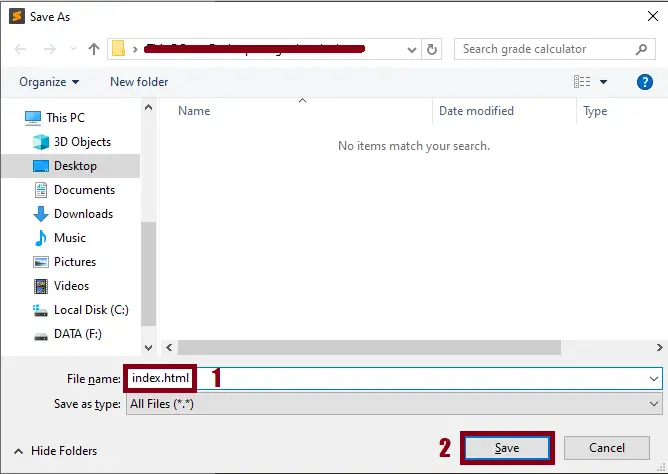
- Step 3: Create a html file.
Third, create a “html” file and save it as “index.html“

The code given below is for the html module
<!DOCTYPE html>
<html lang="en">
<head>
    <meta charset="UTF-8">
    <meta http-equiv="X-UA-Compatible" content="IE=edge">
    <meta name="viewport" content="width=device-width, initial-scale=1.0">
     <!--Title-->
    <title>Simple Student Record</title>
     <!-- CSS File-->
</head>
<body style="background-color: skyblue">
	<CENTER><h2>Simple Student Records</h2></CENTER>
    <!--Table-->
    <table>
        <!--Row-1-->
        <tr>
            <!--Column-1-->
            <td>
                <!--Form-->
                <form onsubmit="event.preventDefault();onFormSubmit();" autocomplete="off">
                	<h3>Student Form</h3>
                  <!--div-1-->
                    <div>
                        <label>Full Name</label>
                        <!--Validation Error-->
                        <label class="validation-error hide" id="userNamevalidationError">This field is required</label>
                        <!--Input User Name-->
                        <input type="text" name="userName" id="userName" placeholder="Enter the user Name">
                    </div>
                    <!--div-2-->
                    <div>
                        <label>Rollno</label>
                        <!--Validation Error-->
                        <label class="validation-error hide" id="rollNovalidationError" >This field is required</label>
                        <!--Input Roll No-->
                        <input type="text" name="rollNo" id="rollNo" placeholder="Enter the Roll number">
                    </div>
                    <!--div-3-->
                    <div>
                        <label>Student Class</label>
                        <!--Validation Error-->
                        <label class="validation-error hide" id="stdClassvalidationError">This field is required</label>
                       <!--Input Student Class-->
                        <input type="text" name="stdClass" id="stdClass" placeholder="Enter the Student Class">
                    </div>
                    <!--div-4-->
                    <div>
                        <label>Total Subject</label>
                        <!--Validation Error-->
                        <label class="validation-error hide" id="tsubvalidationError">This field is required</label>
                        <!--Input Total Subject-->
                        <input type="number" name="tsub" id="tsub" placeholder="Enter the Total Subjects">
                    </div>
                    <!--div-5-->
                    <div>
                        <label>Age</label>
                        <!--Validation Error-->
                        <label class="validation-error hide" id="agevalidationError">This field is required</label>
                        <!--Input Age-->
                        <input type="number" name="age" id="age" placeholder="Enter the Age">
                    </div>
                    <!--div-6-->
                    <div class="form-action-buttons">
                        <!--Input Button-->
                        <input type="submit" value="Submit">
                    </div>
                </form>
            </td>
            <!--Column-2-->
            <td>
                <!--Nested Table-->
                <table class="list" id="stdlist" style="background-color: #C2976D;">
                    <!--Table Head-->
                    <thead>
                        <!--Row-2-->
                        <tr>
                            <th>Full Name</th>
                            <th> Roll no</th>
                            <th>Class</th>
                            <th>Total Subject</th>
                            <th>Age</th>
                            <th>Action</th>
                        </tr>
                    </thead>
                    <!--Table Body-->
                    <tbody>
                    </tbody>
                </table>
            </td>
        </tr>
    </table>
In this module which is the html module of the simple project.
The code given below is for the css module
<style>
       body > table{
    width: 100%;
}

table{
    border-collapse: collapse;
    text-align: center;
}
table.list{
    width:100%;
    text-align: center;
}
table.list td{
    text-align: center;
}
td, th {
    border: 1px solid #dddddd;
    text-align: left;
    padding: 8px;
}
tr:nth-child(even),table.list thead>tr {
    background-color: skyblue;
}
input[type=text], input[type=number] {
    width: 100%;
    padding: 12px 20px;
    margin: 8px 0;
    display: inline-block;
    border: 1px solid #ccc;
    border-radius: 4px;
    box-sizing: border-box;
}
input[type=submit]{
    width: 30%;
    background-color: #ddd;
    color: #000;
    padding: 14px 20px;
    margin: 8px 0;
    border: none;
    border-radius: 4px;
    cursor: pointer;
}
form{
    background-color: skyblue;
    padding: 10px;

}
form div.form-action-buttons{
    text-align: center;

}
a{
    cursor: pointer;
    text-decoration: underline;
    color: #0000ee;
    margin-right: 4px;
}
label.validation-error{
    color:   red;
    margin-left: 5px;
}
.hide{
    display:none;
}
   </style>
In this module which is the css module of the simple project.
The code given below is for the javascript module
<script>
       var selectedRow = null

// Form Submit Function
function onFormSubmit() {
    // check validity
    if (validate()) {
        // store user data
        var formData = readFormData();
        // check empty row
        if (selectedRow == null)
        {
            // Insert New User Record
            insertNewRecord(formData);
        }
        else
        {
            // Update New User Record
            updateRecord(formData);
        }
        // Reset Input Values
        resetForm();
    }
}
// Get Values From Form
function readFormData() {
    var formData = {};
    // Get Values From  Input
    formData["userName"] = document.getElementById("userName").value;
    formData["rollNo"] = document.getElementById("rollNo").value;
    formData["stdClass"] = document.getElementById("stdClass").value;
    formData["tsub"] = document.getElementById("tsub").value;
    formData["age"] = document.getElementById("age").value;
    // return Form Data
    return formData;
}
// Insert New User Record
function insertNewRecord(data) {
    var table = document.getElementById("stdlist").getElementsByTagName('tbody')[0];
    var newRow = table.insertRow(table.length);
    cell1 = newRow.insertCell(0);
    cell1.innerHTML = data.userName;
    cell2 = newRow.insertCell(1);
    cell2.innerHTML = data.rollNo;
    cell3 = newRow.insertCell(2);
    cell3.innerHTML = data.stdClass;
    cell4 = newRow.insertCell(3);
    cell4.innerHTML = data.tsub;
    cell5 = newRow.insertCell(4);
    cell5.innerHTML = data.age;
    cell5 = newRow.insertCell(5);
    cell5.innerHTML = `<a onClick="onEdit(this)">Edit</a>
    <a onClick="onDelete(this)">Delete</a>`;
}
// Reset Function
function resetForm() {
    document.getElementById("userName").value = "";
    document.getElementById("rollNo").value = "";
    document.getElementById("stdClass").value = "";
    document.getElementById("tsub").value = "";
    document.getElementById("age").value = "";
    selectedRow = null;
}
// Edit Function
function onEdit(td) {
    selectedRow = td.parentElement.parentElement;
    document.getElementById("userName").value = selectedRow.cells[0].innerHTML;
    document.getElementById("rollNo").value = selectedRow.cells[1].innerHTML;
    document.getElementById("stdClass").value = selectedRow.cells[2].innerHTML;
    document.getElementById("tsub").value = selectedRow.cells[3].innerHTML;
    document.getElementById("age").value = selectedRow.cells[4].innerHTML;
}
// Update Record
function updateRecord(formData) {
    selectedRow.cells[0].innerHTML = formData.userName;
    selectedRow.cells[1].innerHTML = formData.rollNo;
    selectedRow.cells[2].innerHTML = formData.stdClass;
    selectedRow.cells[3].innerHTML = formData.tsub;
    selectedRow.cells[4].innerHTML = formData.age;
}
// Delete Function
function onDelete(td) {
    if (confirm('Are you sure to delete this record ?')) {
        row = td.parentElement.parentElement;
        document.getElementById("stdlist").deleteRow(row.rowIndex);
        resetForm();
    }
}
// Check User validation
function validate() {
    isValid = true;
    // userName validation
    if (document.getElementById("userName").value == "") {
        isValid = false;
        document.getElementById("userNamevalidationError").classList.remove("hide");
    } else {
        isValid = true;
        if (!document.getElementById("userNamevalidationError").classList.contains("hide"))
        {
            document.getElementById("userNamevalidationError").classList.add("hide");
        }
    }
    // Roll No validation
    if (document.getElementById("rollNo").value == "") {
        isValid = false;
        document.getElementById("rollNovalidationError").classList.remove("hide");
    } else {
        isValid = true;
        if (!document.getElementById("rollNovalidationError").classList.contains("hide"))
        {
            document.getElementById("rollNovalidationError").classList.add("hide");
        }
    }
    // Std class validation
    if (document.getElementById("stdClass").value == "") {
        isValid = false;
        document.getElementById("stdClassvalidationError").classList.remove("hide");
    } else {
        isValid = true;
        if (!document.getElementById("stdClassvalidationError").classList.contains("hide"))
        {
            document.getElementById("stdClassvalidationError").classList.add("hide");
        }
    }
    // Tsub validation
    if (document.getElementById("tsub").value == "") {
        isValid = false;
        document.getElementById("tsubvalidationError").classList.remove("hide");
    } else {
        isValid = true;
        if (!document.getElementById("tsubvalidationError").classList.contains("hide"))
        {
            document.getElementById("tsubvalidationError").classList.add("hide");
        }
    }
    // Age validation
    if (document.getElementById("age").value == "") {
        isValid = false;
        document.getElementById("agevalidationError").classList.remove("hide");
    } else {
        isValid = true;
        if (!document.getElementById("agevalidationError").classList.contains("hide"))
        {
            document.getElementById("agevalidationError").classList.add("hide");
        }
    }
    return isValid;
}
   </script>
In this module which is the javascript module of the simple project.
Project Output
| ABOUT PROJECT | PROJECT DETAILS |
|---|---|
| Project Name : | Student Management System In Javascript |
| Project Platform : | JavaScript |
| Programming Language Used: | php,javascript,html,css |
| Developer Name : | itsourcecode.com |
| IDE Tool (Recommended): | Sublime |
| Project Type : | Web Application |
| Database: | None |
| Upload Date: | July 18, 2021 |
Downloadable Source Code
Summary
This JavaScript Project With Source Code is simply in HTML, CSS, and JavaScript. To start creating this Simple Javascript Project With Source Code, make sure that you have basic knowledge in HTML, CSS and Javascript.
This Javascript Game Project also includes a downloadable Javascript Game Project With Source Code for free.
Related Articles
- Todo List In JavaScript With Source Code
- Currency Converter Project in JavaScript with Source Code
- Calculator In JavaScript Source Code
- [SOLVED] How To Make A Live Chat In JavaScript With Source Code
Inquiries
If you have any questions or suggestions about Student Management System In Javascript With Source Code , please feel free to leave a comment below.
Official documentation
Featured guides worth reading next
Frequently Asked Questions
How does this JavaScript student management system work?
Records demographics, enrollment, grades, attendance, fees. JS frontend, Node.js or PHP backend.
What JavaScript runtime or browser does this project need?
Pure frontend projects (vanilla JS, Vue, jQuery) run in any modern browser (Chrome 90+, Firefox 88+, Safari 14+, Edge 90+) – no install needed. Node.js projects need Node.js 18 LTS or 20 LTS (download from nodejs.org). Run: npm install in project folder, then npm start or node app.js.
How do I run this JavaScript project locally?
For pure HTML/CSS/JS: open index.html in your browser, or use VS Code Live Server extension for auto-reload. For Vue projects: npm install then npm run dev (Vite) or npm run serve (Vue CLI). For Node.js: npm install then npm start. For projects with backend (PHP+MySQL): place in XAMPP htdocs, start Apache + MySQL, browse to localhost/project.
Can I use this JavaScript project for a BSIT capstone or thesis?
Yes. Extend it: add user authentication (JWT for SPA, sessions for traditional), role-based access, real backend (Node.js+Express+MongoDB or PHP+MySQL), responsive design (Bootstrap/Tailwind), PDF exports (jsPDF), real-time features (Socket.IO). Pair with Chapter 1-5 documentation matching your panel’s rubric.
Why am I getting ‘Uncaught ReferenceError’ or ‘Cannot read property of undefined’?
Three common JavaScript issues: (1) Script tag placement wrong, put

Angel Jude Suarez
Full-Stack Developer at PIES IT Solution
Focuses on Python development, machine learning, and AI integration. Has built production AI systems including OpenAI Whisper integration for medical transcription and GPT-4o-powered diagnosis assistance. Strong background in pandas, scikit-learn, and TensorFlow.
Expertise: Python · PHP · Java · VB.NET · ASP.NET · Machine Learning · AI Integration · OpenCV · Django · CodeIgniter · View all posts by Angel Jude Suarez →
Looking for similar projects or tutorials?
Search for more source code, capstone projects, or programming tutorials
The Zip folder is has a password.. Would really need it please.
Zip file password:itsourcecode.com or itsourcecode
i need password for my final year project
i need password for my final year project
itsourcecode