
JavaScript Quiz Source Code
The JavaScript Quiz Source Code is developed using JavaScript, CSS and HTML, this JavaScript Quiz Using Arrays give a simple question to the user to be answer and after that the score will display and count the correct answer of the user.
A JavaScript Quiz For Beginners is designed for the beginners or the students who wants to learn in web developing.
The HTML JavaScript Quiz Code is easy to understand the codes and also easy to manipulate by the users.
This JavaScript Quiz With Answers also includes a downloadable JavaScript Quiz Example Source Code for free, just find the downloadable source code below and click to start downloading.
I have here a suggested list of Best JavaScript Projects with Source Code Free to download and I’m sure this can help you to improve your skills in JavaScript programming and web development as a whole.
To start creating a JavaScript Quiz Source Code, makes sure that you have any platform in creating a JavaScript, CSS, bootstrap, and HTML installed in your computer, in my case I will use Sublime Text.
Steps on how to create a JavaScript Quiz Source Code
JavaScript Quiz Source Code
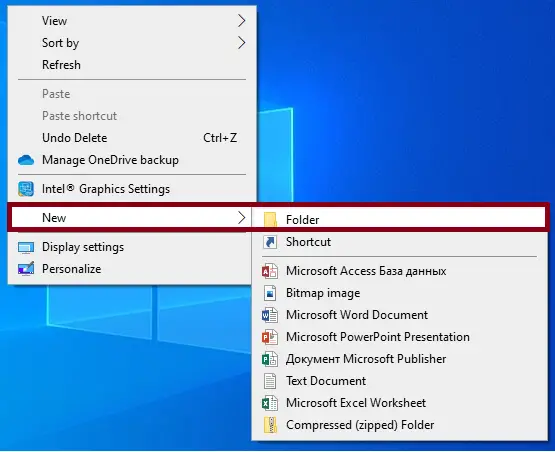
- Step 1: Create a folder.
First, create a folder and named it.

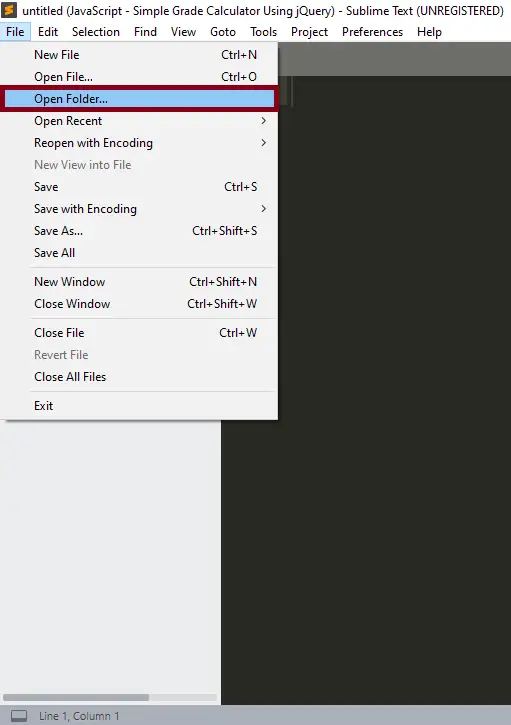
- Step 2: Open the folder in “Sublime Text”.
Second ,after creating a folder, open it in “sublime text“.

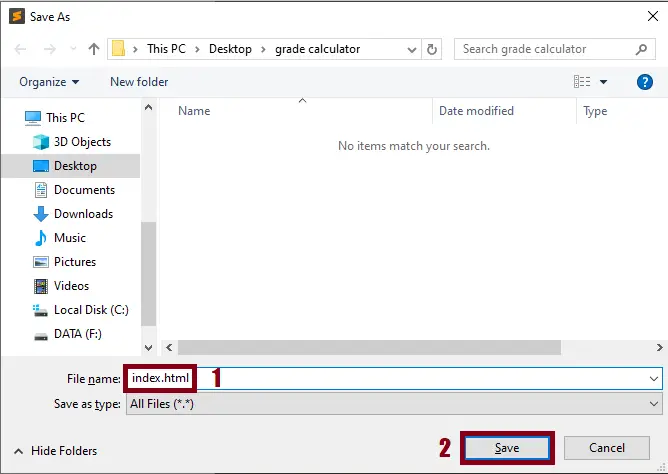
- Step 3: Create a html file.
Third, create a “html” file and save it as “index.html“

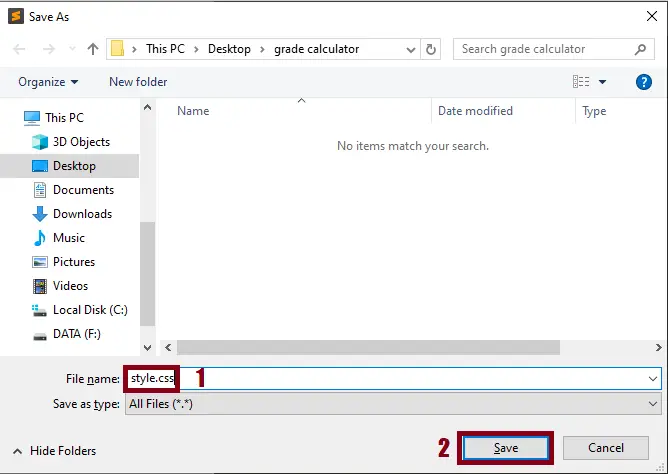
- Step 4: Create a css file.
Fourth, create a “css” file and save it as “style.css“
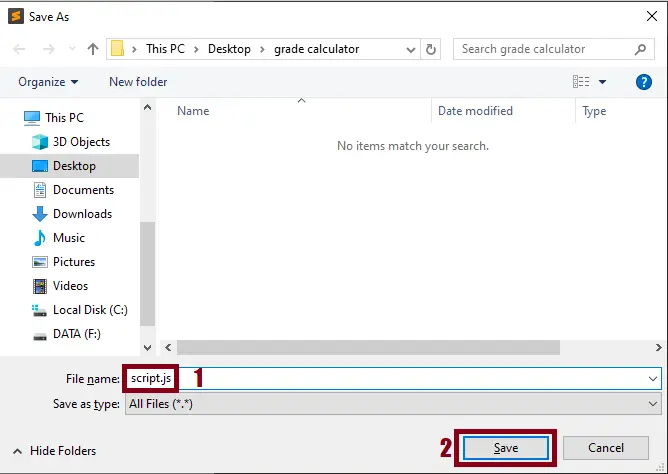
- Step 5: Create a javascript file.
Fifth, create a “javascript” file and save it as “script.js“
The Code Given Below Is For The HTML File
<!DOCTYPE html>
<html>
<head>
<title>Quiz</title>
<link href="style.css" rel="stylesheet">
<script src="main.js"></script>

</head>
<body>

<h1>Simple Javascript Quiz</h1>
<form id="quiz" name="quiz">

	<p>What is the Capital city of Drc (Democratic Republic of Congo) </p>

    <input type="radio" id="mc" name="question1" value="brazzaville">Brazzaville<br>
    <input type="radio" id="mc" name="question1" value="kinshasa">Kinshasa<br>
    <input type="radio" id="mc" name="question1" value="durban">Durban<br>

	<p>What is the Capital city of SA (South Africa) </p>

    <input type="radio" id="mc" name="question2" value="Rabat">Rabat<br>
    <input type="radio" id="mc" name="question2" value="Johannesburg">Johannesburg<br>
    <input type="radio" id="mc" name="question2" value="pretoria">Pretoria<br>


    <p>What is the Capital city of RCA (Republic Center Africa)</p>

    <input type="radio" id="mc" name="question3" value="bangui">Bangui<br>
    <input type="radio" id="mc" name="question3" value="bandundu">Bandundu<br>
    <input type="radio" id="mc" name="question3" value="luanda">Luanda<br>
</br>
    <input id="button" type="button" value="I'm finished!" onclick="check();">

</form>

<div id="after_submit">
	<p id="message"></p>
<p id="number_correct"></p>
</div>

<button onclick="myFunction()">Restart</button>


</body>
</html>
In this file which is the html file of the system project.
The Code Given Below Is For The JavaScript File
function check(){


	var question1 = document.quiz.question1.value;
	var question2 = document.quiz.question2.value;
	var question3 = document.quiz.question3.value;
	var correct = 0;

	if (question1 == "kinshasa"){
		correct++;
}
    if (question2 == "pretoria") {
    	correct++;
}
    if (question3 == "bangui") {
    	correct++
    }

    var messages = ["Good job", "Not bad", "You really need to do better"];
    var range;

     if (correct < 1){
     	 range = 2;
     }

      if (correct > 0 && correct < 3){
     	 range = 1;
     }

        if (correct > 2){
     	 range = 0;
     }

   document.getElementById("after_submit").style.visibility="visible";


   document.getElementById("message").innerHTML = messages[range];
   document.getElementById("number_correct").innerHTML = "you got " + correct + " correct.";

}

// reflesh page function

function myFunction() {
    location.reload();
}
In this file which is the JavaScript file of the system project.
The Code Given Below Is For The CSS File
#after_submit {
	visibility: hidden;
}
In this file which is the css file of the system project.
| ABOUT PROJECT | PROJECT DETAILS |
|---|---|
| Project Name : | JavaScript Quiz |
| Project Platform : | JavaScript |
| Programming Language Used: | php,javascript,html,css |
| Developer Name : | itsourcecode.com |
| IDE Tool (Recommended): | Sublime |
| Project Type : | Web Application |
| Database: | None |
| Upload Date: | November 17, 2020 |
Downloadable Source Code
Summary
This JavaScript Project With Source Code is simply in HTML, CSS, and JavaScript. Talking about the project, A user has to enter his/her name before entering the chatroom.
After that, the user can easily share messages present in the chatroom. This project includes a lot of JavaScript for making the functioning of the project.
Related Articles
- Todo List In JavaScript With Source Code
- Currency Converter Project in JavaScript with Source Code
- Calculator In JavaScript Source Code
- How To Make A Live Chat In JavaScript With Source Code
Inquiries
If you have any questions or suggestions about JavaScript Quiz Source Code , please feel free to leave a comment below.
How the JavaScript Quiz Source Code game logic works
Most browser-based JavaScript games follow the same architecture: a game state kept in memory, a render function that redraws the screen every animation frame, and an input handler that mutates state in response to user actions.
- Game loop. requestAnimationFrame(update) creates a smooth 60 FPS loop that calls your update-and-render function every frame.
- State object. A single JavaScript object holds all mutable data (score, positions, level, game-over flag). Every frame reads from and writes to this object.
- Input handling. addEventListener(‘keydown’) for keyboard, or ‘mousedown’ / ‘touchstart’ for pointer input. Store the key state in a lookup so multiple keys can be pressed at once.
- Rendering. Either canvas 2D drawing (game object positions to draw() calls) or direct DOM manipulation (updating .style.left on absolutely-positioned elements).
- Sound and music. HTMLAudioElement with .play() for one-shot effects, or the Web Audio API for lower-latency mixing.
Extending the JavaScript Quiz Source Code for a capstone project
- Add difficulty levels. Provide easy / medium / hard modes that change speed, spawn rate, or scoring.
- Persist high scores. Save top scores in localStorage or send them to a Node.js backend for a global leaderboard.
- Add sound effects. Include background music and event-triggered sounds (jump, collect, game over) for polish.
- Mobile touch controls. Add touch-and-swipe input alongside keyboard to make the game playable on phones.
- Multiplayer via WebSocket. Connect two browsers through a Node.js WebSocket server for real-time two-player play.
Working code snippet
// Standard JS game loop pattern
const state = { score: 0, playerX: 100, gameOver: false };

function update() {
  if (state.gameOver) return;
  // ...update positions, check collisions, increment score...
  render();
  requestAnimationFrame(update);
}

function render() {
  const ctx = document.getElementById("canvas").getContext("2d");
  ctx.clearRect(0, 0, 800, 600);
  ctx.fillRect(state.playerX, 400, 40, 40);
}

document.addEventListener("keydown", (e) => {
  if (e.key === "ArrowLeft")  state.playerX -= 10;
  if (e.key === "ArrowRight") state.playerX += 10;
});

requestAnimationFrame(update);
Official documentation
Frequently Asked Questions
How does this JavaScript quiz or examination system work?
Admin creates quizzes, questions, answers. Students attempt quiz with countdown via setInterval, submit answers, system auto-grades.
What JavaScript runtime or browser does this project need?
Pure frontend projects (vanilla JS, Vue, jQuery) run in any modern browser (Chrome 90+, Firefox 88+, Safari 14+, Edge 90+) – no install needed. Node.js projects need Node.js 18 LTS or 20 LTS (download from nodejs.org). Run: npm install in project folder, then npm start or node app.js.
How do I run this JavaScript project locally?
For pure HTML/CSS/JS: open index.html in your browser, or use VS Code Live Server extension for auto-reload. For Vue projects: npm install then npm run dev (Vite) or npm run serve (Vue CLI). For Node.js: npm install then npm start. For projects with backend (PHP+MySQL): place in XAMPP htdocs, start Apache + MySQL, browse to localhost/project.
Can I use this JavaScript project for a BSIT capstone or thesis?
Yes. Extend it: add user authentication (JWT for SPA, sessions for traditional), role-based access, real backend (Node.js+Express+MongoDB or PHP+MySQL), responsive design (Bootstrap/Tailwind), PDF exports (jsPDF), real-time features (Socket.IO). Pair with Chapter 1-5 documentation matching your panel’s rubric.
Why am I getting ‘Uncaught ReferenceError’ or ‘Cannot read property of undefined’?
Three common JavaScript issues: (1) Script tag placement wrong, put

Angel Jude Suarez
Full-Stack Developer at PIES IT Solution
Focuses on Python development, machine learning, and AI integration. Has built production AI systems including OpenAI Whisper integration for medical transcription and GPT-4o-powered diagnosis assistance. Strong background in pandas, scikit-learn, and TensorFlow.
Expertise: Python · PHP · Java · VB.NET · ASP.NET · Machine Learning · AI Integration · OpenCV · Django · CodeIgniter
· View all posts by Angel Jude Suarez →
Looking for similar projects or tutorials?
Search for more source code, capstone projects, or programming tutorials