
The Color Guessing Game JavaScript is a web-based game which player is allow to guess the target color.
In addition, the Color Guessing Game was fully developed using the scripting language named JavaScript this is for the interaction of the game, HTML (Hyper Text Mark Up Language) for the structure of the game and CSS (Cascading Style Sheet) for the entire appearance of the game.
What is Color Guessing Game
In JavaScript, Color Guessing Game is a simple game on web which can provide a leisure time as well as for IT students or any related computer students this can be really helpful in terms of there assignments or projects.
Furthermore, the JavaScript Color Guessing Game main features of the is to generate 6 or 3 distinct colors (depending on difficulty) and show one RGB value above each color.
What is the main goal of Color Guessing Game?
This Guess the Colors game main goal is to provide the player to accurately identify the correct color from the ones shown (thus increasing their RGB color recognition skills).
This JavaScript Color Guessing Game also includes a downloadable Project With Source Code for free, just find the downloadable source code below and click to start downloading.
I have here a suggested list of Best JavaScript Projects with Source Code Free to download and I’m sure this can help you to improve your skills in JavaScript programming and web development as a whole.
To start executing a Color Guessing Game, makes sure that you have any platform in creating a JavaScript, CSS, bootstrap, and HTML installed in your computer, in my case I will use Sublime Text.
Project details and technology:
| ABOUT PROJECT | PROJECT DETAILS |
|---|---|
| Project Name : | Color Guessing Game JavaScript |
| Project Platform : | JavaScript |
| Programming Language Used: | JavaScript, HTML, and CSS |
| Developer Name : | itsourcecode.com |
| IDE Tool (Recommended): | Sublime |
| Project Type : | Web Application |
| Database: | None |
| Upload Date: | 9 / 25 / 2022 |
Color Guessing Game: Steps on how to create the project
Time needed: 5 minutes
These are the steps on how to create Color Guessing Game JavaScript With Source Code
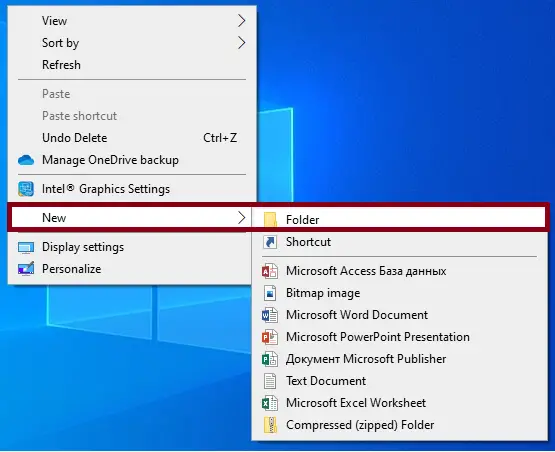
- Step 1: Create a folder.
First, create a folder and named it.

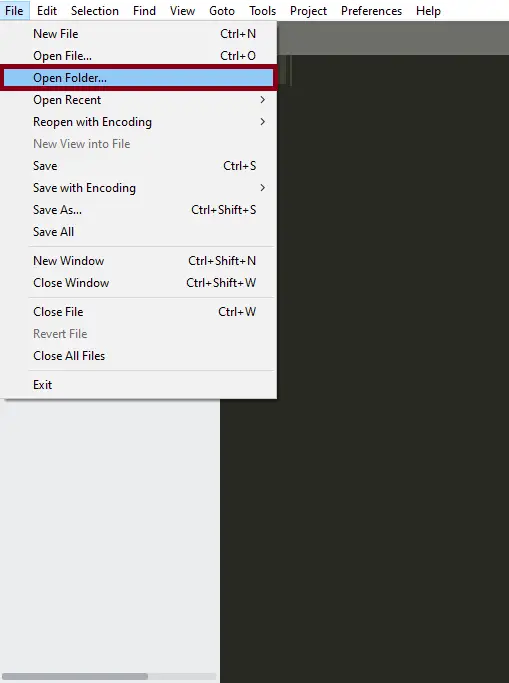
- Step 2: Open the folder in “Sublime Text”.
Second ,after creating a folder, open it in “sublime text“.

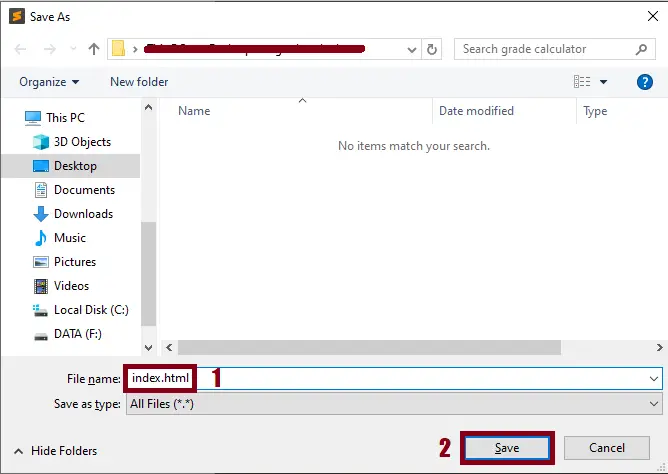
- Step 3: Create a html file.
Third, create a “html” file and save it as “index.html“

Project Output

Downloadable Source Code
Summary
This JavaScript Project With Source Code is simply designed and created in HTML, CSS, and JavaScript. To start creating this Color Guess Project With Source Code, make sure that you have basic knowledge in HTML, CSS and JavaScript.
If you want to enhance you programming skills on web you can explore more on these site we provide a 100 percent of free source code with a lot of programming languages such as Python, PHP, and Java.
Related Articles
- Todo List In JavaScript With Source Code
- Color Detection OpenCV Python With Source Code
- Color Dialog Box in VB.net – Properties, Methods and Events
- Change the Form element color in Java
Inquiries
If you have any questions or suggestions about Color Guessing Game, please feel free to leave a comment below.
How the Color Guessing Game JavaScript game logic works
Most browser-based JavaScript games follow the same architecture: a game state kept in memory, a render function that redraws the screen every animation frame, and an input handler that mutates state in response to user actions.
- Game loop. requestAnimationFrame(update) creates a smooth 60 FPS loop that calls your update-and-render function every frame.
- State object. A single JavaScript object holds all mutable data (score, positions, level, game-over flag). Every frame reads from and writes to this object.
- Input handling. addEventListener(‘keydown’) for keyboard, or ‘mousedown’ / ‘touchstart’ for pointer input. Store the key state in a lookup so multiple keys can be pressed at once.
- Rendering. Either canvas 2D drawing (game object positions to draw() calls) or direct DOM manipulation (updating .style.left on absolutely-positioned elements).
- Sound and music. HTMLAudioElement with .play() for one-shot effects, or the Web Audio API for lower-latency mixing.
Extending the Color Guessing Game JavaScript for a capstone project
- Add difficulty levels. Provide easy / medium / hard modes that change speed, spawn rate, or scoring.
- Persist high scores. Save top scores in localStorage or send them to a Node.js backend for a global leaderboard.
- Add sound effects. Include background music and event-triggered sounds (jump, collect, game over) for polish.
- Mobile touch controls. Add touch-and-swipe input alongside keyboard to make the game playable on phones.
- Multiplayer via WebSocket. Connect two browsers through a Node.js WebSocket server for real-time two-player play.
Working code snippet
// Standard JS game loop pattern
const state = { score: 0, playerX: 100, gameOver: false };

function update() {
  if (state.gameOver) return;
  // ...update positions, check collisions, increment score...
  render();
  requestAnimationFrame(update);
}

function render() {
  const ctx = document.getElementById("canvas").getContext("2d");
  ctx.clearRect(0, 0, 800, 600);
  ctx.fillRect(state.playerX, 400, 40, 40);
}

document.addEventListener("keydown", (e) => {
  if (e.key === "ArrowLeft")  state.playerX -= 10;
  if (e.key === "ArrowRight") state.playerX += 10;
});

requestAnimationFrame(update);
Official documentation
Frequently Asked Questions
How does this JavaScript game work?
Built with vanilla JS + HTML5 Canvas API. Game loop via requestAnimationFrame. Input via document.addEventListener(‘keydown’). Common: Snake, Tic-Tac-Toe, Tetris, Pong, Hangman, Flappy Bird. Drop-in browser play, no install needed. Foundation BSIT 1st-2nd year mini-project.
What JavaScript runtime or browser does this project need?
Pure frontend projects (vanilla JS, Vue, jQuery) run in any modern browser (Chrome 90+, Firefox 88+, Safari 14+, Edge 90+) – no install needed. Node.js projects need Node.js 18 LTS or 20 LTS (download from nodejs.org). Run: npm install in project folder, then npm start or node app.js.
How do I run this JavaScript project locally?
For pure HTML/CSS/JS: open index.html in your browser, or use VS Code Live Server extension for auto-reload. For Vue projects: npm install then npm run dev (Vite) or npm run serve (Vue CLI). For Node.js: npm install then npm start. For projects with backend (PHP+MySQL): place in XAMPP htdocs, start Apache + MySQL, browse to localhost/project.
Can I use this JavaScript project for a BSIT capstone or thesis?
Yes. Extend it: add user authentication (JWT for SPA, sessions for traditional), role-based access, real backend (Node.js+Express+MongoDB or PHP+MySQL), responsive design (Bootstrap/Tailwind), PDF exports (jsPDF), real-time features (Socket.IO). Pair with Chapter 1-5 documentation matching your panel’s rubric.
Why am I getting ‘Uncaught ReferenceError’ or ‘Cannot read property of undefined’?
Three common JavaScript issues: (1) Script tag placement wrong, put

Angel Jude Suarez
Full-Stack Developer at PIES IT Solution
Focuses on Python development, machine learning, and AI integration. Has built production AI systems including OpenAI Whisper integration for medical transcription and GPT-4o-powered diagnosis assistance. Strong background in pandas, scikit-learn, and TensorFlow.
Expertise: Python · PHP · Java · VB.NET · ASP.NET · Machine Learning · AI Integration · OpenCV · Django · CodeIgniter
· View all posts by Angel Jude Suarez →
Looking for similar projects or tutorials?
Search for more source code, capstone projects, or programming tutorials
4w5opty5