
Open Source Project Management Software in C#.net
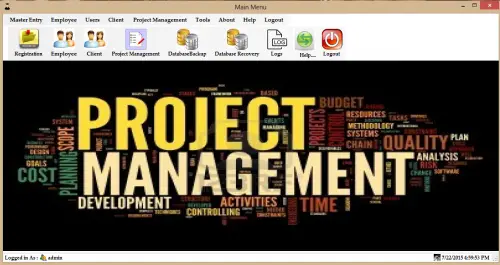
This Open Source Project Management Software is written using C#.NET as the front end and SQL Server 2008 as the back end.
What is Visual Basic’s purpose?
The third-generation programming language was created to aid developers in the creation of Windows applications.
It has a programming environment that allows programmers to write code in.exe or executable files.
They can also utilize it to create in-house front-end solutions for interacting with huge databases.
It is because the language allows for continuing changes, you can keep coding and revising your work as needed.
However, there are some limits to the Microsoft Visual Basic download.
If you want to make applications that take a long time to process, this software isn’t for you.
That implies you won’t be able to use VB to create games or large apps because the system’s graphic interface requires a lot of memory and space.
Furthermore, the language is limited to Microsoft and does not support other operating systems.
What are the most important characteristics of Visual Basic?
Microsoft Visual Basic for Applications Download, unlike other programming languages, allows for speedier app creation.
It has string processing capabilities and is compatible with C++, MFC, and F#.
Multi-targeting and the Windows Presentation Framework are also supported by the system, allowing developers to create a variety of Windows apps, desktop tools, metro-style programs, and hardware drivers.
Requirement:
Visual Studio 2010 (Sql Server 2008)
The main features are:
- Employee management
- Projects Entry
- Project Stages Entry
- Projects Category Entry
- Clients Entry
- Project Management
- Database Backup
- Database Recovery
- Log Facility
Advance Records search:
- Clients Records
- Employee Records
- Category Records
- Stages Records
- Project Management Record
Other Features:
- User Registration
- Change Password
- Password Recovery
- User Registration Record
For Login Information:
User Name – admin
Password – 12345
Contact me at FB:
My WhatsApp Number: +917225958058
Email:[email protected]
Contact number: +917225958058
Other Articles you might read:
- Free Plagiarism Checker Souce Code
- Aguilos Enterprise Netwotk-Based Sales and Inventory System
- Simple Live Chat using PHP
Frequently Asked Questions
How does this C# management system work?
Standard C# WinForms architecture: forms with DataGridView for listings, TextBox / ComboBox / DateTimePicker for input, ADO.NET parametrized SQL for data access, Crystal Reports or RDLC for printable reports. SQL Server backend. Foundation BSIT capstone scope.
What .NET and SQL Server versions does this project require?
Most projects in this batch use C# WinForms on .NET Framework 4.5+ (the dominant stack for tutorial sites) with SQL Server 2012 Express or higher. A few newer projects use .NET 6/7/8. To run: install Visual Studio 2019 / 2022 (Community edition is free), install SQL Server Express + SSMS, open the .sln file, build, run.
How do I set up the database for this C# project?
Open SQL Server Management Studio (SSMS) and connect to your SQL Server instance (e.g. localhost\SQLEXPRESS). Right-click Databases > Restore Database OR > New Database then import the included .sql script. Update the connection string in App.config (or in code-behind) with your server name + credentials. Rebuild and run.
Can I use this C# project for a BSIT capstone or thesis?
Yes, but extend it. A bare CRUD form is too narrow for full capstone scope. Add: role-based access (admin/staff/customer login redirect), Crystal Reports or RDLC reports, dashboard with Chart controls, audit log, multi-branch support. Pair with Chapter 1-5 documentation matching your panel’s rubric.
Why am I getting ‘connection error’ or ‘object reference not set’?
Three common C# issues: (1) Connection error: SQL Server isn’t running OR connection string in App.config has wrong server name. Open SQL Server Configuration Manager + verify SQL Server (SQLEXPRESS) service is running. (2) NullReferenceException: a control reference or DB column returned NULL, add a check or use ?? operator. (3) Build error ‘The type or namespace could not be found’: missing assembly reference, add via Project > Add Reference.
Where can I find more C# projects with source code?
Browse the C# Projects hub for the full library. For other .NET stacks see VB.NET Projects (300+ Windows Forms systems). For ASP.NET WebForms see ASP.NET Projects. For BSIT capstone idea lists see 150 Best Capstone Project Ideas.
Related topic(s) that you may like:
If you have any questions or suggestions for Open Source Project Management Software in C#.net, please feel free to leave a comment below.