
Login User and User Registration in C# and SQL Server 2005
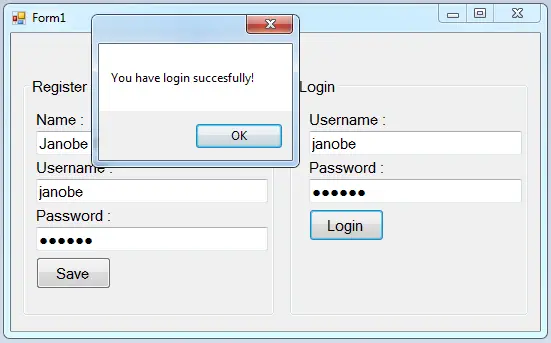
In this Login user and user registration in C#, you can’t gain access to the full content because you need to login first by filling up the fields on the registration form to have complete access to it.
It’s very important for a system to have a login form to provide security to any user who wants to access your system.
That’s why this tutorial will show you how to create a user registration form and login user. This is so easy and this is best for anyone who plans to build a system in the future.
But if you want to start how to code using visual studio 2019, you can start your lesson here on how to connect Mysql to visual Studio 2019.
Let’s begin:
Create a database and name it “dbguest“.
After that, do the following query for creating a table in the database that you have created.
SET ANSI_NULLS ON
GO
SET QUOTED_IDENTIFIER ON
GO
CREATE TABLE [dbo].[tblguest](
 [ID] [int] IDENTITY(1,1) NOT NULL,
 [GNAME] [nvarchar](50) NULL,
 [GUSERNAME] [nvarchar](50) NULL,
 [GPASS] [nvarchar](50) NULL,
 CONSTRAINT [PK_tblguest] PRIMARY KEY CLUSTERED
(
 [ID] ASC
)WITH (PAD_INDEX = OFF, STATISTICS_NORECOMPUTE = OFF, IGNORE_DUP_KEY = OFF, ALLOW_ROW_LOCKS = ON, ALLOW_PAGE_LOCKS = ON) ON [PRIMARY]
) ON [PRIMARY]
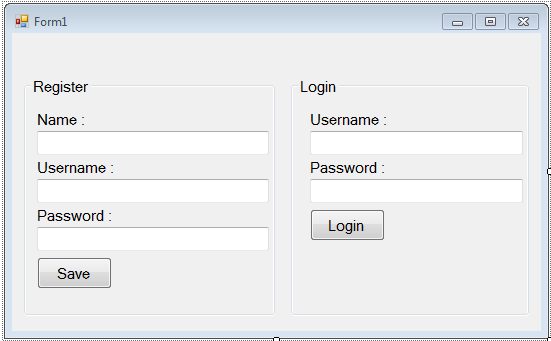
Open Microsoft Visual Studio and create new windows form application. Then, do the form just like this.
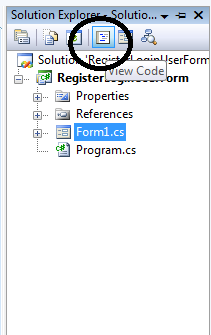
Go to the solution explorer and hit the “code view” to fire the code editor.
In the code editor, declare all the classes and variables that are needed.
Note: Put “using System.Data.SqlClient;” above the namespace to access sql server library.
//initializes new instance
 SqlConnection con = new SqlConnection();
 SqlDataAdapter da = new SqlDataAdapter();
 SqlCommand cmd = new SqlCommand();
 DataTable dt = new DataTable();
 //declare a variable
 string query;
 int result;
After that, create a method for registering the user.
 private void RegisterUser(string query)
 {
 //opening connection
 con.Open();
 try
 {
 //initialize a new instance of sqlcommand
 cmd = new SqlCommand();
 //set a connection used by this instance of sqlcommand
 cmd.Connection = con;
 //set the sql statement to execute at the data source
 cmd.CommandText = query;

 result = cmd.ExecuteNonQuery();

 if (result > 0)
 {
 MessageBox.Show("You are succesfully registered!");
 }
 else
 {
 MessageBox.Show("Failed to save.", "Failed", MessageBoxButtons.OK, MessageBoxIcon.Exclamation);
 }


 }
 catch (Exception ex)
 {
 //catching error
 MessageBox.Show(ex.Message);
 }
 //closing connection
 con.Close();
 }
Then, create a method for logging in the user.
 private void LoginUser(string query)
 {
 //opening connection
 con.Open();
 try
 {
 //initialize a new instance of sqlcommand
 cmd = new SqlCommand();
 //set a connection used by this instance of sqlcommand
 cmd.Connection = con;
 //set the sql statement to execute at the data source
 cmd.CommandText = query;
 //initialize a new instance of sqlDataAdapter
 da = new SqlDataAdapter();
 //set the sql statement or stored procedure to execute at the data source
 da.SelectCommand = cmd;
 //initialize a new instance of DataTable
 dt = new DataTable();
 //add or resfresh rows in the certain range in the datatable to match those in the data source.
 da.Fill(dt);

 if (dt.Rows.Count > 0)
 {
 MessageBox.Show("You have login succesfully!");
 }
 else
 {
 MessageBox.Show("Account does not exist.","Failed" ,MessageBoxButtons.OK ,MessageBoxIcon.Exclamation);
 }


 }
 catch (Exception ex)
 {
 //catching error
 MessageBox.Show(ex.Message);
 }
 //release all resources used by the component
 da.Dispose();
 //closing connection
 con.Close();
 }
Go back to the design view, double-click the form and do the following codes for the connection between SQL server and C#.net.
 private void Form1_Load(object sender, EventArgs e)
 {
 //set a connection between SQL server and Visual C#
 con.ConnectionString = "Data Source=.\\SQLEXPRESS;Database=dbguest;trusted_connection=true;";

 }
Go back to the design view again, double-click the “Register” button and call the method for registering the users that you have created.
 private void btnSave_Click(object sender, EventArgs e)
 {
 query = "INSERT INTO tblguest (GNAME,GUSERNAME,GPASS) VALUES ('" + txtName .Text +"','" + txtRegUsername.Text +"','" + txtRegPass.Text +"')";
 RegisterUser(query);
 }
Go back to the design view again, double-click the “Login” button and call the method for logging in the users that you have created.
private void btnLogin_Click(object sender, EventArgs e)
 {
 query = "SELECT * FROM tblguest WHERE GUSERNAME='" + txtUsername .Text + "' AND GPASS='" + txtPass .Text + "'";
 LoginUser(query);
 }
Output of Login user and user registration in C#:
Frequently Asked Questions
How does this C# login or registration system work?
Login form with username + password, password hashing via System.Security.Cryptography (SHA256 or BCrypt.Net), session via static class or singleton, role-based redirect after login, logout, password reset workflow. Foundation block for any C# user-facing capstone.
What .NET and SQL Server versions does this project require?
Most projects in this batch use C# WinForms on .NET Framework 4.5+ (the dominant stack for tutorial sites) with SQL Server 2012 Express or higher. A few newer projects use .NET 6/7/8. To run: install Visual Studio 2019 / 2022 (Community edition is free), install SQL Server Express + SSMS, open the .sln file, build, run.
How do I set up the database for this C# project?
Open SQL Server Management Studio (SSMS) and connect to your SQL Server instance (e.g. localhost\SQLEXPRESS). Right-click Databases > Restore Database OR > New Database then import the included .sql script. Update the connection string in App.config (or in code-behind) with your server name + credentials. Rebuild and run.
Can I use this C# project for a BSIT capstone or thesis?
Yes, but extend it. A bare CRUD form is too narrow for full capstone scope. Add: role-based access (admin/staff/customer login redirect), Crystal Reports or RDLC reports, dashboard with Chart controls, audit log, multi-branch support. Pair with Chapter 1-5 documentation matching your panel’s rubric.
Why am I getting ‘connection error’ or ‘object reference not set’?
Three common C# issues: (1) Connection error: SQL Server isn’t running OR connection string in App.config has wrong server name. Open SQL Server Configuration Manager + verify SQL Server (SQLEXPRESS) service is running. (2) NullReferenceException: a control reference or DB column returned NULL, add a check or use ?? operator. (3) Build error ‘The type or namespace could not be found’: missing assembly reference, add via Project > Add Reference.
Where can I find more C# projects with source code?
Browse the C# Projects hub for the full library. For other .NET stacks see VB.NET Projects (300+ Windows Forms systems). For ASP.NET WebForms see ASP.NET Projects. For BSIT capstone idea lists see 150 Best Capstone Project Ideas.
For inquiries
If you have any questions or suggestions about this Login user and user registration in C# and SQL server 2005, please leave a comment below.
For all students who need a programmer for your thesis system or anyone who needs a source code in any programming language. You can contact me @ :
Email – jannopalacios@gmail.com
Mobile No. – 09305235027 – talk’nText
Download the full source code Login user and user registration in C# below.
Download Source Code
| ABOUT PROJECT | PROJECT DETAILS |
|---|---|
| Project Name : | Login User and User Registration in C# and SQL Server |
| Project Platform : | C# |
| Programming Language Used: | C# Programming Language |
| Developer Name : | itsourcecode.com |
| IDE Tool (Recommended): | Visual Studio 2019 |
| Project Type : | Desktop Application |
| Database: | MySQL Database |
| Upload Date and Time: | July 29, 2016- 6:10am |
I loved as much as you’ll receive carried out right here. The sketch is tasteful, your authored material stylish. nonetheless, you command get bought an nervousness over that you wish be delivering the following. unwell unquestionably come more formerly again as exactly the same nearly very often inside case you shield this increase.
It’s an remarkable paragraph in favor of all the online viewers; they will take benefit from it I am sure.
Hey There. I found your weblog the use of msn. This is a really neatly written article. I’ll be sure to bookmark it and come back to learn extra of your helpful info. Thank you for the post. I’ll certainly comeback.
What’s Happening i’m new to this, I stumbled upon this I have discovered It positively helpful and it has aided me out loads. I’m hoping to give a contribution & assist other users like its helped me. Great job.
Marvelous, what a weblog it is! This blog provides helpful information to us, keep it up.
Thanks on your marvelous posting! I genuinely enjoyed reading it, you may be a great author. I will always bookmark your blog and will eventually come back later on. I want to encourage that you continue your great writing, have a nice morning!
It’s really a nice and helpful piece of information. I’m happy that you simply shared this useful information with us. Please keep us informed like this. Thanks for sharing.
What’s Happening i’m new to this, I stumbled upon this I have found It positively useful and it has aided me out loads. I am hoping to contribute & help other users like its aided me. Good job.
Excellent post! We are linking to this particularly great post on our website. Keep up the great writing.