
Product management system in C is specially designed for the purpose of adding Product details. The system elaborates the basic concept for storing and generating product’s detail.
In this system, staff can sign up as a system admin, He/she can have full access to the system for maintaining daily records.
There is no any error and warning contents in the project. The design is so simple that user should not find it difficult to use and navigate.
The Simple Product Management System with Source Code is a project that allows you to keep track of the products you sell in your business.
By adding information such as Product ID, Product Name, Price, and Quantity, the system can assist you in organizing your product list. The system’s goal is to sell a product that meets or exceeds consumer expectations.
About Product Management System Project in C
The Product Management System is a simple console program that is protected by security login information. To access the system, you must enter a correct username and password.
The user has several options in the system, including adding new product details, seeing all product lists, and updating current products.
The system can supply everything you need to run a product firm, as well as assist you save time by digitizing transactions.
This system employs the CRUD function, which makes full use of the system’s capabilities to provide a satisfying shopping experience for customers.
The Simple Product Management System is a C-based coding system that teaches and provides basic programming concepts.
| About Project | Project Details |
|---|---|
| Project Name : | Product Management System Project in C |
| Project Platform : | C/C++ |
| Programming Language Used: | C Programming Language |
| Developer Name : | itsourcecode.com |
| IDE Tool (Recommended): | Codeblocks/Command Prompt |
| Project Type : | Desktop Application |
| Database: | File handling |
Features Available Product Management System in C Framework
| Features |
|---|
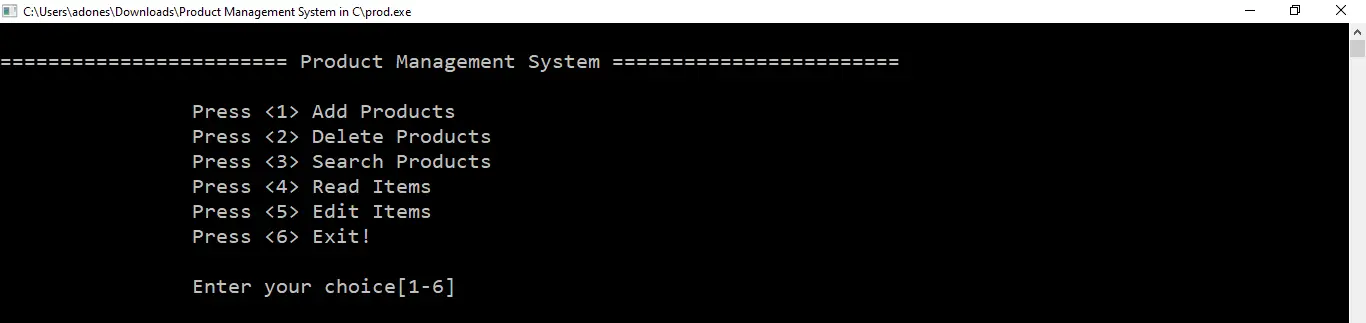
| Add Products |
| Delete Products |
| Search Products |
| Read Items |
| Edit Items |
| Exit application |
Product Management System in C Steps on How to Create a Project
Time needed: 5 minutes
Here’s the step’s on how to create a Product Management System Project in C with Source Code.
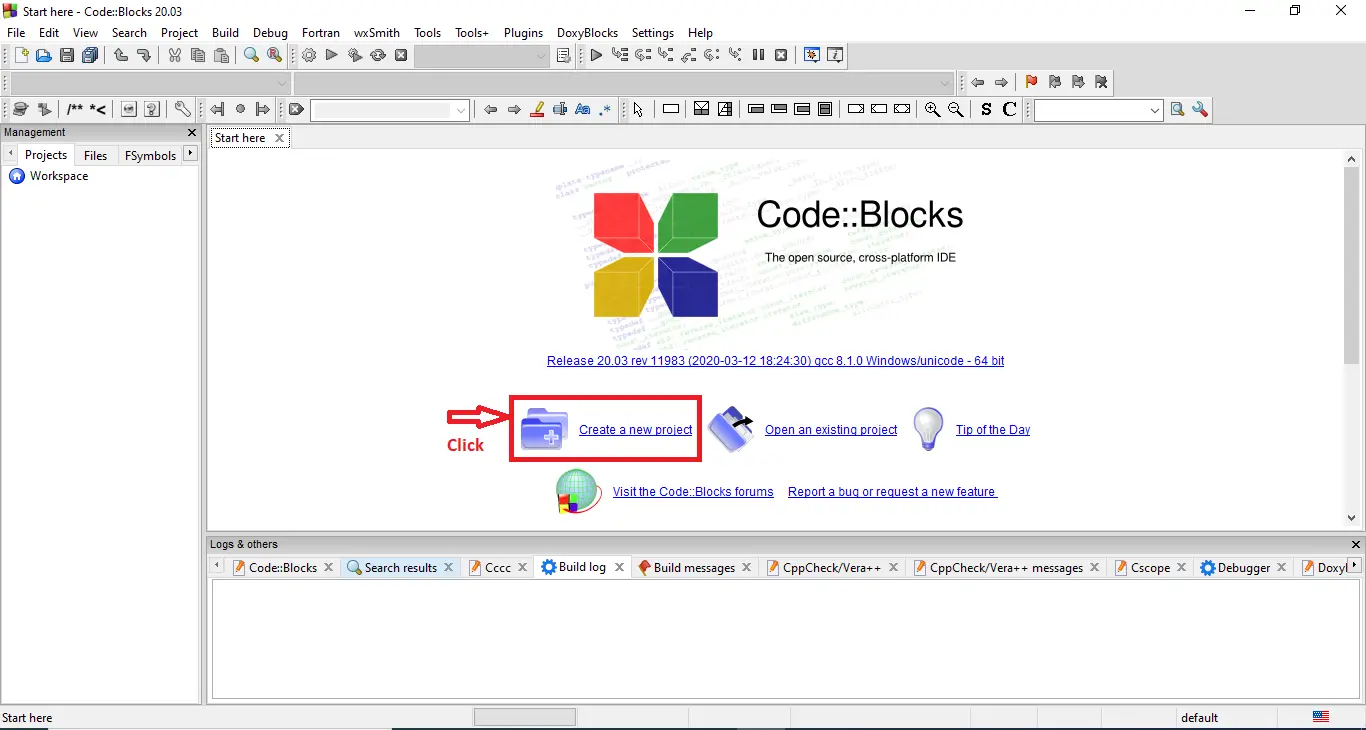
- Step 1: Create a new project.
First open the code blocks IDE and click “create a new project“.

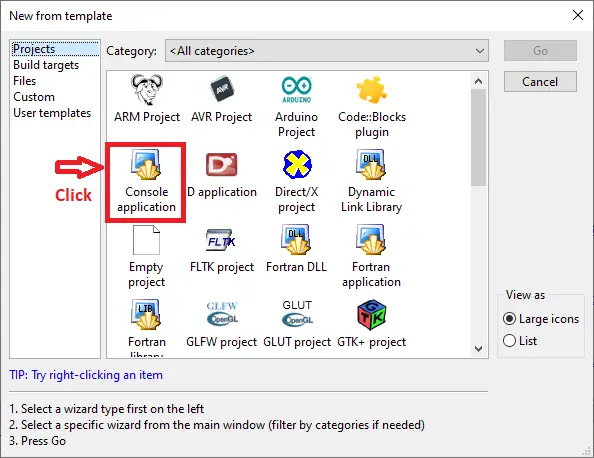
- Step 2: Choose console application.
Next, click the “console application” and after that click “next“.

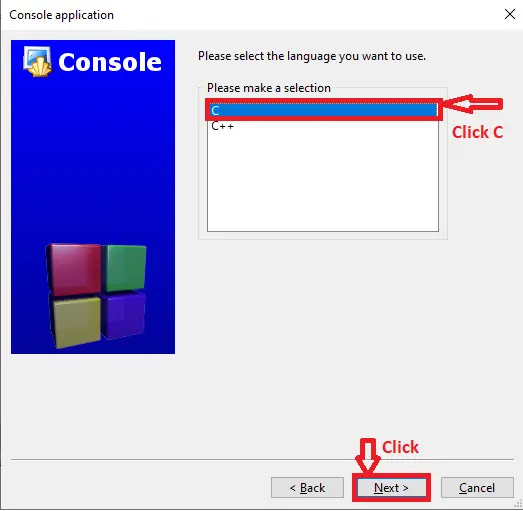
- Step 3: Choose C language.
Then , choose “C language” and click “next“.

- Step 4: Name your project.
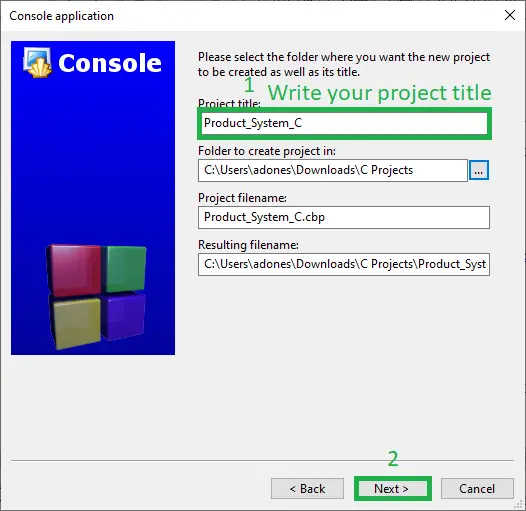
Lastly, name the project you’ve created and click “next” after that click “finish“.

- Step 5: Output of the System.
Finally, the image below is the output of the running program of product management system in C.

Downloadable Source Code
Summary
In conclusion, this Product Management System in C with Source Code can be beneficial to students or professionals interested in learning C programming.
This project can also be customized to meet your specific needs. I hope that this project will assist you in honing your talents. Good luck with your coding!
Related Articles
Inquiries
If you have any questions or suggestions about Product Management System in C with Source Code, please feel free to leave a comment below.
Frequently Asked Questions
How does this C / C++ management system work?
Console application using struct arrays OR file-handling (fopen/fread/fwrite) for persistence. CRUD operations via numbered menu. Compile via gcc (C) or g++ (C++). Foundation BSIT 1st-2nd year mini-project.
What compiler do I need to run this C or C++ project?
For C: gcc (GNU Compiler Collection) or MinGW (Windows). For C++: g++. IDE options: Code::Blocks (lightweight, built-in compiler), Dev-C++ (classic Philippine BSIT favorite), Visual Studio Code with C/C++ extension, CLion (paid). To compile from terminal: gcc program.c -o program (for C) or g++ program.cpp -o program (for C++), then run with ./program (Linux/macOS) or program.exe (Windows).
How do I run this C / C++ project?
Open the .c or .cpp file in your IDE (Code::Blocks, Dev-C++, VS Code). Click Build (or press F9), then Run (or press F5). From terminal: navigate to project folder, run gcc/g++ command above, then ./program. If using file storage, make sure the data file (e.g. records.txt) is in the same folder as the executable.
Can I use this C / C++ project for a BSIT capstone or thesis?
C/C++ projects are usually accepted for 1st-2nd year mini-projects or as building blocks. For a full capstone you would typically pair them with a more interactive frontend (e.g. wrap C++ logic with a Java/Python/PHP frontend, or extend to GTK/Qt for a real GUI). Standalone console C++ capstones are accepted by some panels but rare in 2026.
Why am I getting ‘undeclared identifier’ or ‘cannot find header’ errors?
Three common C/C++ issues: (1) Missing #include directive, e.g. #include
Where can I find more C or C++ projects with source code?
Browse the C and C++ Projects hub for the full library. For Java desktop alternatives see Java Projects. For higher-level languages see Python Projects. For BSIT capstone idea lists see 150 Best Capstone Project Ideas.

Adones Evangelista
Programmer & Technical Writer at PIES IT Solution
Adones Evangelista is a programmer and writer at PIES IT Solution, author of over 900 tutorials and error-fix guides at itsourcecode.com. Specializes in JavaScript, Django, Laravel, and Python error debugging covering ValueError, TypeError, AttributeError, ModuleNotFoundError, and RuntimeError, plus C/C++ and PHP capstone projects for BSIT students.
Expertise: JavaScript · Python · Django · Laravel · Error Debugging · C/C++ · View all posts by Adones Evangelista →