
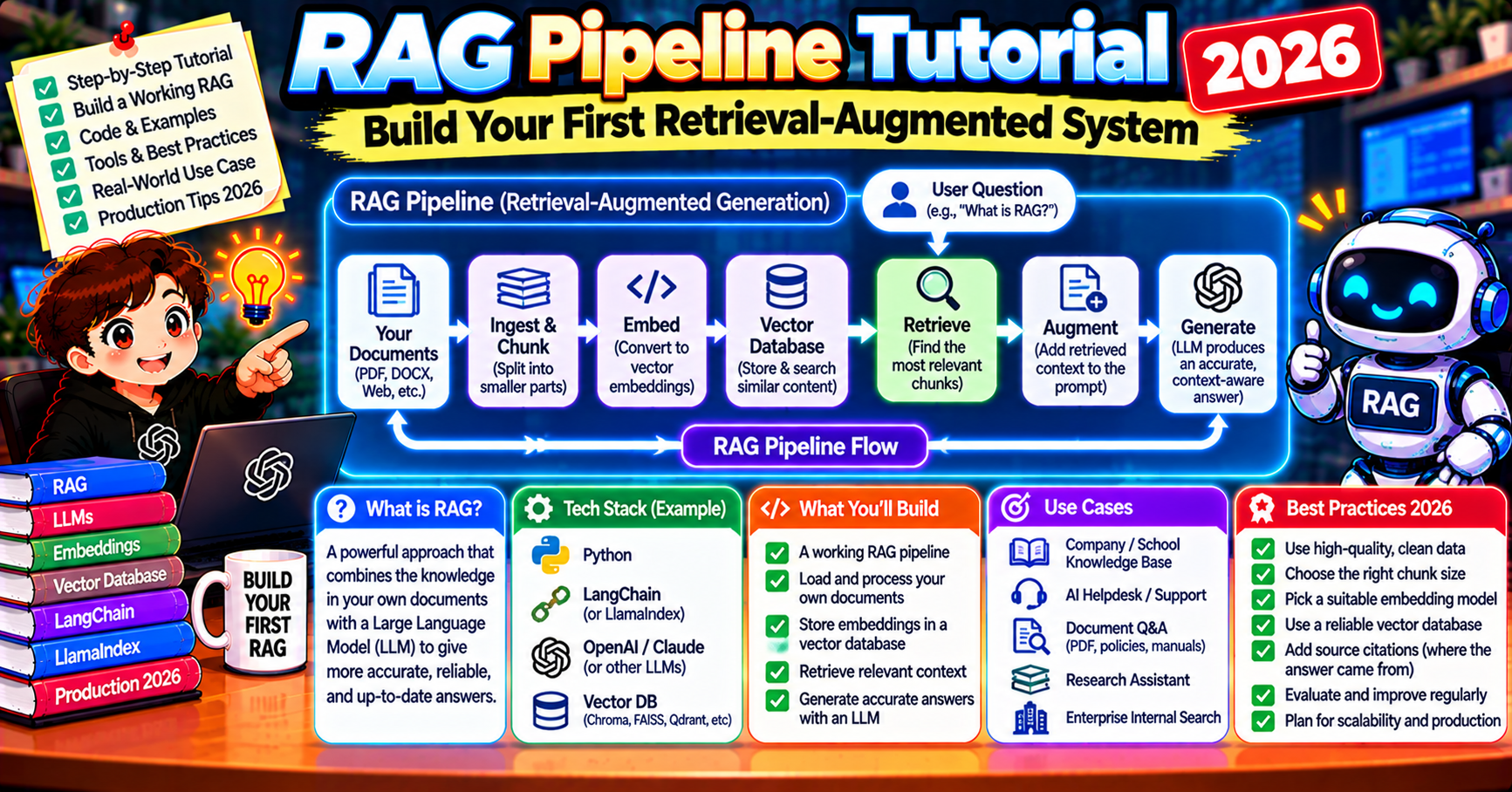
RAG Pipeline Tutorial 2026: Build Your First Retrieval-Augmented System
The short answer
A RAG pipeline retrieves relevant chunks from your own documents and pastes them into the prompt so a large language model answers with grounded context, no fine-tuning needed. The stack is an embedding model, a vector database, and a chat model. This tutorial builds a working RAG system end to end in about 60 lines of Python using OpenAI, Chroma, and Claude. Setup takes 10 minutes, queries cost under a cent.
Retrieval-augmented generation (RAG) is how teams give a large language model access to private documents without fine-tuning. A RAG pipeline retrieves relevant chunks from your own data, pastes them into the prompt, and lets the model answer with grounded context. In 2026 the stack has settled: an embedding model turns documents into vectors, a vector database stores them, and a chat model composes the final answer.
This tutorial walks through a working RAG system end to end. You will embed documents with OpenAI, store the vectors in Chroma, and ask Claude questions grounded in those documents. The full pipeline fits in about 60 lines of Python, runs on your laptop, and costs under a cent per query.
Why RAG beats fine-tuning for most use cases
Fine-tuning rewrites model weights. RAG rewrites the prompt. For 90% of knowledge tasks, RAG wins on four axes:
- Freshness. Documents are swapped in and out of the vector store without retraining anything. Fine-tuned models are frozen in time.
- Attribution. Every answer can cite the chunks it used. Fine-tuning hides the sources inside the weights.
- Cost. Embedding a document costs cents. Fine-tuning a mid-size model costs hundreds to thousands of dollars and has to be redone on data changes.
- Access control. Vector databases can filter by metadata like user ID or tenant. A fine-tuned model will happily reveal anything in its training set to any user.
Fine-tuning still wins for style transfer, domain-specific syntax, and latency-critical workloads where every token of context matters. For everything else, start with RAG.
The 2026 RAG stack at a glance
A production RAG pipeline has five moving parts:
- Loader. Reads files from disk, Google Drive, SharePoint, S3, Notion, Confluence, or a database. Converts to plain text with page or section markers.
- Chunker. Splits long documents into retrievable units of 200 to 800 tokens, usually with 10 to 20% overlap.
- Embedder. Turns each chunk into a 1536 or 3072-dimensional vector using an embedding model like OpenAI text-embedding-3-small, Cohere embed-english-v3, Voyage voyage-3, or an open-source model like BAAI bge-large-en-v1.5.
- Vector store. Indexes the vectors and returns the top-k nearest matches for a query. Chroma, Pinecone, Weaviate, Qdrant, Milvus, pgvector all work.
- Generator. A chat model like Claude Opus 5.5, Claude Sonnet 5.5, GPT-5, or Gemini 2.5 that takes the retrieved chunks plus the user question and writes the final answer.
Everything beyond this baseline (reranking, hybrid search, query rewriting, agentic retrieval) is optimization on top of the same five parts.
Install the dependencies
Create a fresh virtual environment and install the three libraries you need:
python3 -m venv .venv
source .venv/bin/activate
pip install chromadb anthropic openai
Set two environment variables before running anything:
export OPENAI_API_KEY=sk-...
export ANTHROPIC_API_KEY=sk-ant-...
Chroma runs locally with zero setup, which keeps the first pipeline simple. Swap to Pinecone or Weaviate later when you need multi-tenant isolation or production scale.
Load and chunk your documents
For this example, assume you have a folder named docs/ with Markdown or text files. The loader reads them all and splits each one into chunks of about 500 tokens with 50-token overlap.
from pathlib import Path

def load_and_chunk(folder, chunk_size=500, overlap=50):
    chunks = []
    for path in Path(folder).glob("*.md"):
        text = path.read_text()
        words = text.split()
        start = 0
        while start < len(words):
            end = min(start + chunk_size, len(words))
            chunk_text = " ".join(words[start:end])
            chunks.append({
                "source": path.name,
                "text": chunk_text,
                "position": start,
            })
            start = end - overlap
    return chunks

chunks = load_and_chunk("docs/")
print(f"Loaded {len(chunks)} chunks from {len(set(c['source'] for c in chunks))} documents")
Word-based chunking is a sensible default. Switch to token-based chunking with the tiktoken library when you need precise control over context windows. Semantic chunking (splitting on heading boundaries or paragraph similarity) does better on structured documents like legal contracts or technical manuals.
Embed and store the chunks
Each chunk gets converted to a vector and stored in Chroma with its text and metadata attached. Chroma handles the OpenAI embedding call automatically if you register the embedding function at collection-creation time.
import chromadb
from chromadb.utils import embedding_functions

client = chromadb.PersistentClient(path="./chroma_db")

openai_ef = embedding_functions.OpenAIEmbeddingFunction(
    api_key=os.environ["OPENAI_API_KEY"],
    model_name="text-embedding-3-small",
)

collection = client.get_or_create_collection(
    name="my_docs",
    embedding_function=openai_ef,
)

collection.add(
    ids=[f"chunk_{i}" for i in range(len(chunks))],
    documents=[c["text"] for c in chunks],
    metadatas=[{"source": c["source"], "position": c["position"]} for c in chunks],
)

print(f"Indexed {collection.count()} chunks")
Running this once builds the index. On the next run, Chroma loads from disk, so you only re-embed when documents change.
Retrieve relevant chunks for a query
At query time, Chroma embeds the user question with the same embedding function and returns the top-k nearest chunks by cosine similarity.
def retrieve(query, k=5):
    results = collection.query(
        query_texts=[query],
        n_results=k,
    )
    return [
        {
            "text": doc,
            "source": meta["source"],
            "score": 1 - dist,
        }
        for doc, meta, dist in zip(
            results["documents"][0],
            results["metadatas"][0],
            results["distances"][0],
        )
    ]

retrieved = retrieve("What is the refund policy for annual plans?")
for r in retrieved:
    print(f"[{r['score']:.3f}] {r['source']}: {r['text'][:120]}...")
A good retrieval returns chunks whose score is 0.7 or higher. Lower scores mean the query is drifting away from the indexed material and the generator is about to hallucinate.
Generate the grounded answer
Pass the retrieved chunks to Claude as context, along with instructions to answer only from the provided material and to cite sources.
import anthropic

claude = anthropic.Anthropic()

def answer(query):
    retrieved = retrieve(query, k=5)
    context = "\n\n".join(
        f"[Source: {r['source']}]\n{r['text']}"
        for r in retrieved
    )
    response = claude.messages.create(
        model="claude-opus-5-5",
        max_tokens=1024,
        system=(
            "You answer questions using only the provided context. "
            "Cite the source filename for every claim. "
            "If the context does not contain the answer, say so."
        ),
        messages=[{
            "role": "user",
            "content": f"<context>\n{context}\n</context>\n\nQuestion: {query}",
        }],
    )
    return response.content[0].text

print(answer("What is the refund policy for annual plans?"))
Three details matter in the system prompt: the instruction to use only the provided context, the citation requirement, and the explicit fallback for missing information. Without those three, the model will hallucinate confidently when retrieval misses.
Common first-run failures and how to fix them
Three issues account for most broken first-run RAG pipelines:
- Retrieved chunks look irrelevant. The chunk size is probably wrong. If chunks are too small, they lose context and all score similarly low. If chunks are too big, the vector blurs across topics. Start at 500 words with 50 overlap, then adjust.
- The model answers from pretraining, not the context. The system prompt is too soft. Make it stricter: “You MUST only use the provided context. You MUST NOT use outside knowledge.”
- Scores all cluster around 0.3-0.4. The embedding model does not understand your domain. Try a bigger embedding model (text-embedding-3-large), or a domain-tuned one (voyage-code-2 for code, voyage-law-2 for legal).
Debug retrieval before you debug generation. If the top-5 retrieved chunks do not contain the answer, no amount of prompt engineering fixes the system.
What to add once the baseline works
The 60-line pipeline above answers most questions on small-to-mid document sets (under 10,000 chunks). The upgrades that pay off in order of impact:
- Reranking. Add a Cohere Rerank or BGE Reranker pass between retrieval and generation. Lifts answer quality 10 to 20% on hard queries.
- Hybrid search. Combine vector similarity with BM25 keyword scores. Catches exact-match queries that pure vector search misses.
- Query rewriting. Have the model rephrase the user question into 2 to 3 variants, retrieve for all of them, then merge. Great for ambiguous or terse queries.
- Metadata filtering. Filter chunks by date, author, department, access level. The
whereclause in Chroma or Pinecone makes this trivial. - Evaluation. Set up a test set of 50 to 100 question-answer pairs. Score each release with RAGAS or TruLens before shipping.
Cost math for 1,000 queries per day
At 1,000 queries per day with a 5,000-chunk index:
- One-time embedding of 5,000 chunks at text-embedding-3-small ($0.02 per 1M tokens): about $0.05 total.
- Query embedding at 1,000 queries per day: about $0.001 per day.
- Retrieval (local Chroma, no API cost): $0.
- Generation with Claude Sonnet 5.5 (around 2,000 input tokens, 500 output tokens per query at current pricing): about $12 per day, or $360 per month.
Generation dominates cost. The cheapest optimization is to use Claude Haiku 5.5 or GPT-5-mini for easy queries and route only hard questions to the bigger model. Prompt caching on the system prompt (Claude supports this natively) cuts another 30-50% off.
Frequently asked questions
Official documentation
Do I need LangChain or LlamaIndex to build a RAG system?
No. The 60-line pipeline above uses Chroma, OpenAI, and Anthropic SDKs directly with zero framework code. LangChain and LlamaIndex add abstractions (chains, retrievers, loaders) that help once the pipeline grows past a few hundred lines. For a first system, raw SDKs are easier to debug and understand.
What chunk size should I use for RAG?
Start at 500 words with 50 words of overlap. Larger chunks (800 to 1,000 words) work better for narrative documents like policies or research papers. Smaller chunks (200 to 400 words) suit FAQ-style content or structured reference material. Test both on your actual data and compare retrieval quality.
Which embedding model is best in 2026?
For English general-purpose use, OpenAI text-embedding-3-small gives the best balance of quality and cost. For higher quality at 2 to 3x the cost, use text-embedding-3-large or Voyage voyage-3. For code, voyage-code-2 beats both. For multilingual, Cohere embed-multilingual-v3 is the default.
Can I run RAG without any paid APIs?
Yes. Use a local embedding model like BAAI bge-large-en-v1.5 (via sentence-transformers), a local vector store like Chroma, and a local chat model like Llama 3.3 70B or Qwen 2.5 32B through Ollama. Quality is close to GPT-4-class systems but setup is heavier and inference is slower.
How do I prevent the model from hallucinating in RAG?
Three defenses: tight system prompt (“only answer from the provided context”), citation requirement (forces the model to point to a source), and retrieval score threshold (if the top retrieved chunk scores below 0.6, return “I don’t have information on that” instead of answering). All three together drop hallucination rate under 2% on most domains.
How many documents can a single RAG system handle?
Chroma on a laptop comfortably indexes 100,000 to 1 million chunks. Pinecone and Weaviate scale to tens of millions. Beyond that, you want sharding by metadata (per tenant, per department, per language). Query latency stays under 100ms up to about 10 million chunks on managed vector stores.
Build the baseline first, measure retrieval quality on your actual data, then layer in reranking and hybrid search where the measurement shows weakness. Most teams add complexity before they need it. The 60-line system in this tutorial beats most over-engineered pipelines on small-to-mid document sets.

Angel Jude Suarez
Full-Stack Developer at PIES IT Solution
Focuses on Python development, machine learning, and AI integration. Has built production AI systems including OpenAI Whisper integration for medical transcription and GPT-4o-powered diagnosis assistance. Strong background in pandas, scikit-learn, and TensorFlow.
Expertise: Python · PHP · Java · VB.NET · ASP.NET · Machine Learning · AI Integration · OpenCV · Django · CodeIgniter · View all posts by Angel Jude Suarez →