
Slack and Microsoft Teams are the two dominant team chat platforms in 2026. If your workplace uses one, you probably have opinions about the other. The honest truth is that they are more similar than either company’s marketing admits. The differences that matter are pricing structure, integration depth, and which ecosystem your team already lives in.
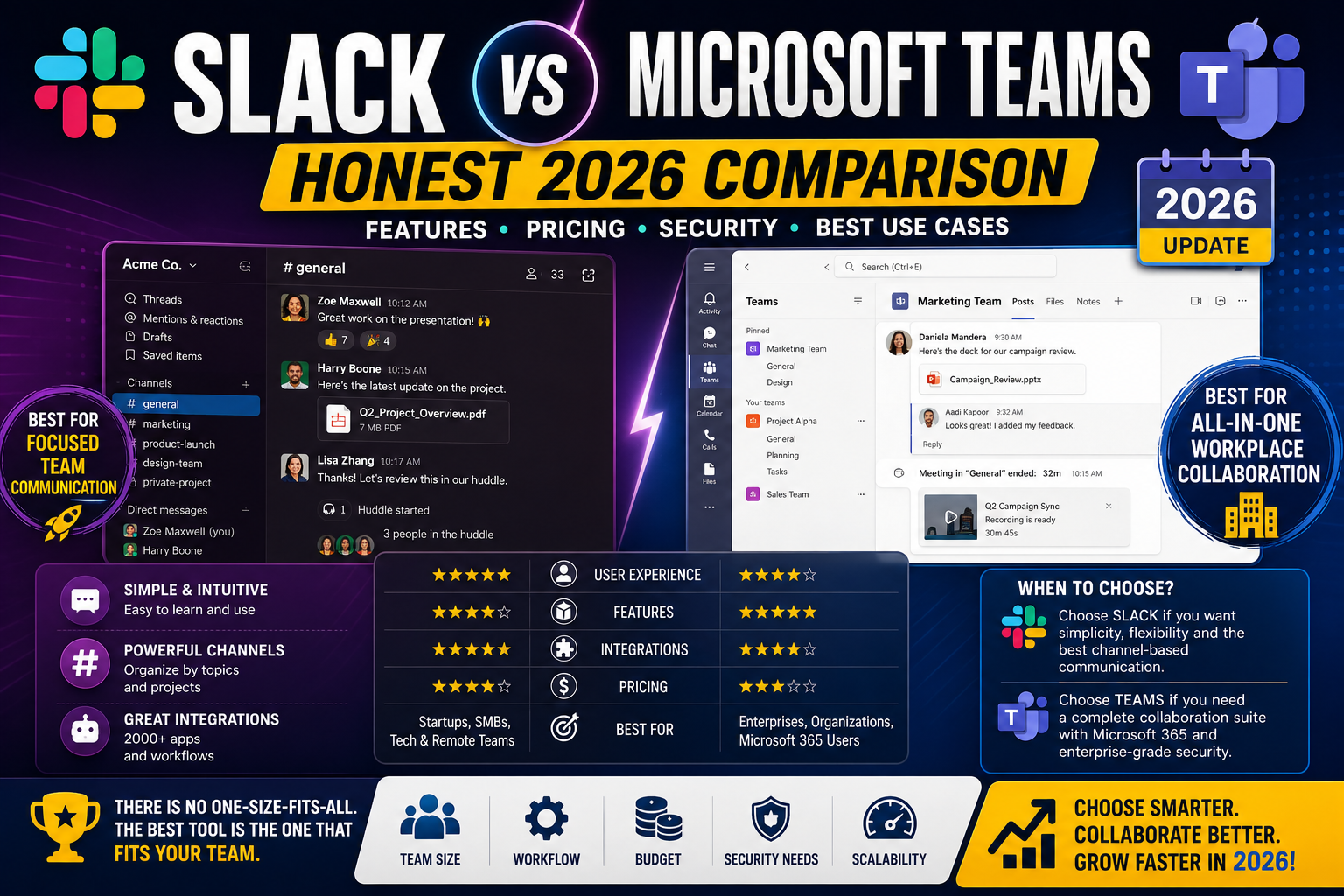
This comparison strips away the tribalism and evaluates both platforms specifically for Filipino teams, distributed agencies, and small-to-mid businesses making the decision in 2026. Real pricing after Microsoft 365 bundling, real feature parity, and which wins for specific scenarios.
Quick verdict
- Pick Slack if: You value the best UX in team chat, you use many third-party SaaS integrations, and your team is under 50 people (Slack’s per-user pricing hurts less at small scale).
- Pick Microsoft Teams if: You already pay for Microsoft 365 (Teams is included free), your organization is 50+ people, or you need Word/Excel/PowerPoint deep integration in your chat flow.
- The math tips: Below 20 people, Slack Pro at USD 7.25/user/month often wins on UX for the price. Above 50 people, Microsoft 365 Business Standard at USD 12.50/user/month (Teams included plus full Office) usually wins on total value.
Pricing that actually matters for Filipino teams
Slack pricing (2026):
- Free tier: 90 days of message history, 1-to-1 huddles only, 10 integrations. Meaningfully limited for real work.
- Pro: USD 7.25/user/month (annual), unlimited message history, unlimited integrations, group huddles.
- Business+: USD 12.50/user/month (annual), SAML SSO, message export, custom retention.
- Enterprise Grid: Custom pricing (roughly USD 20+/user/month), for 500+ user orgs.
Microsoft Teams pricing (2026):
- Teams Essentials: USD 4/user/month, Teams-only, no Office apps.
- Microsoft 365 Business Basic: USD 6/user/month, Teams + web/mobile Office apps + email.
- Microsoft 365 Business Standard: USD 12.50/user/month, Teams + full desktop Office + email + SharePoint.
- Microsoft 365 Business Premium: USD 22/user/month, adds Intune device management + Defender security.
Real cost for a 10-person Filipino agency:
- Slack Pro alone: USD 72.50/month (roughly PHP 4,100/month)
- Microsoft 365 Business Standard: USD 125/month (roughly PHP 7,100/month) but includes Office + email + SharePoint
- Slack Pro plus Google Workspace: USD 72.50 + USD 60 (5 Google users) = USD 132.50/month
Slack alone wins on raw chat cost. Microsoft 365 wins on bundled value if you were going to pay for Office/email anyway.
UX and daily user experience
Slack: Cleaner UI, faster message-sending flow, better emoji reactions and threading, best-in-class search across channels and DMs. Widely considered the more pleasant tool to use daily. Filipino teams that switch from Teams to Slack usually report “chat feels less like a chore.”
Microsoft Teams: More cluttered UI (chat + meetings + files + activity + apps all competing for space). Slower to load on average. Search is functional but not as fast as Slack. On the other hand, Teams handles video meetings noticeably better (background blur, transcription, breakout rooms all work smoothly).
For pure chat, Slack is the better experience. For chat plus video meetings plus document collaboration in one window, Teams is the more integrated experience despite feeling clunkier.
Integration ecosystem
Slack: Over 2,600 apps in the Slack App Directory. Every major SaaS (GitHub, Jira, Notion, Airtable, Zapier, HubSpot, Salesforce, etc.) has a first-class Slack integration. The Slack API is developer-friendly and has been for a decade.
Microsoft Teams: Over 1,900 apps. Weaker third-party ecosystem than Slack but stronger Microsoft ecosystem (Office 365, SharePoint, Power Automate, Dynamics all integrate deeply). If your work lives in Excel and PowerPoint, Teams’ integration is meaningfully better.
For Filipino agencies using diverse SaaS: Slack wins on integration breadth. If you use ClickUp, Notion, Airtable, HubSpot, and Zapier, Slack has better native integrations for all of them.
For teams standardized on Microsoft: Teams wins because Excel/Word/PowerPoint collaboration inside Teams channels is native, not bolted on.
Video meetings quality
Slack Huddles: Voice-first, quick to start, casual feel. Video is available on Pro tier plus but not the primary use case. Good for spontaneous 2-3 person calls. Not designed for scheduled team meetings with 10+ participants.
Microsoft Teams Meetings: Video-first, comparable to Zoom in features (background blur, transcription, breakout rooms, live captions, recording). Handles 300 participants smoothly on Business Standard. Better calendar integration for scheduled meetings.
For teams that run daily standups or client meetings via video, Teams is the stronger tool. Slack forces you to bring in Zoom or Google Meet for meaningful video meetings.
File collaboration
Slack: Basic file sharing (drag and drop into channels). Integrates with Google Drive and OneDrive for real file collaboration but you edit in the source tool, not in Slack.
Microsoft Teams: Native SharePoint backend. Every Teams channel has an underlying SharePoint site with real folder structure. You can co-edit Word, Excel, and PowerPoint files directly inside Teams without opening a separate window. This is a major advantage for teams that spend most of their day in Office apps.
For agencies that work heavily in Excel spreadsheets and PowerPoint decks (financial models, client proposals), Teams’ native Office collaboration is genuinely better than Slack + Google Drive workarounds.
Enterprise features
Slack Business+ (USD 12.50/user/month): SAML SSO, HIPAA compliance, message export for compliance, custom retention policies, guest accounts, workflow builder.
Microsoft 365 Business Standard (USD 12.50/user/month): SAML SSO via Azure AD (included), MFA management, Intune Lite for device compliance, DLP policies, sensitivity labels.
Feature parity at the USD 12.50/user tier is close. Microsoft edges Slack on identity management and device compliance (Azure AD is genuinely better than most identity providers).
Scenario-based recommendations
Small Filipino agency (5-15 people) working with SaaS-heavy stack: Slack Pro. Better UX plus better integrations with the SaaS you use, and the per-user cost is manageable at this size.
Medium Filipino agency (15-50 people) needing Office apps: Microsoft 365 Business Standard. You get Teams free plus Office plus email at USD 12.50/user vs Slack Pro (USD 7.25) + Google Workspace (USD 12) at USD 19.25/user.
Startup with 3-8 remote engineers: Slack. The developer ecosystem tooling (GitHub, PagerDuty, Datadog, Sentry integrations) is materially better in Slack.
Enterprise or large organization (50+ people): Microsoft Teams via Microsoft 365 E3 or E5. At this scale the Microsoft bundle pricing dominates and IT management overhead of dual platforms is not worth it.
Client-facing project work with external stakeholders: Slack Connect (shared channels between organizations) is meaningfully better than Teams’ external federation. Slack wins here.
Team that runs daily video standups plus screen sharing: Microsoft Teams. Video quality and meeting features are better out of the box.
The realistic Filipino-agency scenario in 2026
Most Filipino digital agencies we advise end up with one of two setups:
Setup A (SaaS-first agencies, majority of our clients):
- Slack Pro for team chat
- Google Workspace Business Standard for email + Docs + Drive
- Zoom or Google Meet for scheduled client meetings
- Total cost per user: roughly USD 20/month (PHP 1,140)
Setup B (Office-first agencies, especially those with corporate clients):
- Microsoft Teams via Microsoft 365 Business Standard
- Teams handles chat + meetings + file collaboration
- Total cost per user: USD 12.50/month (PHP 715)
Setup B is USD 7.50/user/month cheaper but requires committing to the Microsoft ecosystem. Setup A costs more but preserves best-of-breed choice at every layer.
Bottom line
For most Filipino agencies under 20 people, Slack Pro is the better chat tool day-to-day and the ecosystem breadth wins. Pair it with Google Workspace for email and docs. Total spend at USD 20/user/month is reasonable at small scale.
For medium and larger Filipino businesses that need Office collaboration or already pay for Microsoft 365, Teams is the pragmatic choice. Not because Teams’ chat UX is better, but because the bundle economics dominate past a certain team size.
Do not switch from one to the other purely on feature comparisons. The migration cost (retraining, integration reconfiguration, historical message loss) is significant. Only switch when the cost math clearly favors the other side by USD 5+ per user per month, sustained.
Official documentation
Try Slack or Microsoft Teams (affiliate)
Some links below are affiliate links. We may earn a commission at no extra cost to you. See our affiliate disclosure.
- Slack, best chat UX for small to mid-size Filipino agencies
- Microsoft 365 Business Standard, best value if you need Office plus Teams
- Google Workspace, common pairing with Slack for email plus Docs
Frequently asked questions
Is Microsoft Teams really free?
Teams Free exists but is very limited (5 GB team storage, no meeting recording, 60-minute meeting cap). For real business use you need at minimum Teams Essentials at USD 4/user/month or Microsoft 365 Business Basic at USD 6/user/month. The “Teams is free with Microsoft 365” claim assumes you were going to pay for Microsoft 365 anyway for the Office apps.
Can Slack replace Zoom for our team calls?
Slack Huddles works well for spontaneous 2-5 person voice or video calls. It does not replace Zoom for scheduled meetings with external clients, recorded sessions, or 10+ participant calls. Most Filipino agencies using Slack still pay for Zoom or use Google Meet for real scheduled meetings.
Which is better for hybrid remote teams?
Slack for async communication (better message threading, better search across long conversations). Teams for synchronous video meetings (better meeting features, better calendar integration). Many hybrid teams use both: Slack for daily chat, Teams or Zoom for scheduled video meetings. It is not a binary choice.
Does Teams work well outside the Microsoft ecosystem?
Adequately. Teams can integrate with Google Drive, Trello, GitHub, and other non-Microsoft tools but the integrations are less deep than Slack’s. If your stack is heavily non-Microsoft (Google Workspace, ClickUp, Notion, Airtable), Slack is the better chat platform. If your stack is mixed or Microsoft-heavy, Teams works well.
Which platform have PH BPOs standardized on?
Microsoft Teams dominates in Philippine BPO and enterprise contexts. Most large PH corporations (Accenture PH, Deloitte PH, PwC PH) use Teams because they are already deep in Microsoft 365. Smaller Filipino agencies serving Western clients tend toward Slack because their clients use Slack. The choice often follows client convention.
Is switching platforms worth it if we already use one?
Rarely. Migration costs are significant: retraining time, historical message archive loss (Slack has export tools, Teams has export tools, but neither imports the other cleanly), integration reconfiguration, and disruption to daily workflow. Only switch if the cost math favors the other side by USD 5+ per user per month sustained, or if a critical integration only exists on the other platform.

Leah Whynett Dela Pena
Technology Writer at PIES IT Solution
Leah Whynett Dela Pena is a technology writer at PIES IT Solution, author of 93 career and IT education guides at itsourcecode.com. Specializes in tech career paths (software engineering, web development, cybersecurity, IT analyst roles), degree and certification guidance, and IT industry how-to content for students and career changers.
Expertise: Tech Careers · IT Education · Web Development Careers · Software Engineering Careers · Cybersecurity Careers · IT Certifications · Career Guidance · View all posts by Leah Whynett Dela Pena →