

The activity diagram example for library management system is a UML behavioral model. It shows the system’s behavior by presenting the flow of activities from one to another. The possible flow of activities can be in order, split, or continuous.
Library Management System Details of Activity Diagram
The table shows the project details of the library management system. It has the complete details of the project.
| Name: | Library Management System Activity Diagram |
| Abstract: | The Library Management System Activity Diagram represents the behavior of the project in terms of its activities. It contains the important details on the activities and constraints done in the project. |
| UML Diagram: | Activity Diagram |
| Users: | School Admin, Book Borrowers, and Librarian. |
| Tools Used: | Diagram tools that provide activity diagram symbols. |
| Designer: | ITSourceCode.com |
Importance of Library Management System
The importance of the Library System Activity Diagram is that it enables interaction between developers and clients. This is done by helping them visualize the system’s functionality in various degrees of detail.
Activity Diagram Library Management System using Swimlanes
The Activity Diagram for Library System using Swimlanes is given to expound its ideas. This Activity Diagram using swim lanes is shown in different scenarios and is based on its users.
Activity Diagram (Librarian) – This illustration shows the activities and scenarios done when the librarian accesses the system. All the actions and decisions included are all emphasized here.

Activity Diagram (for Students) – This diagram now shows the series of scenarios while using the library system. It illustrates the activities or events that are done when the system is in use. The system design can show you the functions on the student side.

Draw the activity diagram example for library management system
Time needed: 5 minutes
Steps in creating an Activity Diagram for Library Management System.
- Step 1: Familiarize Activity Diagram Symbols
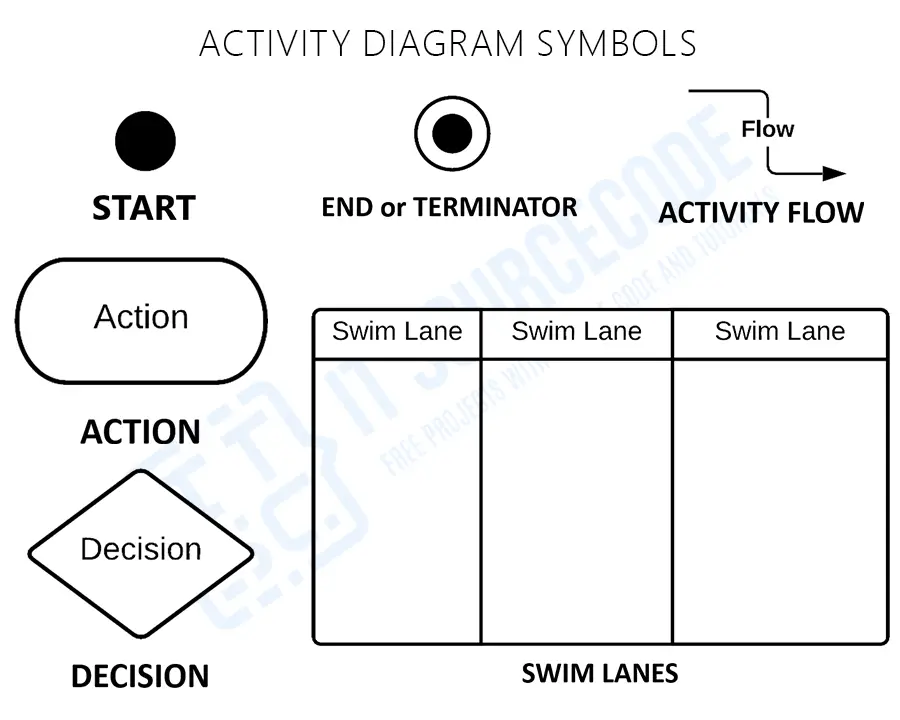
First, Activity Diagram Symbols – are used to create an Activity Diagram which was presented here. Their symbols and applications must be familiarized before you build the Activity Diagram.

• Start – is the beginning of the action is symbolized by a filled circle. A dark circle represents the initial node.
• Action – is a stage of an activity in which users or software accomplish a certain task. Actions are represented by round-edged rectangles.
• Decision – represented by a diamond and is used to symbolize a conditional branch in the flow. It has two or more outputs and a single input.
• Swim Lanes – are the lanes drawn as boundaries, and the activities drawn in the same lane as the organization’s activities. Swim lanes must be arranged in a logical order.
• Activity Flow – is another name for the connectors in the diagram that illustrate the flow between processes (activity).
• End or Terminator – is the last phase of the activity. An indicated black circle represents the final node. - Step 2: Determine the targeted users
Second, After the symbol familiarization, you’ll need to determine your targeted users. Your targeted users will be the ones to use your project.
- Step 3: Analyze the activities included
Third, analyzation is very important in creating an activity diagram. It will help you understand the work of the diagram and avoid unwanted errors.
- Step 4: Plot the Activity Diagram
Finally, to plot the activity diagram you will need the users, activities, decisions, and their flows (paths). You will base the flow of activities on the evaluated information to have the exact Activity Diagram.
Related UML Diagrams
- Library Management System Sequence Diagram UML
- Deployment Diagram For Library Management System
- Class Diagram For Library Management System
- DFD For Library Management System Data Flow Diagram
- Component Diagram Of Library Management System
- Use Case Diagram Library Management System
How to read an activity diagram
An activity diagram is essentially a flowchart with UML notation. It shows the sequence of actions in a process or use case.
- Initial node. Filled black circle marks the start.
- Activity/Action. Rounded rectangle for a step.
- Decision node. Diamond with a guard condition on each outgoing arrow (e.g., [amount > 100]).
- Merge node. Diamond joining multiple flows back into one.
- Fork. Horizontal bar splitting one flow into parallel flows.
- Join. Horizontal bar merging parallel flows back into one.
- Final node. Circle with a filled dot inside — end of the activity.
- Swimlanes. Vertical columns showing which actor performs each action.
Common capstone mistakes to avoid
- Decision without guard condition. Every branch from a decision must have a condition in brackets.
- Missing merge nodes. When branches rejoin, use a merge diamond, not just connect the lines.
- Fork/join mismatch. Every fork must have a matching join.
- No swimlanes. Multi-actor processes benefit greatly from swimlanes for clarity.
- Too detailed. Focus on business logic, not UI clicks.
Where the activity diagram fits in Chapter 3
- Section 3.3 (Process Design). Ideal for business workflows.
- One diagram per major use case or workflow.
- Reference from the use case description so panel can trace the flow.
Official documentation
Working source code for this system
Download the actual implementation of this system in your preferred language. Each project includes source code, database, and setup instructions for BSIT capstone use.
- PHP: Library Management System Project in PHP with Source Code
- VB.NET: Library Management System for St. Columban’s Academy in VB.net
- Java: Library Management System Project In Java With Source Code
- Python: Django Library Management System with Source Code
- Django: Django Library Management System with Source Code
- Laravel: Library Management System Project in Laravel With Source Code
Frequently Asked Questions
What is an Activity Diagram for Library Management System?
An Activity Diagram for Library Management System is a UML behavioral diagram showing the workflow of library operations , book search, issue, return, fine calculation, and member registration. It illustrates the sequence of activities, decision points (book available? overdue?), and parallel processes (inventory update + member notification).
What are the main activities in Library Management workflow?
Main activities in Library Management Activity Diagram include: Member Registration, Login, Search Books, Check Availability, Issue Book (verify member, update inventory, record transaction), Return Book (check overdue, calculate fine if any, update inventory), Pay Fine, Reserve Book, View History, and Generate Reports for librarian.
How is the book issue process shown in Activity Diagram?
The book issue process in Library Management Activity Diagram flows as: Member Login → Search Book → Check Availability (decision: Available?) → If Yes: Verify Member Status (decision: Valid?) → Check Max Books Limit → Issue Book → Update Inventory → Print Receipt. If any check fails, appropriate error flow with retry or rejection.
What is the swim lane structure in Library Activity Diagram?
Library Management Activity Diagram swim lanes typically include: Member (logs in, searches, requests books), System (validates, processes, updates database), Librarian (approves issues, manages returns, collects fines), and Admin (manages catalog, generates reports). Each lane shows responsibilities clearly, making the diagram easy to understand.
Is this Activity Diagram suitable for IT capstone defense?
Yes, the Library Management System Activity Diagram is excellent for IT capstone defense. It demonstrates understanding of UML behavioral modeling, real-world library operations, and includes decision flows and parallel activities. Combined with use case diagram, class diagram, and source code in PHP/MySQL, it forms comprehensive capstone documentation.
Conclusion
You need to know the diagrams used to design and develop the Library Management System. This is due to the fact that without it, it is impossible to create a fully functional system.
But if you create this activity diagram, you will know the possible inputs and scenarios that the system should process and perform. Not only that, but you will identify the processes that are required and connect them to the other UML Diagrams.
Inquiries
If you have inquiries or suggestions about the Activity Diagram for the Library System, just leave us your comments below. We would be glad to hear your concerns and suggestions and be part of your learning.

Mary Grace G. Patulada
Programmer & Technical Writer at PIES IT Solution
Mary Grace G. Patulada (pen name ‘Nym’) is a programmer and writer at PIES IT Solution with a BSIT background from Carlos Hilado Memorial State College, Binalbagan Campus. Authored 370+ UML diagram tutorials and capstone documentation guides at itsourcecode.com. Specializes in UML (class, use case, activity, sequence, component, deployment), DFD, and ER diagrams for BSIT capstone projects.
Expertise: UML Diagrams · DFD · ER Diagrams · Use Case Diagrams · Activity Diagrams · Capstone Documentation · PHP
· View all posts by Mary Grace G. Patulada →