

A Library Management System Class Diagram is a form of structural (UML) diagram that depicts the library’s management structure. This is designed by displaying the system’s classes, attributes, methods, and relationships between classes.
Class diagrams reveal the class structure blueprint of the Library Management System. It is used to model the items that make up the system and depict their relationships. This is to define the function of an object and the operation it provides.
Library Management System Class Diagram: Details
The table shows the name and details of the library management system class diagram. It has complete information on project components and diagramming tools.
| Name: | Library Management System Class Diagram |
| Abstract: | The Library Management System Class Diagram represents the structure of the project in terms of its classes. It contains the important details on the data characteristics present in the project. |
| UML Diagram: | Class Diagram |
| Users: | School Admin, Book Borrowers, and Librarian. |
| Tools Used: | Diagram tools that provide class diagram symbols. |
| Designer: | ITSourceCode.com |
Importance of Library Management System Class Diagram
The class diagram for library management system in UML is that it helps in visualizing the classes that make up the system. It displays the classes’ connections and reports their characteristics, operations, and methods used.
Free tool
Generate this Class Diagram in 3 minutes
You have the structure. Now build it with your own entities. The Library Management template comes pre-filled, so you rename what does not match your project and export straight into your Chapter 3.
Open the Library Management template →3 free diagrams every week. No credit card needed.
UML Class Diagram for Library Management System
The UML Class Diagram for Library Management System in UML describes an entity. A group of objects with similar structure and characteristics. A box with three rows is used to represent them.
The class diagram is presented in a rectangle with three partitions. The upper part is for the name of the class. The middle is for its attributes, and the bottom is for the methods. These partitions will clearly emphasize the details of the classes.
Library Management System Class Diagram: Benefits
Their Benefits are as follows:
- It aids in the better and more accurate illustration of data models.
- It explains a more straightforward and clear understanding of the overall system or process’ overview and schematics.
- It provides a sense of direction.
- It gives a lot of information on the structure of your systems.
- Summarize the system’s static perspective.
- It enumerates how the parts of a static view work together.
- defines the functions that the system does, and object-oriented programming languages are used to create software applications.
Class Diagram for Library Management System with Explanation
The simple class diagram for library management system is given with an explanation to expound on its ideas. This Class Diagram gives you the exact details about the class characteristics and methods. It also clarifies the connections between classes in the system.
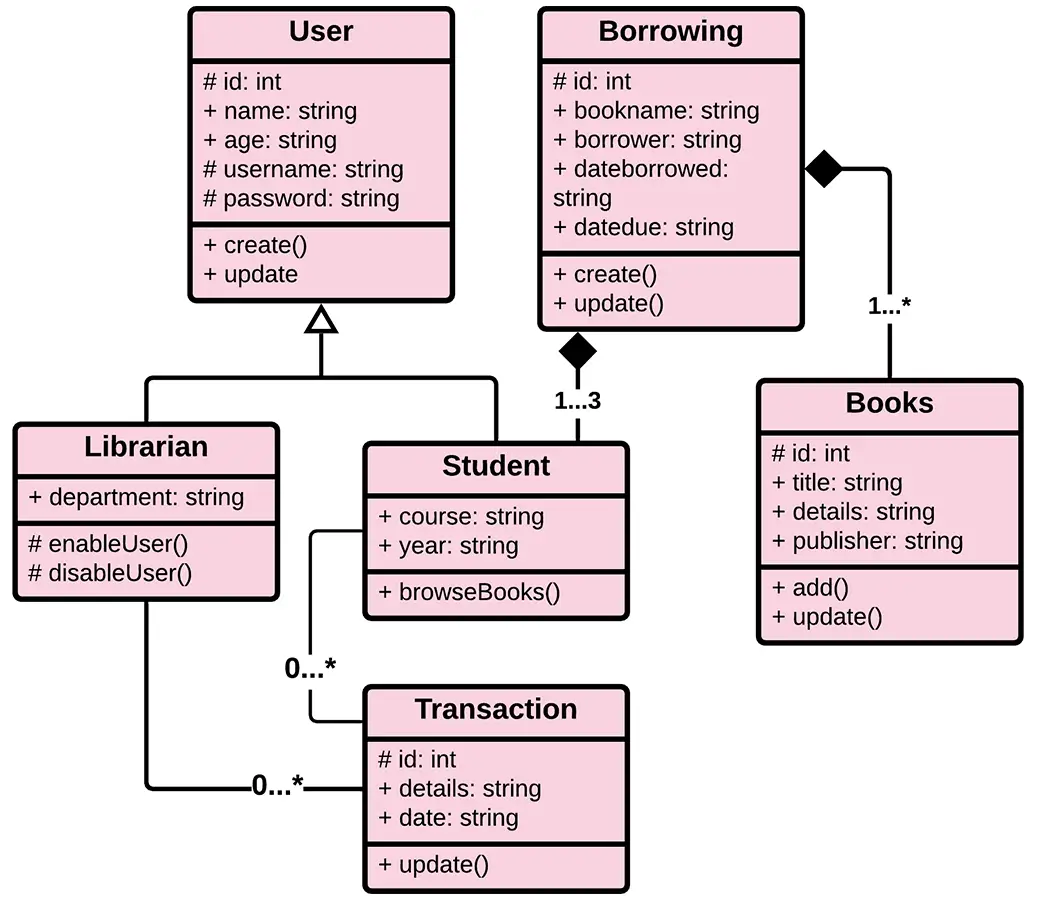
The classes identified for the Library Management System were the users (librarians and students or borrowers), books, borrowing, and transactions.
Library Management System Class Diagram in Java (2026 Code Example)
Below is a complete Java implementation following the Class Diagram structure. You can copy these classes directly into your capstone project as a starting point:
User Class
import java.util.ArrayList;
import java.util.Date;
import java.util.List;

public class User {
    private String userId;
    private String name;
    private String email;
    private String role; // student, faculty, etc.
    private List<Transaction> transactions;

    public User(String userId, String name, String email, String role) {
        this.userId = userId;
        this.name = name;
        this.email = email;
        this.role = role;
        this.transactions = new ArrayList<>();
    }

    public void borrowBook(Book book) {
        Transaction transaction = new Transaction(this, book, new Date(), "BORROWED");
        transactions.add(transaction);
    }

    public List<Transaction> getTransactions() {
        return transactions;
    }

    // Getters and setters
}
Book Class
public class Book {
    private String bookId;
    private String title;
    private String author;
    private String category;
    private boolean isAvailable;

    public Book(String bookId, String title, String author, String category) {
        this.bookId = bookId;
        this.title = title;
        this.author = author;
        this.category = category;
        this.isAvailable = true;
    }

    public void markAsBorrowed() {
        this.isAvailable = false;
    }

    public void markAsReturned() {
        this.isAvailable = true;
    }

    // Getters and setters
}
Transaction Class
import java.util.Date;

public class Transaction {
    private User user;
    private Book book;
    private Date transactionDate;
    private String status; // BORROWED or RETURNED

    public Transaction(User user, Book book, Date transactionDate, String status) {
        this.user = user;
        this.book = book;
        this.transactionDate = transactionDate;
        this.status = status;
    }

    public void updateStatus(String status) {
        this.status = status;
    }

    // Getters and setters
}
Library Management System Class Diagram in PHP (2026 Code Example)
Here’s the same Class Diagram implemented in modern PHP 8.x. This pattern works well for Laravel and CodeIgniter capstones:
User.php
<?php

class Book {
    private string $bookId;
    private string $title;
    private string $author;
    private string $category;
    private bool $isAvailable = true;

    public function __construct(
        string $bookId,
        string $title,
        string $author,
        string $category
    ) {
        $this->bookId = $bookId;
        $this->title = $title;
        $this->author = $author;
        $this->category = $category;
    }

    public function markAsBorrowed(): void {
        $this->isAvailable = false;
    }

    public function markAsReturned(): void {
        $this->isAvailable = true;
    }

    // Getters and setters
}
Book.php
<?php

class Book {
    private string $bookId;
    private string $title;
    private string $author;
    private string $category;
    private bool $isAvailable = true;

    public function __construct(
        string $bookId,
        string $title,
        string $author,
        string $category
    ) {
        $this->bookId = $bookId;
        $this->title = $title;
        $this->author = $author;
        $this->category = $category;
    }

    public function markAsBorrowed(): void {
        $this->isAvailable = false;
    }

    public function markAsReturned(): void {
        $this->isAvailable = true;
    }

    // Getters and setters
}
Transaction.php
<?php

class Transaction {
    private User $user;
    private Book $book;
    private DateTime $transactionDate;
    private string $status;

    public function __construct(
        User $user,
        Book $book,
        DateTime $transactionDate,
        string $status
    ) {
        $this->user = $user;
        $this->book = $book;
        $this->transactionDate = $transactionDate;
        $this->status = $status;
    }

    public function updateStatus(string $status): void {
        $this->status = $status;
    }

    // Getters and setters
}
UML Class Diagram Symbols , Complete Reference Table
Use this reference table to read or draw any UML Class Diagram correctly. These symbols are standard across all UML modeling tools:
| Symbol | Name | Meaning |
|---|---|---|
| ― | Association | Solid line , basic “uses” or “knows about” relationship |
| ―◇ | Aggregation | Hollow diamond , weak “has-a” (part can exist without whole) |
| ―◆ | Composition | Filled diamond , strong “contains-a” (part dies with whole) |
| ―▷ | Inheritance / Generalization | Hollow triangle , “is-a” parent/child relationship |
| – – – ▷ | Realization | Dashed line with hollow triangle , interface implementation |
| – – – ► | Dependency | Dashed arrow , temporary “uses” relationship |
| + | Public visibility | Attribute or method accessible from anywhere |
| – | Private visibility | Attribute or method accessible only inside the class |
| # | Protected visibility | Accessible within the class and subclasses |
| ~ | Package visibility | Accessible within the same package (mostly Java) |
| 1, 0..1, 0..*, 1..* | Multiplicity | Cardinality at relationship endpoints (how many instances) |
Quick rule: If you’re unsure between aggregation and composition, ask: “If I destroy the whole, does the part still exist?” Yes = aggregation. No = composition.
How to Draw the Library Management System Class Diagram , Step by Step
Follow these 6 steps to draw this Class Diagram from scratch using draw.io (recommended for BSIT capstones):
Step 1 , Open draw.io and set up the canvas
Go to app.diagrams.net → create a blank diagram → enable the UML shape library. You will see Class, Interface, and Relationship tools.
Step 2 , Draw the User class
Drag a Class shape onto the canvas and set:
Class Name: User
Attributes:
- userId: String
- name: String
- email: String
- role: String
Methods:
- borrowBook(book: Book): void
- getTransactions(): List
Step 3 , Draw the Book class
Create another Class shape:
Class Name: Book
Attributes:
- bookId: String
- title: String
- author: String
- category: String
- available: boolean
Methods:
- markAsBorrowed(): void
- markAsReturned(): void
Step 4 , Draw the Transaction association class
Create a class named Transaction:
Attributes:
- borrowDate: Date
- returnDate: Date
Methods:
- returnBook(date: Date): void
This class represents the relationship between User and Book.
Step 5 , Draw relationships
Use UML relationship lines:
- User → Transaction (Aggregation, 1..*)
- Book → Transaction (Aggregation, 1..*)
- User → Book (Association, 1..*)
Transaction acts as the association class connecting User and Book.
Step 6 , Add multiplicity labels
Add labels on each connector:
- User: 1 → Transaction: 0..*
- Book: 1 → Transaction: 0..*
- User: 1 → Book: 0..*
This shows one user can borrow many books, and each book can appear in many transactions over time.
Export
Export your diagram:
- PNG (minimum 1200px width) for PowerPoint presentation
- PDF for documentation and printing
High-quality export is important for capstone defense clarity.
Common Mistakes Students Make with Library Management System Class Diagrams
Avoid these mistakes that capstone defense panels frequently catch:
Mistake #1 , Treating Transaction as a simple log instead of an association class
Many students draw Transaction as just a “history table” class. In UML, Transaction is an association class, meaning it connects User ↔ Book and stores extra data like borrowDate and returnDate.
If Transaction is disconnected from both User and Book, the diagram is considered incorrect or incomplete.
Mistake #2 , Missing multiplicity
Every relationship MUST have multiplicity labels.
Correct examples:
- User → Transaction: 1 to 0..*
- Book → Transaction: 1 to 0..*
- User → Book: 1 to 0..*
A line without multiplicity is a common deduction point in defenses.
Mistake #3 , Confusing availability logic with database design
Some students incorrectly model:
- available: boolean as a “database concern”
Instead, it is a domain behavior attribute, meaning it belongs in the Book class. However, it should also be supported by methods like:
- markAsBorrowed()
- markAsReturned()
The system should not rely only on the boolean without behavior methods.
Mistake #4 , Mixing database tables with class diagrams
Do NOT include:
- tbl_user
- tbl_book
- tbl_transaction
Class Diagrams model OBJECTS, not tables.
Use:
- User
- Book
- Transaction
Database structure belongs in an ER Diagram, not UML Class Diagram.
Mistake #5 , Incorrect relationship direction (User “owns” Book)
A very common mistake is drawing:
- User → Book (composition)
This is wrong because:
- Books exist independently of users
- Books are shared resources in a library system
Correct relationship is:
- Association, not composition
Mistake #6 , Missing behavior in classes
Some students only add attributes and forget methods.
Each class must answer:
“What does this class DO?”
Examples:
User:
- borrowBook()
Book:
- markAsBorrowed()
- markAsReturned()
Transaction:
- returnBook()
Empty method sections make the diagram look incomplete during defense.
Mistake #7 , Not showing real-world lifecycle logic
A common conceptual mistake:
- A Book should NOT be deleted when a User borrows it
- A Transaction should persist even after the book is returned
Ignoring lifecycle rules leads to incorrect UML interpretation.
Mistake #8 , Low-quality diagram export
Blurry diagrams can hurt presentation quality.
Always export:
- PNG at 1200px or higher
- PDF for documentation submission
Defense panels expect readable multiplicities and attribute text.
Official documentation
Working source code for this system
Download the actual implementation of this system in your preferred language. Each project includes source code, database, and setup instructions for BSIT capstone use.
- PHP: Library Management System Project in PHP with Source Code
- VB.NET: Library Management System for St. Columban’s Academy in VB.net
- Java: Library Management System Project In Java With Source Code
- Python: Django Library Management System with Source Code
- Django: Django Library Management System with Source Code
- Laravel: Library Management System Project in Laravel With Source Code
Frequently Asked Questions
What is a Class Diagram for Library Management System?
A Class Diagram for Library Management System is a UML structural diagram that shows the system’s classes (Book, Member, Librarian, Transaction), their attributes (book_id, title, author), methods (issueBook, returnBook, calculateFine), and relationships (association, inheritance, composition). It serves as the blueprint for object-oriented implementation.
What are the main classes in Library Management System?
The main classes in a Library Management System Class Diagram are: Book (with attributes like ID, title, author, ISBN), Member (with member_id, name, contact), Librarian (with employee details and methods), Transaction (manages issue/return), Category (book categories), Fine (penalty management), and Admin (system administrator).
What relationships exist between classes in Library Management System?
Class relationships in Library Management System include: Member ‘borrows’ Book (association), Librarian ‘manages’ Book (association), Transaction ‘records’ both Member and Book (aggregation), Book ‘belongs to’ Category (composition), and Admin ‘inherits from’ User (inheritance/generalization).
How do you implement a Library Management Class Diagram in code?
To implement the Library Management Class Diagram in code: create separate class files (Book.java, Member.java, Transaction.java in Java; or Book.php, Member.php in PHP). Use private attributes with getters/setters, define methods like issueBook() and calculateFine(), and establish relationships using object references. MySQL database tables mirror the class structure.
Where can I get the complete Class Diagram with source code?
You can download the complete Library Management System Class Diagram with all classes, attributes, methods, and relationships. The package includes UML PDF, accompanying Java and PHP source code, MySQL database schema, and capstone documentation , all free and ready to use for your IT thesis project.
Check out our Related and Recommended Articles for more Learnings and Information.
- Library Management System UML Diagrams
- Activity Diagram for Library Management System
- Component Diagram of Library Management System
- Use Case Diagram for Library Management System
- Deployment Diagram for Library Management System
- Library Management System Sequence Diagram
- College Library Management System ER Diagram
Conclusion
You need to know the diagrams used to design and develop the Library Management System. This is due to the fact that without it, it is impossible to create a fully functional system.
But if you create this class diagram, you will know the possible classes and scenarios. The system should process and perform. Not only that, but you will identify the processes that are required and connect them to the other UML Diagrams.
Inquiries
If you have inquiries or suggestions about the Library Management System Class Diagram, just leave us your comments below. We would be glad to hear your concerns and suggestions and be part of your learning.
Keep us updated and Good day!

Mary Grace G. Patulada
Programmer & Technical Writer at PIES IT Solution
Mary Grace G. Patulada (pen name ‘Nym’) is a programmer and writer at PIES IT Solution with a BSIT background from Carlos Hilado Memorial State College, Binalbagan Campus. Authored 370+ UML diagram tutorials and capstone documentation guides at itsourcecode.com. Specializes in UML (class, use case, activity, sequence, component, deployment), DFD, and ER diagrams for BSIT capstone projects.
Expertise: UML Diagrams · DFD · ER Diagrams · Use Case Diagrams · Activity Diagrams · Capstone Documentation · PHP
· View all posts by Mary Grace G. Patulada →